Develop/AI,LLM

Claude Code 티스토리 블로그 스킨 커스텀하기 | Claude Code Customizing a Tistory Blog Skin

오랜만에 블로그 포스팅이다. 요즘 claude code를 엄청 재밌게 사용하고있다.그러다보니 이제는 누군가가 잘 만들어둔걸 갔다쓰는게 아니라 본인이 원하는걸 만들어내는 세상이라는 느낌이 들었다.Claude Code 세션을 어떻게 사용중인지 그 과정을 기록한다. (아마 나중에는 이것도 원시적이라고 하려나왜 스킨을 바꾸려 했나원래 "Responsive Simplit3"라는 티스토리 기본 스킨을 쓰고 있었다. 이전에 블로그를 쓰면서 frontend 를 고치기 싫어서 냅두고 있었는데, 솔직히 이 스킨 쓰는 블로그가 너무 많아서 어딜 가도 비슷비슷한 느낌이었다. 내 블로그인지 남의 블로그인지 구분이 안 되는 수준.그러나 ai 시대 이제는 기존 스킨에 내가 원하는 기능을 붙이기보단 그냥 처음부터 만드는게 빠른 시대..

Claude Code 티스토리 블로그 스킨 커스텀하기 | Claude Code Customizing a Tistory Blog Skin

728x90

오랜만에 블로그 포스팅이다. 요즘 claude code를 엄청 재밌게 사용하고있다.
그러다보니 이제는 누군가가 잘 만들어둔걸 갔다쓰는게 아니라 본인이 원하는걸 만들어내는 세상이라는 느낌이 들었다.
Claude Code 세션을 어떻게 사용중인지 그 과정을 기록한다. (아마 나중에는 이것도 원시적이라고 하려나


왜 스킨을 바꾸려 했나

원래 "Responsive Simplit3"라는 티스토리 기본 스킨을 쓰고 있었다. 이전에 블로그를 쓰면서 frontend 를 고치기 싫어서 냅두고 있었는데, 솔직히 이 스킨 쓰는 블로그가 너무 많아서 어딜 가도 비슷비슷한 느낌이었다. 내 블로그인지 남의 블로그인지 구분이 안 되는 수준.
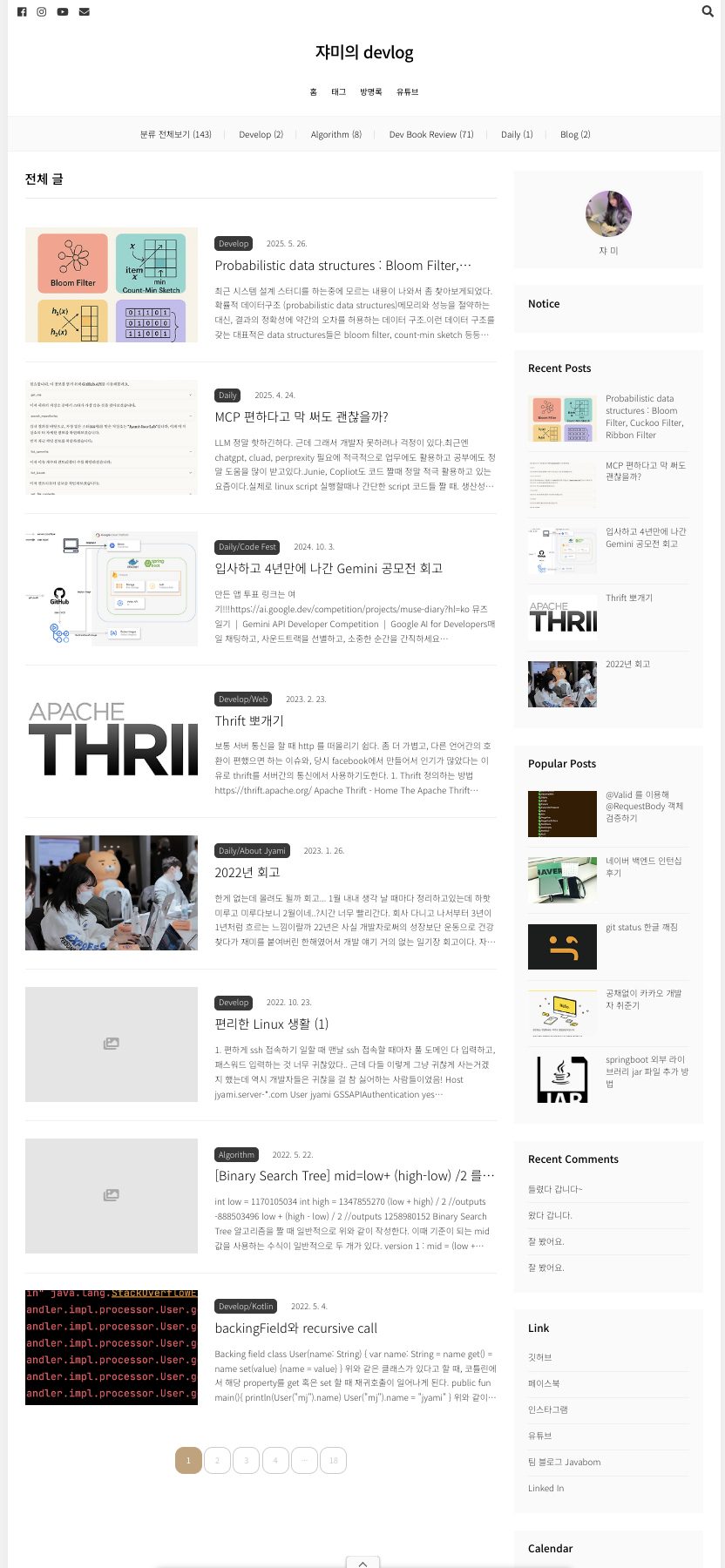
이전 블로그 스킨

그러나 ai 시대 이제는 기존 스킨에 내가 원하는 기능을 붙이기보단 그냥 처음부터 만드는게 빠른 시대니까 해봤다. 
크게 내가 원했던 기능은

  • 블로그스러운 적당한 레이아웃
  • 다크모드
  • Progress bar (몇 분 읽기)
  • 목차
  • 한국어/영어 번역 (물론 사용자가 google translater 써도 되지만 한번 해보고 싶었다)

Claude Code 해줘

plan 모드를 적극적으로 사용하는 편이다. 처음 프롬프트는 간소했다. 자세히 말하지 않아도 알아서 구체화하기 위해 여러가지 질문을 유저에게 한다. 

첫 프롬프트

아무래도 모호한 프롬프트를 주었다보니 디자인쪽으로 구체적 질문을 던졌었다. 아래 보이는건 당시 claude 의 답변을 저장해둔것. 옵션 선택과정 화면 캡쳐해둘껄.. 그때만해도 내가 블로그를 쓸지 몰랐다.

  • 디자인 옵션 : 블루/그린/퍼플/옐로우..
  • 홈페이지 레이아웃 : 아래꺼 말고도 뭐 앨범형 그런것들이 있었다
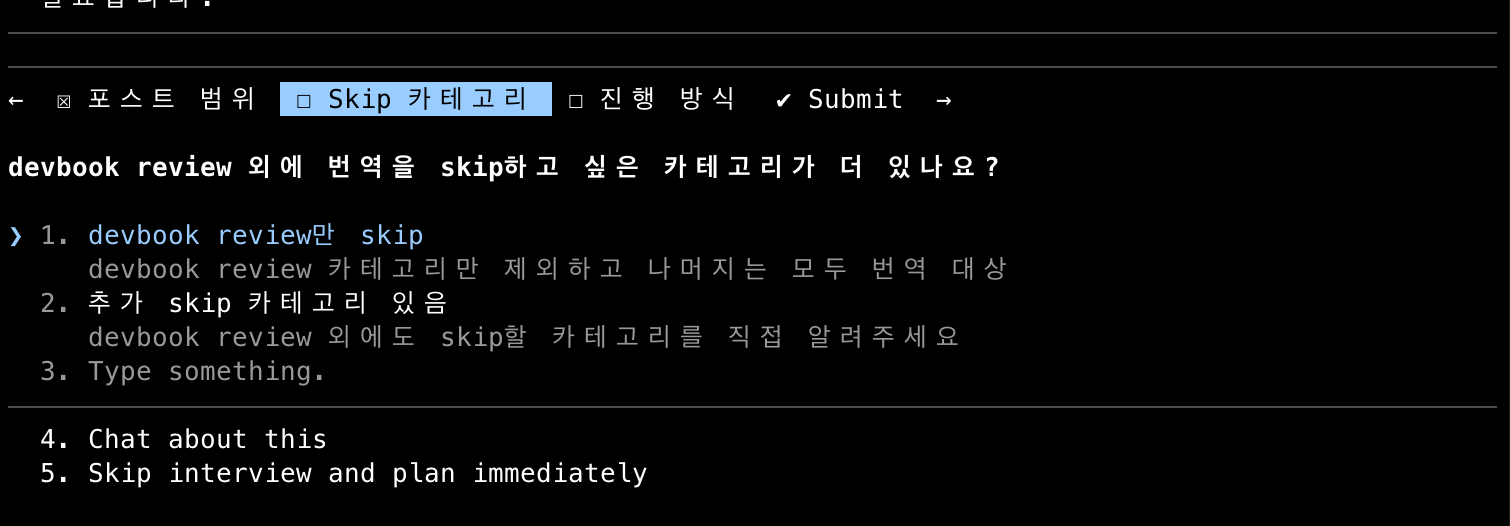
  • 사이드바 레이아웃 : 왼쪽에할지 오른쪽에할지 등등 아래처럼 tui 그려서 선택하는게 재밌었다
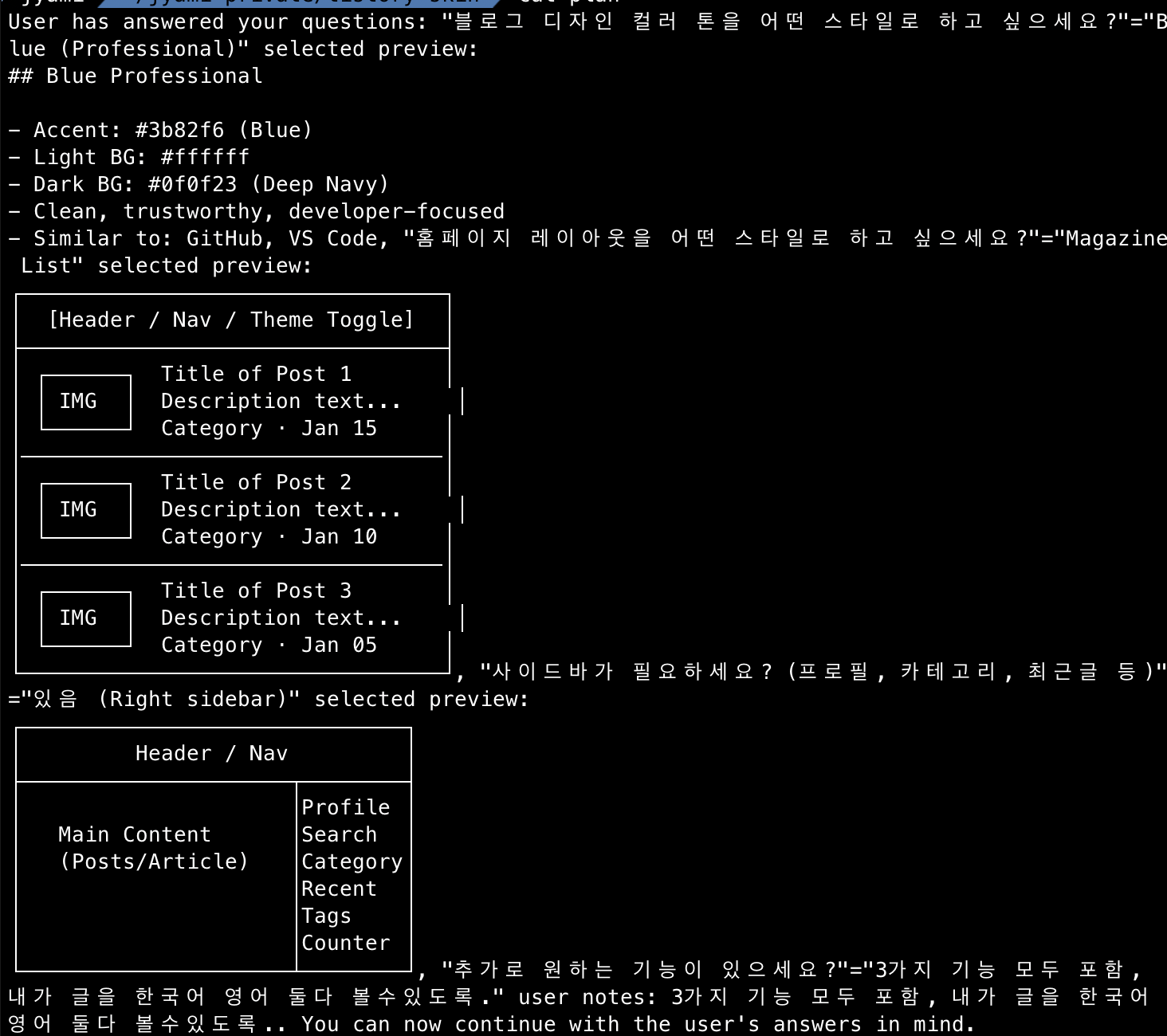
Plan Question

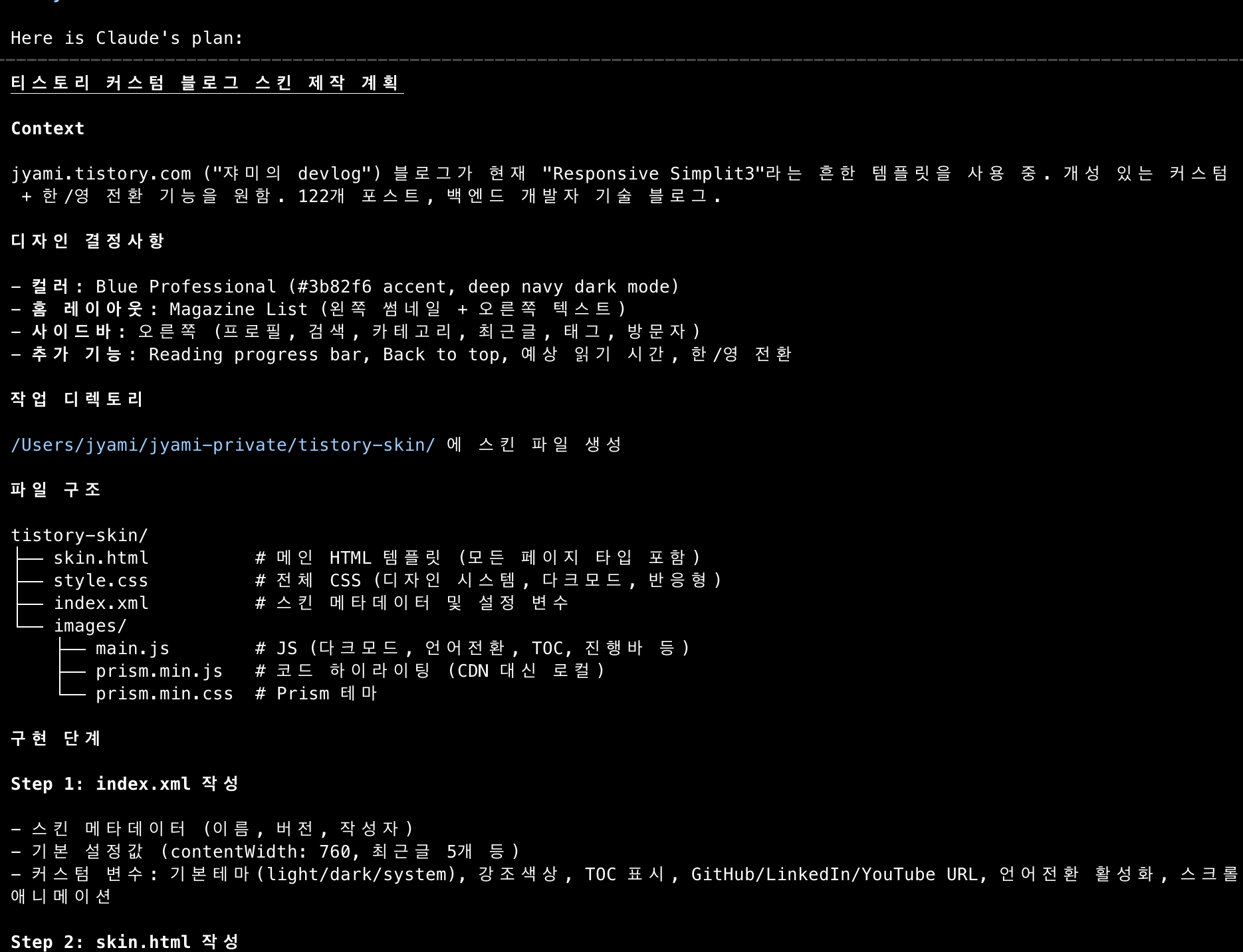
결국 아래와 같이 plan 을 잘 만들어줬다. 아주 든든했다.

이미 Plan 이 나온상태여도 위에 말한것처럼 Reading progress bar, Back to top, 예상 읽기 시간, 한/영 전환에 대한 추가적인 기능들도 추가하고싶다고 하면 그에 따라 잘 수정해서 알아서 만들어준다 ㅇㅂㅇ


티스토리 고유 문법에 대한 삽질을 해결하는 방법 : agent

초반에 만들어진 사이트 디자인은 괜찮았다. 그러나 실제 포스트 내용이 나오지 않았다.
티스토리 고유 문법 <side_bar_elements> 를 claude code는 알 수 없었을테니 말이다.

뭐 알아서 찾아서 해결하지 않을까 싶어서 아래와 같이 명령했다.

요구사항을 만족하느라 매끄럽지 못한부분이 있어 직접 들어가서 리서치 하면서 찾아봐.
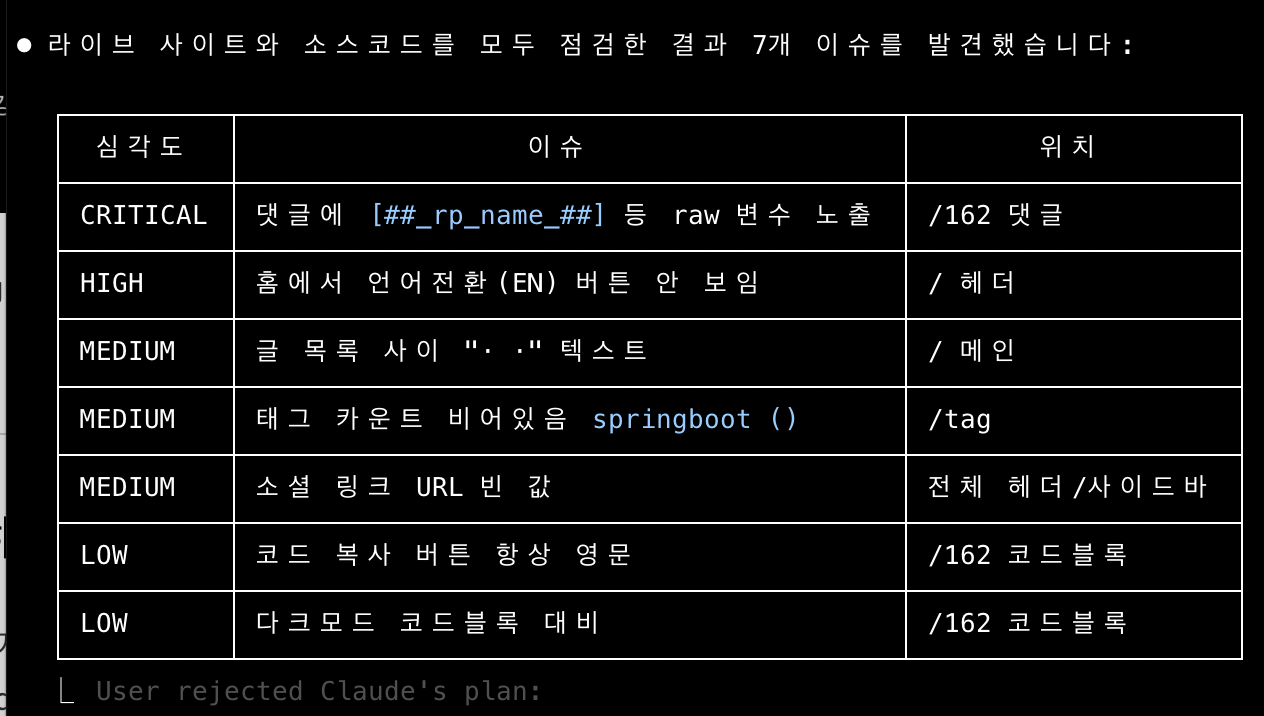
이에 따른 답변

나름 잘 찾았다? 근데 이걸 찾을때 다른사람들이 만든 스킨 코드를 search 하여 찾는 모습을 보였고, 그러면서 똑같은 동작이 여러번 반복되었다. 예를들면 최신글이 아니라 인기글을 노출해줘 했는데, 인기글을 계속 노출하지 못했었다.

결국 Tistory 스킨 가이드 전문가 에이전트를 따로 만들었다. 이 agent는 https://tistory.github.io/document-tistory-skin/ 을 전부 알고있으며 main 세션에서 스킨을 고칠때 이 agent에게 자문을 구해서 문제 상황을 확인하고 알맞는 치환자를 매핑해달라고 했다. 이후로는 치환자 관련한 반복된 서치가 줄었다.

이 접은글은 claude code가 내 블로그 말투를 확인해서 나름 삽질기라고 쓴 글인데 말투가 웃겨서 가져왔다ㅋㅋㅋㅋ
실제로 나는 얘기 이런 삽질을 했는지도 몰랐다.

더보기

삽질 모음 (진짜 많다)

index.xml 커스텀 변수의 한계

index.xml에  같은 커스텀 변수를 정의할 수 있다. 근데 이 변수의 값을 입력하려면 스킨 편집기의 설정 탭에서 해야 한다. 편집기가 안 되니까? 변수가 전부 빈 문자열로 렌더링된다.

결국 skin.html에 URL을 직접 하드코딩했다. (우아함 따위는 없다)

사이드바 wrapper가 증발하는 문제

<s_sidebar> + <s_sidebar_element> 안에 <div>랑 <h3> 제목을 넣어놨는데, 렌더링하면 wrapper <div>랑 <h3>가 통째로 사라진다. Tistory가 내부적으로 벗겨내는 것 같다.

CSS ::before 가상 요소로 제목을 다시 추가하는 방식으로 해결. 좀 hack스럽긴 한데 다른 방법이 없었다.

카테고리 치환자: 폴더형 vs 리스트형

처음에 

분류 전체보기 (124)
Develop (40)
git-github (5)
Springboot (14)
Web (3)
DevOps (10)
JAVA (2)
Kotlin (3)
AI,LLM (2)
Algorithm (7)
Dev Book Review (57)
Daily (18)
Blog (2)
 (폴더형)을 사용했다. 이게 렌더링되면 #treeComponent라는 table 기반 구조가 나오는데, GIF 이미지를 쓰고, inline style이 떡칠되어있고, 스타일을 고치려면 !important를 남발해야 했다.

 (리스트형)으로 전환하니까 <ul>/<li> 시맨틱 구조로 나와서 CSS 스타일링이 깔끔하게 됐다. 이건 처음부터 리스트형을 썼어야 했는데, 삽질하고 나서야 알게 됐다.

치환자명 오류의 반복

이게 제일 힘들었다. Tistory 치환자 이름이 직관적이지 않아서 Claude도 자주 틀렸다.

  • _thumbnail_url_ vs _thumbnail_link_
  • prev_page_url vs article_prev_link

이런 식으로 비슷비슷한 이름이 많은데, 정확한 이름을 쓰지 않으면 그냥 빈칸이 된다. 에러도 안 뜬다. (이건 진짜 디버깅 지옥이다)

다크모드 인라인 스타일 전쟁

Tistory 에디터로 글을 쓰면 color:#333, background-color:#fff 같은 인라인 스타일이 자동으로 삽입된다. 문제는 다크모드로 전환해도 이 인라인 스타일이 CSS보다 우선순위가 높아서 무시된다는 거다. 검은 배경에 검은 글씨. 훌륭하다.

JS로 fixInlineStyles() 함수를 만들어서 다크모드 전환 시 인라인 스타일을 strip하고, 라이트 모드로 돌아가면 복원하는 방식으로 해결했다. 근데 이게 맞나 싶긴 하다.

페이지네이션 href 이중 속성

<a href=""> 이렇게 넣으면 Tistory가 치환할 때 href가 이중으로 들어간다. 치환자 자체에 href 속성이 포함되어 있었기 때문이다. 이런 건 문서에도 잘 안 나와있어서 직접 렌더링 결과를 보고 알아냈다.

비밀글 체크박스가 체크박스가 아닌 건에 대하여

가 checkbox로 렌더될 줄 알았는데, "secret"이라는 텍스트로 나온다. JS로 checkbox 요소를 동적 생성해서 변환했다. (Tistory 치환자는 매번 기대를 배반한다)

소셜 링크 처리

index.xml 커스텀 변수 방식이 실패했으니 소셜 링크도 다른 방법이 필요했다. skin.html에 JSON 데이터 블록을 넣고 LinkManager JS로 처리하는 방식으로 해결.


Playwright MCP로 자동 배포

커스텀 스킨을 적용한 상태에서 Tistory 스킨 편집기(/manage/design/skin/edit)에 들어가면... 아무것도 안떴다.

개발자 도구를 보니, 편집기가 내부적으로 current.json API를 호출하는데 커스텀 스킨은 이 API가 500를 반환했다.
window.monaco에 접근할 수도 없고, Tistory API에 직접 POST를 날려보려 했는데 CSRF 토큰이 필요해서 그것도 실패. (라고 claude 가 말했다. 난 몰랐음)

결국 스킨 등록 방식으로 배포해야 했다. /manage/design/skin/add 페이지에서 파일 6개를 하나하나 업로드 해야했다.
사실 위에서도 대부분의 blog 스킨 확인 등등의 작업을 playwrite 에게 맞기고 확인하라는 방식으로 진행했기 때문에 그냥 브라우저 알아서 인식하고, 배포하고 확인하고 방법으로 진행되었다.

배포 플로우는 아래와 같이 반복적이었고 반복적인 작업이니 skill 로 정의해서 동일하게 수행하도록했다.

  1. 파일 6개 업로드 (skin.html, style.css, index.xml, main.js, prism.min.js, prism.min.css)
  2. 스킨명 저장
  3. 스킨 보관함에서 적용
  4. confirm 다이얼로그 수락

https://youtube.com/shorts/qpY1D0fAUR0?feature=share

실제로 이 동영상의 내용을 확인하면 안에서 버그픽스를 하는것도 playwrite 로 확인 + 검증을 하고있으며 배포도 Playwrite로 tistory 안의 컴포넌트를 대신 클릭하면서 진행하도록 자동화했다.


결과
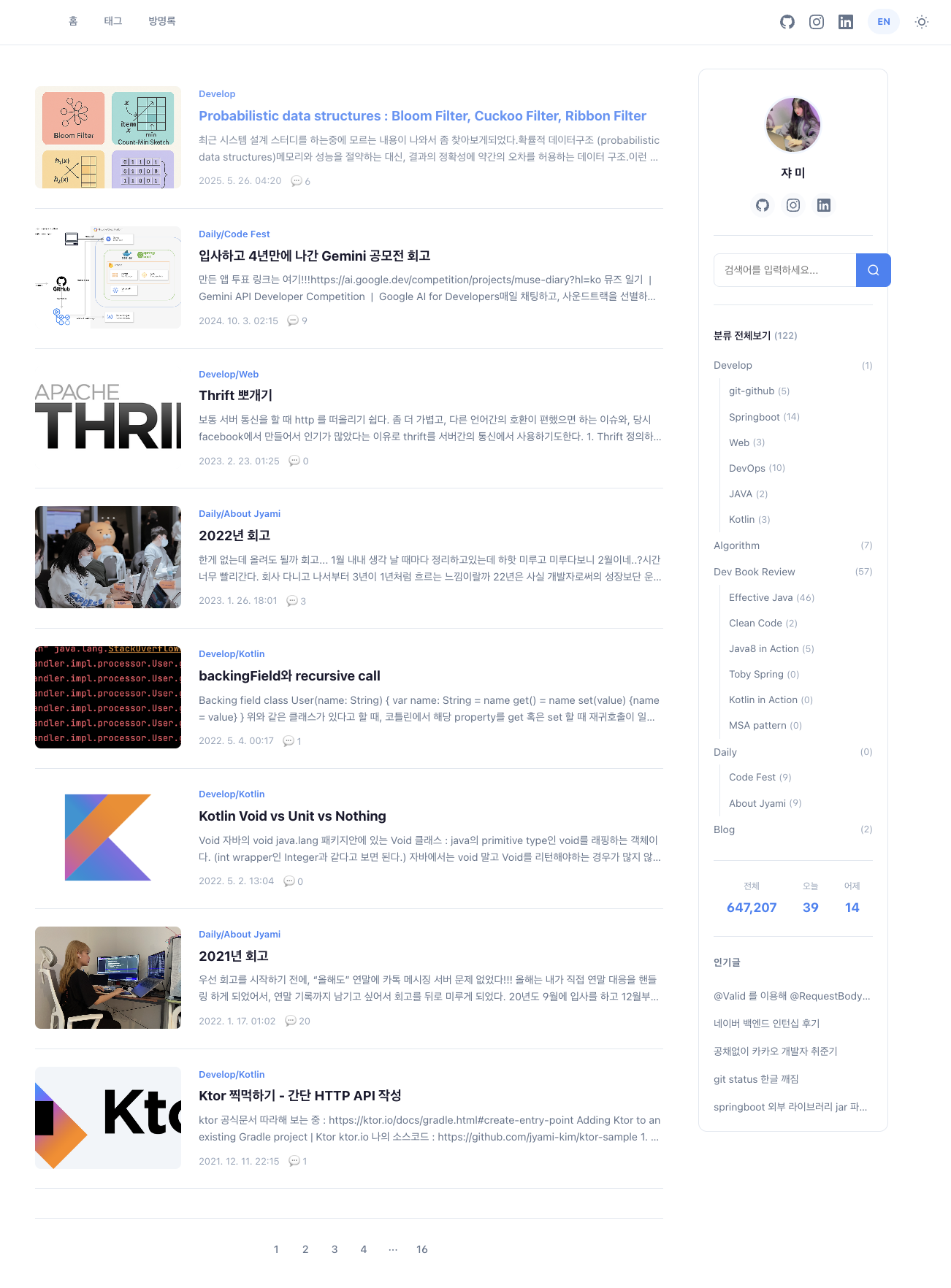
새로 단장한 내 블로그

적용된 기능들

  • 라이트/다크 모드 지원
  • 한/영 전환 기능 (언어 토글)
  • Reading progress bar
  • Table of Contents (TOC)
  • Prism.js 코드 하이라이팅
  • 반응형 디자인

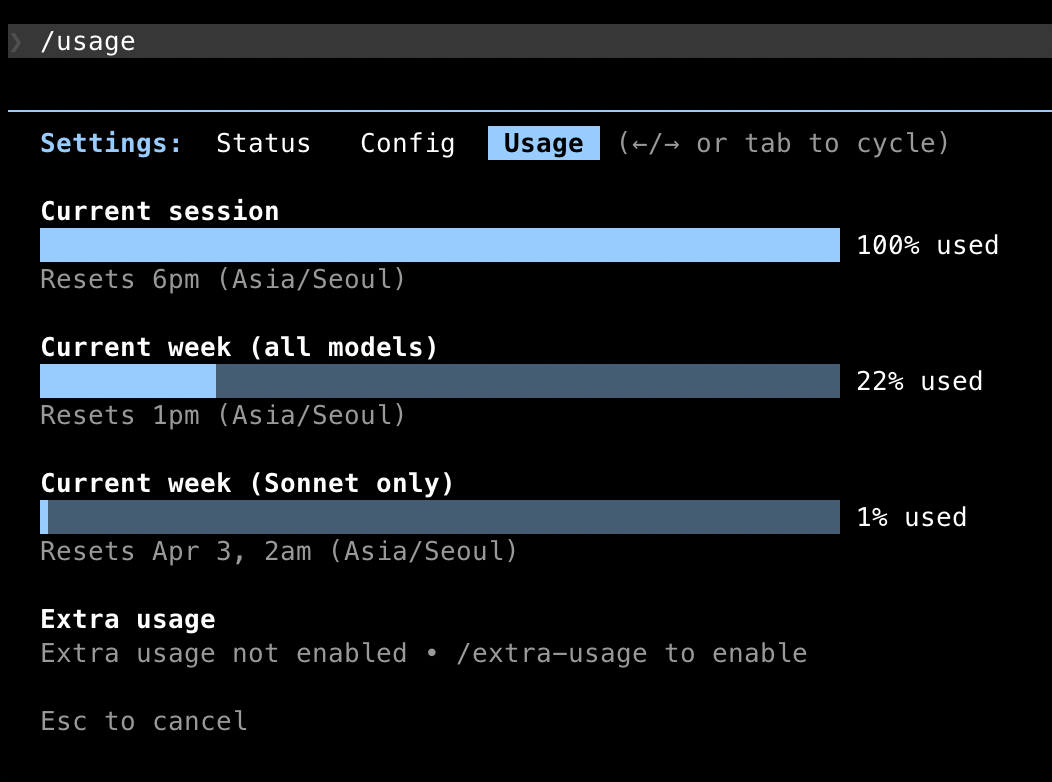
아주 주말동안 알차게 세션 /usage 를 잘 사용할 수 있었다

번역 migration

가장 재밌었던 부분이다!!! 한국말로 작성한 포스트를 영어로 번역하는 기능인데, 결국 한글 -> 영어로 번역하여 같은 포맷으로 보여주는 파이프라인을 만드는 과정이었기 때문이다. 물론 읽으러 들어오는 사람이 google translate 이용하는 방법도 있지만, 그렇게 했을땐 google 검색에 영문으로 걸리지 않을것이다. 뭐.. 요즘같은 시대에 AI 요약본을 보지 누가 사람이 쓴 블로그를 보나 싶기도하지만.. 여튼!

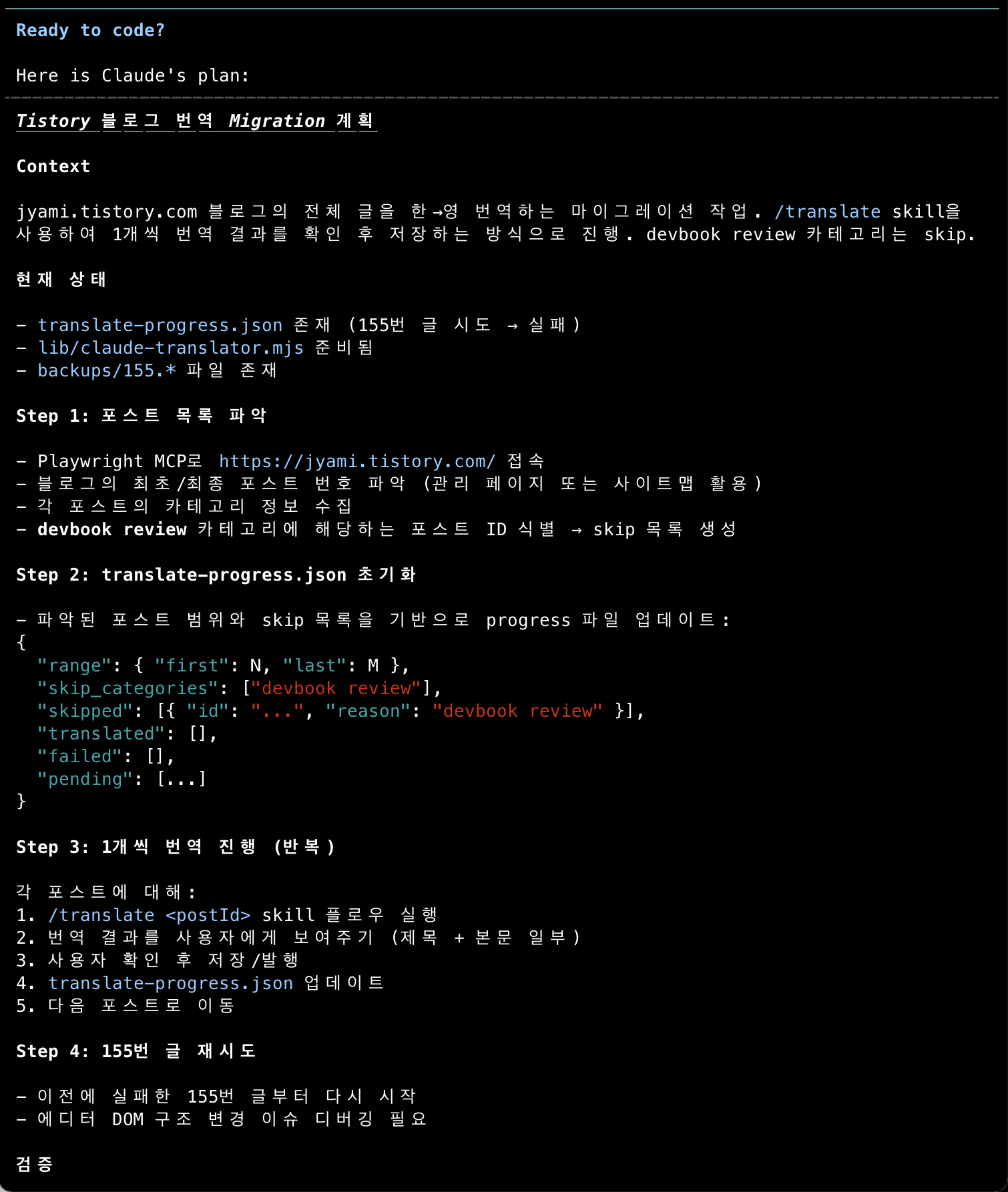
새로 발행할 글을 이 번역 pipeline 을 태워서 두개다 보여줄 수 있게 스킨을 수정했지만, 결국 기존 122개 포스트를 마이그레이션을 하는 작업도 하는게 맞았다. 그러니 자동화를 위해  /translate /translate 스킬을 만들었다!
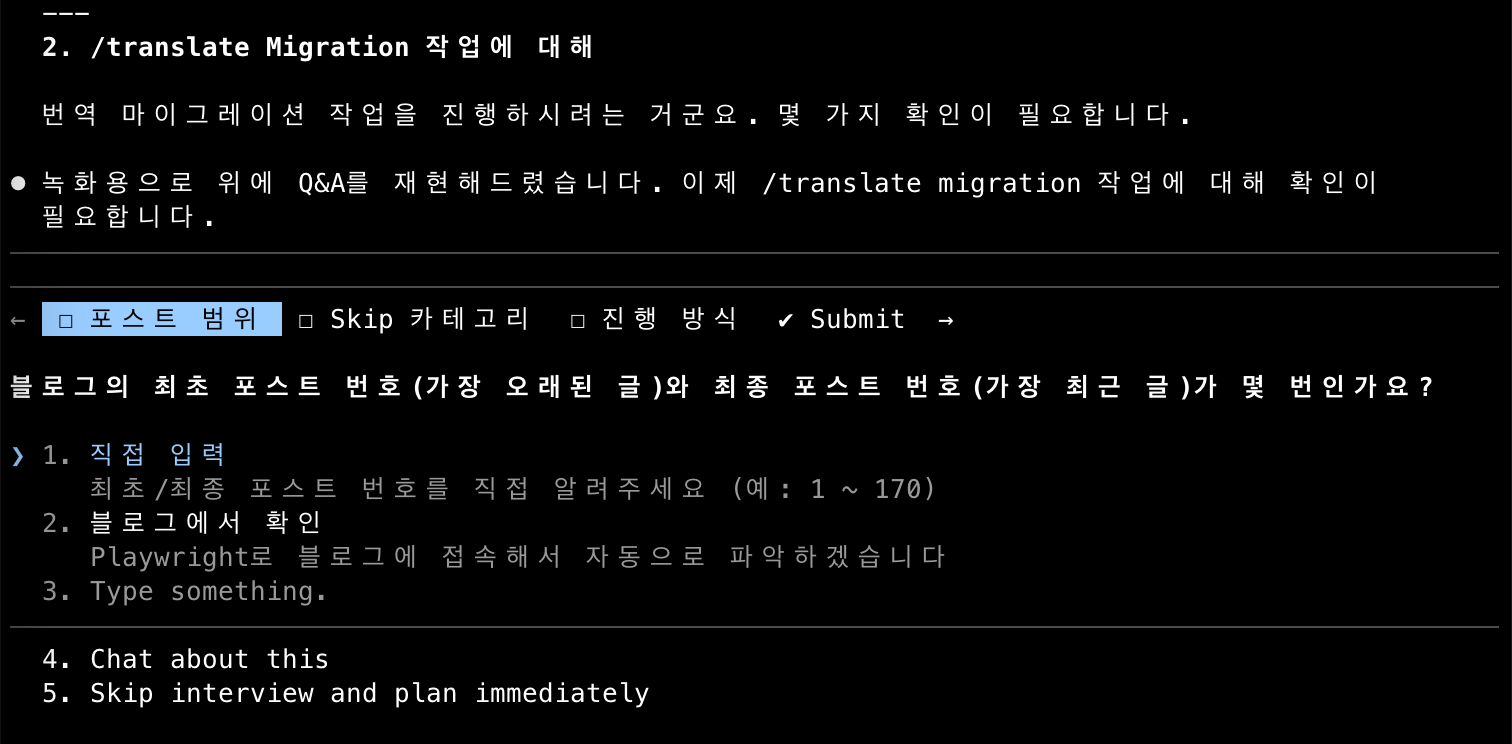
migration 진행 계획을 세우고 포스트 하나를 먼저 테스트해보았다. 이때 재밌는 문제점이 발생했는데, 이를 문제라고 명시하고 해결책을 제시할수있다는게 개발자 짬인가 생각이 들었다.

1. node 기반 playwrite 수행시 티스토리 2차 로그인 문제

처음에 llm 이 내 블로그의 글을 가져올때 node-js 기반 script 로 가져오려했었다 (playwrite npm 기반).
그러나 이렇게 할 때 매번 새로운 브라우저 창을 열다보니 카카오 로그인을 계속 수동으로 해야하는 상황이었고 그러면 이론상 122번의 카카오 로그인을 내가 수동으로 해야하니 귀찮았다. 그래서 llm 이 찾은 다른 방법은

2. playwrite mcp 사용

그냥 llm 자체가 Playwrite mcp 로 읽어서 내용을 파일로 저장하고 번역하는 방식이었다. 그리고 쓰는것도 마찬가지로 playwrite mcp를 사용해서... 그런데 이렇게 수행되는 얘를 보니 이거 token 큰일나겠는데 생각이 바로 들었다. 

3. node sciprt 기반으로 잘 사용해봐

결국 2차 로그인 문제니까 기존 로그인 되어있던 브라우저에 있는 cookie 정보를 가져와서 새로 띄울 playwrite 브라우저에서 항상 이 값을 가져다가 쓰라고 했다. 그리고 이후에는 아래 영상처럼 claude는 background 에서 5개씩 병렬로 node 스크립트를 돌리고, 완성되면 내가 검수해서 현재 블로그 글 전체 마이그레이션 진행중이다.

https://youtube.com/shorts/YzU6PrNW044

위 영상처럼, claude는 그저 병렬 node script를 수행하는걸 체크하고 현재 progress bar가 어느정도까지 왔나정도만 확인하게 만들었다.
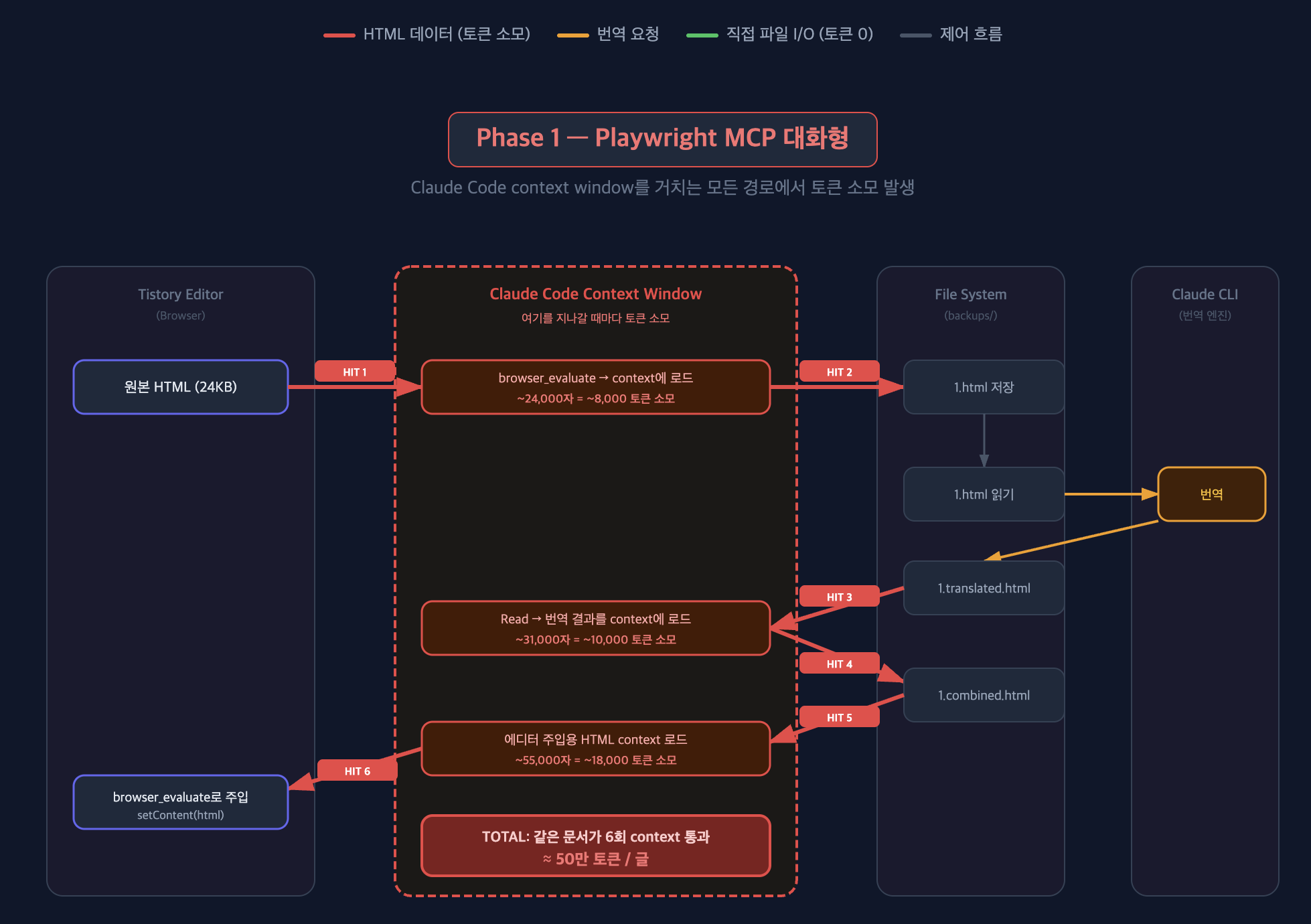
pipeline 데이터 구조 변경

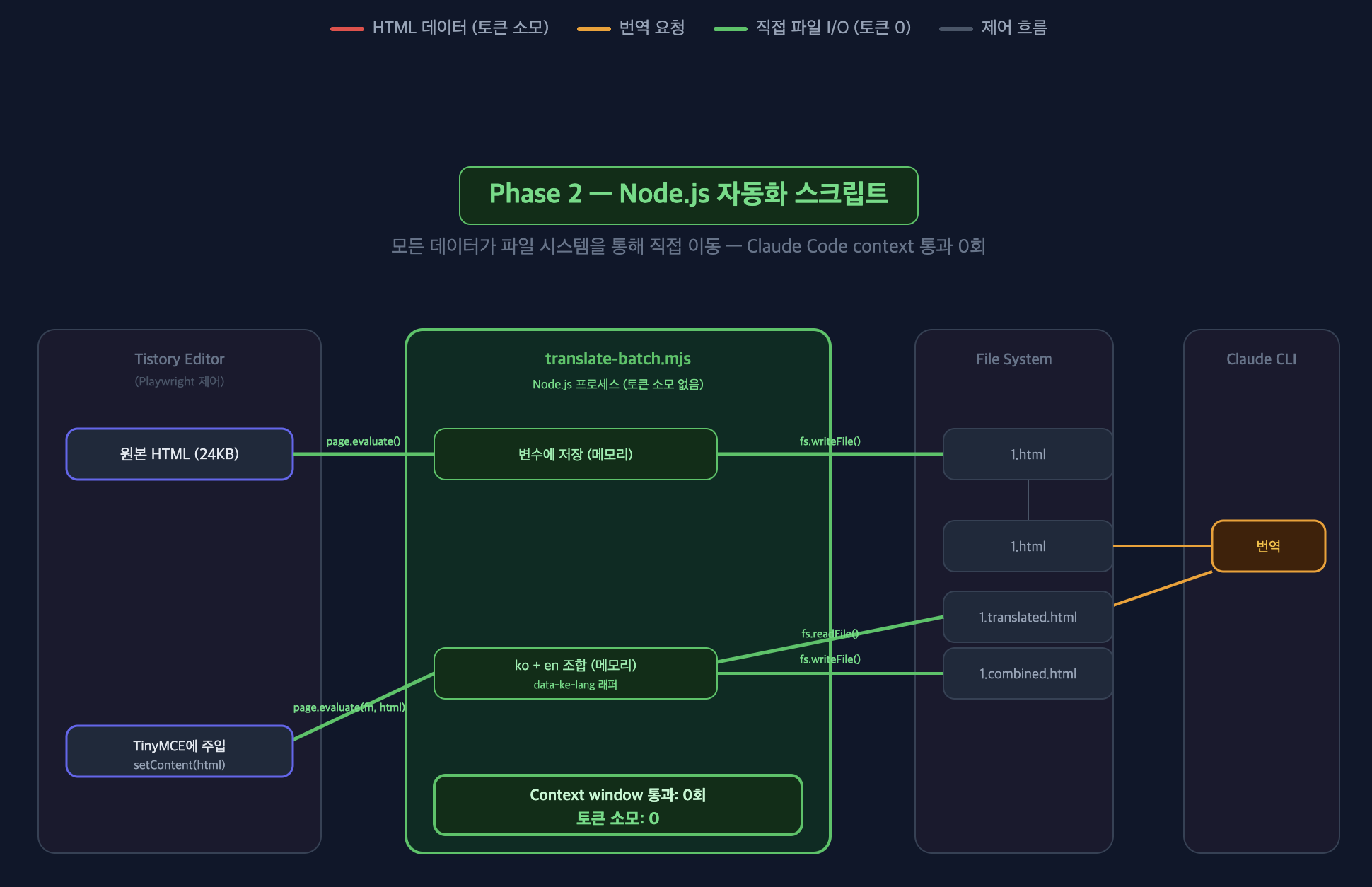
결국 번역은 claude CLI 가 하고, 브라우저 제어는 playwrite가 함. 그러나 HTML 문서 내용이 claude code context 를 잡아먹는 구조로 동작하고 있음을 직감적으로 생각했고(근데 6번이나 될 줄이야) node.js 스크립트가 playwrite + fs + claude cli 를 직접 연결하면 claude code 의 context window 를 우회해서 token 을 아껴야겠다고 생각했다.

역시.. 자동화가 효율적으로 되서 그런지 이번 작업에서 가장 재미를 느꼈다.
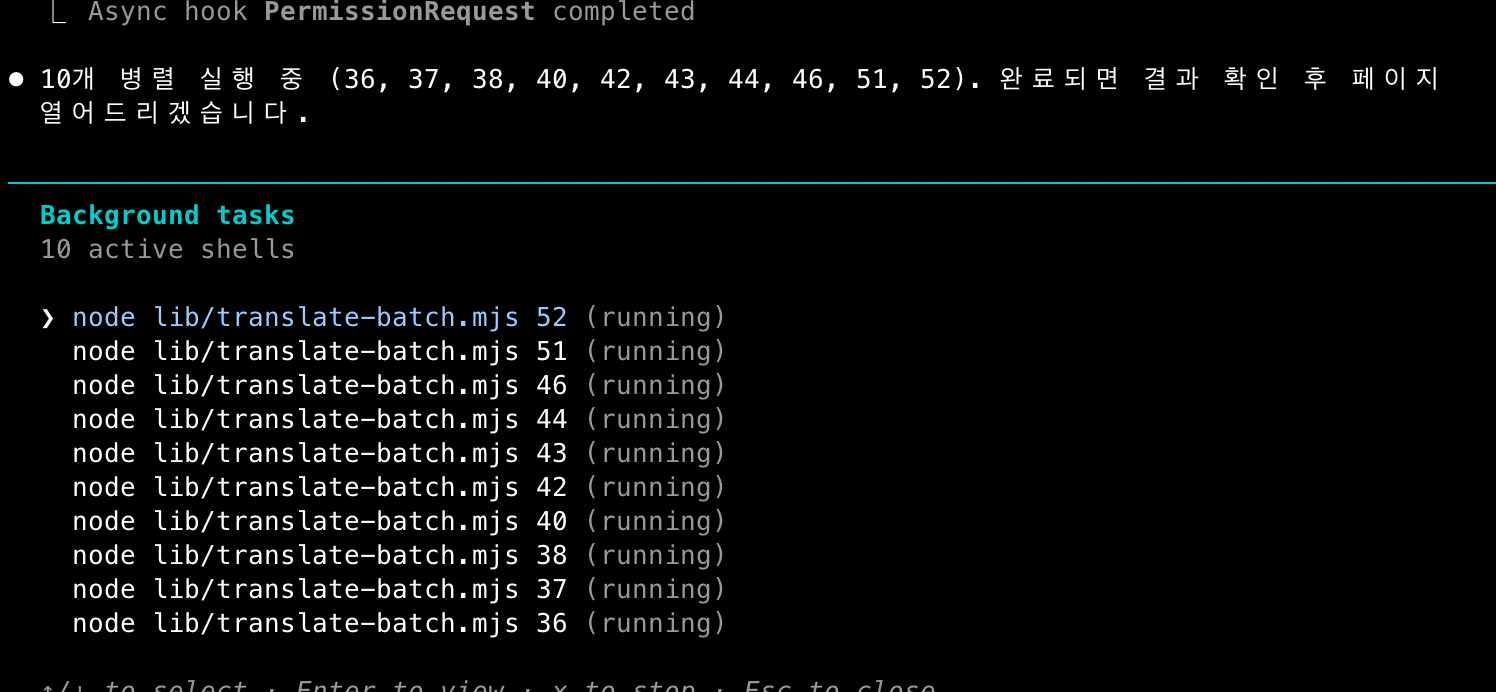
병렬 실행의 쾌감

느낀점

claude 가 나오면서 이전 전통적인 프로그래밍 방식이었을때 코드짜기 귀찮아서 안하던 것들을 할 수 있게 된 것 같다. 그럼에도 지금 이 작업들을 좀더 시간을 줄일 수 없었을까? 의사결정을 하는 사람인 내가 보틀넥이 되는 느낌이다. 그리고 얘가 이상한 방향으로 가고있을땐 내가 컨텍스트를 혹은 가이드를 잘 주지 못했구나 싶어서 claude code 잘 쓰기 참 어렵다 느낀다.

특히 ai 가 발전하면서 FE의 영역이 좀 회색지대가 된 느낌이 있다. 결국 중요한건 데이터지 보여지는 부분은 언제나 커스텀이 가능하겠구나 싶다. 왜냐면 playwrite가 웹 테스팅 영역에서 막강하고... 최근에 웹 작업시에 playwrite 자동화가 있으니 업무에서도 가능하면 내가 직접 클릭하는 것들을 playwrite 를 이용한 skill 로 변경하고있다.

블로그 글 초안까지 Claude Code에게 내 말투를 학습해서 써볼까 했는데, 역시 내 블로그는 아직 사람 손이 가는 영역으로 둘 것 같다. 대신 취준생 시절 처럼 배운것에 대한 지식 나열이 아니라, 최대한 경험과 느낀점을 녹여서 쓰려한다.

이제 블로그 단장했으니까 블로그 글을 잘 쓰겠지..? 솔직히 모르겠다 히히... 한/영 마이그레이션 검수하면서 AI가 나오기전 하나하나 찾아 공부하던 취준생 때의 기록을 보면서 젊었구나 생각이 들었다ㅋㅋㅋ

아니 그리고 티스토리 동영상 지원안하는거 어이없다. 그래서 스킨 변경 다했는데 블로그 플랫폼 바꾸고싶다는 생각이 들었음

이번 주말 뚝딱! 하 내일은 출근이다.

It's been a while since my last blog post. I've been having a blast with Claude Code lately.
And because of that, I started feeling like we live in a world where you don't just use things others built — you create what you want yourself.
I'm documenting the process of how I've been using my Claude Code sessions. (I wonder if even this will be considered primitive later on)


Why I Wanted to Change My Skin

I was originally using a default Tistory skin called "Responsive Simplit3." I didn't want to touch the frontend while blogging before, so I just left it as-is. But honestly, so many blogs use this skin that everywhere you go, they all look the same. It got to the point where I couldn't tell my blog apart from someone else's.

Previous blog skin

But hey, in the AI era, it's faster to just build from scratch than to bolt features onto an existing skin, so I went for it. 
The main features I wanted were:

  • A decent blog-like layout
  • Dark mode
  • Progress bar (estimated reading time)
  • Table of contents
  • Korean/English translation (of course users could just use Google Translate, but I wanted to try building it myself)

Claude Code, Do Your Thing

I tend to use plan mode quite actively. My first prompt was pretty brief. Even without going into detail, it asks you various questions on its own to flesh things out. 

First prompt

Since I gave it a vague prompt, it threw back some specific design questions. What you see below is Claude's response that I saved at the time. I wish I had screenshotted the option selection process... Back then, I didn't know I'd be writing a blog post about this.

  • Design options: Blue / Green / Purple / Yellow...
  • Homepage layout: Besides the ones below, there were album-style options and such
  • Sidebar layout: Left or right, etc. — it was fun that it drew a TUI for me to pick from, like the one below
Plan Question

In the end, it put together a solid plan like the one below. Very reassuring.

Even after the plan was ready, if I said I also wanted additional features like the reading progress bar, back to top, estimated reading time, and Korean/English toggle mentioned above, it would revise the plan accordingly and build everything on its own.


Solving Tistory's Unique Syntax Headaches: Agents

The initial site design looked fine. But the actual post content wasn't showing up.
Makes sense — Claude Code wouldn't have known about Tistory's proprietary syntax like <side_bar_elements>.

I figured it would find and fix the issue on its own, so I gave it this command:

There are some rough edges from trying to meet the requirements. Go in and research it yourself to figure it out.

Response to that prompt

It found things reasonably well? But while searching, it was looking through skin code that other people had made, and the same actions kept repeating. For example, I asked it to show popular posts instead of recent posts, but it kept failing to surface the popular posts.

So I ended up creating a separate Tistory Skin Guide expert agent. This agent had full knowledge of https://tistory.github.io/document-tistory-skin/, and when the main session needed to fix the skin, it would consult this agent to identify the problem and map the correct substitution variables. After that, the repetitive searching for substitution variables decreased significantly.

This collapsible section below is something Claude Code wrote after analyzing my blog's writing style — it called it a "struggle journal" and the tone was so funny I had to include it lol
I actually didn't even know it went through all this trouble.

더보기

Collection of Struggles (There Were a LOT)

Limitations of index.xml Custom Variables

You can define custom variables like  in index.xml. But to input the variable's value, you have to do it in the settings tab of the skin editor. If the editor doesn't work? All variables render as empty strings.

Ended up hardcoding URLs directly in skin.html. (Elegance? Never heard of her.)

The Case of the Vanishing Sidebar Wrapper

I put <div> and <h3> title elements inside <s_sidebar> + <s_sidebar_element>, but when rendered, the wrapper <div> and <h3> completely disappeared. Tistory seems to strip them out internally.

Fixed it by re-adding titles using CSS ::before pseudo-elements. It's kind of hacky, but there was no other way.

Category Substitution Variables: Folder Type vs List Type

At first, I used 

분류 전체보기 (124)
Develop (40)
git-github (5)
Springboot (14)
Web (3)
DevOps (10)
JAVA (2)
Kotlin (3)
AI,LLM (2)
Algorithm (7)
Dev Book Review (57)
Daily (18)
Blog (2)
 (folder type). When this renders, it produces a #treeComponent table-based structure that uses GIF images, is slathered with inline styles, and requires !important spam just to fix the styling.

Switching to 

 (list type) gave me a semantic <ul>/<li> structure, and CSS styling became clean. I should have used list type from the start, but I only figured that out after struggling with it.

Repeated Substitution Variable Name Errors

This was the hardest part. Tistory substitution variable names aren't intuitive, so even Claude got them wrong frequently.

  • _thumbnail_url_ vs _thumbnail_link_
  • prev_page_url vs article_prev_link

There are tons of similar-looking names like this, and if you don't use the exact name, it just renders blank. No error message either. (This is truly debugging hell.)

Dark Mode Inline Style Wars

When you write posts with the Tistory editor, it automatically injects inline styles like color:#333, background-color:#fff. The problem is that even when you switch to dark mode, these inline styles have higher priority than CSS, so they get ignored. Black text on a black background. Wonderful.

Fixed it by creating a fixInlineStyles() JS function that strips inline styles when switching to dark mode and restores them when switching back to light mode. Not sure if this is the right approach, though.

Pagination href Double Attribute

If you write <a href="">, Tistory doubles up the href when substituting. That's because the substitution variable itself already contains an href attribute. This kind of thing isn't well-documented, so I had to figure it out by looking at the rendered output.

On the Matter of the Secret Post Checkbox Not Being a Checkbox

I expected to render as a checkbox, but it came out as the text "secret." Had to dynamically create a checkbox element with JS. (Tistory substitution variables betray your expectations every single time.)

Social Link Handling

Since the index.xml custom variable approach failed, I needed a different method for social links too. Fixed it by embedding a JSON data block in skin.html and processing it with LinkManager JS.


Automated Deployment with Playwright MCP

When I went into the Tistory skin editor (/manage/design/skin/edit) with the custom skin applied... nothing showed up.

Looking at the developer tools, the editor internally calls a current.json API, and for custom skins, this API returned a 500 error.
Couldn't access window.monaco either, and I tried to POST directly to the Tistory API but it failed because a CSRF token was needed. (That's what Claude told me anyway. I had no idea.)

So I had to deploy using the skin registration method. On the /manage/design/skin/add page, I had to upload 6 files one by one.
In fact, for most of the tasks above — like checking the blog skin — I was already handing things off to Playwright to verify, so the approach was basically: let the browser figure it out, deploy, and verify automatically.

The deployment flow was repetitive as shown below, so I defined it as a skill to perform consistently.

  1. Upload 6 files (skin.html, style.css, index.xml, main.js, prism.min.js, prism.min.css)
  2. Save the skin name
  3. Apply from the skin storage
  4. Accept the confirm dialog

https://youtube.com/shorts/qpY1D0fAUR0?feature=share

If you actually watch this video, you'll see that even the bug fixes inside are verified using Playwright, and the deployment is automated by having Playwright click through Tistory's components on your behalf.


Results

My freshly revamped blog

Features implemented:

  • Light/dark mode support
  • Korean/English toggle (language switch)
  • Reading progress bar
  • Table of Contents (TOC)
  • Prism.js code highlighting
  • Responsive design

I made great use of my weekend session /usage


Translation Migration

This was the most fun part!!! It's a feature that translates posts written in Korean to English, and essentially it was the process of building a pipeline that translates Korean → English and displays it in the same format. Sure, visitors could just use Google Translate, but that way the posts wouldn't show up in English Google searches. Well... in this day and age, people just read AI summaries anyway — who reads human-written blogs? But still!

I modified the skin so that newly published posts go through this translation pipeline and both versions can be displayed. But ultimately, it made sense to also migrate the existing 122 posts. So for automation, I created the /translate /translate skill!

I set up a migration plan and tested it on one post first. An interesting problem came up at this point, and I felt like being able to identify it as a problem and propose a solution — that's the developer experience kicking in.

1. Tistory Secondary Login Issue When Running Playwright via Node

Initially, when the LLM was fetching posts from my blog, it tried using a Node.js-based script (npm-based Playwright).
But since this opens a brand new browser every time, I had to manually log in to Kakao each time — meaning in theory, I'd have to manually do 122 Kakao logins. That was way too annoying. So the alternative approach the LLM found was:

2. Using Playwright MCP

Just have the LLM itself read content via Playwright MCP, save it to a file, and translate it. Writing was done the same way using Playwright MCP... But watching this in action, my immediate thought was this is going to burn through tokens like crazy

3. Make It Work Properly with Node Scripts

Since the issue was the secondary login, I told it to grab the cookie info from the browser where I was already logged in and always use those cookies in the newly launched Playwright browser. After that, as shown in the video below, Claude runs node scripts in the background — 5 in parallel — and once they're done, I review them. Currently migrating all blog posts this way.

https://youtube.com/shorts/YzU6PrNW044

As shown in the video above, I set it up so Claude just runs the parallel node scripts, checks on them, and monitors how far along the progress bar is.

Pipeline data structure changes

In the end, Claude CLI handles the translation, and Playwright handles the browser control. But I intuitively sensed that the HTML document content was eating up Claude Code's context (though I didn't expect it to happen 6 times), so I figured I should save tokens by having the Node.js script directly connect Playwright + fs + Claude CLI to bypass Claude Code's context window.

As expected... the automation was running so efficiently that this was the most fun part of the whole project.

The joy of parallel execution

Takeaways

Since Claude came along, I feel like I can now do all the things I never bothered doing before because writing the code was too annoying in the traditional programming way. Still, could I have spent less time on this work? I feel like I, as the decision-maker, was the bottleneck. And when it starts going in the wrong direction, I realize it's because I didn't provide the right context or guidance — so using Claude Code well is actually really hard.

Especially as AI advances, I feel like the frontend domain has entered a gray area. Ultimately what matters is the data — the presentation layer can always be customized. Because Playwright is incredibly powerful in web testing... and recently, since I have Playwright automation for web tasks, I've been converting things I used to click manually into Playwright-based skills at work too.

I thought about having Claude Code learn my writing style and draft blog posts for me, but I think my blog is still an area that needs a human touch. Instead of listing knowledge I've learned like I did when I was job-hunting, I want to write with my experiences and thoughts woven in.

Now that the blog is all spruced up, I'll write posts regularly... right? Honestly, I'm not sure lol... While reviewing the Korean/English migration, I was reading through records from my job-hunting days when I used to study everything one by one before AI existed, and I thought, wow, I was so young back then lol

Also, it's ridiculous that Tistory doesn't support video. So after finishing all the skin changes, I started thinking about switching blog platforms.

A productive weekend project! Ugh, tomorrow is Monday.

댓글

Comments

Develop/AI,LLM

MCP 편하다고 막 써도 괜찮을까? | Is It Really Okay to Use MCP Just Because It's Convenient?

LLM 정말 핫하긴하다. 근데 그래서 개발자 못하려나 걱정이 있다.최근엔 chatgpt, cluad, perprexity 필요에 적극적으로 업무에도 활용하고 공부에도 정말 도움을 많이 받고있다.Junie, Copliot도 코드 짤때 정말 적극 활용하고 있는 요즘이다.실제로 linux script 실행할때나 간단한 script 코드들 짤 때. 생산성이 정말 많이 올라갔다. 예를들면 log format이 이 형태인데 grep으로 이 포맷에서 이 필드를 가진 로그가 총 몇개인지, unique 값은 몇개인지 전체 log row 중에서의 비율은 몇개인지 간단한 한줄짜리 linux command 알려달라고 할 때 일회성으로 생각없이 쓰게되는 것 같다.전반적인 구조를 고려해서 짜야하는 코드는 아직 잘 모르겠다. 구조..

MCP 편하다고 막 써도 괜찮을까? | Is It Really Okay to Use MCP Just Because It's Convenient?

728x90

LLM 정말 핫하긴하다. 근데 그래서 개발자 못하려나 걱정이 있다.
최근엔 chatgpt, cluad, perprexity 필요에 적극적으로 업무에도 활용하고 공부에도 정말 도움을 많이 받고있다.
Junie, Copliot도 코드 짤때 정말 적극 활용하고 있는 요즘이다.

실제로 linux script 실행할때나 간단한 script 코드들 짤 때. 생산성이 정말 많이 올라갔다.
예를들면 log format이 이 형태인데 grep으로 이 포맷에서 이 필드를 가진 로그가 총 몇개인지, unique 값은 몇개인지 전체 log row 중에서의 비율은 몇개인지 간단한 한줄짜리 linux command 알려달라고 할 때 일회성으로 생각없이 쓰게되는 것 같다.
전반적인 구조를 고려해서 짜야하는 코드는 아직 잘 모르겠다. 구조를 고려한건 아무래도 Junie가 잘 해주는것 같긴한데 그래도 결국 실무 코드에서는 실무자가 배포 부담을 져야하니 쉽지않다.

여튼 이런식으로 그동안은 써보기만하다가 이제는 슬슬 이것들의 동작원리나 조심해서 써야하는 부분들을 찾아봐야하려나 하는 고민이 생겼다. mcp의 등장이후로 token 연동해서 외부 api를 (mcp server) llm으로 활용하는 경우도 점점늘어나고 있어서 그렇다. 특이나 아래글들을 읽고 좀 알아봐야겠다는 생각이 들었는데

llm으로 인해 서버비가 너무 많이나온 개발자의 linkedIn 글


어느 날 웹 서버비가 많이 나왔어요. DDOS인 줄 알고 허겁지겁 가장 큰 트래픽 IP들 방화벽으로 차

어느 날 웹 서버비가 많이 나왔어요. DDOS인 줄 알고 허겁지겁 가장 큰 트래픽 IP들 방화벽으로 차단했는데요. 가만히 살펴보니 User-agent에 claudebot geminibot openai ... 라고 쓰여있네요. 마냥 접속을 허

kr.linkedin.com

mcp 보안에 대한 geek news 뉴스레터 글


MCP에서 발생할 수 있는 모든 문제들 | GeekNews

MCP는 LLM 기반 에이전트에 외부 도구 및 데이터를 통합하는 실질적 표준으로 빠르게 자리잡음보안, UX, LLM 신뢰성 문제 등 다양한 잠재적 취약점과 한계가 존재함프로토콜 자체의 설계와 인증 방

news.hada.io

이제 얕게라도 좀 알아야될때가 됐다. mcp에 대해 찾아보고 나서의 생각을 적어본것이기 때문에, 부정확할 수 있다.
더 알아야할 것들이나 정정이 필요하다면 댓글로..


1. MCP가 뭘까

https://modelcontextprotocol.io/introduction


Introduction - Model Context Protocol

Understand how MCP connects clients, servers, and LLMs

modelcontextprotocol.io


내생각엔 그동안 http api, tcp 등으로 통신규약을 정의해서 서버의 요청이나 응답 등으로 서비스를 제공했다면
이제 통신규약이 아니라 지정해둔 llm 키워드로 서비스를 제공하는 방식으로 세상이 변하고 있구나를 느꼈다.

만약 원하는게 github에서 내가 원하는 repo의 issue를 가져오는게 목표다 하면 그동안은
github에서 제공하는 http api 규약을 한땀한땀 맞춰서 아래와같이 요청포맷을 그들이 원하는대로 직접 넣어줬었다면.

curl -L \
  -H "Accept: application/vnd.github+json" \
  -H "Authorization: Bearer <YOUR-TOKEN>" \
  -H "X-GitHub-Api-Version: 2022-11-28" \
  https://api.github.com/repos/OWNER/REPO/issues

mcp를 사용하면 그냥 아래와 같은 prompt를 입력하면 mcp server가 위 api를 매핑해서 그 응답을 잘 내려주는 방식인 것이다.

gem-api repository의 첫번째 issue가 뭔지 알려줘.


실제로 github mcp server 구현을 보면 우리가 @Controller를 이용해서 endpoint를 뚫듯이 mcp server가 매핑할때 참고할만한 description을 추가해서 mcp server의 endpoint를 뚫은 모양새와 같다

https://github.com/modelcontextprotocol/servers/blob/main/src/github/index.ts


servers/src/github/index.ts at main · modelcontextprotocol/servers

Model Context Protocol Servers. Contribute to modelcontextprotocol/servers development by creating an account on GitHub.

github.com

   {
        name: "get_issue",
        description: "Get details of a specific issue in a GitHub repository.",
        inputSchema: zodToJsonSchema(issues.GetIssueSchema)
      },


실제로 안의 inputSchema의 내용을 따라가면 github api 호출을 하고있음을 알 수 있다.
결국 mcp는 llm이 사용하기 위한 @Controller를 하나 뚫어둔거라고 생각하면 된다.
어떻게? description과 name을 적당히 자연어로 잘 적어서

그래서 이제 llm + mcp를 사용하게되면 서버 프로그래밍 상으로 여러 api요청을 연쇄적으로 그때그때 인자값을 열심히 연결해서 코딩해서 넣던걸 자연어로 원하는 응답을 받을 수 있다는 장점이 생기게 된다.

요구사항이 아래와 같다고하자.

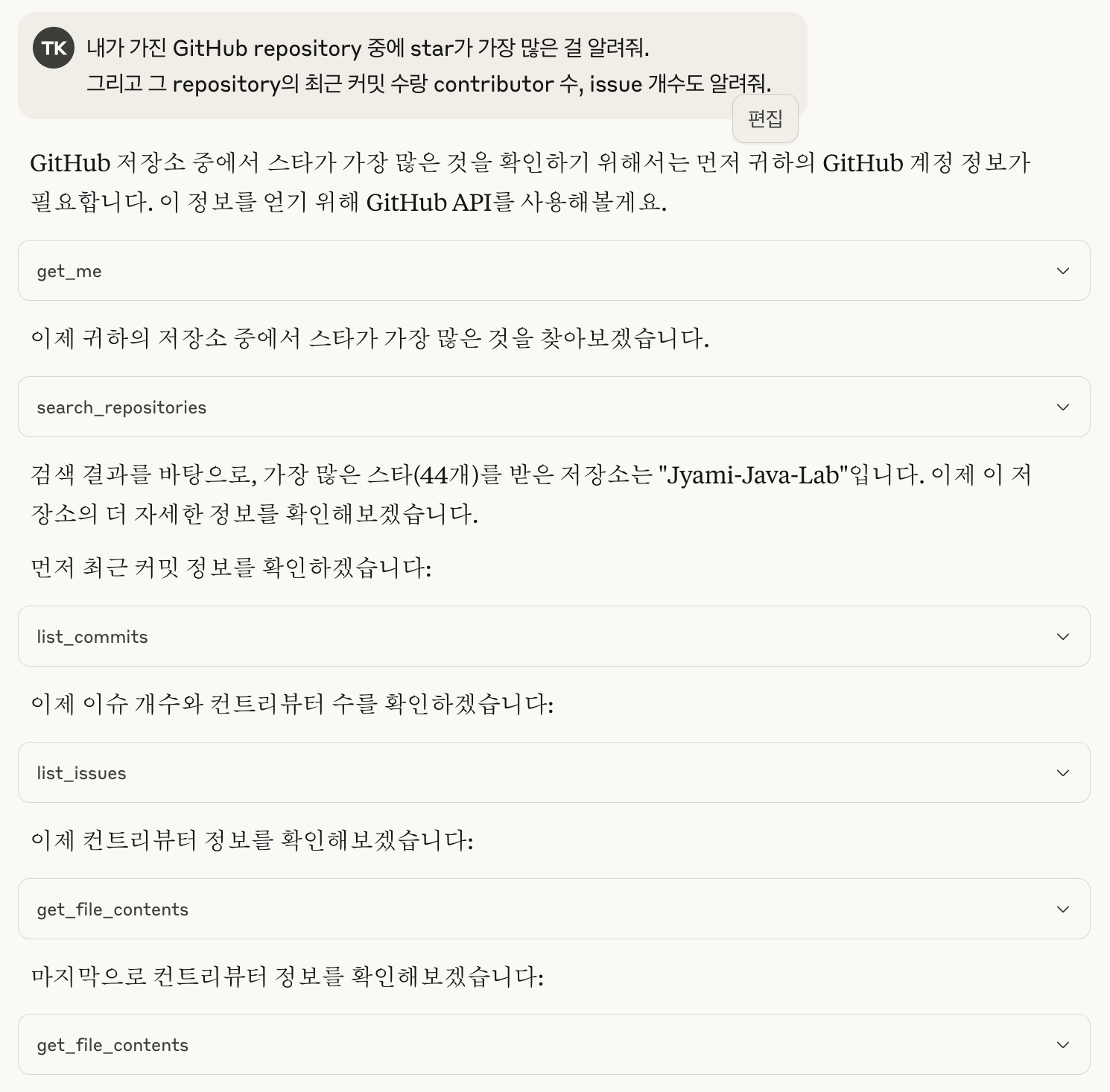
내가 가진 GitHub repository 중에 star가 가장 많은 걸 알려줘.
그리고 그 repository의 최근 커밋 수랑 contributor 수, issue 개수도 알려줘.

예전에 코딩으로 이 요구사항을 해결해야했으면
아래와 같은 수도코드를 작성하기 위해 api 명세를 확인하고.. 틀린지 아닌지 확인하고 올바른 dto 매핑인지 살펴보고 등등 귀찮았다.
사실 아래의 수도코드로는 위에 있는 요구사항을 전부 해결할 수 없다. (더 해야한다)

# 기존 방식
import requests

headers = {
    "Authorization": "Bearer <MY_TOKEN>",
    "Accept": "application/vnd.github+json"
}

# 1. 내 전체 repo 가져오기
repos = requests.get("https://api.github.com/user/repos", headers=headers).json()

# 2. 가장 star 많은 repo 찾기
top_repo = max(repos, key=lambda r: r["stargazers_count"])

# 3. 커밋 정보 가져오기
commits = requests.get(f"https://api.github.com/repos/{top_repo['full_name']}/commits", headers=headers).json()

# 4. 통계 출력
print(f"{top_repo['name']}의 커밋 수: {len(commits)}")

근데 이제 llm과 함께 mcp를 사용하게 되면 그냥 저 요구사항을 입력하면 된다.

이 요구사항을 만족하기위해 필요한 mcp server description을 알아서 판별하고 알아서 인자값을 넣어서 github api 를 호출한다.
실제로 저기 블록에 있는 search_repositories 가 호출한 mcp server 프로토콜 명을 뜻한다.

{
    name: "search_repositories",
    description: "Search for GitHub repositories",
    inputSchema: zodToJsonSchema(repository.SearchRepositoriesSchema),
  },
   case "search_repositories": {
    const args = repository.SearchRepositoriesSchema.parse(request.params.arguments);
    const results = await repository.searchRepositories(
      args.query,
      args.page,
      args.perPage
    );
    return {
      content: [{ type: "text", text: JSON.stringify(results, null, 2) }],
    };
  }

결국 자연어에서 어떤 api를 써야하는지 찾기위한 힌트를 적기만해도 api endpoint가 뚫리는게 MCP이다

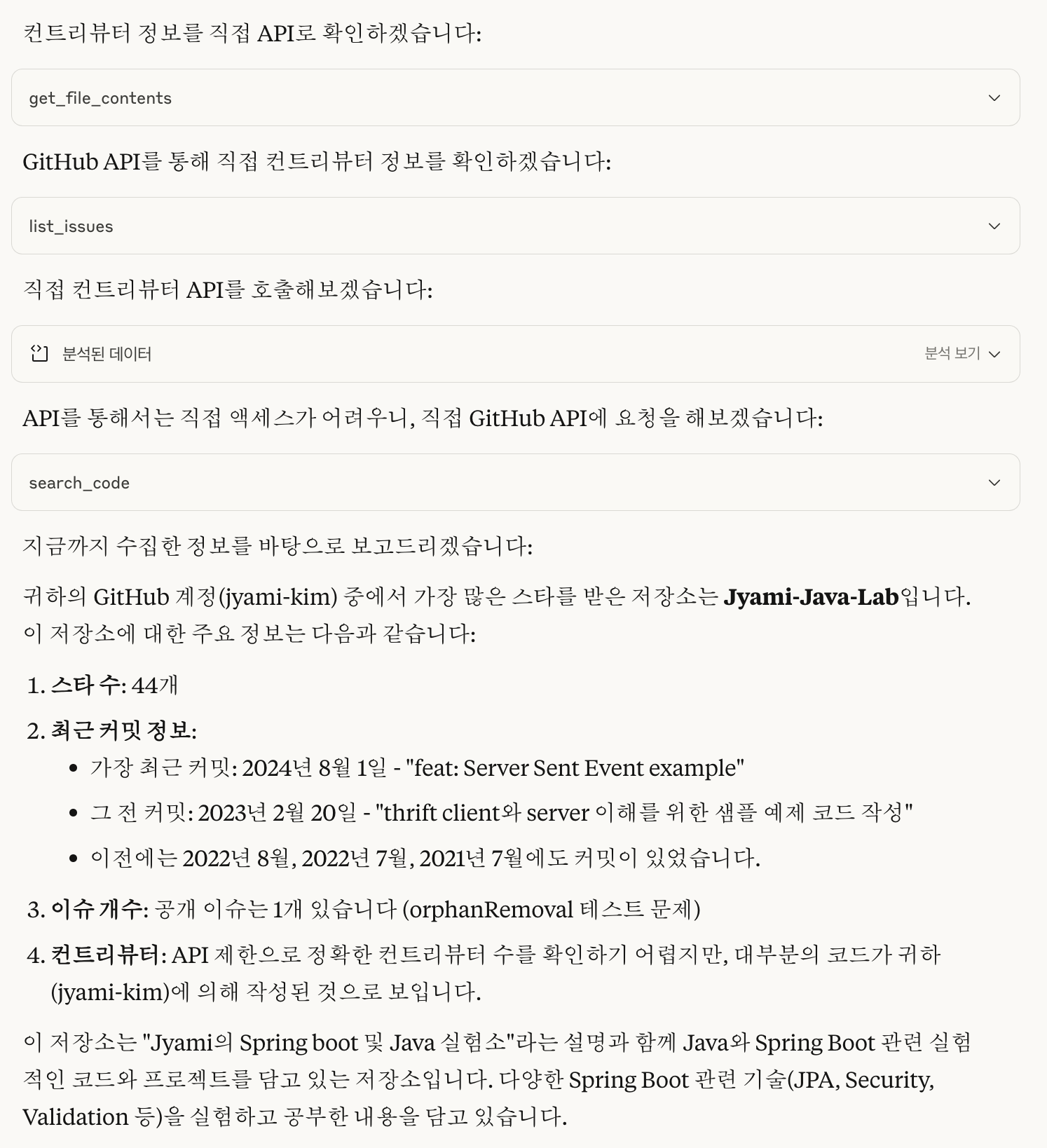
근데 이 작은 요구사항을 해결하려고 llm은 api 콜을 9개나 썼는데, 정말 이렇게까지 많이 필요한건가?
엄청 많이 하는거아닌가? 사실 개발자가 직접 코딩을 했다면 이렇게까지 많은 api를 썼을까? 이런 생각이 든다.
(근데 편하긴하다)

  • 예전 방식은 내가 어떤 API를 호출하고 있는지, 어떤 데이터를 어디로 보내고 있는지를 내가 다 컨트롤할 수 있었다.
  • MCP 방식은 내 의도를 파악한 LLM과 MCP 서버가 대신 처리해주는 구조이기 때문에, 내가 뭘 보내고 있는지 명확히 보이지 않을 수도 있다.

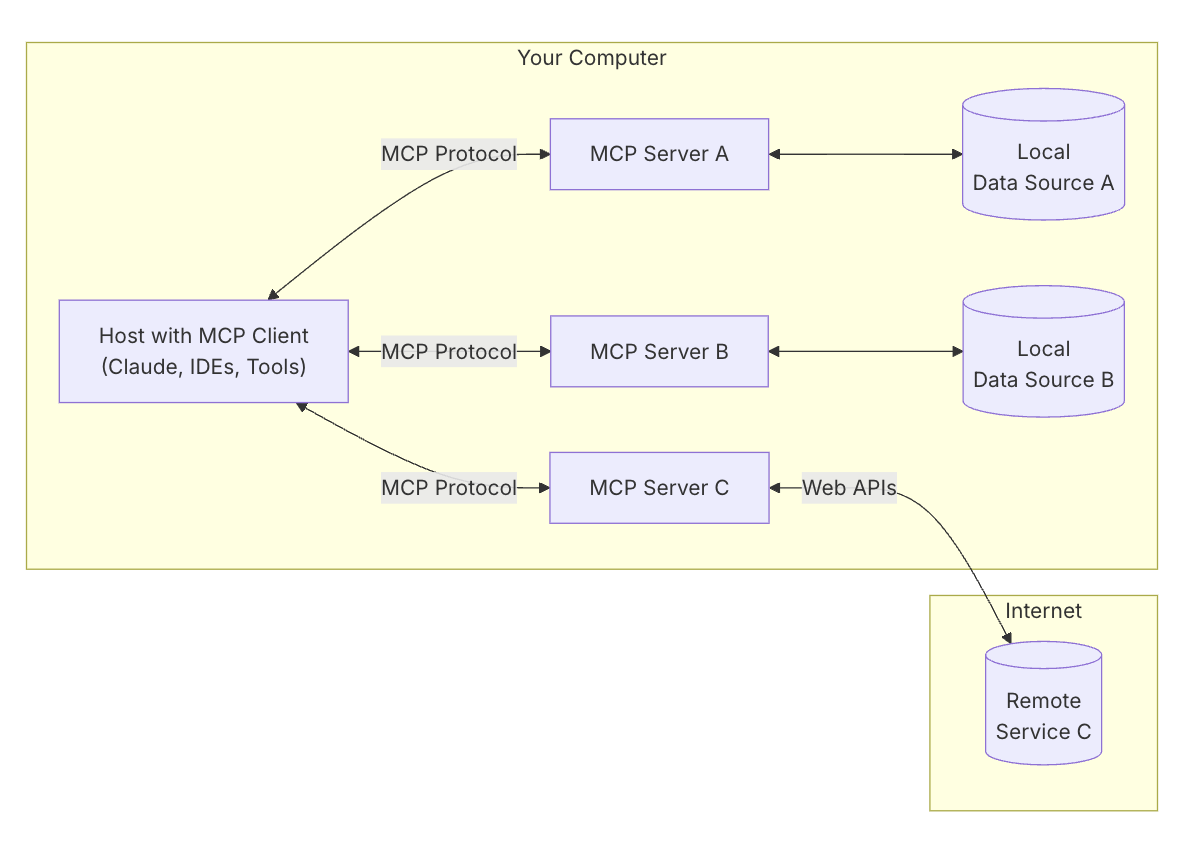
지금까지 설명한 이 흐름이 mcp 문서에서 설명한 architecture의 MCP Server C <-> Remote Service C 부분이다.
이걸 이해했다면 local data source에 대한것도 금방이해하리라 본다.

2. LLM + MCP가 만들어내는 보이지않는 API Call 폭발

위와같이 실제로 MCP를 통해 LLM이 API를 호출하는 과정을 추적해보면, 단일 프롬프트가 여러 개의 API 호출로 이어지는 경우를 확인할 수 있었다. 이러한 호출은 로그나 네트워크 트래픽을 분석하여 파악할 수 있으며, 예상보다 많은 호출이 발생함을 알 수 있었다.

그렇다면 기존에 서비스들이 본인들이 제공하던 open api에 더불어 mcp server 제공하게되면? 본인 서비스의 호출이 증가하게 되고
llm + mcp가 만들어내는 트래픽까지 감당해야하게 되면서 결국 서버 프로그래머들의 대규모 트래픽 관리 능력이 더더욱 중요해지는게 아닐까? (희망회로..)

한편으로는 api 호출수로 과금을 하는. 서비스라면 mcp server 호출을 유도해서 돈을 아주 잘 벌 수 있게 되겠지 싶기도 하다.

1. 캐싱전략

a. mcp server inmemory caching

LLM이 동일한 질문을 여러 번 할 수 있고, API 응답은 보통 몇 초 단위로 바뀌지 않기 때문에
응답 결과를 캐싱해두면 서버 부하를 많이 줄일 수 있을 것으로 예상한다.
이때 mcp server는 본인의 local에 있다는 점을 잘 활용하면 remote service까지 가지 않게 트래픽을 조절할 수 있다.
remote service 입장에서는 사실 기존의 클라이언트에서 local storage에 정보를 가지고 서버에 api를 호출하지 않는것과 같은 맥락

import express from "express"
import NodeCache from "node-cache" //가볍고 직관적인 in-memory 캐시 라이브러리야. TTL 기반으로 자동 만료
import axios from "axios"

const app = express()
const cache = new NodeCache({ stdTTL: 300 }) // 기본 TTL 5분

app.get("/commits/:owner/:repo", async (req, res) => {
  const { owner, repo } = req.params
  const cacheKey = `commits:${owner}/${repo}`

  // 1. 캐시에 있으면 리턴
  const cached = cache.get(cacheKey)
  if (cached) {
    console.log(`[CACHE HIT] ${cacheKey}`)
    return res.json(cached)
  }

  // 2. 외부 API 호출
  const response = await axios.get(
    `https://api.github.com/repos/${owner}/${repo}/commits`,
    {
      headers: {
        Authorization: `Bearer ${process.env.GITHUB_TOKEN}`,
        Accept: "application/vnd.github+json"
      }
    }
  )

  const data = response.data

  // 3. 캐시에 저장
  cache.set(cacheKey, data)

  console.log(`[CACHE MISS] ${cacheKey} - 저장 완료`)
  res.json(data)
})

위와 같은 코드로 api를 호출할때 caching 해두는 것 처럼 내가 만든 mcp서버가 외부 api 를 호출하는 서버라면 이 전략을 사용해서 외부 api 호출량을 줄이는 방법이 있을 것으로 보인다.

다만 이렇게 했을때 client에서 "내용이 부정확하다", "잘못된 내용으로 보인다", 등의 프롬프트가 있다면 cache reset 하고 직접 api에 호출한다던지 전략이 필요해보인다.

b. prompt caching / semantic caching

LLM에게 동일한 프롬프트를 반복해서 보냈을 때, 매번 새롭게 생각(=토큰 소모)하지 않도록, 이전 응답을 미리 캐시해두는 방식

“We do not currently cache prompts on our side. However, we recommend client-side caching if you’d like to avoid resending the same prompt multiple times.”

https://docs.anthropic.com/en/docs/build-with-claude/prompt-caching#continuing-a-multi-turn-conversation


Prompt caching - Anthropic

Large context caching example This example demonstrates basic prompt caching usage, caching the full text of the legal agreement as a prefix while keeping the user instruction uncached. For the first request: input_tokens: Number of tokens in the user mess

docs.anthropic.com

mcp client라고 볼수 있는 claud가 제공하고 있는 방식이다. claude나 OpenAI 같은 LLM Provider는 사실상 MCP의 client 역할을 하고 있고, 결국 client 입장에서는 llm 사용요금과도 연결되는 (돈을 아끼면서 llm을 쓰고싶은..) 부분이라서 공식적으로 지원하고 있는것으로 보인다.

요약하면 claud 사용시 아래와 내용을 추가하면 prompt cache가 활성화 된다는 이야기이다.

"cache_control": {"type": "ephemeral"}

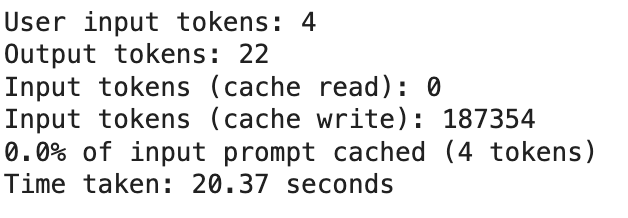
실제로 model 로 부터 응답을 받는데 더 작은 시간이 소요된다는 예시는 아래에 있다. Example1의 non-cached api call과 cached api call을 비교하면 20s > 2s 로 많이 줄어들었음을 확인할 수 있다.

https://github.com/anthropics/anthropic-cookbook/blob/main/misc/prompt_caching.ipynb


anthropic-cookbook/misc/prompt_caching.ipynb at main · anthropics/anthropic-cookbook

A collection of notebooks/recipes showcasing some fun and effective ways of using Claude. - anthropics/anthropic-cookbook

github.com


Example2에서 응답 시간은 초기 캐시 설정 후 거의 24초에서 단 7-11초로 단축되었고, 응답 전반에 걸쳐 동일한 수준의 품질을 유지한다고한다. 7~11초의 이유는 대부분은 응답을 생성하는 데 걸리는 시간 때문이며, 캐시 breakpoints를 계속 조정하면서 입력 토큰의 거의 100%가 이후에 캐시되었기 때문에, 사용자 메시지를 거의 즉시 읽을 수 있었다고한다.

1번째 ... N 번째 시도


prompt_caching을 사용하면 mcp server가 효율적이게 될까? 라고하면 그건 또 상황에 따라 다르다.

1. MCP 서버가 단순 API bridge역할만 하고있다면

외부 api 응답 자체를 mcp 서버 내부에서 캐싱하고있는 것이 훨씬 효율적이다. 왜냐면 prompt를 안쓰니까.
즉, MCP 서버가 단순 API bridge역할만 하고있다면 1번과 같이 api요청에 대한 inmemory caching이 더 효과적이다.

2. mcp 서버가 여러가지 역할을 하고있다면?

지금까지 알아본 prompt caching이 효율적이려면 mcp server가 LLM prompt 결과생성까지 담당하는 구조일 때만 효율적이다.

사용자 → LLM 프롬프트 구성 → 외부 API 호출 → 응답 생성 → LLM에 전달

mcp 서버가 중간 로직과 응답 조합까지 처리하는 경우라면, 같은 프롬프트에 대해 응답을 만들 수 있기때문에 mcp 자체에서 캐싱할 수 있다.

이때 같은 프롬프트에 대한 캐싱만 아니라 의미상 비슷한 내용을 캐싱하기 위해 semantic caching을 이용하는 방법도 있는걸로 안다.
의미적 유사도를 계산하여 vector화 시키고 이것을 임베딩한다. 새로운 입력이들어왔을때 이 입력을 마찬가지로 vector화시키고 임베딩된  데이터와 유사하다면 그 응답을 반환하는 방법이라고 알고있다. 근데 직접 한다고 생각하면 머리아프다 그만알고싶다


여튼 말하고자 하는 바는 기존의 remote server api 제공자(지금의 서버개발자들)가 mcp server까지 제공하게된다면 어떤 캐싱 전략을 취하는지도 중요한 시대가 되어버렸다.
기존의 remote server 단 캐싱을 믿고 몰려드는 트래픽을 멋진 서버구조로 해결하겠어! 라는 마음가짐이 아니라
제공하는 mcp server 단에도 inmemory caching을 달아서 remote server에 몰리는 트래픽을 줄이는 방법을 고려해야한다.

근데 생각해보면 remote server 단 api 호출 수로 유저가 과금하게 만드는 구조라면 일부러 mcp server에 캐싱을 안 달 것 같기도하다.
유저입장에선 api call bridge 역할의 mcp server들의 호출들을 전부 caching해주는 caching mcp server를 사용하는게 나을 수도


2. 요청 제한 설정

위에 말했듯이. MCP를 쓰기 시작하면서, LLM이 단순히 한 줄 프롬프트만 받아들이는 게 아니라, 그 프롬프트를 해석해서 여러 개의 외부 API를 한꺼번에 호출하기 시작한다는 점이었다.

예전에는 사용자가 직접 API를 호출했기 때문에 “한 번에 몇 개 요청 보낼지”, “실행 시간이 얼마일지”를 어느 정도 예측할 수 있었다.
하지만 LLM은 한 문장의 목적을 이루기 위해 5개, 10개 넘는 요청을 연쇄적으로 호출할 수도 있다. 

a. rate limiting

문제는 기존 전통적인 remote server api들은 rate limiting 제한이 있다. 1초에 3개이상의 요청을 보내지 말라는 등의 요구사항으로.
고로 mcp server에서 api 콜을 보낼 때 rate limiting을 고려해야한다. ( 기존 전통적인 client들에서 고민하던 것들을 mcp server에 녹이는 느낌이 든다)

https://github.com/jwaxman19/qlik-mcp/blob/main/src/index.ts


qlik-mcp/src/index.ts at main · jwaxman19/qlik-mcp

An MCP server to run qlik. Contribute to jwaxman19/qlik-mcp development by creating an account on GitHub.

github.com

실제로 위 mcp서버는 Qlik Cloud API를 사용해서 시각화하는 목적을 갖고있는데, 실제 호출부의 코드를 보면 rate limiting 적용을 위해 delay를 적용해둔 걸 확인할 수 있었다.

   const data = await withRetry(async () => chartObject.getHyperCubeData('/qHyperCubeDef', [{
          qTop: startRow,
          qLeft: 0,
          qWidth: metadata.totalColumns,
          qHeight: rowCount
        }]));

        if (data?.[0]?.qMatrix) {
          allData.push(...data[0].qMatrix);
        }

        // Add delay between chunks to avoid rate limiting
        if (startRow + pageSize < rowsToFetch) {
          await delay(REQUEST_DELAY_MS);
        }
페이지네이션 하는 forloop 안에 rate limiting 코드가 들어있었음.


외에도 고려하면 좋을 것들로 

b. timeout

mcp server에서 외부 api를 계속 호출하는데 응답이 너무 느리게 오는 상황이라면 일부러 강제종료를 시켜서 다른 mcp tools를 이용하여 llm 이 결과를 낼수록 유도하기 때문에 timeout 설정도 잘해주는게 좋다.

c. 병렬처리 제한.

llm이 mcp tools를 이용하여 병렬로 여러 요청을 날리면 그만큼 remote server에 영향이 커지게 된다. a에서의 ratelimiting을 건다고해도 한개의 api요청에 대해서만 ratelimiting이 걸리게하는 방식으로 코드를 작성한걸 볼 수 있다.
그러나 mcp는 동시에 여러개의 tools를 사용하여 api 요청을 하게할 수 있으니 tools를 동시에 여러개 실행하게 되면 remote server에 부하가 동시에 몰릴 수도 있게되는 상황이다.

고로 java 기준은 api호출시 ExecutorService를 이용해서 고정된 쓰레드 풀로 병렬작업을 실행하도록 병렬처리 작업개수를 조절한다거나 하는 방법을 이용하는 것이다.

d. circuit breaker

나의 remote server가 죽었는데도 llm으로 인해 계속 mcp가 retry를 하게된다면? remote server에 오히려 요청이 몰리면서 c에 해둔 병렬처리 제한이 같이 걸려있다면 오히려 리소스를 사용하지 못하는 상황이 될 수 있다. 이런 상황을 막기위해 일정 횟수 이상 실패시 api 호출을 차단하는 로직들이 필요할 수 있다.


결국 써놓고 보니 mcp server를 구현하는 것은 server와 client를 동시에 제공하는것과 같은느낌이 들지 않는가? mcp server를 기존시스템에 녹여서 사용하기 위해서는 기존에 client단에서 성능을 올리기 위한 여러 트릭들을 mcp server에 적용하면 되는 느낌이다.


3. 보안

제일 무섭다.


4. 기술은 진화하지만, 본질은 크게 다르지 않다

llm이 나오고 나서 “이제 개발자는 할 일 없어지는 거 아닌가?“라는 얘기를 자주 듣는다.
우선 mcp 자체만 놓고봤을 땐, 새로운 형태의 api 프로토콜일 뿐이다. api 요청이 더 자연어에 가까워졌을 뿐

그래서 프론트에서 들어오는 요청이 자연어가 되었다고해서 그걸 처리하는 서버의 역할까지 사라지는건 아니다. 오히려 유저 요청을 더. 편하게 쓸 수 있게되었다는 점이고.

결국 서비스를 만들기 위해서는 여전히 특정 플로우를 설계해야 하고, 보안과 성능을 고려해서 캐싱도 걸고, 트래픽도 분산해야 한다.
이건 예전에도 개발자가 하던 일이었다.

이전에 pc만 쓰던시대에서 mobile도 쓰는 시대로 넘어갈때, 원래도 서버라는 개념이 있었다. 다만 mobile로 넘어가면서 그 서버들이 여러 환경에서 요청을 받을수있고 접근이 쉬워졌고 그러면서 서버에서 처리해야할 요청량들이 엄청나게 많아졌다. 따라서 서버에서 이런 요청을 처리하기 위해 많은 기존의 서버개발자들이 머리를 싸매 성능향상을 위해 여러 방법론을 제안하고 기존의 개념들을 활용한 아키텍쳐가 발생하게 된것이 아닌가?

이제 mobile app을 쓰던 시대에서 llm으로 서비스를 제공받는 시대로 넘어감에 따라서. 이전과 거의 비슷하다. 이전과 같이 유저의 서버 요청이 더 쉬워짐에 따라서 서버는 성능향상에 더 몰두하게 될 것이고, 기존의 여러 client, server 통신, 보안등에 대해서 기존의 개념들을 활용한 아키텍처가 생기고 또 서버 성능을 끌어올리기위한 노력들이 더더욱 생길 것 같다.

그래서 개발자가 사라지는게 아니라 오히려 이런 부분을 채워줄 수 있는 개발자로 나아가야할 것 같다.
결국 기존 기술들의 개념을 잘 이해하고 있는 개발자들이 LLM 시대에도 더 필요한 역할을 맡게 되지 않을까?
그래서 결국 개발공부는 해야할것 같다는 결론이 나버렸다..

근데 난 gpt 로 블로그 글은 못쓰겠다. 얘가 써주는 내용은 너무 오글거림

LLMs are really blowing up. But honestly, I'm a bit worried about whether developers will become obsolete.
Lately, I've been actively using ChatGPT, Claude, and Perplexity for work and studying — they've been incredibly helpful.
These days, I'm also heavily using Junie and Copilot when writing code.

My productivity has genuinely skyrocketed, especially when running Linux scripts or writing quick script code.
For example, when I have a log format like this and I need a one-liner Linux command to grep for how many logs have a certain field in that format, how many unique values there are, and what percentage of total log rows they represent — I just mindlessly ask for it and use it as a throwaway thing.
For code that requires thinking about the overall architecture, I'm still not so sure. Junie seems to handle structural considerations pretty well, but at the end of the day, in production code, the developer has to bear the deployment risk, so it's not that simple.

Anyway, up until now I've just been casually using these tools, but I'm starting to think it's time to look into how they actually work and what to watch out for. Especially since the arrival of MCP has led to more and more cases where people connect tokens to use external APIs (MCP servers) through LLMs. In particular, reading the articles below made me think I should dig into this a bit more.

A developer's LinkedIn post about server costs skyrocketing because of LLMs


One day, the web server bill was way too high. Thinking it was a DDOS attack, I frantically started blocking the top traffic IPs with the firewall

One day, the web server bill was way too high. Thinking it was a DDOS attack, I frantically blocked the top traffic IPs with the firewall. But when I looked closely, the User-agent said claudebot geminibot openai ... Just blindly allowing access

kr.linkedin.com

A GeekNews newsletter article about MCP security


All the Problems That Can Occur with MCP | GeekNews

MCP is rapidly becoming the de facto standard for integrating external tools and data into LLM-based agents. Various potential vulnerabilities and limitations exist, including security, UX, and LLM reliability issues. The protocol's own design and authentication approach

news.hada.io

I think it's time to learn at least the basics now. This is written after looking into MCP, so it might not be entirely accurate.
If there's anything that needs correcting or more research, let me know in the comments.


1. What Is MCP?

https://modelcontextprotocol.io/introduction


Introduction - Model Context Protocol

Understand how MCP connects clients, servers, and LLMs

modelcontextprotocol.io


The way I see it, until now we've been providing services through communication protocols like HTTP APIs, TCP, etc., defining request and response formats.
But now, the world is shifting toward providing services not through communication protocols, but through designated LLM keywords.

Say your goal is to fetch issues from a specific repo on GitHub. Previously,
you'd have to manually match the HTTP API specifications that GitHub provides, carefully crafting the request format exactly how they want it, like this:

curl -L \
  -H "Accept: application/vnd.github+json" \
  -H "Authorization: Bearer <YOUR-TOKEN>" \
  -H "X-GitHub-Api-Version: 2022-11-28" \
  https://api.github.com/repos/OWNER/REPO/issues

With MCP, you just type a prompt like the one below, and the MCP server maps it to the API above and returns the response nicely for you.

gem-api repository의 첫번째 issue가 뭔지 알려줘.


If you actually look at the GitHub MCP server implementation, it's structured similarly to how we expose endpoints using @Controller — the MCP server adds descriptions that it can reference for mapping, essentially opening up MCP server endpoints.

https://github.com/modelcontextprotocol/servers/blob/main/src/github/index.ts


servers/src/github/index.ts at main · modelcontextprotocol/servers

Model Context Protocol Servers. Contribute to modelcontextprotocol/servers development by creating an account on GitHub.

github.com

   {
        name: "get_issue",
        description: "Get details of a specific issue in a GitHub repository.",
        inputSchema: zodToJsonSchema(issues.GetIssueSchema)
      },


If you follow the inputSchema inside, you can see that it's actually making GitHub API calls under the hood.
In the end, you can think of MCP as opening up a @Controller for the LLM to use.
How? By writing the description and name appropriately in natural language.

So when you use LLM + MCP, you gain the advantage of receiving the responses you want in natural language, instead of having to chain multiple API requests together in server code, painstakingly passing arguments from one call to the next.

Let's say the requirement is something like this:

내가 가진 GitHub repository 중에 star가 가장 많은 걸 알려줘.
그리고 그 repository의 최근 커밋 수랑 contributor 수, issue 개수도 알려줘.

If you had to solve this requirement with code back in the day,
you'd have to check API specs, verify whether your code is correct, make sure the DTO mapping is right, and so on — all just to write pseudocode like the one below. It was a hassle.
And honestly, the pseudocode below doesn't even fully satisfy the requirements above. (You'd need to do more.)

# 기존 방식
import requests

headers = {
    "Authorization": "Bearer <MY_TOKEN>",
    "Accept": "application/vnd.github+json"
}

# 1. 내 전체 repo 가져오기
repos = requests.get("https://api.github.com/user/repos", headers=headers).json()

# 2. 가장 star 많은 repo 찾기
top_repo = max(repos, key=lambda r: r["stargazers_count"])

# 3. 커밋 정보 가져오기
commits = requests.get(f"https://api.github.com/repos/{top_repo['full_name']}/commits", headers=headers).json()

# 4. 통계 출력
print(f"{top_repo['name']}의 커밋 수: {len(commits)}")

But now with LLM + MCP, you just type in the requirement as-is.

It automatically figures out which MCP server descriptions are needed to fulfill the requirement, fills in the arguments on its own, and calls the GitHub API.
In fact, the search_repositories shown in that block represents the name of the MCP server protocol that was called.

{
    name: "search_repositories",
    description: "Search for GitHub repositories",
    inputSchema: zodToJsonSchema(repository.SearchRepositoriesSchema),
  },
   case "search_repositories": {
    const args = repository.SearchRepositoriesSchema.parse(request.params.arguments);
    const results = await repository.searchRepositories(
      args.query,
      args.page,
      args.perPage
    );
    return {
      content: [{ type: "text", text: JSON.stringify(results, null, 2) }],
    };
  }

Ultimately, MCP is about opening up an API endpoint just by writing hints in natural language so the LLM can figure out which API to use.

But to handle this small requirement, the LLM made 9 API calls — do we really need that many?
Isn't that way too much? Honestly, would a developer have used this many API calls if they coded it themselves? That's what I'm thinking.
(But it is convenient, though.)

  • With the old approach, I had full control over which APIs I was calling, what data I was sending, and where it was going.
  • With the MCP approach, the LLM and MCP server handle things on your behalf based on their interpretation of your intent, which means you might not always have clear visibility into what's being sent.

The flow I've described so far corresponds to the MCP Server C <-> Remote Service C part of the architecture explained in the MCP documentation.
Once you understand this, you should be able to quickly grasp the local data source part as well.

2. The Hidden API Call Explosion Created by LLM + MCP

As shown above, when you actually trace the process of an LLM making API calls through MCP, you can see that a single prompt leads to multiple API calls. These calls can be identified by analyzing logs or network traffic, and it turns out there are far more calls happening than expected.

So what happens when existing services start offering MCP servers on top of the open APIs they already provide? Their service call volume will increase,
and they'll have to handle the additional traffic generated by LLM + MCP — which means server programmers' ability to manage large-scale traffic becomes even more important, doesn't it? (Hopeful thinking...)

On the other hand, for services that charge based on API call volume, incentivizing MCP server usage could be a great way to rake in money.

1. Caching Strategies

a. MCP Server In-Memory Caching

An LLM can ask the same question multiple times, and API responses typically don't change within a few seconds,
so caching response results should significantly reduce server load.
If you take advantage of the fact that the MCP server lives on your local machine, you can control traffic so it never even reaches the remote service.
From the remote service's perspective, it's essentially the same concept as a traditional client holding information in local storage and not making API calls to the server.

import express from "express"
import NodeCache from "node-cache" //가볍고 직관적인 in-memory 캐시 라이브러리야. TTL 기반으로 자동 만료
import axios from "axios"

const app = express()
const cache = new NodeCache({ stdTTL: 300 }) // 기본 TTL 5분

app.get("/commits/:owner/:repo", async (req, res) => {
  const { owner, repo } = req.params
  const cacheKey = `commits:${owner}/${repo}`

  // 1. 캐시에 있으면 리턴
  const cached = cache.get(cacheKey)
  if (cached) {
    console.log(`[CACHE HIT] ${cacheKey}`)
    return res.json(cached)
  }

  // 2. 외부 API 호출
  const response = await axios.get(
    `https://api.github.com/repos/${owner}/${repo}/commits`,
    {
      headers: {
        Authorization: `Bearer ${process.env.GITHUB_TOKEN}`,
        Accept: "application/vnd.github+json"
      }
    }
  )

  const data = response.data

  // 3. 캐시에 저장
  cache.set(cacheKey, data)

  console.log(`[CACHE MISS] ${cacheKey} - 저장 완료`)
  res.json(data)
})

Like the code above that caches API call results, if the MCP server you built is one that calls external APIs, you could use this strategy to reduce the number of external API calls.

However, if the client sends prompts like "the information seems inaccurate" or "this looks wrong," you'd need a strategy like resetting the cache and calling the API directly.

b. Prompt Caching / Semantic Caching

When the same prompt is repeatedly sent to an LLM, this approach pre-caches previous responses so it doesn't have to think from scratch (= consume tokens) every time.

“We do not currently cache prompts on our side. However, we recommend client-side caching if you’d like to avoid resending the same prompt multiple times.”

https://docs.anthropic.com/en/docs/build-with-claude/prompt-caching#continuing-a-multi-turn-conversation


Prompt caching - Anthropic

Large context caching example This example demonstrates basic prompt caching usage, caching the full text of the legal agreement as a prefix while keeping the user instruction uncached. For the first request: input_tokens: Number of tokens in the user mess

docs.anthropic.com

This is an approach provided by Claude, which can be considered an MCP client. LLM providers like Claude or OpenAI essentially play the role of MCP clients, and since from the client's perspective this directly ties into LLM usage costs (wanting to use LLMs while saving money..), they seem to officially support it.

In short, when using Claude, adding the following activates prompt caching.

"cache_control": {"type": "ephemeral"}

An example showing that it actually takes less time to get a response from the model is below. Comparing the non-cached API call and cached API call in Example 1, the time dropped significantly from 20s to 2s.

https://github.com/anthropics/anthropic-cookbook/blob/main/misc/prompt_caching.ipynb


anthropic-cookbook/misc/prompt_caching.ipynb at main · anthropics/anthropic-cookbook

A collection of notebooks/recipes showcasing some fun and effective ways of using Claude. - anthropics/anthropic-cookbook

github.com


In Example 2, the response time dropped from nearly 24 seconds to just 7-11 seconds after the initial cache setup, while maintaining the same level of quality across responses. The 7-11 seconds is mostly due to the time needed to generate the response, and by continuously adjusting the cache breakpoints, nearly 100% of input tokens were cached afterwards, which means the user message could be read almost instantly.

1st attempt ... Nth attempt


Does using prompt_caching make MCP servers more efficient? Well, that depends on the situation.

1. If the MCP server is only acting as a simple API bridge

It's much more efficient to cache external API responses internally within the MCP server. Because you're not using prompts at all.
In other words, if the MCP server is only acting as a simple API bridge, in-memory caching for API requests as described in option 1 is more effective.

2. What if the MCP server handles multiple responsibilities?

The prompt caching we've looked at so far is only efficient when the MCP server is structured to handle LLM prompt result generation as well.

User → LLM prompt composition → External API call → Response generation → Pass to LLM

If the MCP server handles intermediate logic and response composition, it can generate responses for the same prompt, so caching can be done at the MCP level itself.

At this point, it's not just about caching for identical prompts — I understand there's also an approach using semantic caching to cache semantically similar content.
It calculates semantic similarity, vectorizes it, and embeds it. When new input comes in, it's similarly vectorized, and if it's similar to the embedded data, the corresponding response is returned. But thinking about implementing this myself gives me a headache. I don't want to know anymore.


Anyway, the point I'm trying to make is that if existing remote server API providers (today's server developers) start providing MCP servers as well, choosing the right caching strategy has become important in this new era.
Rather than the mindset of "I'll trust the remote server-side caching and handle the flood of traffic with a fancy server architecture!",
you need to consider adding in-memory caching at the MCP server level to reduce the traffic hitting the remote server.

But then again, if the business model charges users based on remote server API call volume, they might intentionally not add caching to the MCP server.
From the user's perspective, it might be better to use a caching MCP server that caches all the calls from MCP servers acting as API call bridges.


2. Request Throttling

As I mentioned above, once you start using MCP, the LLM doesn't just take in a single line of prompt — it interprets that prompt and starts calling multiple external APIs all at once.

Before, users called APIs directly, so you could somewhat predict "how many requests they'd send at once" and "how long execution would take."
But an LLM might chain 5, 10, or even more requests just to fulfill a single sentence's objective. 

a. Rate Limiting

The problem is that traditional remote server APIs have rate limiting restrictions — things like "don't send more than 3 requests per second."
So when making API calls from the MCP server, you need to account for rate limiting. (It feels like we're taking the concerns that traditional clients used to deal with and baking them into the MCP server.)

https://github.com/jwaxman19/qlik-mcp/blob/main/src/index.ts


qlik-mcp/src/index.ts at main · jwaxman19/qlik-mcp

An MCP server to run qlik. Contribute to jwaxman19/qlik-mcp development by creating an account on GitHub.

github.com

The MCP server above is actually designed to visualize using the Qlik Cloud API, and if you look at the actual call code, you can see a delay applied for rate limiting.

   const data = await withRetry(async () => chartObject.getHyperCubeData('/qHyperCubeDef', [{
          qTop: startRow,
          qLeft: 0,
          qWidth: metadata.totalColumns,
          qHeight: rowCount
        }]));

        if (data?.[0]?.qMatrix) {
          allData.push(...data[0].qMatrix);
        }

        // Add delay between chunks to avoid rate limiting
        if (startRow + pageSize < rowsToFetch) {
          await delay(REQUEST_DELAY_MS);
        }
The rate limiting code was inside the pagination for-loop.


Other things worth considering include: 

b. Timeout

If the MCP server keeps calling external APIs but the responses are coming back too slowly, it's good to set proper timeouts to force-terminate and guide the LLM to produce results using other MCP tools instead.

c. Concurrency Limits

When the LLM fires off multiple requests in parallel using MCP tools, the impact on the remote server grows accordingly. Even with the rate limiting from section (a), you can see the code only applies rate limiting to individual API requests.
However, since MCP can use multiple tools simultaneously to make API requests, running several tools at once could cause a burst of load on the remote server all at once.

So in Java, for example, you'd use an ExecutorService with a fixed thread pool to control the number of concurrent tasks when making API calls.

d. Circuit Breaker

What if your remote server is down but the LLM keeps making the MCP retry? Requests pile up on the remote server, and if the concurrency limits from section (c) are also in place, you could end up in a situation where resources can't be utilized at all. To prevent this, you may need logic that blocks API calls after a certain number of failures.


When I step back and look at what I've written, doesn't implementing an MCP server feel like providing both a server and a client at the same time? To integrate an MCP server into an existing system, it feels like you just need to apply all the performance tricks that used to live on the client side to the MCP server instead.


3. Security

This one scares me the most.


4. Technology Evolves, but the Fundamentals Stay the Same

Ever since LLMs came out, I keep hearing "aren't developers going to be out of a job?"
First of all, looking at MCP by itself, it's just a new form of API protocol. API requests just got closer to natural language, that's all.

So just because the requests coming from the frontend are now in natural language doesn't mean the server's role in processing them disappears. If anything, it means users can now make requests more conveniently.

At the end of the day, to build a service you still need to design specific flows, add caching for security and performance, and distribute traffic.
This is the same work developers have always done.

Back when we transitioned from the PC-only era to the mobile era, the concept of servers already existed. But with mobile, those servers started receiving requests from multiple environments, access became easier, and the volume of requests servers had to handle skyrocketed. So server developers racked their brains to propose various methodologies for performance improvement and came up with architectures leveraging existing concepts — isn't that what happened?

Now, as we transition from the mobile app era to the era of receiving services through LLMs, it's almost identical to before. Just like before, as it becomes easier for users to make server requests, servers will focus even more on performance improvements, and architectures leveraging existing concepts around client-server communication and security will emerge, along with even more efforts to push server performance further.

So developers aren't disappearing — rather, we should be growing into developers who can fill these gaps.
Ultimately, won't developers who deeply understand the fundamentals of existing technologies be the ones needed even more in the LLM era?
So I've arrived at the conclusion that... we still need to study development after all..

The end.

But honestly, I can't write blog posts with GPT. The stuff it writes is just too cringe.

댓글

Comments