Develop/git-github

git 종종 사용하지만 까먹는 명령어들 | git commands I occasionally use but keep forgetting

+ 조금씩 추가할 예정이미 commit한 메세지 author 변경git rebase -i HEAD~N # 원하는 수정 커밋 범위 설정# 원하는 커밋 pick > e 로 수정 후git commit --amend --author="jyami-kim " # --amend로 author 변경git rebase --continue # 다음 rebase 진행 branch upstream 변경local branch가 remote branch를 추적하도록 git branch --set-upstream-to=origin/feature/TM-5644 feature/TM-5644 tag 추가git tag tag-namegit push origin tag-name git local 설정git config --local u..

git 종종 사용하지만 까먹는 명령어들 | git commands I occasionally use but keep forgetting

728x90

+ 조금씩 추가할 예정

이미 commit한 메세지 author 변경

git rebase -i HEAD~N # 원하는 수정 커밋 범위 설정

# 원하는 커밋 pick > e 로 수정 후

git commit --amend --author="jyami-kim <mor2222@naver.com>"   # --amend로 author 변경

git rebase --continue # 다음 rebase 진행


branch upstream 변경

local branch가 remote branch를 추적하도록

 git branch --set-upstream-to=origin/feature/TM-5644 feature/TM-5644


tag 추가

git tag tag-name
git push origin tag-name


git local 설정

git config --local user.email "mor2222@naver.com"
git config --local user.name "jyami-kim"

+ Will be updated gradually

Changing the author of an already committed message

git rebase -i HEAD~N # 원하는 수정 커밋 범위 설정

# 원하는 커밋 pick > e 로 수정 후

git commit --amend --author="jyami-kim <mor2222@naver.com>"   # --amend로 author 변경

git rebase --continue # 다음 rebase 진행


Changing branch upstream

Make a local branch track a remote branch

 git branch --set-upstream-to=origin/feature/TM-5644 feature/TM-5644


Adding a tag

git tag tag-name
git push origin tag-name


Git local configuration

git config --local user.email "mor2222@naver.com"
git config --local user.name "jyami-kim"

댓글

Comments

Develop/git-github

git status 한글 깨짐 | git status Korean character broken

git status를 할 때, 한글이름을 가지는 파일일 경우에 /200/300/385 이런식으로 파일명이 깨지는 경우가 있다. (mac 터미널)git config --global core.quotepath false위 설정으로 바꾸면 올바르게 한글이름 파일을 git status로 상태확인이 가능해진다.core.quotePathCommands that output paths (e.g. ls-files, diff), will quote "unusual" characters in the pathname by enclosing the pathname in double-quotes and escaping those characters with backslashes in the same way C escapes c..

git status 한글 깨짐 | git status Korean character broken

728x90

git status를 할 때, 한글이름을 가지는 파일일 경우에 /200/300/385 이런식으로 파일명이 깨지는 경우가 있다. (mac 터미널)

git config --global core.quotepath false

위 설정으로 바꾸면 올바르게 한글이름 파일을 git status로 상태확인이 가능해진다.

core.quotePath

Commands that output paths (e.g. ls-files, diff), will quote "unusual" characters in the pathname by enclosing the pathname in double-quotes and escaping those characters with backslashes in the same way C escapes control characters (e.g. \t for TAB, \n for LF, \\ for backslash) or bytes with values larger than 0x80 (e.g. octal \302\265 for "micro" in UTF-8). If this variable is set to false, bytes higher than 0x80 are not considered "unusual" any more. Double-quotes, backslash and control characters are always escaped regardless of the setting of this variable. A simple space character is not considered "unusual". Many commands can output pathnames completely verbatim using the -z option. The default value is true.

output path에 대한 커맨드는 unusual인 패스 이름을 조정한다. ( " 가 들어가 있거나, escaping 이 들어가 있는 경우 )
이때 한글 인코딩이 UTF-8에 들어가 0x80 보다 큰 바이트를 가진 escape 문자 처리가 되어 "unusual"인 케이스로 포함이 된다.

그래서 이 변수를 false로 설정하면

0x80보다 높은 바이트는 더 이상 "unusual" 인 것으로 간주되지 않는다.
"unusual"로 간주되는 큰 따옴표, 백 슬래시 및 제어 문자는 이 변수의 설정에 관계없이 항상 이스케이프 되며,
단순한 공백 문자는 "unusual"로 간주되지 않는다.

참고 : https://git-scm.com/docs/git-config#Documentation/git-config.txt-corequotePath


Git - git-config Documentation

When using the deprecated [section.subsection] syntax, changing a value will result in adding a multi-line key instead of a change, if the subsection is given with at least one uppercase character. For example when the config looks like [section.subsection

git-scm.com


When running git status, if a file has a Korean name, the filename may appear garbled like /200/300/385. (Mac terminal)

git config --global core.quotepath false

If you change to the above setting, you'll be able to correctly check the status of files with Korean names using git status.

core.quotePath

Commands that output paths (e.g. ls-files, diff), will quote "unusual" characters in the pathname by enclosing the pathname in double-quotes and escaping those characters with backslashes in the same way C escapes control characters (e.g. \t for TAB, \n for LF, \\ for backslash) or bytes with values larger than 0x80 (e.g. octal \302\265 for "micro" in UTF-8). If this variable is set to false, bytes higher than 0x80 are not considered "unusual" any more. Double-quotes, backslash and control characters are always escaped regardless of the setting of this variable. A simple space character is not considered "unusual". Many commands can output pathnames completely verbatim using the -z option. The default value is true.

Commands that deal with output paths adjust pathnames that are considered unusual. (e.g., when they contain double quotes or escape characters)
In this case, Korean characters encoded in UTF-8 have bytes larger than 0x80, so they get treated as escape characters and fall under the "unusual" case.

So if you set this variable to false:

Bytes higher than 0x80 are no longer considered "unusual".
Double-quotes, backslashes, and control characters that are considered "unusual" are always escaped regardless of this variable's setting,
and simple space characters are not considered "unusual".

Reference: https://git-scm.com/docs/git-config#Documentation/git-config.txt-corequotePath


Git - git-config Documentation

When using the deprecated [section.subsection] syntax, changing a value will result in adding a multi-line key instead of a change, if the subsection is given with at least one uppercase character. For example when the config looks like [section.subsection

git-scm.com


댓글

Comments

Develop/git-github

git & github cooperation - DSC Ewha 세션 | git & github cooperation - DSC Ewha Session

마지막 미니세미나로 git과 github를 이용해서 협업을 하는 방법을 설명했습니다.제가 처음 협업을 시작할 때, github의 PR을 이용한 방법으로 개념을 잡기 시작했어서, 그 방법을 소개 드렸습니다. Git cooperation from 민정 김 For the last mini seminar, I explained how to collaborate using git and GitHub.When I first started collaborating, I learned the concepts through the method of using GitHub PRs, so that's the approach I introduced. Git cooperation from 민정 김

git & github cooperation - DSC Ewha 세션 | git & github cooperation - DSC Ewha Session

728x90

마지막 미니세미나로 git과 github를 이용해서 협업을 하는 방법을 설명했습니다.

제가 처음 협업을 시작할 때, github의 PR을 이용한 방법으로 개념을 잡기 시작했어서, 그 방법을 소개 드렸습니다.


For the last mini seminar, I explained how to collaborate using git and GitHub.

When I first started collaborating, I learned the concepts through the method of using GitHub PRs, so that's the approach I introduced.


댓글

Comments

Develop/git-github

git & github basic - DSC Ewha 세션 | git & github basic - DSC Ewha Session

DSC Ewha에서 진행하는 미니세미나에서 세번의 발표를 하게되었습니다.두번째 세션으로 git과 github의 기초개념과 가장 메인이되는 커맨드를 알려드렸습니다 :) Git basic from 민정 김 I gave three presentations at the mini seminar held by DSC Ewha.In the second session, I covered the basic concepts of git and github, along with the most essential commands :) Git basic from 민정 김

git & github basic - DSC Ewha 세션 | git & github basic - DSC Ewha Session

728x90

DSC Ewha에서 진행하는 미니세미나에서 세번의 발표를 하게되었습니다.
두번째 세션으로 git과 github의 기초개념과 가장 메인이되는 커맨드를 알려드렸습니다 :)


I gave three presentations at the mini seminar held by DSC Ewha.
In the second session, I covered the basic concepts of git and github, along with the most essential commands :)


댓글

Comments

Develop/git-github

git-flow 전략

git-flow clean code study에서 앞으로의 협업을 대비하여 git-flow 전략을 이해하고 실습하는 시간을 가졌습니다.당시 스스로 작성한 노트입니다. git-flow 전략을 이해하기 위해 아래 우아한 형제들 블로그를 참고했습니다. http://woowabros.github.io/experience/2017/10/30/baemin-mobile-git-branch-strategy.html 우린 Git-flow를 사용하고 있어요 - 우아한형제들 기술 블로그안녕하세요. 우아한형제들 배민프론트개발팀에서 안드로이드 앱 개발을 하고 있는 나동호입니다.오늘은 저희 안드로이드 파트에서 사용하고 있는 Git 브랜치 전략을 소개하려고 합니다. ‘배달의민족 안드로이드 모바일 파트에서 이렇게 브랜치를 관리하고..

git-flow 전략

728x90

git-flow


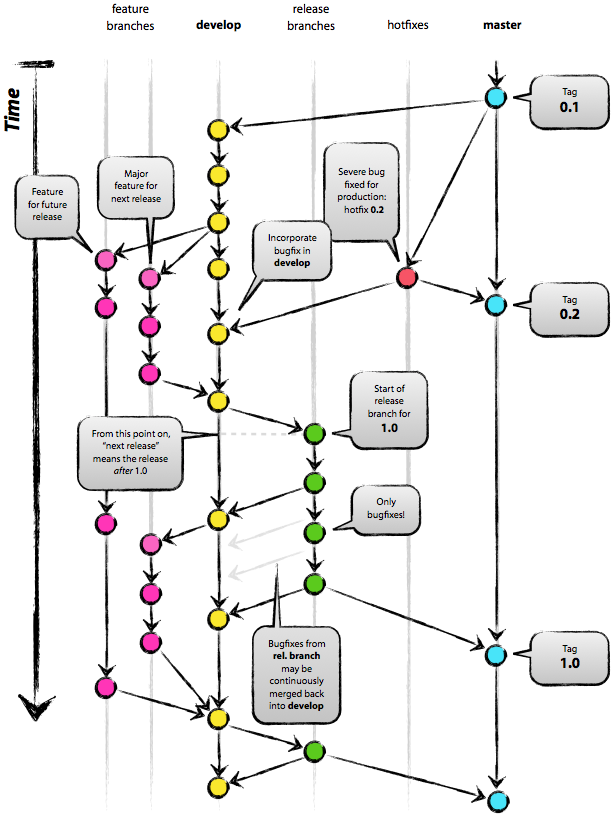
clean code study에서 앞으로의 협업을 대비하여 git-flow 전략을 이해하고 실습하는 시간을 가졌습니다.

당시 스스로 작성한 노트입니다. 


git-flow 전략을 이해하기 위해 아래 우아한 형제들 블로그를 참고했습니다.


http://woowabros.github.io/experience/2017/10/30/baemin-mobile-git-branch-strategy.html


우린 Git-flow를 사용하고 있어요 - 우아한형제들 기술 블로그

안녕하세요. 우아한형제들 배민프론트개발팀에서 안드로이드 앱 개발을 하고 있는 나동호입니다.오늘은 저희 안드로이드 파트에서 사용하고 있는 Git 브랜치 전략을 소개하려고 합니다. ‘배달의민족 안드로이드 모바일 파트에서 이렇게 브랜치를 관리하고 있구나’ 정도로 봐주시면 좋을 것 같습니다.

woowabros.github.io


1. Branch Naming

master

배포버전 브랜치 > tag를 이용해서 버전을 기록한다.

  • X . 0 : 프로젝트 추가
  • 1 . X : 기능 추가


develop

개발 브랜치

  • 2줄 전략 : merge + rebase 를 이용해서 git flow를 이쁘게 본다! 어느 시점에 반영이 됐는지 보기 위해서


feature

기능 브랜치

  • develop에서 갈라져 나온 기능 : git flow를 깔끔하게 보기 위해, origin develop의 갈라나온 시점을 잘 관리해 주어야 한다. git pull --rebase origin devlop 을 이용해서 제일 마지막에 반영된 develop에서 branch가 갈라 나온 것 처럼 보이게 한다.


hotfixes

배포버전에서 버그가 났을 떄 고치기 위한 브랜치

  • hotfixes에서 수정하고 나면 develop과 master에 push한다.


release

배포 직전에 QA 수정

  • 베타 서버와 같은 버전, QA 받고 나면 develop과 master에 push한다.


2. github issue 이용 관련 intelli J 단축키

ctrl+shift+a - intellij에 github 등록해서 issue 바로 접근

alt+shift+n  - issue이름으로 feature branch를 딴다.


3. git-flow 전략에 따른 git bash 명령어

git checkout feature/git-flow-2

git fetch                                     ## 원격에 있는 반영사항들을 local에 알리기

git commit -m "git-flow-2 commit"

git pull --rebase origin develop

git push origin feature/git-flow-2

git checkout develop

git pull origin devlop

git merge --no-ff feature/git-flow-2

git push origin develop

커밋 메시지 여러개를 하나로 !

git rebase -i HEAD~2
# s : commit 최신것을 스쿼시하겠다. 둘중에 의미없는 message를 지우거나 수정한다.

git-flow


In our clean code study group, we took some time to understand and practice the git-flow strategy to prepare for future collaboration.

These are the notes I wrote at the time. 


To understand the git-flow strategy, I referenced the blog post from Woowa Brothers (Baemin) below.


http://woowabros.github.io/experience/2017/10/30/baemin-mobile-git-branch-strategy.html


We Use Git-flow - Woowa Brothers Tech Blog

Hello, I'm Dongho Na, an Android app developer on the Baemin Front-end Development Team at Woowa Brothers. Today, I'd like to introduce the Git branch strategy we use in our Android team. Think of it as a look into how the Baemin Android mobile team manages their branches.

woowabros.github.io


1. Branch Naming

master

Release version branch > Uses tags to record versions.

  • X . 0 : New project added
  • 1 . X : New feature added


develop

Development branch

  • Two-line strategy: Use merge + rebase to keep the git flow looking clean! This helps you see at which point changes were integrated.


feature

Feature branch

  • Branches off from develop: To keep the git flow looking clean, you need to carefully manage the point where it diverges from origin develop. Use git pull --rebase origin devlop to make it look like the branch was created from the latest reflected develop.


hotfixes

Branch for fixing bugs found in the release version

  • After fixing in hotfixes, push to both develop and master.


release

QA fixes right before deployment

  • Same version as the beta server. After QA is done, push to both develop and master.


2. IntelliJ Shortcuts for Using GitHub Issues

ctrl+shift+a - Register GitHub in IntelliJ to access issues directly

alt+shift+n  - Create a feature branch named after the issue.


3. Git Bash Commands Following the git-flow Strategy

git checkout feature/git-flow-2

git fetch                                     ## 원격에 있는 반영사항들을 local에 알리기

git commit -m "git-flow-2 commit"

git pull --rebase origin develop

git push origin feature/git-flow-2

git checkout develop

git pull origin devlop

git merge --no-ff feature/git-flow-2

git push origin develop

Squash multiple commit messages into one!

git rebase -i HEAD~2
# s : commit 최신것을 스쿼시하겠다. 둘중에 의미없는 message를 지우거나 수정한다.

댓글

Comments