규모 확장 시스템 설계 기본 | Fundamentals of Designing Systems for Scale
쟈 미
728x90
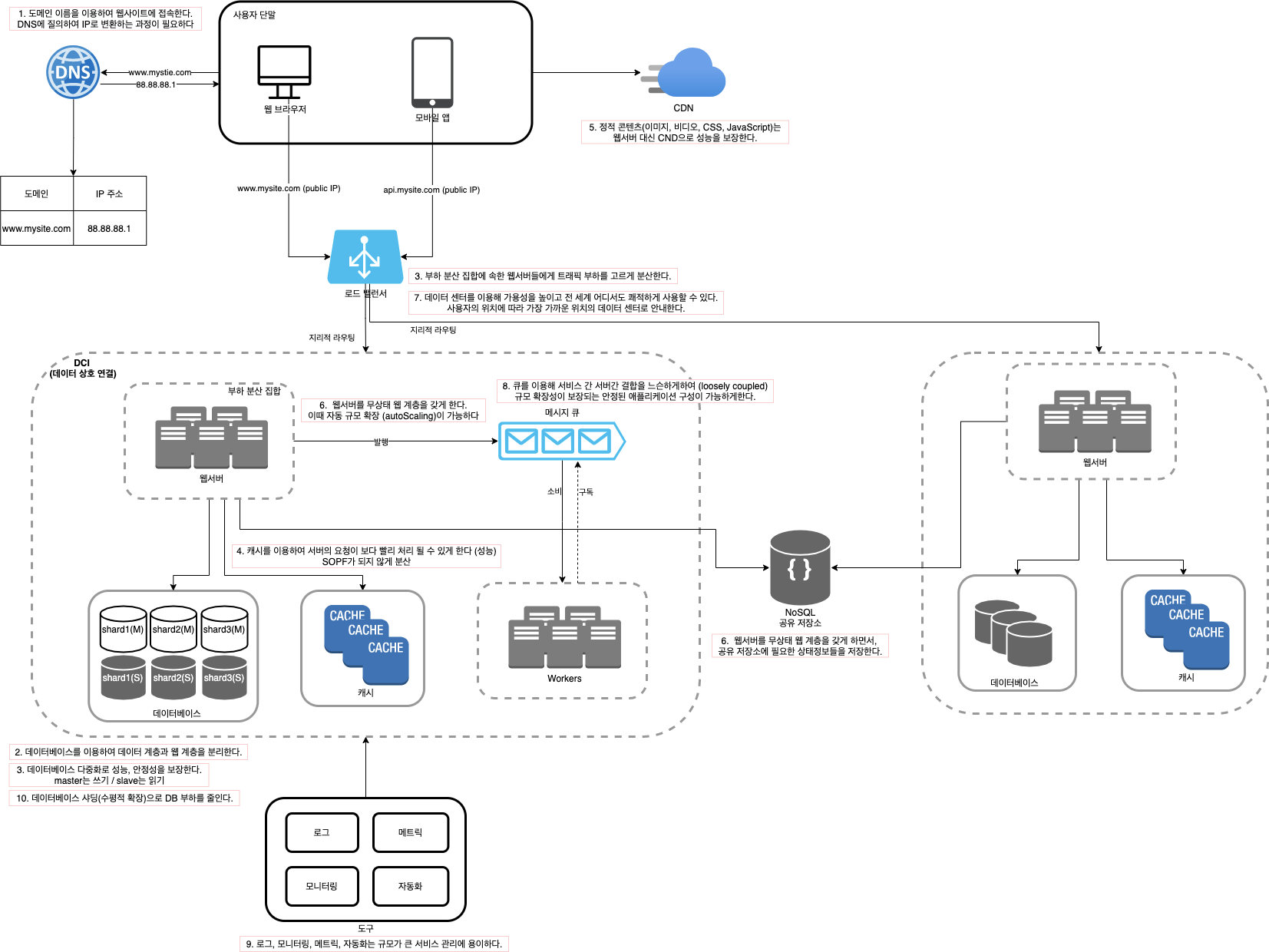
1. 단일 서버 DNS : 도메인 이름을 이용해 웹사이트에 접속한다. DNS에 질의하여 IP로 변환하는 과정이 필요하다. http 요청을 보내고 클라이언트는 응답을 받는다
2. 데이터베이스 데이터베이스 : 웹/모바일 트래픽 처리 서버 (웹 계층)와 데이터베이스 서버 (데이터 계층) 분리를 시도한다.
3. 로드밸런서 로드밸런서 : 부하 분산 집합에 속한 웹서버들에게 트래픽 부하를 고르게 분산한다 데이터베이스 : 다중화로 성능과 안정성을 보장한다 (master는 쓰기, slave는 읽기)
4. 캐시 캐시 : 캐시를 이용해 서버의 요청이 보다 빨리 처리될 수 있게 한다. SOPF가 되지 않게 분산한다
5. 콘텐츠 전송 네트워크 (CDN) CND : 정적 콘텐츠(이미지, 비디오, CSS, JavaScript)는 웹 서버대신 CDN으로 성능을 보장한다
6. 무상태(stateless) 웹 계층 웹서버 : 무상태 웹 계층을 갖게 함으로써 자동 규모 확장(autoScaling)이 가능하다 공유 저장소 : 웹서버를 무상태 웹 계층으로 전환하면서, 필요한 상태정보들은 공유 저장소에 저장한다.
7. 데이터 센터 로드밸런서 : 데이터 센터를 이용해 가용성을 높이고, 전 세계 어디서도 쾌적하게 사용이 가능하다. 지리적 라우팅을 이용하여 사용자의 위치에 따라 가장 가까운 위치의 데이터 센터로 안내한다.
8. 메시지 큐 메시지 큐 : 서버간 결합을 느슨하게 하여 (loosely coupled) 규모 확장성이 보장되는 안정된 애플리케이션 구성이 가능하게 한다.
9. 로그, 메트릭 그리고 자동화 도구 : 로그, 모니터링, 메트링, 자동화는 규모가 큰 서비스 관리에 용이하다
10. 데이터베이스의 규모 확장 데이터베이스 : 샤딩으로(수평적 확장 = 서버증설) DB부하를 줄인다.
관련 책 : 가상 면접 사례로 배우는 대규모 시스템 설계 기초
1. Single Server DNS : You access a website using a domain name. A process of querying DNS to resolve it into an IP address is needed. You send an HTTP request and the client receives a response.
2. Database Database : We separate the server that handles web/mobile traffic (web tier) from the database server (data tier).
3. Load Balancer Load Balancer : Evenly distributes traffic load across web servers in the load-balanced set. Database : Replication ensures performance and reliability (master handles writes, slave handles reads).
4. Cache Cache : Uses cache so that server requests can be processed faster. Distribute caches to avoid becoming a SPOF.
5. Content Delivery Network (CDN) CDN : Static content (images, videos, CSS, JavaScript) is served through a CDN instead of web servers to ensure performance.
6. Stateless Web Tier Web Server : By making the web tier stateless, auto-scaling becomes possible. Shared Storage : When converting web servers to a stateless web tier, the necessary state information is stored in shared storage.
7. Data Centers Load Balancer : Using data centers improves availability and enables a smooth experience from anywhere in the world. GeoDNS routing directs users to the nearest data center based on their location.
8. Message Queue Message Queue : By loosely coupling servers, it enables building stable applications with guaranteed scalability.
9. Logging, Metrics, and Automation Tools : Logging, monitoring, metrics, and automation make it easier to manage large-scale services.
10. Database Scaling Database : Sharding (horizontal scaling = adding more servers) reduces the database load.
Related Book: System Design Interview – An Insider's Guide
이 챕터의 목표 : Reacitve Stream 패턴의 이해와 reactive application의 설계 방법의 전반적인 이해를 위함.
4.4.1 Motivation
비동기(Asynchronous)와 리액티브 방법론 (reactive methodolgies)는 네트워크나 디스크 IO로 인한 쓰레드의 대기시간 낭비 대신 시스템의 리소스를 좀 더 효율적으로 사용하도록 해준다.
이런 스타일의 프로그래밍을 용이하게 하기위한 광법위한 기술이 존재하는데, java.util.concurrent.Future 부터 Akka와 같이 완전한 라이브러리들이 있다 (?)
Project Reactor는 매우 방대한 셋의 asynchronous workflow를 위한 연산자들이 있고, 이것들은 더이상 프레임워크에 의존하지 않으며 매우 많은 Reactive Streams model을 지원한다.
4.4.2 Understanding Reactive Streams
Reactive Stream은 처음에는 표준의 non-blocking back pressure(이게 뭐지) 을 기반으로 한 asynchronous stream의 표준을 제공하기 위해 만들어졌다. 여기에는 런타임 환경 (JVM and Javascript)뿐만 아니라 네트워크 프로토콜도 포함하려하는 목표가 있었다.
Reactive Streams의 범위는 목표를 달성하는 데 필요한 작업이나 엔터티를 설명하는 최소한의 인터페이스, 메서드 및 프로토콜 집합을 찾는 것이다. 그 목표는 non-blocking back pressure 이 있는 asynchronous streams data이다. (?)
그것은 어플리케이션 코드에서 라이브러리를 연결할 필요 없이, 상호자용을 할 수 있도록 허용해주는 multiple reactive composition 라이브러리들 사이의 운영 표준이다.
Reactive Stream의 통합은 주로 Publicsher<T> 나 Subscriber<T> 타입으로 복잡성을 숨기는 composition library (컴포지션 라이브러리)로 제공된다. Lettuce는 publisher를 Mono, Flux로 사용하는 Project Reactor를 사용한다.
Aynchronouse processing은 IO작업이나 계산과 같은 작업을 호추한 스레드에서 분리한다. handle이 그 return 타입이며, 주로 java.util.concurrent.Future와 동일하거나 비슷하다. 유사하게 single object나 collection, exception을 return 한다. asynchronously하게 fetch 한 결과를 가져온 결과를 기억하는 것은 주로 한 프로우의 끝이 아니다. 한번 데이터가 확보되면 항상 혹은 조건부로 추가 요청을 발행할 수 있다. Java 8이나 Promise 패턴을 사용하면 futuers의 chaining은 연속적으로 그 이후의 asynchronous한 request가 발생하도록 할 수 있다. 한번 조건처리가 필요하면 asynchronous한 flow을 interrupted 시키고 synchronized 해야한다. 이런 접근 방식은 가능하지만 asynchronous의 장점을 완전히 활용하지는 않는다.
반면 Publisher<T> 객체는 다양하고 asynchronous한 질문에 다른방향으로 대답한다 : Pull pattern을 Push patter으로 변환한다.
push : 데이터 변경시 변경이 발새된 곳에서 데이터를 보내주는 방식 (Mono, Flux) pull : 변경된 데이터가 있는지 질의 후 가져오는 방식 (클라이언트 요청 -> 서버 -> 응답)
Publisher<T>는 Futures처럼 single scalar value에 대한 emission 뿐만 아니라 emission sequences 심지어 infinite streams도 지원한다. 당신이 stream 작업을 시작하기만 하면 이 사실을 감사하게 여길 것이다. Project Reactor는 두개의 타입의 publisher가 사용된다 : Mono 와 Flux
Mono : 0부터 1까지의 event를 emit 한다. Flux : 0부터 N까지의 event를 emit 한다.
Publisher<T> 는 concurrency(동시성)나 asynchronicity(비동기성)의 특정 소스나 코드가 실행되는 방식에 편향되지 않는다. synchronous, asynchronous 둘다 ThreadPool 내에서 실행된다. Publisher<T>의 consumer는 실제 구현을 supplier에게 맡겨 나중에 supplier의 코드를 수정하지 않고도 변경이 가능하다.
Publisher<T>의 마지막 키포인트는 Publisher<T>를 가져올 때 처리가 되는 것이 아니라, Publisher<T>에 대한 observer가 subscribe하거나 신호가 보내지는 순간 프로세스가 실행된다는 것이다. 이것은 java.util.concurrent.Future와의 중요한 차이점이다. (Future는 created/obtained 가되는 순간 프로세스가 시작되기 때문이다.) 따라서 어떤 옵저버가 Publisher<T>를 subscribe 하지 않으면 아무일도 일어나지 않는다.
4.4.4. A word on the lettuce Reacitve API
모든 커맨드는 Flux<T>, Mono<T>, Mono<Void> 를 return 한다. 이것들은 Subscriber가 subscribe할 수 있다. 이 구독자는 Publisher <T>가 emit하는 아이템 또는 아이템의 시퀀스에 반응한다. 이 패턴은 Publisher<T>가 객체를 emit 할때까지 기다리는 동안 차단을 할 필요가 없어 동시작업(concurrent operations)에 용이하다. 대신, Publisher<T>가 어떤 futuer time에든 적절하게 반응하도록 준비가 되어있는 Subscriber 형태로 sentry를 만든다.
4.4.5 Consuming Publisher<T>
publisher를 사용할 때 가장먼저 고려할 일은 그들을 consume하는 것이다. Consuming a publisher의 의미는 subscribing을 의미한다.
    @Test
    @DisplayName("Consuming Publisher 예제 : emit 된 모든 항목을 subscribe 하고 print 한다.")
    void consumingPublisher() {
        Flux.just("jyami", "java", "javabom").subscribe(new Subscriber<String>() {
            @Override
            public void onSubscribe(Subscription s) {
                s.request(3);
            }

            @Override
            public void onNext(String s) {
                System.out.println("Hello " + s + "!");
            }

            @Override
            public void onError(Throwable t) {
                t.printStackTrace();
            }

            @Override
            public void onComplete() {
                System.out.println("Complete consuming!");
            }
        });
    }
모든 구독자 또는 관찰자 (Subscriber or Observer)가 모든 이벤트에 대한 알림을 받고 완료된 이벤트도 받은걸을 확인 할 수 있다.한개의 Publisher<T>는 exception이 발생하거나, 그 Publisher<T>가 종료되었다고 onComplete()를 호출할 때까지 아이템을 내 보낸다. 그 이후에는 더이상 element가 emit되지 않는다.
subscribe의 호출로 한개의 Subscription이 등록되고 이것은 cancel을 허용하므로 더이상 이벤트를 수진하지 않는다. Publisher는 한번 Publisher<T>가 unsubscribed하면 구독 취소및 리소스 할당 해제(free resource)를 상호 운용할 수 있다. (?)
좀더 간단한 포맷의 Subscriber<T> 구현
    @Test
    @DisplayName("Subscriber<T> 의 더 간단한 구현")
    void subscriberSimpleImpl() {
        Flux.just("Ben", "Michael", "Mark").doOnNext(new Consumer<String>() {
            public void accept(String s) {
                System.out.println("Hello " + s + "!");
            }
        }).doOnComplete(new Runnable() {
            public void run() {
                System.out.println("Completed");
            }
        }).subscribe();
    }
    @Test
    @DisplayName("Subscriber<T> 의 더 간단한 구현 - 람다사용")
    void subscriberSimpleImplWithLambda() {
        Flux.just("Ben", "Michael", "Mark")
                .doOnNext(s -> System.out.println("Hello " + s + "!"))
                .doOnComplete(() -> System.out.println("Completed")).subscribe();
    }
Subscriber의 여러 연산자를 이용해서 element를 제어할 수 있다. take() 연산자는 관심이 있는 처음 N개 요소까지로 emit되는 수를 제한한다.
Hello Ben!
Hello Michael!
왜 여기서 Completed가 같이 출력이 안되는지를 모르겠다.
take 연산자는 기대하는 요소 수를() emit한 후 Publisher<T>에서 암시적으로 subscription을 취소한다.
Publisher<T> 에 대한 subscription은 다른 Flux나 Subscriber가 수행 할 수도 있다. 커스텀한 Publisher를 구현하지 않는한 항상 Subscriber를 사용하라.
그리고 항상 error handler를 올바르게 구현하는 것을 권장한다. 특정시점에서 일이 잘못될 수 있다 (스택트레이스가 쌓여서) 완벽하게 구현이 된 subscriber는 이벤트에 반응할 수 있게 onCompleted, onError 메서드를 모두 선언하자
4.4.6. From push to pull
위에서 햇던 예제는 publisher가 blocking, non-blocking execution에 대해서 별다른 의견없이(추가 없이) 설정되어있는 방법을 기술하였다. Flux<T>는 명시적으로 Iterable<T>로 변환하거나 block() 메서드를 이용해서 synchronized(동기화) 할 수 있다. block() 호출은 피하자. block()을 호출하면 애플리케이션에 대한 reactive chain의 모든 non-blocking 적인 장점이 사라진다.
    @Test
    @DisplayName("block() 연산자 : async -> sycn")
    void blockOperator() {
        String last = Flux.just("Ben", "Michael", "Mark").last().block();
        System.out.println(last); // Mark
    }
blocking 호출은 publisher의 체인을 synchronize로 사용되게 할 수 있고, 평범하고 잘 알려진 Pull 패턴으로 돌아가는 방법을 찾는다.
toList 연산자는 모든 emmited된 요소들을 모으고(collect), 그리고 그 리스트를 BlockingPublisher<T> 타입으로 패스한다.
4.4.7 Creating Flux and Mono using Lettuce
publisher를 설계하는 방법은 많이 있다. 당신은 이미 just(), take(), collectList()를 이미 보았다. Project Reactor documentation 의 참조에 따르면 Flux와 Mono를 만드는데 사용 할 수 있는 더 많은 메서드가 있다.
Lettuce publisher는 초기화나 체이닝 작업에 사용할 수 있다. Lettuce publisher를 사용하면 non-blocking 동작을 확인 할 수 있다. 이는 모든 I/O 및 커맨드 처리가 netty의 EventLoop를 사용해 aynchronously(비동기적)으로 처리되기 때문이다.
key에서 value를 가져오려면 GET 연산이 필요하다. (subscribe자리에 Consumer를 넣었다.)
    @Test
    @DisplayName("lettuce publisher를 사용하고, 여기서 get 연산자를 통해 redis의 key에 따른 value를 가져올 수 있다. ")
    void LettucePublisher() {
        commands.get("key")
                .subscribe(System.out::println);
    }
이것의 실행은 asynchronously(비동기적으로) 처리되며, Netty EventLoop Thread에서 작업이 완료되는 동안 호출하는 스레드(invoking thread)는 프로세스내의 다른 일을 처리할 수 있다. 분리된 특성으로 인해 호출한 메서드(calling method)는 Publisher<T>의 실행이 완료되기 전에 그대로 둘 수 있다 (?).
Lettuce의 publichser는 연결된 컨텍스트(context of chaining) 내에서 여러개의 키들을 asynchronously(비동기적으로) 로드하는데 사용될 수 있다.
Notes from my struggles trying to connect MySQL to a GCP compute engine.
1. Installing MySQL on Compute Engine
sudo apt-get update
sudo apt-get install mysql-server
sudo mysql_secure_installation // mysql 설정
Log in using the password you set during mysql_secure_installation.
How to connect: Log in as the root user with a password
sudo mysql -u root -p
2. Opening Firewall Ports for External IP Access
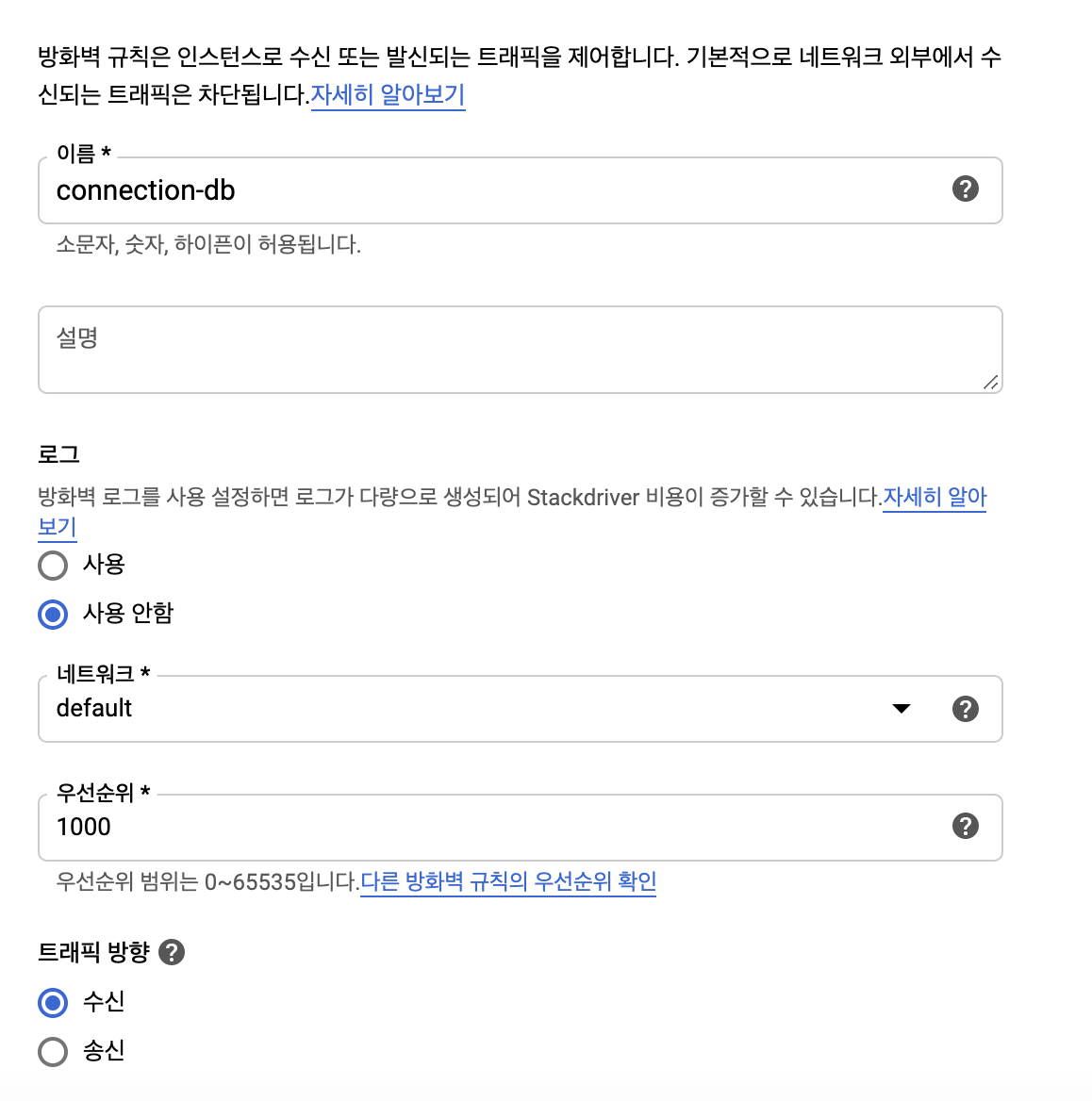
Go to VPC network > firewall rules menu
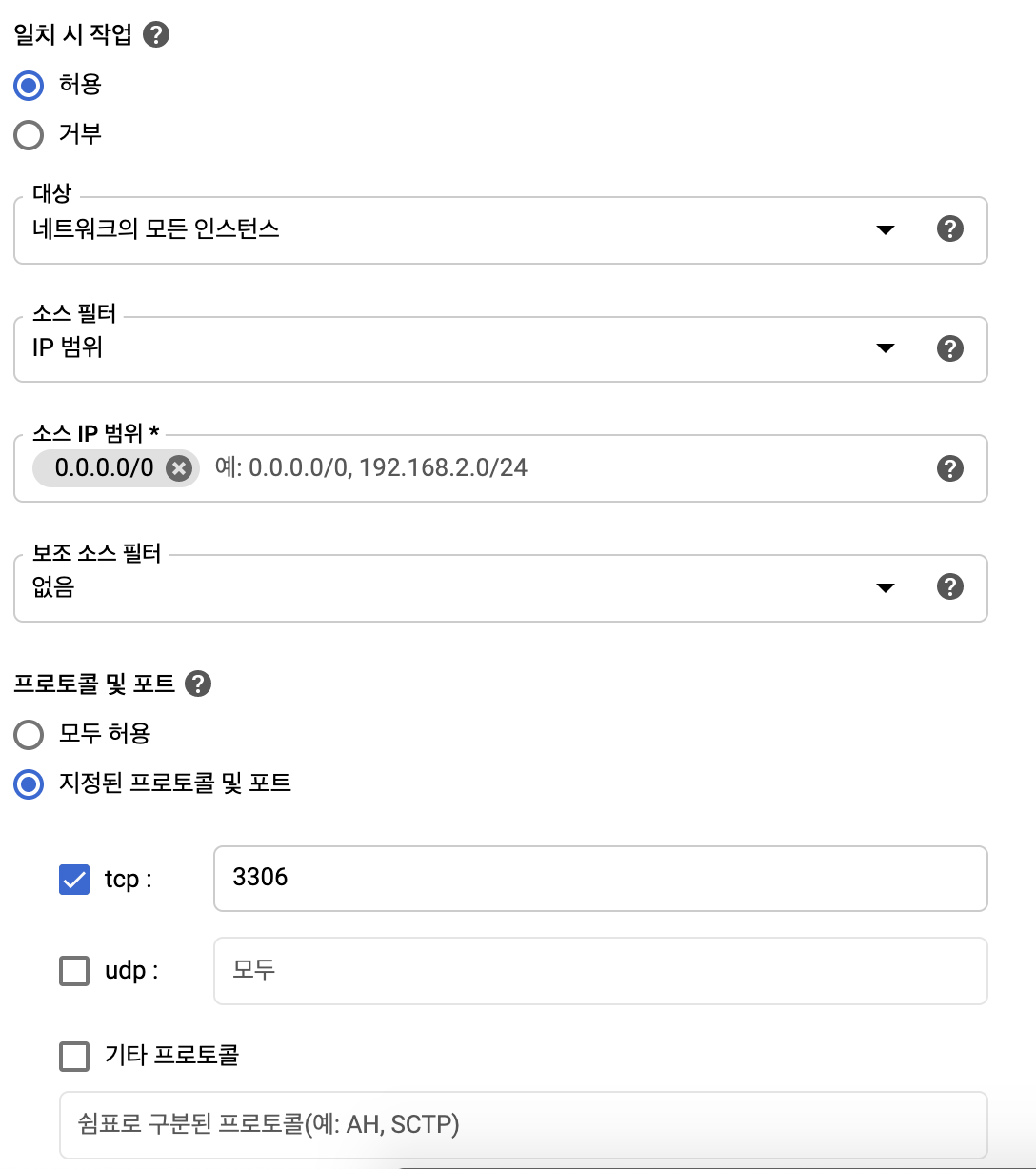
traffic : ingress
protocols and port : 3306
Port 3306 will be opened in the firewall.
Customize the source filters and targets as you need. I set it to all instances for general-purpose use.
3. Changing the Daemon Address
To allow MySQL access via IP, the MySQL daemon needs to be listening on 0.0.0.0 (the default is 127.0.0.1) To do this, you need to modify the conf file in the compute engine's shell.
cd /ect/mysql/mariadb.conf.d
sudo vi 50-server.cnf
The config file is located at this path. Go in and change the bind-address.
# bind-address = 127.0.0.1
bind-address = 0.0.0.0
After making this change, you need to restart the daemon.
You could use service restart, but since it wasn't installed on the VM, I used a different method.
sudo /etc/init.d/mysql restart
4. Granting User Permissions
Earlier, we connected to the DB using sudo privileges. So let's add a dedicated user for external access and grant permissions to that user.
Check User List
SELECT user, host FROM mysql.user;
Add a User Account
CREATE USER 'jyami'@'%' IDENTIFIED BY 'password';
Username: jyami
Access: % - allows access from external sources
Password: password
User Access Scope
localhost
Allows access only from local
%
Allows access from all IPs
xxx.xxx.xxx.xxx
Allows access only from a specific IP
xxx.xxx.%
Allows access from a specific IP range
Grant DB Privileges
GRANT ALL PRIVILEGES ON *.* TO 'jyami'@'%' WITH GRANT OPTION;
This grants all privileges to the user jyami connecting from anywhere.
*.*
Privileges to do everything
[database_name].*
Privileges to manage a specific DB
[database_name].[tablename]
Privileges to manage a specific table in a specific DB
View Granted Privileges
SHOW GRANTS FOR jyami@%
5. Connecting from Spring Boot
When I accessed the GCE, I definitely installed MySQL following the commands above, but when I actually connected to MySQL, it showed MariaDB [DB]>. In this case, the MySQL connection didn't work, but the MariaDB connection did.
알아두면 언젠간 깨달을 도커지식 2 - 도커 네트워크 | Docker Knowledge You'll Eventually Appreciate 2 - Docker Network
쟈 미
728x90
이글은 야매로 작성된 글이며 필자가 깨달아갈 수록 추가되는 글입니다 필자가 도커를 공부하며 깨달은 지극히 주관적인 관점일 수 있으니 이상한 점은 친절한 댓글 부탁드립니다! 그리고 항상 도커의 길로 인도해주는 영우찡 감사여!
가상 네트워크
아이피의 갯수는 제한적이다 우리가 사용하는 공유기는 주로 192.168.x.x 아이피 대역으로 내 컴퓨터에 아이피를 할당해준다. 그치만 이 아이피는 내 공유기 밖에서는 접근 할 수 없다.
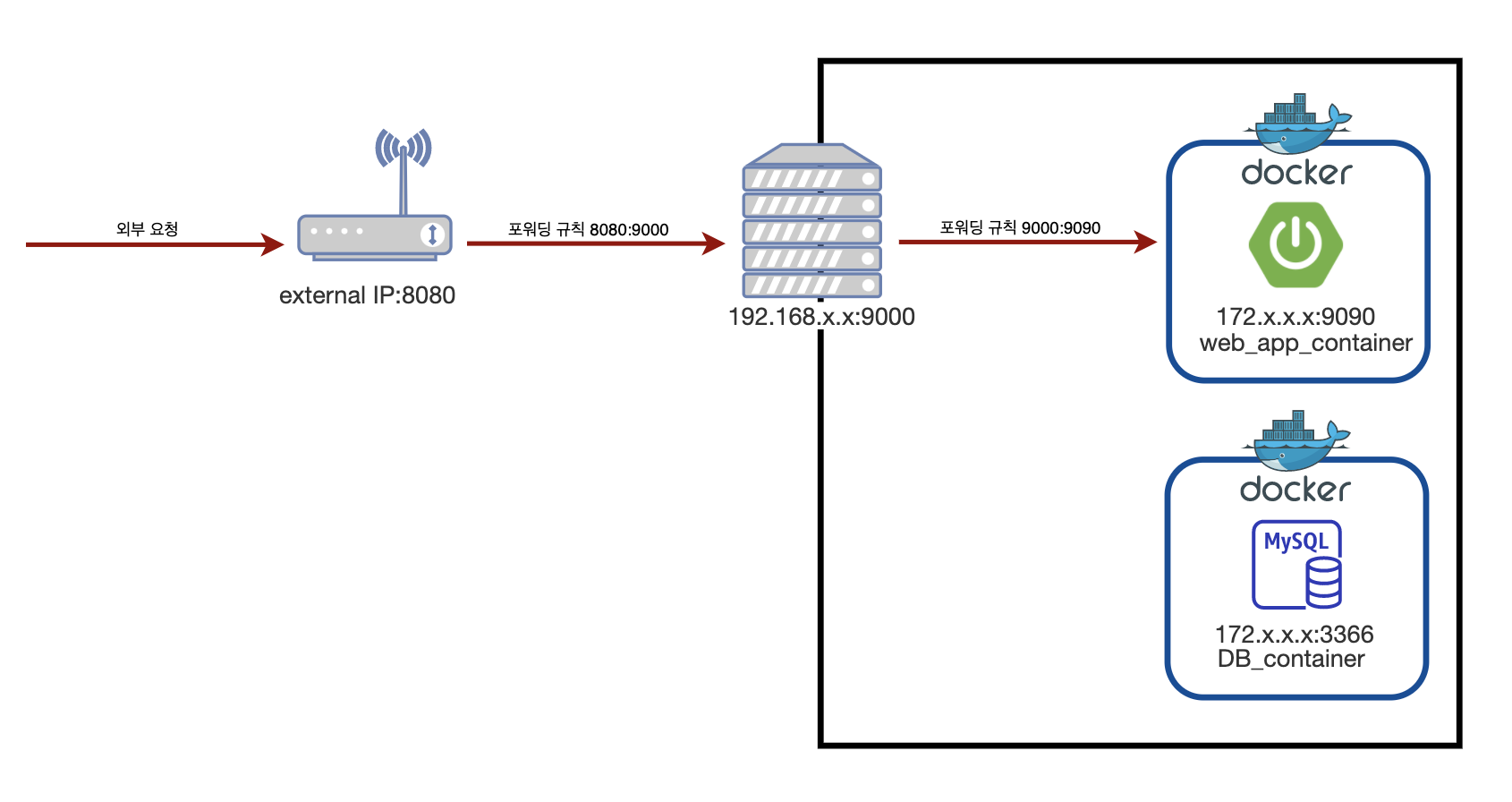
그럼 이 때 외부에서 공유기 안의 특정 서버에 접근하기 위해서는 포트 포워딩을 사용한다. 포트포워딩이 필요한 이유는 공유기는 하나인데 비해(ip는 하나인데 비해) 내부 서버는 여러대일 수 있으니 어느 서버의 포트로 연결을 해주어야 하는지 몰라서 포트 포워딩을 사용하는 것이다. 외부에서 8080포트를 요청할 때 공유기 하위에 있는 서버들이 모두 8080을 쓰고 있을 때 어느 서버의 8080인지를 몰라서 서버를 지정하는게 목적이다. 추가로 서버를 지정하면서 포트도 바꿀수 있게 되었고!
주로 사용하는 http와 tcp 요청은 ip와 포트로 타겟을 지정하는데, 외부에서 요청할 때
ip는 우리집 공유기가 가진 공인 아이피를 지정할 테고, port는 공유기 아래 있는 여러대의 서버중에 어떤 곳에 이 요청을 전달해야 할 지 모르기 때문에 포트포워딩으로 미리 정해두고 전달하는 것이다.
도커의 포트포워딩
도커도 마찬가지로 -p 플래그를 사용해서 포트포워딩을 지정할 수 있다. 도커도 하나의 서버에 여러개의 컨테이너가 있어서, 서버의 포트에 컨테이너를 지정할지가 애매해서, 위에서 공유기에서 서버를 지정할 때 애매했던 것과 동일한 이유로 포트포워딩이 필요하다.
도커환경에서는 OS가 설치된 host machine이 공유기의 역할을 하고, 도커가 가상 망을 이루고 있는 것이다.
ip는 도커가 설치된 머신을 의미하고 port는 도커 망안에서 어떤 컨테이너로 연결을 할지에 대한 의미로 생각하자 (-p)
도커 안에서는 모든 컨테이너가 전부 다른 서브넷을 가진다.
도커 컨테이너 끼리는 통신을 하지 못한다 -> 컨테이너끼리 연결해주는 작업이 도커 안에 네트워크를 다는 것
사실 컨테이너 가상화가 각자 분리된 영역을 만들어 주기 위함이었으니 서로 통신도 분리를 해둔 것이라고 생각하면 편하다.(필요할 경우에 통신을 연결하면 되도록 만든 것)
도커 네트워크
하지만 컨테이너가 분리가 되어있다 하더라도 통신은 필요하다. 예를 들자면 내 springboot 서비스에 대한 컨테이너 A와 DB에 대한 컨테이너 B 둘사이에서 통신이 일어나는 경우를 생각할 수 있을 것이다.
따라서 컨테이너끼리 통신을 위해 도커 네트워크를 만들어서 여러개의 컨테이너를 하나의 가상의 망 아래에 묶을 수 있다.
이런식으로 네트워크를 만들고
docker network create test_network
만들어진 네트워크에 컨테이너를 등록하는 형태로 지정하면 컨테이너간 통신이 가능해진다.
docker network connect web_server_container
이때 문제는 컨테이너의 아이피가 랜덤으로 만들어진다는 점이다. (아이피가 컨테이너마다 부여된다) 컨테이너가 뜰 때마다 아이피가 랜덤이다.
아이피가 랜덤으로 부여되면, 아이피를 이용해서 통신을 할 수 없다. 따라서 통신을 하기위해서는 컨테이너 네임으로 지정하는 방식을 이용한다.
컨테이너 네임이 Container network interface(CNI)이라는 도커 내부의 가상망을 만들어주는 곳에 등록되어 있어 ip 대신 컨테이너 네임을 DNS 서버에 등록한다.
도커 네트워크에 컨테이너가 등록될 때 컨테이너의 ip는 랜덤하게 부여되지만, CNI 덕분에 컨테이너 네임을 이용할 수 있다.
결국 도커에서 네트워크 통신을 할 때 DNS 검색 우선 순위에서 CNI가 1순위이기 때문에 컨테이너 이름으로 호출이 가능한 것이다.
컨테이너 이름을 아이피 대신 사용한다.
그래서 웹앱 컨테이너 하나랑 db 컨테이너하나 띄우고 두 컨테이너를 하나의 네트워크로 묶어서 앱에서 DB를 호출할 때.
네임스페이스
포트
웹앱 컨테이너
web_app_container
9090
DB 컨테이너
DB_container
3306
다음과 같은 정보를 갖고있다면, 그저 springboot 에서 DB 컨테이너에 연결을 하고자 한다면 DB_container:3306 이런식으로 적어도 작동이 된다는 것이다.
이해를 위한 예제
Q. 집에 공유기가 있고, 그 안에 서버가 있고, 그안에 컨테이너 한경에서 9090 포트로 서비스하는앱이 있다. 이때 포트 포워딩은 몇 번 일어날까?
A. 2번일어난다 : 공유기에서 한번, 도커에서 한번
Q. 클라우드 환경에서 nginx를 사용한 포트포워딩을 할 때, nginx는 springboot 로 연결 연결, springboot에서는 db로 연결할 때 도커 네트워크 통신은 몇번 일어날까?
A. 2번 일어난다 : nginx의 proxy_pass 1번, spring에서 mysql로의 1번
container_name:portNumber 의 규칙을 사용하여 도커 네트워크 통신을 한다
This post is written in a rough-and-ready style and gets updated as I learn more This may reflect a highly subjective perspective gained while studying Docker, so please leave a kind comment if anything seems off! And thanks as always to Youngwoo for guiding me down the path of Docker!
Virtual Network
The number of IP addresses is limited. The router we use typically assigns an IP to our computer in the 192.168.x.x range. However, this IP is not accessible from outside our router.
So, to access a specific server behind the router from the outside, we use port forwarding. The reason port forwarding is needed is that while there's only one router (only one IP), there can be multiple internal servers, and there's no way to know which server's port to route the connection to — that's why we use port forwarding. When an external request comes in on port 8080, if all the servers behind the router are using 8080, there's no way to tell which server's 8080 it should go to — so the purpose is to specify the server. As a bonus, you can also change the port while specifying the server!
Commonly used HTTP and TCP requests specify targets using IP and port. When making a request from the outside:
The IP will point to the public IP of our home router, and since there's no way to know which of the multiple servers behind the router should receive the request, we use port forwarding to predetermine and route it.
Port Forwarding in Docker
Docker works the same way — you can specify port forwarding using the -p flag. Since Docker also has multiple containers on a single server, it's ambiguous which container should be assigned to the server's port. For the same reason it was ambiguous when specifying servers on a router, port forwarding is needed.
In a Docker environment, the host machine with the OS installed acts as the router, and Docker forms its own virtual network.
Think of the IP as referring to the machine where Docker is installed, and the port as indicating which container to connect to within the Docker network (-p).
Inside Docker, every container has a completely different subnet.
Docker containers cannot communicate with each other -> The process of connecting containers is adding a network within Docker
Since container virtualization was designed to create isolated areas in the first place, it makes sense that communication is also separated. (It's built so that you connect communication only when needed.)
Docker Network
However, even though containers are isolated, communication is still necessary. For example, you can think of a case where container A running your Spring Boot service needs to communicate with container B running the DB.
So, for inter-container communication, you can create a Docker network to group multiple containers under a single virtual network.
You create a network like this:
docker network create test_network
Then you register containers to the created network, and communication between containers becomes possible.
docker network connect web_server_container
The problem here is that container IPs are assigned randomly. (Each container gets its own IP.) Every time a container starts up, the IP is random.
If IPs are assigned randomly, you can't rely on IPs for communication. Therefore, to communicate, we use the container name instead.
The container name is registered in Docker's internal virtual network manager called the Container Network Interface (CNI), and the container name is registered in the DNS server instead of the IP.
When a container is registered to a Docker network, its IP is assigned randomly, but thanks to CNI, you can use the container name instead.
Ultimately, when Docker handles network communication, the CNI has the highest priority in DNS lookup, which is why you can call containers by their name.
Container names are used in place of IPs.
So when you spin up one web app container and one DB container, group them under a single network, and the app calls the DB:
Namespace
Port
Web App Container
web_app_container
9090
DB Container
DB_container
3306
If you have the information above, then to connect from Spring Boot to the DB container, you can simply write DB_container:3306 and it will work.
Examples for Understanding
Q. You have a router at home, a server behind it, and inside that server, an app serving on port 9090 in a container environment. How many times does port forwarding occur?
A. It happens 2 times: once at the router, once at Docker
Q. In a cloud environment using nginx for port forwarding, where nginx connects to Spring Boot, and Spring Boot connects to the DB — how many times does Docker network communication occur?
A. It happens 2 times: once for nginx's proxy_pass, once for Spring to MySQL
Docker network communication follows the rule of container_name:portNumber
This post is written in a rough-and-ready style and will be updated as I learn more This may reflect a highly subjective perspective from my experience studying Docker, so please leave a kind comment if anything seems off! And shoutout to Youngwoo for always guiding me down the path of Docker!
Server Virtualization
There are two types of virtualization.
Hypervisor Virtualization
Container Virtualization
Hypervisor Virtualization
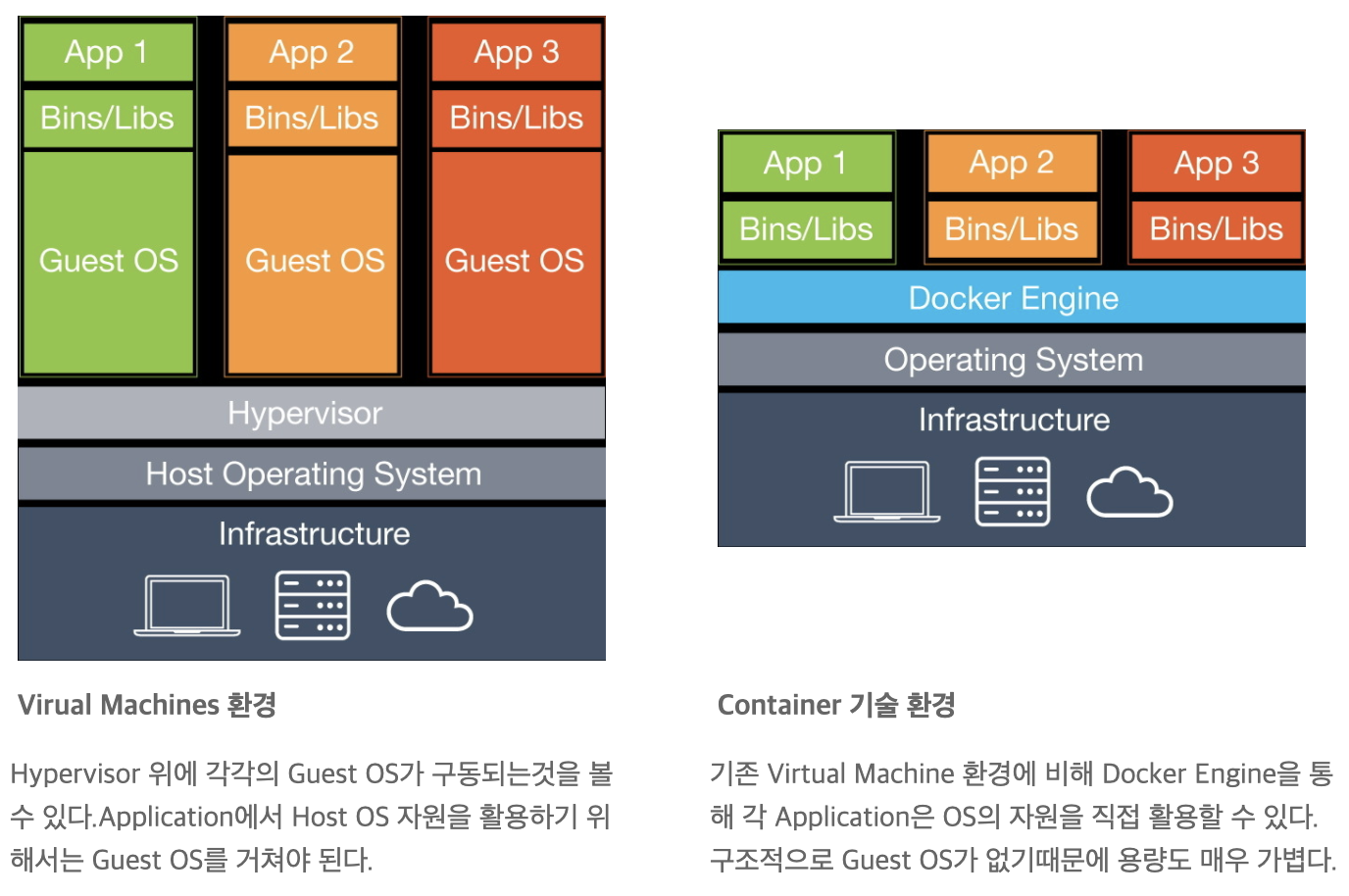
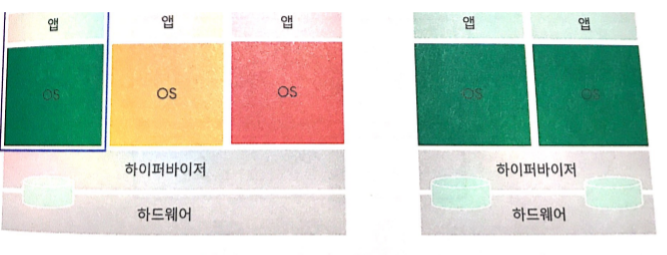
Hypervisor-based virtualization works by installing a host OS on your server, partitioning resources as needed to create virtual machines, then installing a Guest OS on each VM to run applications on top of it.
However, with hypervisor-based virtualization, each VM uses its own separately allocated resources — and when there are duplicate resources across VMs, it essentially wastes unnecessary capacity (resources).
Container Virtualization
So what came along to replace this OS-based virtualization technology is Container technology. This container technology is called LXC (Linux Containers), and Docker is something built by leveraging this LXC technology really well.
In a Docker environment, as shown in the diagram above, a Guest OS is not needed. Let's walk through an example for easier understanding.
The Host OS is CentOS, and you want to run an application on Ubuntu.
1. With a hypervisor, you install Ubuntu as the Guest OS and run the app on top of it. Then the kernel in the Guest OS passes commands to the hypervisor, and the hypervisor relays them to the CentOS kernel.
Just looking at this, there are already two kernels and two OSes (consuming a lot of resources).
Here, the hypervisor's role is to logically separate CPU and memory resources.
2. On the other hand, the Docker engine can deliver app commands directly to the host OS (CentOS) kernel without needing the Guest OS (Ubuntu) or Ubuntu's kernel.
This is because the Docker engine translates the commands from apps running on Ubuntu (Guest OS) into something the CentOS (host OS) kernel can understand.
Compared to a hypervisor, resource consumption is significantly lower.
Unlike a hypervisor, Docker doesn't install a kernel, so even the base image has no kernel. Therefore, Docker images (even base images) are much lighter compared to the Windows or Linux image files (ISO) used when setting up servers in a hypervisor.
Being lightweight means installation is incredibly fast!!! (Container environments are lightweight)
LXC (Linux Containers)
If you think about how a container environment is actually stored in memory,
you can think of it as processes separated by different namespaces in Linux. It creates isolated zones in Linux so things don't get tangled up, and simply runs processes within those zones.
This is what LXC does for us.
LXC is a userspace interface for the Linux kernel containment features. It lets Linux users easily create and manage system and application containers.
According to the official documentation, it has the following features. (Though honestly, I still don't fully get it even after reading it)
So, running code on top of Docker in a container environment basically means:
Through LXC, isolated zones are created inside the Linux kernel by combining identifiers called Cgroups and Namespaces.
The Docker engine uses LXC to run programs inside those isolated zones.
In other words, when the Docker engine runs on Linux, it uses LXC to translate commands into host OS kernel commands (as mentioned above) and isolate the zones.
As a side note, Docker on Windows in the old days
used to install Linux as a Guest OS on top of a hypervisor and run the Docker engine on that (so there were no resource savings).
Nowadays it just works natively, they say. (Apparently a Linux kernel [WSL] was recently added to Windows..I'm a Mac user so I didn't really care)
[Intellij] GCP Plugin - Cloud Code 사용하기 in GCS | [Intellij] GCP Plugin - Using Cloud Code in GCS
쟈 미
728x90
GCP Storage를 연동하여 사용하는 글을 블로그에 포스팅하려고 Spring initializer을 이용해서 프로젝트를 생성하면서 좋은 플러그인을 발견하여 기록하려 한다.
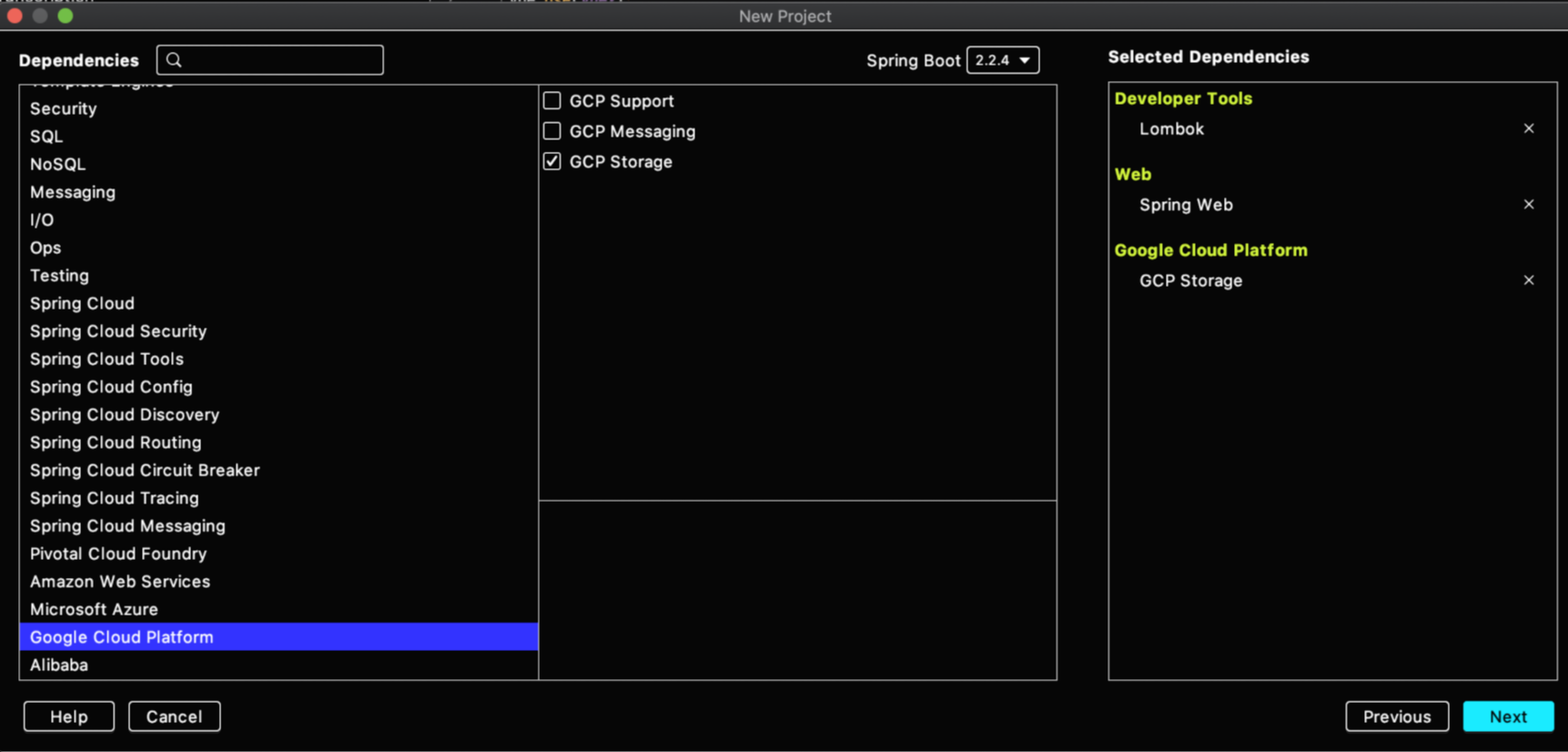
Initializer에 Google Cloud Platform 관련 dependency를 추가할 수 있다.
위와 같은 dependency로 새로운 프로젝트를 설정하니, Cloud Code라는plugin 추천이 떠서 받아보았다.
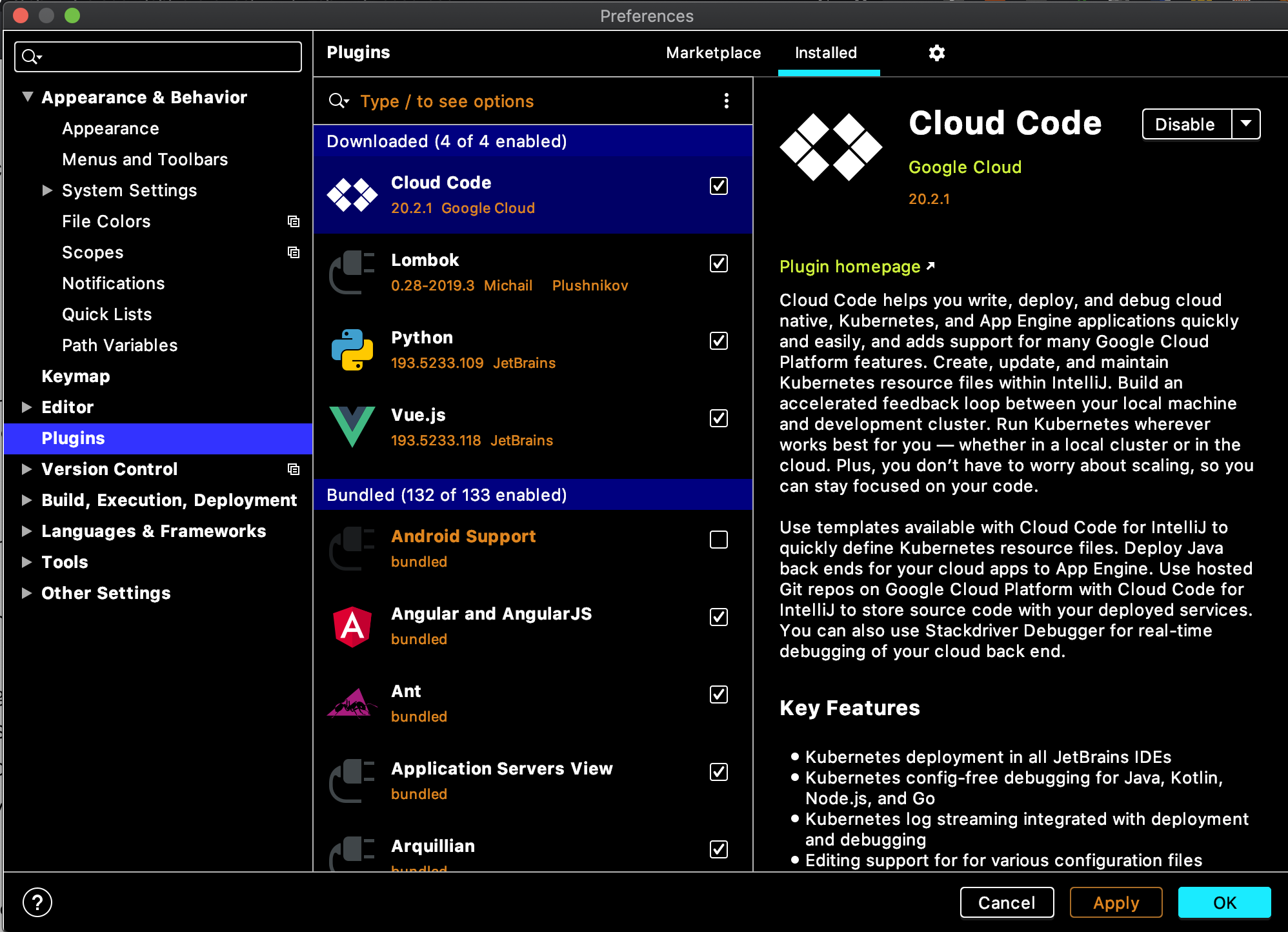
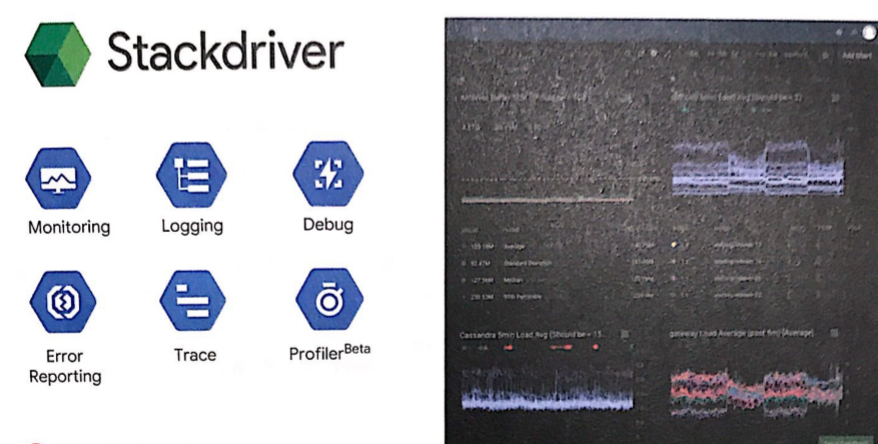
Google에서 개발한 플러그인으로, Stackdriver Debugger와 통합되서 GCP에서 실행되는 프로덕션 애플리케이션을 intellij에서 디버깅할 수 있다. 특히 Stackdriver Debugger를 사용하면 Stackdriver Debugger를 사용하면 Compute Engine과 App Engine 표준 환경 및 가변형 환경 모두에 배포된 자바 애플리케이션을 디버깅할 수 있다. 또한 App Engine 환경 배포를 직접 IDE에서 할 수 있는 장점도 있다.
인텔리제이의 Preference [ ⌘ + , ] > Plugins > clod code 를 입력해서 설치할 수 있고, 설치가 완료될 경우 intellij를 restart 해야 플러그인을 적용할 수 있다.
또한 Cloud code에서 제공하는 Google Cloud Platform에서 지원되는 프로덕트 리스트는 총 6개로 아래와 같으며 개요를 읽어보니 Kubernetes 개발, 배포에서의 편리성이 가장 큰 장점인 듯하다. 근데 나는 Storage 작업을 할 건데,, 여튼 저튼 쨋든
1. Kubernetes : 애플리케이션 만들기, 애플리케이션 배포 2. App Engine : 애플리케이션 만들기 (가변, 표준) 3. Cloud API 및 GCP 라이브러리 관리 4. Cloud Storage : 버킷 안 콘텐츠 탐색 5. Cloud Source Repositories 6. Stackdriver Debugger : logging
storage 연동 첫 시작
플러그인 설치를 완료하면 인텔리제이 우측 바에 google cloud storage, kubernetes Explorer 탭이 생기게 되는데, 현재 내가 개발할 프로젝트는 cloud storage와 관련된 것이라, storage 탭에 대해 알아보려 한다.
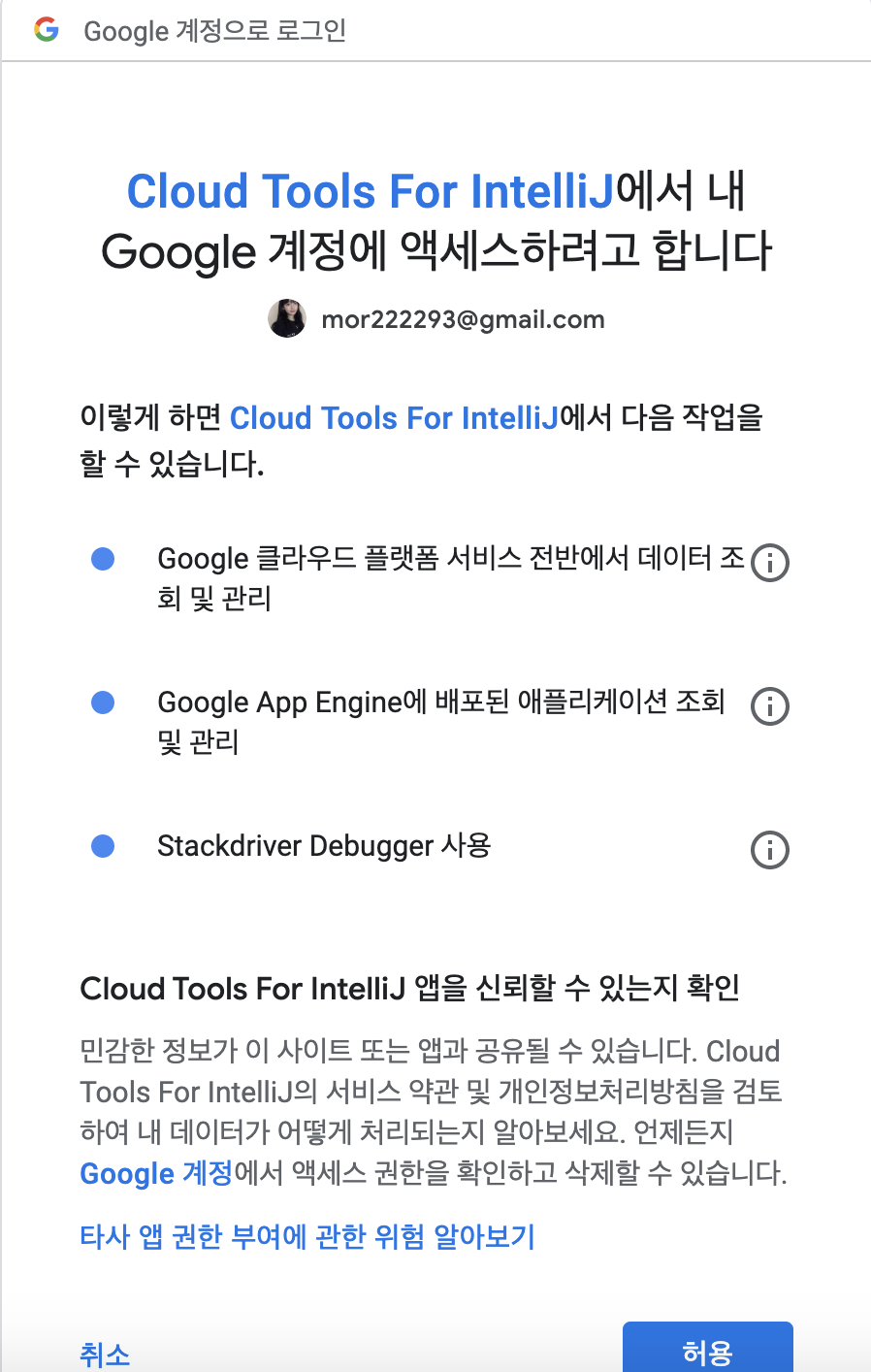
storage에 대한 정보를 얻어오려면 GCP의 project를 가져와야 하기 때문에, 그 프로젝트의 권한을 가진 account로 로그인을 진행해준다. 로그인 버튼을 누르면 왼쪽 아래 그림과 같이 로그인 창이 뜨고 허용을 눌러주면 된다.
그리고 다시 Google Cloud Storage 탭으로 돌아와서 project를 선택해주면 되는데, 내가 현재 선택한 account가 권한을 가진 프로젝트 리스트들이 보이므로, storage를 사용할 project를 선택한다.
나는 daily-commit이라는 개인 프로젝트를 선택하였다. 이렇게 간단하게 연동이 마무리된다. 따로 console.cloud web을 통해 bucket안에 들어있는 파일, 폴더를 찾아보지 않아도, 개발하는 IDE 안에서 볼 수 있다는 장점이 있다.
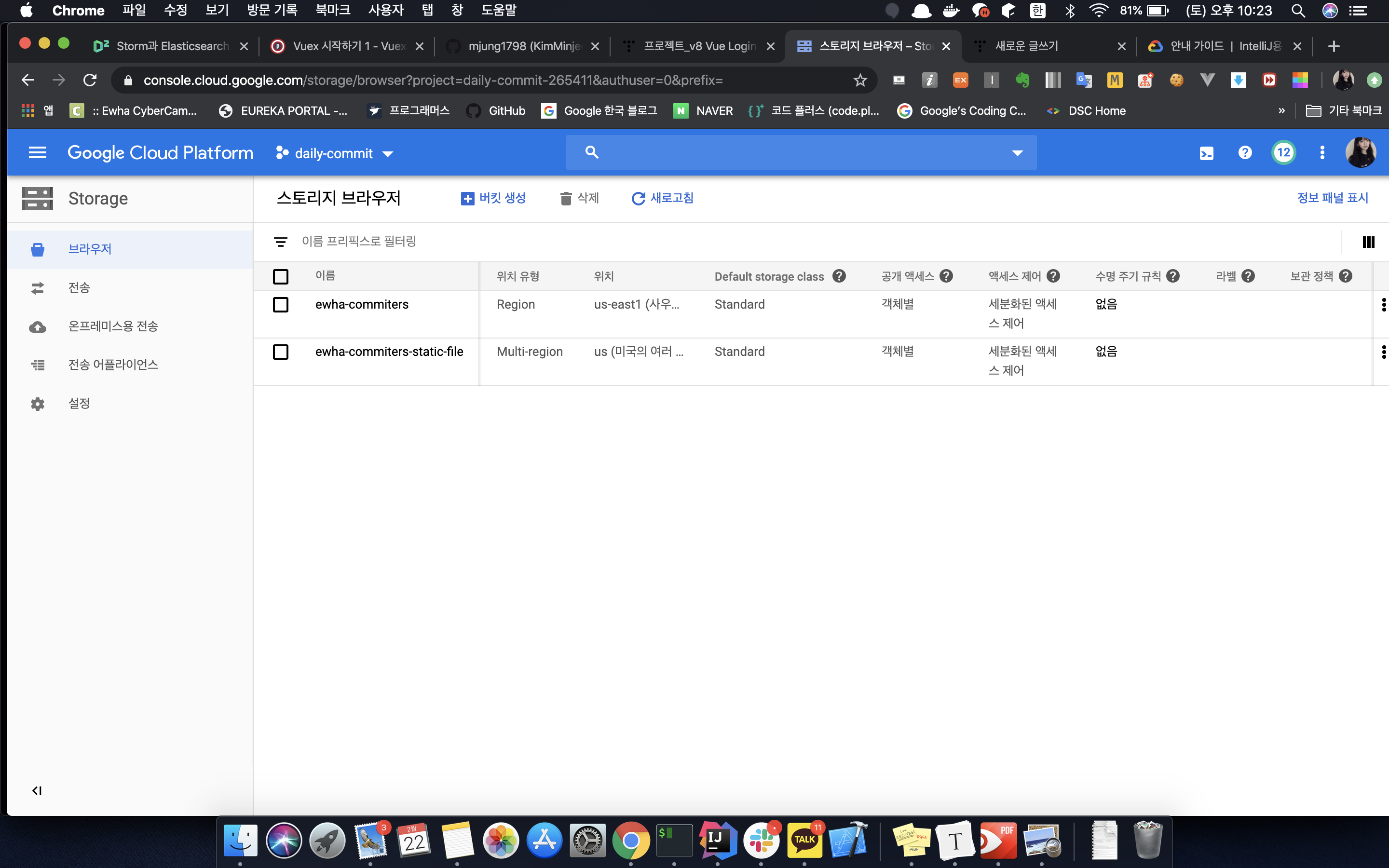
나는 프로젝트에 두 개의 bucket을 만들었고, ewha-commiters-static-file이라는 버킷 안에 여러 폴더 + 파일들을 저장해둔 상태이다. 이런 내용을 기존에 GCP console Web을 이용해서 봤다면, 플러그인을 이용해서
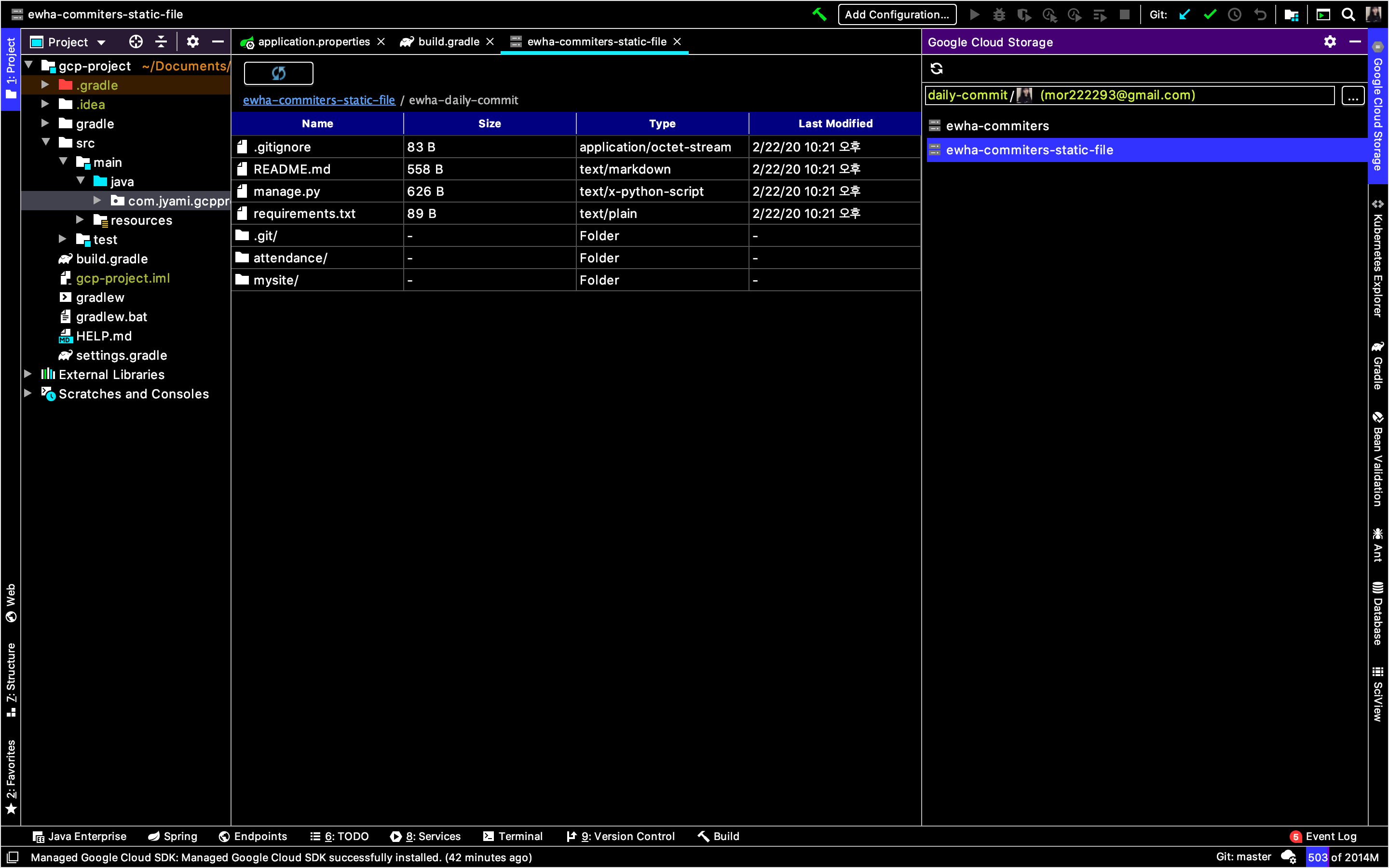
아래와 같이 Intellij IDE 안에서 bucket안에 있는 파일의 내용을 확인할 수 있다.
다만 아쉬운 게 있다면, Web GCP Console에서는 파일의 URL 및 다운로드 경로도 알 수 있었는데, plugin에서는 지원하지 않는다. 우클릭을 하면 아래와 같이 blob name과 bucket name을 복사할 수 있는데, 이를 이용해서 수제로 URL, 다운로드 경로를 만들어주자.
storage 버켓 확인은 이 플러그인을 효과적으로 사용하는 것 같지 않아서, 다음번엔 Stackdriver의 log를 플러그인을 통해서 확인하는 방법을 찾아봐야겠다.
I was about to write a blog post about integrating GCP Storage, and while creating a project using Spring Initializer, I discovered a nice plugin that I wanted to document.
You can add Google Cloud Platform related dependencies in the Initializer.
When I set up a new project with the dependencies shown above, a plugin recommendation for Cloud Code popped up, so I gave it a try.
It's a plugin developed by Google that integrates with Stackdriver Debugger, allowing you to debug production applications running on GCP directly from IntelliJ. In particular, with Stackdriver Debugger, you can debug Java applications deployed on both Compute Engine and App Engine standard and flexible environments. It also has the advantage of letting you deploy to App Engine environments directly from the IDE.
You can install it by going to IntelliJ's Preferences [ ⌘ + , ] > Plugins > and searching for "cloud code." Once the installation is complete, you need to restart IntelliJ to apply the plugin.
After reading the documentation, I found out it works not only with IntelliJ but also with several other JetBrains IDEs. However, it is optimized for IntelliJ.
Also, Cloud Code supports a total of 6 Google Cloud Platform products as listed below. After reading the overview, it seems like the biggest advantage is the convenience in Kubernetes development and deployment. But I'm just going to work with Storage, so... anyway, moving on.
Once the plugin installation is complete, you'll see Google Cloud Storage and Kubernetes Explorer tabs appear on the right sidebar of IntelliJ. Since the project I'm currently working on is related to Cloud Storage, I'm going to look into the Storage tab.
To retrieve information about storage, you need to fetch the GCP project, so you'll need to log in with an account that has permissions for that project. When you click the login button, a login window like the one on the left below will appear — just click "Allow."
Then go back to the Google Cloud Storage tab and select your project. You'll see a list of projects that your currently selected account has permissions for, so just pick the project you want to use with Storage.
I selected my personal project called "daily-commit." And just like that, the integration is done. The nice thing is that you don't have to go through console.cloud web to look for files and folders inside your buckets — you can see them right inside the IDE where you're developing.
I created two buckets in my project and have stored several folders and files inside a bucket called "ewha-commiters-static-file." If you used to check this kind of stuff through the GCP Console Web, now you can use the plugin instead.
As shown below, you can view the contents of files inside a bucket right within the IntelliJ IDE.
One downside though — in the Web GCP Console, you could see the file's URL and download path, but the plugin doesn't support that. If you right-click, you can copy the blob name and bucket name as shown below. You can use these to manually construct the URL and download path.
URL : gs://[bucket-name]/[blob-name] Link URL : https://storage.cloud.google.com/[bucket-name]/[blob-name]?authuser=0
Checking storage buckets doesn't seem like the most effective use of this plugin, so next time I should look into how to check Stackdriver logs through the plugin.
Cloud Dataproc: Managed Hadoop MapReduce, Spark, Pig, Hive service
Cloud Dataflow: Stream and batch processing, unified pipeline integration and simplification
BigQuery: Analytics database, data streaming at 100,000 rows per second
Cloud Pub/Sub: Scalable and flexible enterprise messaging
Cloud Datalab: Interactive data exploration
1-2. Cloud Dataproc
Features
Managed Hadoop
A fast and easy way to run GCP Hadoop and Spark/Hive/Pig as a managed service
Average cluster creation time under 90 seconds
Scale clusters up and down even while jobs are running
Why you should use it
Easily migrate on-premises Hadoop workloads to the cloud.
Quickly analyze data such as logs stored in Cloud Storage, create clusters in under 90 seconds on average, and delete them immediately.
Perform data mining and analysis quickly using Spark/Spark SQL.
Run classification algorithms using the Spark machine learning library (MLlib).
1-3. Cloud Dataflow
Features
Managed data pipelines
Processes data using Compute Engine instances
Automatic cluster size adjustment
Automated scaling, no instance provisioning required
Write code once for both batch and stream processing
Transform-based programming model
Data moves from sources through transformations in a Dataflow pipeline
Why you should use it
Move, filter, enrich, and shape data with ETL (Extract/Transform/Load) pipelines
Data analytics: Batch computation or continuous computation using streaming
Orchestration: Build pipelines that coordinate multiple services, including external services
Integrates with GCP services such as Cloud Storage, Cloud Pub/Sub, BigQuery, and Bigtable
Open source Java and Python SDKs
1-4. BigQuery
Fully managed data warehouse
Provides near real-time interactive analysis on massive datasets (hundreds of TB)
Queries using SQL syntax (SQL 2011)
No cluster maintenance required
Runs on Google's high-performance infrastructure
Compute and storage separated by a terabit-class network
Pay only for storage used and processing performed
Automatic discounts for long-term data storage
1-5. Cloud Pub/Sub
Features
Scalable and reliable messaging
Supports many-to-many asynchronous messaging: Create push/pull subscriptions to topics from application components
Includes offline consumer support
Leverages proven Google technology
Why you should use it
A building block for data ingestion in Dataflow, Internet of Things (IoT), and marketing analytics
Foundation for Dataflow streaming
Push notifications for cloud-based applications
Connect multiple applications within Google Cloud Platform (push/pull between Compute Engine and App Engine)
1-6. Cloud Datalab
Features
Provides interactive data exploration
An interactive tool for large-scale data exploration, transformation, analysis, and visualization
Integrated, open source: Built on Jupyter (IPython)
Why you should use it
Create and manage code, documentation, results, and visualizations in an intuitive notebook format Use Google Charts or matplotlib for easy visualization
Analyze data from BigQuery, Compute Engine, and Cloud Storage using Python, SQL, and JavaScript
Easily deploy models to BigQuery
2. Google Cloud AI Platform
2-1. Cloud AI Platform
An open source tool for building and running neural network models
Broad platform support: CPU or GPU, mobile, server, cloud
Fully managed machine learning service
Familiar notebook-based developer environment
Optimized for Google infrastructure, integrated with BigQuery and Cloud Storage
Pre-trained machine learning models built by Google
Speech: Streams results in real time and understands 80 languages
Vision: Identifies objects, landmarks, text, and content
Translation: Language detection and translation
Natural Language: Meaning and structure of text
Structured data: Classification and regression / Recommendations / Anomaly detection
Unstructured data: Image and video analysis / Text analysis
2-2. Cloud Vision API
Analyze images with a simple REST API
Logo detection, label recognition, and more
Features provided by Cloud Vision API
Extract useful information from images
Detect inappropriate content
Sentiment analysis
Text extraction
2-3. Cloud Speech API
Recognizes over 80 languages and variants
Can return text in real time
Provides high accuracy even in noisy environments
Accessible from any device
Powered by Google machine learning
2-4. Cloud Natural Language API
Uses machine learning models to understand the structure and meaning of text
Extracts information about topics mentioned in text documents, news articles, and blog posts.
Analyzes uploaded text on request or integrates with Cloud Storage.
2-5. Cloud Translation API
Translates arbitrary strings between numerous language pairs
Programmatically detects the language of a document
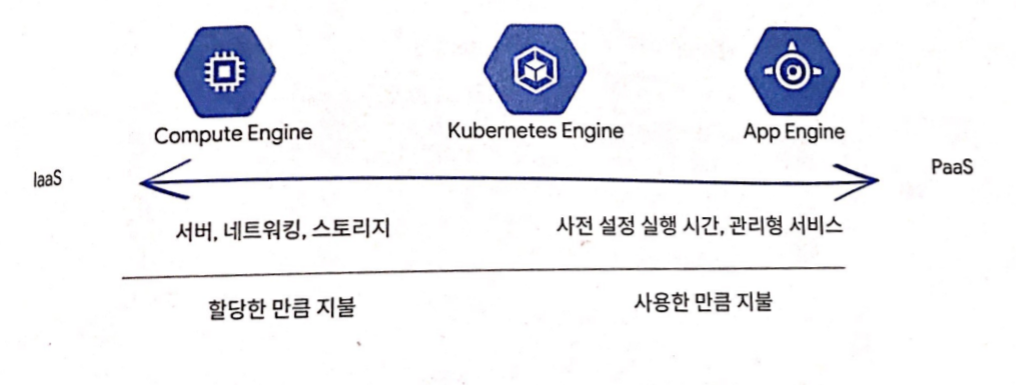
A service that provides the infrastructure level. The customer directly manages the OS and applications.
PaaS : Platform as a Service - heroku
A cloud service that provides developers with the capabilities needed to develop and serve applications. Users only manage applications and data.
2. Introduction to Containers
IaaS : Virtualizes hardware and allows resource sharing.
However, flexibility comes at the cost of boot time (minutes) and resources (GB).
App Engine
Provides access to programming services
A platform that rapidly scales apps independently based on workload and infrastructure as app demand grows
2-1. Containers
What containers provide
Offers the scalability of both IaaS and PaaS.
An abstraction layer over hardware and OS
An invisible box that provides configurable access to file systems, RAM, and networking divided into isolated partitions
Fast startup
Container capabilities
Configurable, independent, and highly portable.
Define your own hardware, OS, and software stack configuration
By treating the OS and hardware as a black box, there's no need to change or rebuild anything when migrating from development to staging to production, or from a laptop to the cloud.
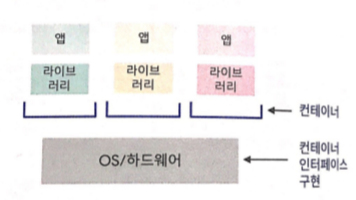
A container is app + libraries: the OS/hardware implements the container interface
2-2. Clusters
Cluster capabilities
Allows deploying containers to server groups with a shared host configuration.
Connects multiple containers using network connections
Write modular code
Easy deployment
Achieve maximum efficiency and savings through independent scaling of containers and hosts
3. Kubernetes and Kubernetes Engine
3-1. Kubernetes
Easily orchestrates many containers across multiple hosts.
Build and run an app as a container
Docker : Bundles the app, dependencies, and system settings together
Other tools like Google Cloud Build can also be used. Code example: a Python Flask app that displays hello world
[app.py]

from flask import Flask
app = Flask(__name__)

@app.route("/")
def hello():
    return "helloworld!"

if __name__ == "__main__":
    app.run(host='0.0.0.0');
Bring the app to Kubernetes - Specify 4 things using a Docker file
The requirements.txt file for Flask dependencies
The OS image and version for Python
How to install Python
How to run the app
[requirement.txt]
Flask==0.12
uwsgi==2.0.15
FROM ubuntu:18.10
RUN apt-get update -y && \
    apt-get install -y python3-pip python3-dev
COPY requirements.txt /app/requirements.txt
WORKDIR /app
RUN pip3 install -r requirements.txt
COPY ./app
ENDPOINT ["python3", "app.py"]
Build the container into an image and run it
Use docker build to build the container and save it as a locally runnable image
Upload images to a registry service (such as Google Container Registry) for sharing
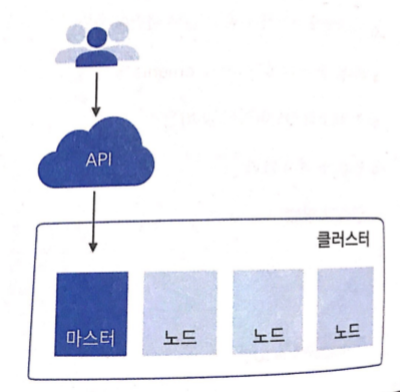
Deploy containers to a collection of nodes called a cluster using the Kubernetes API
The master runs the control plane
Nodes run the containers
Nodes are VMs (used as GCE instances in GKE)
You describe the app, and Kubernetes figures out how to implement it
Bootstrapping Kubernetes Engine
In a GKE cluster, you can specify the following > Machine type > Number of nodes > Network settings, etc.
$> gcloud container clusters create k1
Use a wrapper called a Pod when deploying containers to nodes
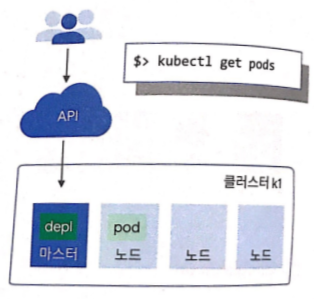
Run a container in a Pod using Kubectl run
Kubectl is a command-line client for the Kubernetes API
This command starts a deployment with a container running in a Pod
In this case, the container is an image of an NGINX server
$> kubectl run nginx --image=nginx:1.15.7
Deployment
Manages a set of replica Pods for an app or workload, ensuring the desired number of Pods are running and remain healthy
$> kubectl get pods
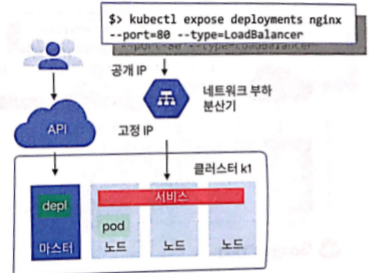
Pods are only accessible within the cluster by default and have ephemeral IPs
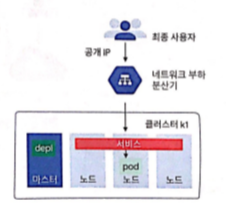
Run Kubectl expose to attach a load balancer to the deployment so it's publicly accessible at a static IP
Kubernetes creates a service using the Pod's static IP, and the controller displays a message saying 'I need to attach an external load balancer with a public IP address'
Clients reaching this IP are routed to the Pods behind the service
For example, if you create two sets of Pods named frontend and backend and place them behind their own services, changes in the backend Pods won't be noticed by the frontend Pods. They simply reference the backend service.
Run kubectl get services to get the public IP of the service
$> kubectl get services
NAME     TYPE             CLUSTER-IP     EXTERNAL-IP     PORT(S) AGE
nginx    LoadBalancer    10.0.65.118    104.198.149.140    80/TCP    5m
Run kubectl scale to scale the deployment
$> kubectl scale nginx ==replicas=3
Use various parameters to enable autoscaling, or place autoscaling behind programming logic for intelligent management
Run kubectl apply -f to declaratively apply changes
$> kubectl apply -f nginx-deployment.yaml
Run kubectl get replicasets to check the update status
$> kubectl get replicasets
NAME                DESIRED    CURRENT    READY    AGE
nginx-2035384211    5        3        3        2s
Run kubectl get pods to verify the Pods are coming online
$> kubectl get pods
NAME                    READY    STATUS    RESTARTS    AGE
nginx-203584211-7ci7o    1/1        Running    0            18s
nginx-203584211-he3h3    1/1        Running    0            18s
nginx-203584211-qqcnn    1/1        Running    0            18s
nginx-203584211-abbcc    1/1        Running    0            18s
nginx-203584211-knlen    1/1        Running    0            18s
Run kubectl get deployments to describe the deployment and verify the correct number of replicas are running
$> kubectl get deployments
NAME    DESIRED    CURRENT    UP-TO-DATE    AVAILABLE    AGE
nginx    5        5        5            5            18s
Build the container and run the image
$> kubectl get services
NAME     TYPE             CLUSTER-IP     EXTERNAL-IP     PORT(S) AGE
nginx    LoadBalancer    10.0.65.118    104.198.149.140    80/TCP    5m
4. Google App Engine
A PaaS for building scalable applications
App Engine makes deployment, maintenance, and scaling easy, so you can focus solely on innovation
Particularly well-suited for building scalable web applications and mobile backends
5. Google App Engine Standard Environment
Easy application deployment
Automatic workload scaling in response to demand
Cost-effective
Free daily quota / usage-based pricing
SDKs for development, testing, and deployment
Supports specific versions of Java, Python, PHP, and Go
Applications must comply with sandbox constraints
No writing to the local file system
A 60-second timeout applies to all requests
Third-party software installation is restricted
Example web application
6. Google App Engine Flexible Environment
Build and deploy containerized apps with a single click
No sandbox constraints
Access to App Engine resources
Standard runtimes: Python, Java, Go, Node.js
Custom runtime support: Any language that supports HTTP requests
Package the runtime as a Dockerfile
App Engine Environment Comparison
7. Google Cloud Endpoints and Apigee Edge
Application programming interfaces hide implementation details and enforce contracts [diagram]
7-1. Cloud Endpoints
Supports API creation and maintenance
Distributed API management through the API console
Expose APIs using RESTful interfaces
Access control and call validation using JSON Web Tokens and Google API keys -> Verify web and mobile user identity through Auth0 and Firebase Authentication
Client library generation
Supported platforms [diagram]
7-2. Apigee Edge
Supports API security and monetization
A platform where customers and partners can use APIs
Provides analytics, monetization, and developer portal
8. Development, Deployment, and Monitoring in the Cloud
8-1. Cloud Source Repositories
Fully-featured Git repositories hosted on Google Cloud Platform
Supports collaborative development of cloud apps
Provides integration with Stackdriver Debugger
8-2. Cloud Functions
Create single-purpose functions that respond to events without a server or runtime Event examples: A new instance is created. A file is added to Cloud Storage.
Written in Javascript, runs in a managed Node.js environment on Google Cloud Platform
8-3. Deployment Manager
Infrastructure management service
Create .yaml templates that describe your environment and use Deployment Manager to create resources



















댓글
Comments