
알아두면 언젠간 깨달을 도커지식 1 - 가상화 | Docker Knowledge You'll Eventually Appreciate 1 - Virtualization
이글은 야매로 작성된 글이며 필자가 깨달아갈 수록 추가되는 글입니다
그리고 항상 도커의 길로 인도해주는 영우찡 감사여!
서버 가상화
가상화에는 두가지 종류가 있다.
- 하이퍼 바이저 가상화
- 컨테이너 가상화
하이퍼바이저 가상화
하이퍼바이저 기반의 가상화를 사용할 경우에는 내 서버 위에 host OS를 설치하고, 사용할 만큼만 자원을 분할하여 가상머신을 생성한 후에 그 위에 Guest OS를 설치하여 그 위에서 어플리케이션을 사용한다.
하지만 하이퍼바이저 기반 가상화의 경우엔 vm마다 자원을 따로따로 분리해서 사용을하는데, 중복된 자원이 있을 경우엔 사실 불필요한 용량(자원)을 소모한다고 볼 수 있다.
컨테이너 가상화
따라서 이 OS 기반 가상화 기술을 대체할 수 있게 나온것이 Container 기술이다 이 컨테이너 기술은 LXC(linux Containers)라고 부르며 이 LXC 기술을 잘 활용해서 만든 것이 Docker이다.
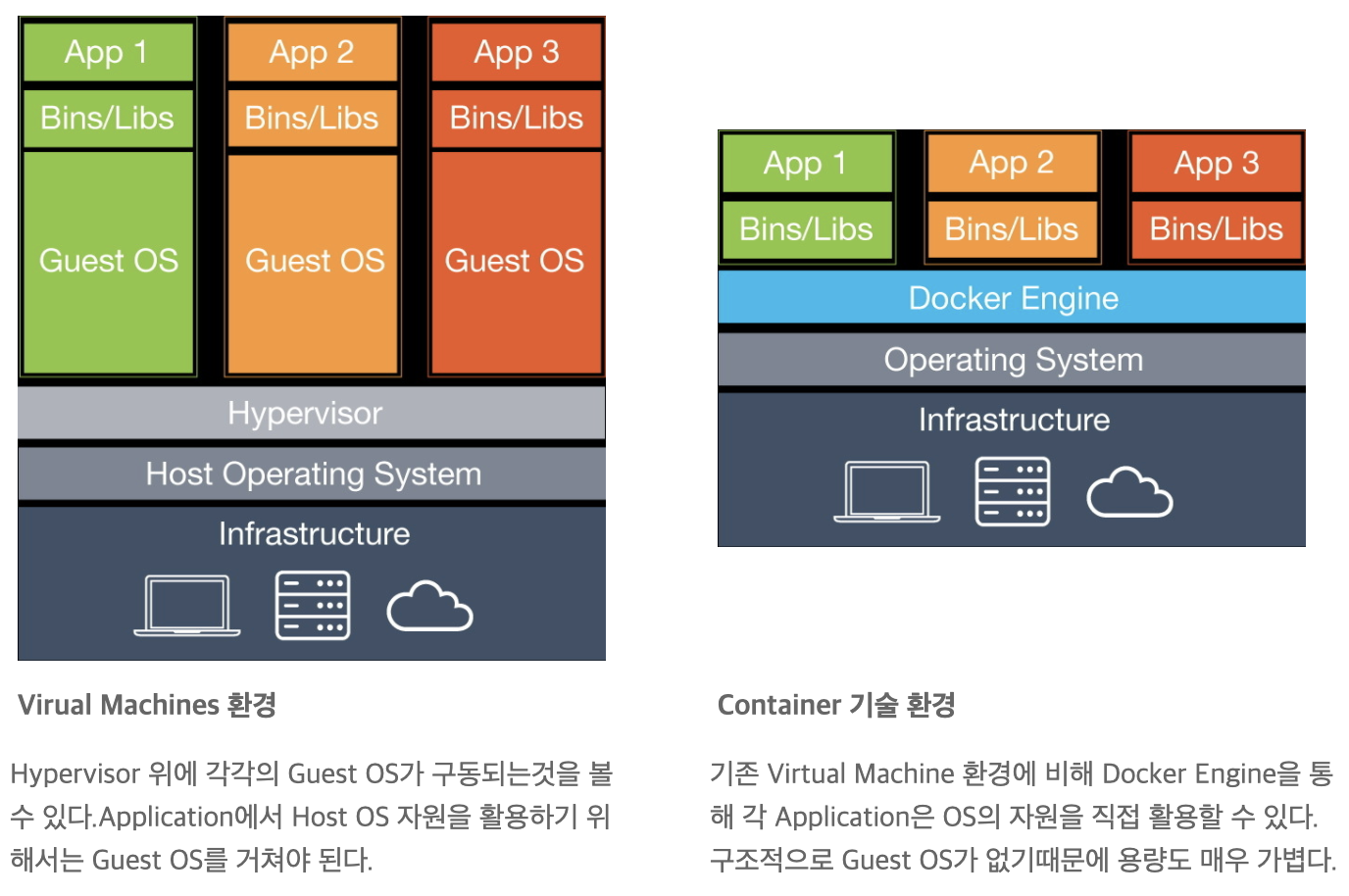
도커환경에서는 위 그림처럼 Guest OS가 필요하지 않다. 쉬운 이해를 위해 예를 들어보자
Host OS가 Cent OS이고, Ubuntu에서 application을 실행하고 싶다.
1. 하이퍼 바이저에서는, GuestOS인 Ubuntu를 설치하고 그 위에서 app을 실행한다. 그러면 Guest OS에 있는 Kernel이 하이퍼 바이저에 명령을 전달하고 하이퍼 바이저가 다시 Cent OS의 Kernel로 명령어를 전달한다.
사실 이때만 봐도 커널과, OS가 각각 2개이다 (많은 리소스를 소모한다)
이때 하이퍼 바이저는 논리적으로 CPU와 Memory 자원을 분리하는 역할을 한다.
2. 반면 도커엔진은 Guest OS인 Ubuntu와 Ubuntu의 Kernel 없이 앱의 명령을 내 host OS인 Cent OS의 kernel에 전달 할 수 있다.
이는 도커엔진이 Ubuntu(guest OS) 위에서 실행되는 app의 명령어를 Cent OS(host OS) kernel이 이해할 수 있게 바꿔주는 역할을 하기 때문이다.
하이퍼 바이저와 비교해서 리소스 소모가 훨씬 적다.
하이퍼 바이저와는 다르게 도커는 커널을 설치하지 않아, 베이스 이미지에도 커널이 없다. 따라서 하이퍼바이저에서 서버를 설치할 때 쓰는 윈도우나 리눅스 이미지 파일(iso)에 비해서 도커 이미지는 (베이스 이미지 조차도) 훨씬 가볍다
가벼운만큼 설치가 엄청 빠르다!!! (컨테이너 환경은 가볍다)
LXC(Linux Containers)
컨테이너 환경이 실제 메모리 상에 어떤식으로 저장될지를 생각해보면,
리눅스에 프로세스의 네임스페이스를 다르게 해서 분리해둔 것이라고 생각하면된다. 리눅스에 격리 구역을 만들어서 서로 엉키지 않게 분리해놓고 그냥 프로세스를 실행하는 것이다
이 작업들을 LXC가 해준다
LCX는 리눅스 커널 컨테이너 기능을 위한 사용자 영역 인터페이스다. 리눅스 사용자가 쉽게 시스템과 어플리케이션의 컨테이너들을 생성/관리 할 수 있게 해준다.
공식문서에 따르면 아래와 같은 기능이 있다 한다. (근데 읽어도 솔직히 잘 모르겠다)
- 커널 네임스페이스 (ipc, uts, 마운트, pid, 네트워크, 사용자)
- Seccomp 정책
- Chroots (pivot_root 사용)
- 커널 캐퍼빌리티
- CGroups (컨트롤 그룹)
- Apparmor와 SELinux 프로파일
그래서 그냥 컨테이너 환경에서는 도커 위에 올라간 코드를 돌린다는 것은
- LCX를 통해 리눅스 커널안에 Cgroup이라는 구분자와 NameSpace라는 구분자를 결합하여 격리된 구역을 만든다.
- 해당 격리 구역에 있는 코드를 도커엔진은 LXC를 사용하여 격리된 구역 안에서 프로그램을 실행한다
- 즉, 도커엔진이 리눅스에서 돌 때 LXC를 사용하여 위에 말한 host OS kernel 명령어로의 치환이 이루어 지고 구역을 격리시킨다는 것이다
첨언하자면 옛날의 윈도우의 도커는
하이퍼바이저위에 geust OS로 리눅스를 설치하고 그위에서 도커엔진을 돌렸다고한다 (리소스 절약이 없었을 것)
요즘엔 그냥 된다고 한다.(최근 윈도우에 리눅스 커널[WSL]이 들어왔다고..
mac유저라 관심이 없었음)
[연결 글]
2020/07/12 - [Develop/DevOps] - 알아두면 언젠간 깨달을 도커지식 2 - 도커 네트워크
알아두면 언젠간 깨달을 도커지식 2 - 도커 네트워크
이글은 야매로 작성된 글이며 필자가 깨달아갈 수록 추가되는 글입니다 필자가 도커를 공부하며 깨달은 지극히 주관적인 관점일 수 있으니 이상한 점은 친절한 댓글 부탁드립니다! 그리고 항상
jyami.tistory.com
This post is written in a rough-and-ready style and will be updated as I learn more
And shoutout to Youngwoo for always guiding me down the path of Docker!
Server Virtualization
There are two types of virtualization.
- Hypervisor Virtualization
- Container Virtualization
Hypervisor Virtualization
Hypervisor-based virtualization works by installing a host OS on your server, partitioning resources as needed to create virtual machines, then installing a Guest OS on each VM to run applications on top of it.
However, with hypervisor-based virtualization, each VM uses its own separately allocated resources — and when there are duplicate resources across VMs, it essentially wastes unnecessary capacity (resources).
Container Virtualization
So what came along to replace this OS-based virtualization technology is Container technology. This container technology is called LXC (Linux Containers), and Docker is something built by leveraging this LXC technology really well.
In a Docker environment, as shown in the diagram above, a Guest OS is not needed. Let's walk through an example for easier understanding.
The Host OS is CentOS, and you want to run an application on Ubuntu.
1. With a hypervisor, you install Ubuntu as the Guest OS and run the app on top of it. Then the kernel in the Guest OS passes commands to the hypervisor, and the hypervisor relays them to the CentOS kernel.
Just looking at this, there are already two kernels and two OSes (consuming a lot of resources).
Here, the hypervisor's role is to logically separate CPU and memory resources.
2. On the other hand, the Docker engine can deliver app commands directly to the host OS (CentOS) kernel without needing the Guest OS (Ubuntu) or Ubuntu's kernel.
This is because the Docker engine translates the commands from apps running on Ubuntu (Guest OS) into something the CentOS (host OS) kernel can understand.
Compared to a hypervisor, resource consumption is significantly lower.
Unlike a hypervisor, Docker doesn't install a kernel, so even the base image has no kernel. Therefore, Docker images (even base images) are much lighter compared to the Windows or Linux image files (ISO) used when setting up servers in a hypervisor.
Being lightweight means installation is incredibly fast!!! (Container environments are lightweight)
LXC (Linux Containers)
If you think about how a container environment is actually stored in memory,
you can think of it as processes separated by different namespaces in Linux. It creates isolated zones in Linux so things don't get tangled up, and simply runs processes within those zones.
This is what LXC does for us.
LXC is a userspace interface for the Linux kernel containment features. It lets Linux users easily create and manage system and application containers.
According to the official documentation, it has the following features. (Though honestly, I still don't fully get it even after reading it)
- Kernel namespaces (ipc, uts, mount, pid, network, user)
- Seccomp policies
- Chroots (using pivot_root)
- Kernel capabilities
- CGroups (control groups)
- Apparmor and SELinux profiles
So, running code on top of Docker in a container environment basically means:
- Through LXC, isolated zones are created inside the Linux kernel by combining identifiers called Cgroups and Namespaces.
- The Docker engine uses LXC to run programs inside those isolated zones.
- In other words, when the Docker engine runs on Linux, it uses LXC to translate commands into host OS kernel commands (as mentioned above) and isolate the zones.
As a side note, Docker on Windows in the old days
used to install Linux as a Guest OS on top of a hypervisor and run the Docker engine on that (so there were no resource savings).
Nowadays it just works natively, they say. (Apparently a Linux kernel [WSL] was recently added to Windows..
I'm a Mac user so I didn't really care)
[Related Post]
2020/07/12 - [Develop/DevOps] - Docker Knowledge You'll Eventually Appreciate 2 - Docker Networking
Docker Knowledge You'll Eventually Appreciate 2 - Docker Networking
이글은 야매로 작성된 글이며 필자가 깨달아갈 수록 추가되는 글입니다 필자가 도커를 공부하며 깨달은 지극히 주관적인 관점일 수 있으니 이상한 점은 친절한 댓글 부탁드립니다! 그리고 항상
jyami.tistory.com


댓글
Comments