
[Cloud OnBoard] 3 - 컨테이너 및 앱 개발, 배포, 모니터링 | [Cloud OnBoard] 3 - Container and App Development, Deployment, Monitoring
2019년 11월 26일 세종대학교에서 있었던 Google Cloud OnBoard에서 나누어준 자료집의 정리본입니다
모듈3 컨테이너 및 앱 개발, 배포, 모니터링
0. 추가자료
Kubernetes Engine : https://cloud.google.com/kubernetes-engine/docs
Kubernetes : https://kubernetes.io
Google Cloud Build : https://cloud.google.com/cloud-build/docs
Google Container Registry : https://cloud.google.com/container-regitry/docs
Google App Engine : https://cloud.google.com/appengine/docs
Google App Engine 가변형 환경 : https://cloud.google.com/appengine/docs/flexible
Google App Engine 표준 환경 : https://cloud.google.com/appengine/docs/standard
Google Cloud Endpoints : https://cloud.google.com/endpoints/docs
Apigee Edge : https://cloud.google.com/api-services/content/what-apigee-edge
Cloud Source Repositories : https://cloud.google.com/source-repositories/docs
Deployment Manager : https://cloud.google.com/deployment-manager/docs
Google Stackdriver : https://cloud.google.com/stackdriver/docs
1. 복습 : IaaS와 PasS
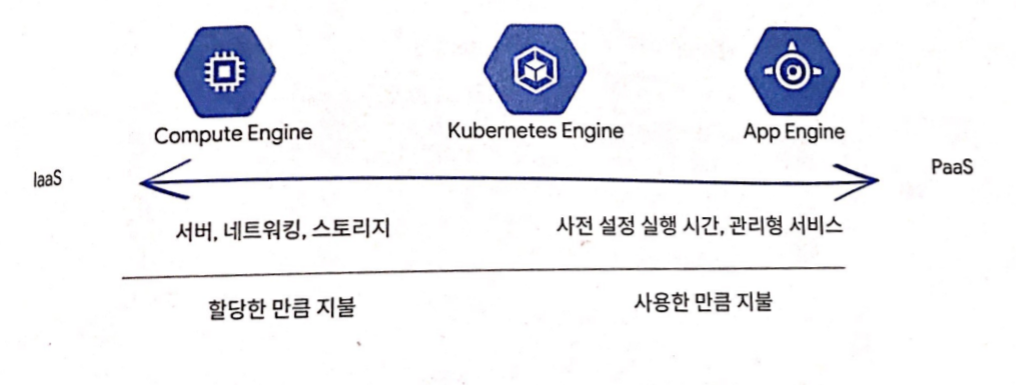
IaaS: Infrastructure as a Service - AWS EC2
인프라 스트럭쳐 레벨을 제공하는 서비스이다. 고객이 OS와 어플리케이션을 직접 관리한다.
PaaS : Platform as a Service - heroku
개발자가 어플리케이션을 개발, 서비스하기위해 사용가능한 기능들이 제공되는 클라우드 서비스. 사용자는 어플리케이션과 데이터만 관리
2. 컨테이너 소개
- IaaS : 하드웨어를 가상화 하고, 리소스를 공유할 수 있다.
- 하지만 유연성에는 부팅시간(분)과 리소스(GB)가 부과된다.
- App Engine
- 프로그래밍 서비스에 대한 액세스를 제공
- 앱 수요가 늘어날 수록 워크로드 및 인프라에 따라 독립적으로 앱을 신속하게 확장하는 플랫폼
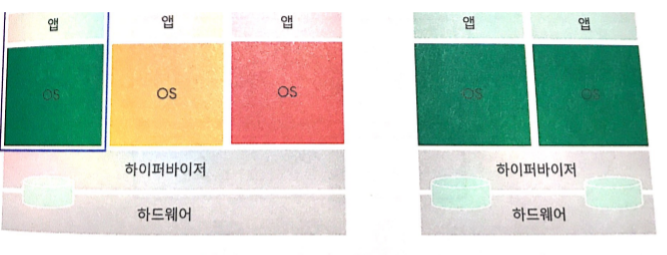
2-1. 컨테이너
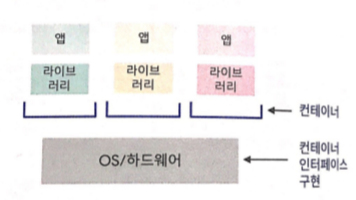
- 컨테이너에서 제공하는 사항
- IaaS와 PaaS의 확장성을 제공한다.
- 하드웨어 및 OS의 추상화 레이어
- 격리된 파티션으로 나눈 파일 시스템, RAM 네트워킹에 대한 구성 가능한 액세스를 제공하는 보이지 않는 상자
- 빠른 시작
- 컨테이너의 기능
- 구성이 가능하며 독립적이고 이식성이 우수하다.
- 자체 하드웨어, OS, 소프트웨어 스택 구성 정의
- OS 및 하드웨어를 블랙박스처럼 이용하여 개발에서 스테이징, 프로덕션에 이르기까지 또는 노트북에서 클라우드로 마이그레이션 하는 과정에서 아무것도 변경하거나 다시 빌드할 필요가 없다.
컨테이너는 앱 + 라이브러리 : 컨테이너 인터페이스를 구현한게 OS/하드웨어

2-2. 클러스터

- 클러스터의 기능
- 공동의 호스트 구성으로 컨테이너를 서버 그룹에 배포가 가능하다.
- 네트워크 연결을 사용해서 여러 컨테이너를 연결
- 모듈식 코드 작성
- 손쉬운 배포
- 컨테이너 및 호스트의 독립적인 확장으로 최대 효율과 절약 달성
3. Kubernetes 및 Kubernetes Engine
3-1. Kubernetes
여러 호스트의 많은 컨테이너를 쉽게 조정한다.
- 앱을 컨테이너로 빌드해 실행해보기
- Docker : 앱, 종속항목, 시스템 설정을 번들로 묶는다
- Google Cloud Build 등의 다른 도구도 사용이 가능하다. 코드 예시 : hello world를 표시하는 python flask 앱
[app.py]

from flask import Flask
app = Flask(__name__)

@app.route("/")
def hello():
    return "helloworld!"

if __name__ == "__main__":
    app.run(host='0.0.0.0');
- 앱을 Kubernetes로 가져오기 - Docker 파일을 사용해 4가지 지정
- Flask 종속 항목의 requirements.txt 파일
- Python의 OS 이미지 및 버전
- Python 설치 방법
- 앱 실행 방법
[requirement.txt]
Flask==0.12
uwsgi==2.0.15
FROM ubuntu:18.10
RUN apt-get update -y && \
    apt-get install -y python3-pip python3-dev
COPY requirements.txt /app/requirements.txt
WORKDIR /app
RUN pip3 install -r requirements.txt
COPY ./app
ENDPOINT ["python3", "app.py"]
- 컨테이너를 이미지로 빌드해 실행하기
- docker build로 컨테이너를 빌드하여 로컬에 실행 가능한 이미지로 저장
- 공유를 위해 레지스트리 서비스 (Google Container Registry 등)에 이미지 업로드 기능
- docker run으로 컨테이너 이미지를 시작
$> docker build -t py-server .
$> docker run -d py-server
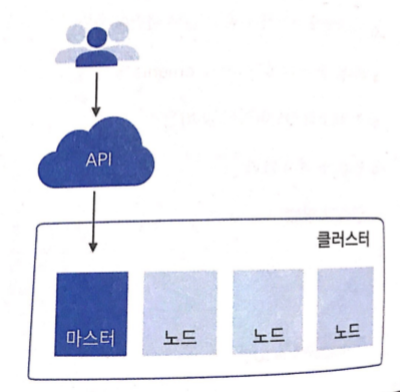
- Kubernetes API를 사용해 컨테이너를 클러스터라고 부르는 노드 모음에 배포하기
- 마스터는 제어영역을 실행
- 노드는 컨테이너를 실행
- 노드는 VM(GKE에서는 GCE인스턴스로 사용됨)
- 사용자가 앱을 설명하면 Kubernetes가 구현방법 파악
- Kubernetes Engine 부트 스트랩하기
- GKE 클러스터에서 다음 사항을 지정 가능 > 머신 유형 > 노드수 > 네트워크 설정 등
$> gcloud container clusters create k1
- 컨테이너를 노드에 배포할때 Pod라고 부르는 래퍼 사용하기

- Kubectl run을 사용해 Pod에서 컨테이너 실행하기
- Kubectl은 Kubernetes API에 대한 명령줄 클라이언트임
- 이 명령어로 Pod에서 실행 중인 컨테이너에 배포를 시작
- 이 경우 컨테이너는 NGINX 서버의 이미지임
$> kubectl run nginx --image=nginx:1.15.7
- 배포
- 앱 또는 워크로드의 복제본 Pod 모음을 관리하고 원하는 수의 Pod가 실행되고 정상상태를 유지하도록 한다
$> kubectl get pods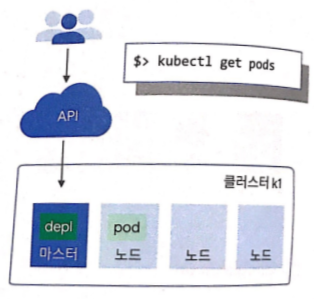
- 기본적으로 클러스터 안에서만 사용되며, 임시 IP를 가져오는 Pod
- 고정 IP에서 공개적으로 사용할 수 있도록 Kubectl expose를 실행하여 부하 분산기를 배포에 연결가능
- Kubernetes에서 Pod의 고정 IP를 사용해 서비스를 만들며 컨트롤러에 'I need to attach an external load balancer with a public IP address'라는 메세지가 표시됨
$> kubectl expose deployments nginx --port=80 --type=LoadBalancer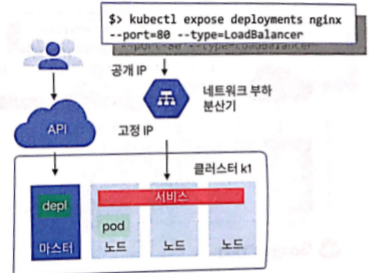
- 이 IP에 도달한 클라이언트는 서비스 뒤에 있는 Pod로 라우팅 됨
- 예를 들어 프런트엔드 및 백엔드라는 이름의 Pod 모음을 2개 만들어 자체 서비스 뒤에 배치할 경우 백엔드 Pod에서 변경이 발생해도 프런트엔드 Pod에서 이를 알지 못한다. 백엔드 서비스를 참조할 뿐
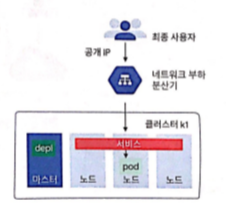
- kubectl get services를 실행해 서비스의 공개 IP를 가져오기
$> kubectl get servicesNAME TYPE CLUSTER-IP EXTERNAL-IP PORT(S) AGE
nginx LoadBalancer 10.0.65.118 104.198.149.140 80/TCP 5m- kubectl scale을 실행해 배포 확장하기
$> kubectl scale nginx ==replicas=3
- 각종 매개변수를 사용해 자동확장을 실행하거나 지능적 관리를 위해 프로그래밍 로직 뒤에 자동 확장 배치 가능
$> kubectl autoscale nginx --min=10 --max=15 --cpu=80
- 선언적 방법을 사용할 때 Kubernetes의 진정한 강점이 발휘
- 예 : 구성 파일을 가져오는 방법
$> kubectl get pods -l "app=nginx"
[nginx-development.yaml]
apiVersion: v1
kind: Deployment
metadata:
name: nginx
labels:
app: nginx
spec:
replicas: 3
selector:
matchLabels:
app: nginx
template:
metadata:
labels:
app: nginx
spec:
containers:
- name: nginx
image: nginx:1.15.7
ports:
- continerPort: 80- kubectl apply -f 를 실행해 변경사항을 선언적으로 적용하기
$> kubectl apply -f nginx-deployment.yaml
- kubectl get replicasets를 실행해 업데이트 상태 확인하기
$> kubectl get replicasets
NAME DESIRED CURRENT READY AGE
nginx-2035384211 5 3 3 2s
- kubectl get pods를 실행해 Pod가 온라인으로 전환되는 것 확인하기
$> kubectl get pods
NAME READY STATUS RESTARTS AGE
nginx-203584211-7ci7o 1/1 Running 0 18s
nginx-203584211-he3h3 1/1 Running 0 18s
nginx-203584211-qqcnn 1/1 Running 0 18s
nginx-203584211-abbcc 1/1 Running 0 18s
nginx-203584211-knlen 1/1 Running 0 18s
- kubectl get deployments 실행으로 배포를 설명해 적절한 수의 복제본 실행하기
$> kubectl get deployments
NAME DESIRED CURRENT UP-TO-DATE AVAILABLE AGE
nginx 5 5 5 5 18s
- 컨테이너를 빌드하고 이미지 실행하기
$> kubectl get services
NAME     TYPE             CLUSTER-IP     EXTERNAL-IP     PORT(S) AGE
nginx    LoadBalancer    10.0.65.118    104.198.149.140    80/TCP    5m
4. Google App Engine
- 확장 가능한애플리케이션을 빌드할 수 있는 PaaS
- App Engine으로 배포 유지보수, 확장이 쉬워지므로 혁신에만 집중할 수 있음
- 확장가능한 웹 애플리케이션 및 모바일 백엔드를 빌드하는데 특히 적합함
5. Google App Engine 표준환경
- 손쉬운 애플리케이션 배포
- 수요에 대응하여 워크로드 자동 확장
- 경제성
- 무료 일일 할당량 / 사용량 기준 가격 책정
- 개발, 테스트, 배포용 SDK
- 특정 버전의 자바, Python, PHP, Go가 지원됨
- 애플리케이션이 샌드박스 제약을 준수해야함
- 로컬 파일 시스템에 쓰기 금지
- 모든 요청에 타임아웃 60초가 적용됨
- 타사 소프트웨어 설치가 제한됨
예시 웹 애플리케이션

6. Google App Engine 가변형 환경
- 클릭 한번으로 컨테이너형 앱 빌드 및 배포
- 샌드박스 제약 없음
- App Engine 리소스에 액세스 가능
- 표준 런타임 : Python, 자바, Go, Node.js
- 커스텀 런타임 지원: HTTP요청을 지원하는 모든 언어
- 런타임을 Dockerfile로 패키지화
App Engine 환경 비교

7. Google Cloud Endpoints 및 ApiGee Edge
- 애플리케이션 프로그래밍 인터페이스로 세부정보를 숨기고 계약을 시행 [그림]
7-1. Cloud Endpoints
- API의 생성 및 유지보수를 지원
- API 콘솔을 통해 분산된 API 관리
- RESTful 인터페이스를 사용하여 API 노출
- JSON 웹 토큰 및 Google API 키를 사용하여 액세스 제어 및 호출 유효성 검사
-> Auth0 및 Firebase 인증을 통해 웹, 모바일 사용자 신원 확인 - 클라이언트 라이브러리 생성
- 지원되는 플랫폼 [그림]
7-2. Apigee Edge
- API의 보안과 수익 창출을 지원
- 곡객과 파트너가 API를 사용할 수 있는 플랫폼
- 분석, 수익 창출, 개발자 포털 제공
8. 클라우드에서 개발, 배포 모니터링
8-1. Cloud Source Repositories
- Google Cloud Platform에 호스팅된 완전한 Git 저장소
- 클라우드 앱의 공동 개발 지원
- Stackdriver Debugger 와의 통합 기능 제공
8-2. Cloud Functions
- 서버 또는 런타임 없이 이벤트에 응답하는 단일 목적의 함수 생성
이벤트 예시: 새로운 인스턴스가 생성됨. 파일이 Cloud Storage에 추가됨 - Javascript로 작성됨, Google Cloud Platform의 관리형 Node.js 환경에서 실행함
8-3. Deployment Manager
- 인프라 관리 서비스
- 환경을 설명하는 .yaml 템플릿을 만들고 Deployment Manager를 사용하여 리소스 생성
- 반복 가능한 배포 제공
8-4. Stackdriver
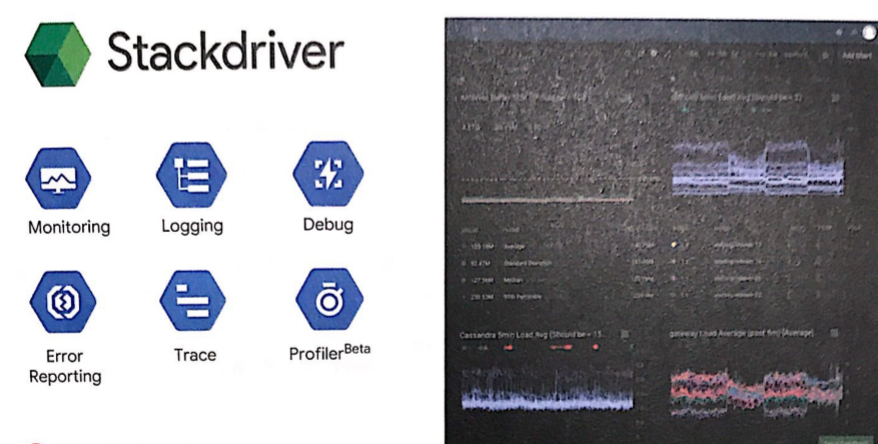
- Monitoring
- 플랫폼, 시스템, 애플리케이션 측정항목
- 업타임/상태 확인
- 대시보드 및 알림
- Logging
- 플랫폼, 시스템, 애플리케이션 로그
- 로그 검색, 뷰, 필터, 내보내기
- 로그 기반 측정 항목
- Trace
- 지연 시간 보고 및 샘플링
- URL별 지연 시간 및 통계
- Error Reporting
- 오류 알림
- 오류 대시보드
- Debugger
- 애플리케이션 디버깅
- Profiler
- CPU 및 메모리 사용량에 대한 지속적인 프로파일링
This is a summary of the materials handed out at the Google Cloud OnBoard event held at Sejong University on November 26, 2019.
Module 3: Containers and App Development, Deployment, Monitoring
0. Additional Resources
Kubernetes Engine : https://cloud.google.com/kubernetes-engine/docs
Kubernetes : https://kubernetes.io
Google Cloud Build : https://cloud.google.com/cloud-build/docs
Google Container Registry : https://cloud.google.com/container-regitry/docs
Google App Engine : https://cloud.google.com/appengine/docs
Google App Engine Flexible Environment : https://cloud.google.com/appengine/docs/flexible
Google App Engine Standard Environment : https://cloud.google.com/appengine/docs/standard
Google Cloud Endpoints : https://cloud.google.com/endpoints/docs
Apigee Edge : https://cloud.google.com/api-services/content/what-apigee-edge
Cloud Source Repositories : https://cloud.google.com/source-repositories/docs
Deployment Manager : https://cloud.google.com/deployment-manager/docs
Google Stackdriver : https://cloud.google.com/stackdriver/docs
1. Review: IaaS and PaaS
IaaS: Infrastructure as a Service - AWS EC2
A service that provides the infrastructure level. The customer directly manages the OS and applications.
PaaS : Platform as a Service - heroku
A cloud service that provides developers with the capabilities needed to develop and serve applications. Users only manage applications and data.
2. Introduction to Containers
- IaaS : Virtualizes hardware and allows resource sharing.
- However, flexibility comes at the cost of boot time (minutes) and resources (GB).
- App Engine
- Provides access to programming services
- A platform that rapidly scales apps independently based on workload and infrastructure as app demand grows
2-1. Containers
- What containers provide
- Offers the scalability of both IaaS and PaaS.
- An abstraction layer over hardware and OS
- An invisible box that provides configurable access to file systems, RAM, and networking divided into isolated partitions
- Fast startup
- Container capabilities
- Configurable, independent, and highly portable.
- Define your own hardware, OS, and software stack configuration
- By treating the OS and hardware as a black box, there's no need to change or rebuild anything when migrating from development to staging to production, or from a laptop to the cloud.
A container is app + libraries: the OS/hardware implements the container interface
2-2. Clusters
- Cluster capabilities
- Allows deploying containers to server groups with a shared host configuration.
- Connects multiple containers using network connections
- Write modular code
- Easy deployment
- Achieve maximum efficiency and savings through independent scaling of containers and hosts
3. Kubernetes and Kubernetes Engine
3-1. Kubernetes
Easily orchestrates many containers across multiple hosts.
- Build and run an app as a container
- Docker : Bundles the app, dependencies, and system settings together
- Other tools like Google Cloud Build can also be used. Code example: a Python Flask app that displays hello world
[app.py]
from flask import Flask
app = Flask(__name__)
@app.route("/")
def hello():
return "helloworld!"
if __name__ == "__main__":
app.run(host='0.0.0.0');
- Bring the app to Kubernetes - Specify 4 things using a Docker file
- The requirements.txt file for Flask dependencies
- The OS image and version for Python
- How to install Python
- How to run the app
[requirement.txt]
Flask==0.12
uwsgi==2.0.15
FROM ubuntu:18.10
RUN apt-get update -y && \
apt-get install -y python3-pip python3-dev
COPY requirements.txt /app/requirements.txt
WORKDIR /app
RUN pip3 install -r requirements.txt
COPY ./app
ENDPOINT ["python3", "app.py"]
- Build the container into an image and run it
- Use docker build to build the container and save it as a locally runnable image
- Upload images to a registry service (such as Google Container Registry) for sharing
- Start the container image with docker run
$> docker build -t py-server .
$> docker run -d py-server
- Deploy containers to a collection of nodes called a cluster using the Kubernetes API
- The master runs the control plane
- Nodes run the containers
- Nodes are VMs (used as GCE instances in GKE)
- You describe the app, and Kubernetes figures out how to implement it
- Bootstrapping Kubernetes Engine
- In a GKE cluster, you can specify the following > Machine type > Number of nodes > Network settings, etc.
$> gcloud container clusters create k1- Use a wrapper called a Pod when deploying containers to nodes
- Run a container in a Pod using Kubectl run
- Kubectl is a command-line client for the Kubernetes API
- This command starts a deployment with a container running in a Pod
- In this case, the container is an image of an NGINX server
$> kubectl run nginx --image=nginx:1.15.7- Deployment
- Manages a set of replica Pods for an app or workload, ensuring the desired number of Pods are running and remain healthy
$> kubectl get pods- Pods are only accessible within the cluster by default and have ephemeral IPs
- Run Kubectl expose to attach a load balancer to the deployment so it's publicly accessible at a static IP
- Kubernetes creates a service using the Pod's static IP, and the controller displays a message saying 'I need to attach an external load balancer with a public IP address'
$> kubectl expose deployments nginx --port=80 --type=LoadBalancer- Clients reaching this IP are routed to the Pods behind the service
- For example, if you create two sets of Pods named frontend and backend and place them behind their own services, changes in the backend Pods won't be noticed by the frontend Pods. They simply reference the backend service.
- Run kubectl get services to get the public IP of the service
$> kubectl get servicesNAME TYPE CLUSTER-IP EXTERNAL-IP PORT(S) AGE
nginx LoadBalancer 10.0.65.118 104.198.149.140 80/TCP 5m- Run kubectl scale to scale the deployment
$> kubectl scale nginx ==replicas=3- Use various parameters to enable autoscaling, or place autoscaling behind programming logic for intelligent management
$> kubectl autoscale nginx --min=10 --max=15 --cpu=80
- The true power of Kubernetes shines when using the declarative approach
- Example: How to use a configuration file
$> kubectl get pods -l "app=nginx"
[nginx-development.yaml]
apiVersion: v1
kind: Deployment
metadata:
    name: nginx
    labels:
        app: nginx
spec:
    replicas: 3
    selector:
        matchLabels:
            app: nginx
        template:
            metadata:
                labels:
                    app: nginx
            spec:
                containers:
                    - name: nginx
                      image: nginx:1.15.7
                      ports:
- continerPort: 80- Run kubectl apply -f to declaratively apply changes
$> kubectl apply -f nginx-deployment.yaml
- Run kubectl get replicasets to check the update status
$> kubectl get replicasets
NAME                DESIRED    CURRENT    READY    AGE
nginx-2035384211    5        3        3        2s
- Run kubectl get pods to verify the Pods are coming online
$> kubectl get pods
NAME                    READY    STATUS    RESTARTS    AGE
nginx-203584211-7ci7o    1/1        Running    0            18s
nginx-203584211-he3h3    1/1        Running    0            18s
nginx-203584211-qqcnn    1/1        Running    0            18s
nginx-203584211-abbcc    1/1        Running    0            18s
nginx-203584211-knlen    1/1        Running    0            18s
- Run kubectl get deployments to describe the deployment and verify the correct number of replicas are running
$> kubectl get deployments
NAME    DESIRED    CURRENT    UP-TO-DATE    AVAILABLE    AGE
nginx    5        5        5            5            18s
- Build the container and run the image
$> kubectl get services
NAME     TYPE             CLUSTER-IP     EXTERNAL-IP     PORT(S) AGE
nginx    LoadBalancer    10.0.65.118    104.198.149.140    80/TCP    5m
4. Google App Engine
- A PaaS for building scalable applications
- App Engine makes deployment, maintenance, and scaling easy, so you can focus solely on innovation
- Particularly well-suited for building scalable web applications and mobile backends
5. Google App Engine Standard Environment
- Easy application deployment
- Automatic workload scaling in response to demand
- Cost-effective
- Free daily quota / usage-based pricing
- SDKs for development, testing, and deployment
- Supports specific versions of Java, Python, PHP, and Go
- Applications must comply with sandbox constraints
- No writing to the local file system
- A 60-second timeout applies to all requests
- Third-party software installation is restricted
Example web application
6. Google App Engine Flexible Environment
- Build and deploy containerized apps with a single click
- No sandbox constraints
- Access to App Engine resources
- Standard runtimes: Python, Java, Go, Node.js
- Custom runtime support: Any language that supports HTTP requests
- Package the runtime as a Dockerfile
App Engine Environment Comparison
7. Google Cloud Endpoints and Apigee Edge
- Application programming interfaces hide implementation details and enforce contracts [diagram]
7-1. Cloud Endpoints
- Supports API creation and maintenance
- Distributed API management through the API console
- Expose APIs using RESTful interfaces
- Access control and call validation using JSON Web Tokens and Google API keys
-> Verify web and mobile user identity through Auth0 and Firebase Authentication - Client library generation
- Supported platforms [diagram]
7-2. Apigee Edge
- Supports API security and monetization
- A platform where customers and partners can use APIs
- Provides analytics, monetization, and developer portal
8. Development, Deployment, and Monitoring in the Cloud
8-1. Cloud Source Repositories
- Fully-featured Git repositories hosted on Google Cloud Platform
- Supports collaborative development of cloud apps
- Provides integration with Stackdriver Debugger
8-2. Cloud Functions
- Create single-purpose functions that respond to events without a server or runtime
Event examples: A new instance is created. A file is added to Cloud Storage. - Written in Javascript, runs in a managed Node.js environment on Google Cloud Platform
8-3. Deployment Manager
- Infrastructure management service
- Create .yaml templates that describe your environment and use Deployment Manager to create resources
- Provides repeatable deployments
8-4. Stackdriver
- Monitoring
- Platform, system, and application metrics
- Uptime/health checks
- Dashboards and alerts
- Logging
- Platform, system, and application logs
- Log search, view, filter, and export
- Log-based metrics
- Trace
- Latency reporting and sampling
- Per-URL latency and statistics
- Error Reporting
- Error notifications
- Error dashboard
- Debugger
- Application debugging
- Profiler
- Continuous profiling of CPU and memory usage


댓글
Comments