
[Cloud OnBoard] 1 - Google Cloud Platform 소개 | [Cloud OnBoard] 1 - Introduction to Google Cloud Platform
2019년 11월 26일 세종대학교에서 있었던 Google Cloud OnBoard에서 나누어준 자료집의 정리본입니다
모듈1 Google Cloud Platform 소개
0. 추가 자료
GCP를 선택해야하는 이유 : https://cloud.google.com/why-google/
가격 책정 철학 : https://cloud.google.com/pricing/philosophy
데이터 센터 : https://www.google.com/about/datacenters
Google Cloud Platform 제품 개요 : https://cloud.google.com/products
Google Cloud Platform 솔루션 : https://cloud.google.com/solutions
Google Cloud Platform 보안 : https://cloud.google.com/security
권한 구성 : https://cloud.google.com/docs/permissions-overview
Identity And Access Management (IAM) : https://cloud.google.com/iam/
Cloud SDK 설치 및 빠른 시작 : https://cloud.google.com/sdk/#Quick_Start
gcloud 도구 가이드 : https://cloud.google.com/sdk/gcloud
1. GCP의 특징
- 고객 상황에 알맞은 서비스를 제공하는 GCP 컴퓨팅 아키텍처
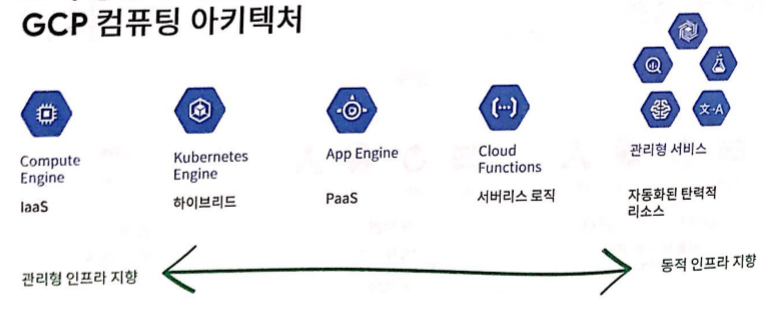
- 전세계 134개의 접속 지점과 13개의 해저 케이블에 투자했다
전 세계적인 서비스에 GCP는 적합하다. - GCP의 구성은 Region과 Zone으로 구성되어있다.
멀티 리전 : 미국 - 한국
리전 : europe-west2
Zone : europe-west2-a, europe-west2-b, europe-west2-c
현재 발표된 Region의 수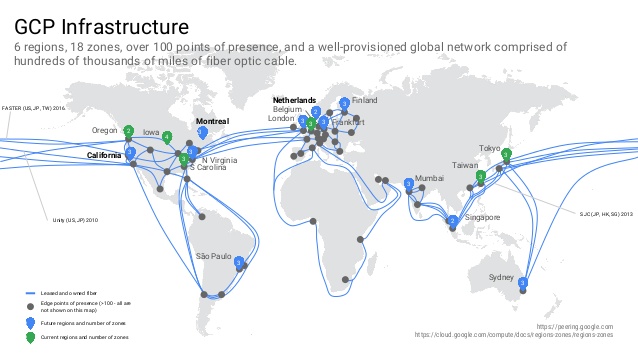
- google은 환경보호에 앞장선다.
- 2007년부터 탄소 중립성 100%를 유지하고있다.
- 전세계적으로 재생 에너지를 가장 많이 구매하는 기업 중 하나이다.
- ISO 14001 인증을 획득한 가장 최초의 데이터 센서이다.
- Google은 고객에게 유리한 가격 조건을 제시한다.
- 분단위 증가분 결제 - 컴퓨팅, 데이터 처리, 기타 서비스
- 지속 사용 할인 - 가상 머신을 한달에 25%이상 사용하는 경우 자동으로 적용
- 약정 사용 할인 - 장기간 워크로드가 꾸준할 경우 비용 할인
- 선점형 사용 할인 - 일시 중단될 수 있는 워크로드에 대한 비용 할인
- 커스텀 VM 인스턴스 유형 - 애플리케이션에 필요한 리소스에만 지불
- 개방형 API 및 오픈소스

- 보안
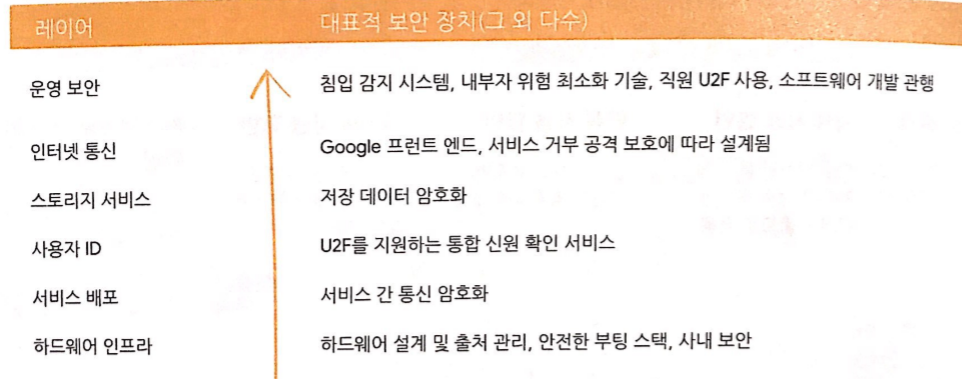
- GCP의 서비스

2. CGP 리소스 계층 구조
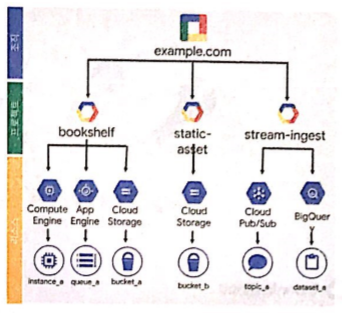
2-1. 리소스 계층 구조 수준에 따라 신뢰 경계정의
- 조직 구조에 따라 리소스를 그룹화
- 계층 구조 수준에 따라 신뢰 경계 및 리소스 격리가 설정
2-2. 모든 GCP 서비스는 프로젝트와 연결
- 리소스 및 할당량 사용량 추적
- 결제를 사용설정
- 권한 및 사용자 인증 정보를 관리
- 서비스 및 API를 사용 설정
2-3. 프로젝트에 사용되는 3가지 식별 속성
| 프로젝트 ID | 전역에서 고유 | 사용자가 선택 | 변경 불가능 |
|---|---|---|---|
| 프로젝트 ID | 전역에서 고유 | 사용자가 선택 | 변경 불가능 |
| 프로젝트 이름 | 고유할 필요 없음 | 사용자가 선택 | 변경 불가능 |
| 프로젝트 번호 | 전역에서 고유 | GCP 에서 선택 | 변경 불가능 |
2-4. GCP의 폴더관리
- 폴더로 한 조직내의 여러 프로젝트를 그룹화 할 수 있다.
- 폴더에는 프로젝트나 다른 폴더 또는 이 두가지가 모두 포함될 수 있다.
- 폴더를 사용해 정책을 할당할 수 있다.
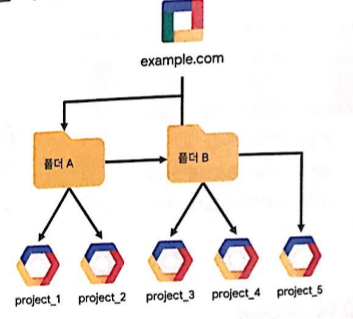
2-5. 조직노드로 프로젝트 정리

2-6. IAM 리소스 계층 구조 예시
- 정책이 리소스에 설정 : 각 정책은 역할 및 역할 구성원 집합을 명시
- 상위 정책이 리소스에 상속 : 리소스 정책은 상위 리소스와 현재 리소스의 합집합 이다.
- 덜 제한적인 상위정책이 더 제한적인 리소스 정책을 재 정의
3. Identity and Access Management (IAM)
3-1. GCP IAM에서 정의하는 요소 3가지
- 누가
- Google 계정 Cloud ID 사용자 : test@gamil.com , test@example.com
- 서비스 계정 : test@project_id.iam.gserviceaccount.com
- google 그룹 : test@googlegroups.com
- cloudID 또는 G Suite 도메인 : example.com
- 무엇을
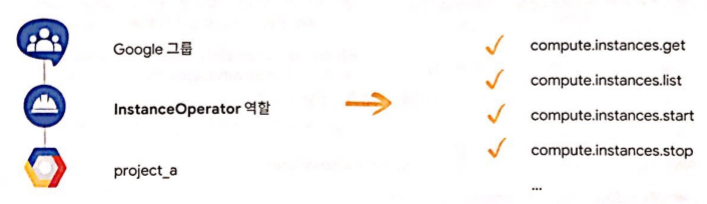
IAM의 역할은 관련된 권한의 모음이다. 서비스 리소스 등에 대해 인스턴스 관리자 역할을 한다. - 어느 리소스에
계층 구조의 특정 항목에 대한 역할을 부여받은 사용자가 IAM이다.
3-2. IAM의 3가지 역할
- 기본 역할
- 프로젝트의 모든 GCP 서비스에 적용된다. [모든 리소스에]
- 세분화 되지 않은 고정된 액세스 수준을 제공한다.
한 프로젝트에 여러 소유자, 편집자, 뷰어, 결제 관리자가 있을 수 있다.소유자 구성원 초대 / 구성원 삭제 / 프로젝트 삭제 / 기타 ... 편집자 애플리케이션 배포 / 코드 수정 / 서비스 구성 / 기타 ... 뷰어 읽기 전용 액세스 결제 관리자 결제 관리 / 관리자 추가 및 삭제
- 사전정의 역할
- 프로젝트의 모든 GCP 서비스에 적용된다. [이 프로젝트, 폴더 or 조직의 Gompute Engine 리소스에]
- 특정 서비스에 보다 세분화된 권한을 제공한다.
- 커스텀 역할
- IAM 커스텀 역할 권한 집합을 정확하게 정의할 수 있다.
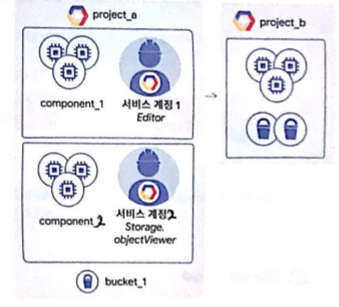
3-3. 서비스 계정
- 프로젝트에서 서버간 상호작용에 사용되는 ID 제공
- 서비스간 인증에 사용
- 리소스에서 사용하는 권한을 제어하는데 사용 : 이를 통해 애플리케이션이 인증된 최종 사용자 대신 작업을 수행할 수 있음
- 이메일 주소로 식별
PROJECT_NUMBER-compute@developer.gserviceaccount.com
PROJECT_ID@appspot.gserviceaccount.com - 서비스 계정과 IAM
- 키를 사용해 서비스 계정에 인증 : google에서 Compute Engine 및 App Engine의 키 관리
- 서비스 계정에 사전 정의 또는 커스텀 IAM 역할 할당 가능
4. Cloud ID
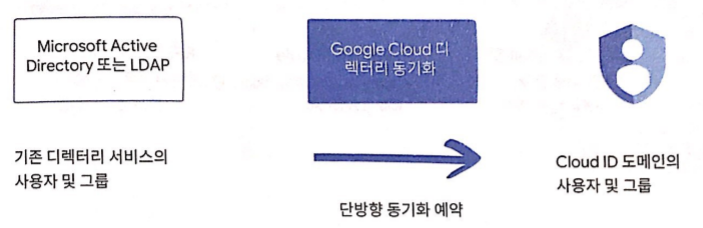
- 무엇으로 GCP 관리 사용자를 관리하나요?
- Gmail 계정 및 Google 그룹스
- G Suite 도메인의 사용자 및 그룹
- Cloud ID 도메인의 사용자 및 그룹
- 다른 기업 디렉터리가 있는 경우
5. Google Cloud Platform 과의 상호작용
5-1. GCP와 상호작용하는 4가지 방법
- Cloud Platform Console : 웹 사용자 인터페이스
- 모든 프로젝트 데이터에 대한 중앙 관리형 콘솔
- 개발자 도구 : Cloud Sourc Repositories (github 같은 것), Cloud shell, Test Lab (모바일 앱 테스트)
- 제품 API에 액세스
- 프로젝트 관리 및 생성
- Cloud Shell 및 Cloud SDK : 명령줄 인터페이스
- SDK에 Cloud Platfrom 제품 및 서비스를 위한 CLI 도구 포함 : gcloud, gwutil(Cloud Storage), bq(BigQuery)
- Docker 이미지로 제공
- Cloud Shell을 통해 제공 : Compute Engine 인스턴스에서 실행되는 Cloud SDK의 컨테이너형 버전
- Cloud Console Mobile App : iOS및 Android
- 가상 머신 및 데이터베이스 인스턴스 관리
- Google App Engine에서 앱 관리
- 결제 관리
- 맞춤 설정 가능한 대시보드로 프로젝트 시각화
- REST 기반 API : 커스텀 애플리케이션
- 제품 및 서비스에 프로그래매틱 액세스 : 일반적으로 JSON을 교환방식으로 사용 , 인증 및 승인에 OAuth 2.0 사용
- Google Cloud Platform Console을 통해 사용 설정
- 지출을 관리할 수 있도록 대부분의 API에 일일 할당량 및 요금(한도)이 적용됨 : 요청에 따라 할당 및 요금 상향 조정 가능
5-2. API 탐색기
- 브라우저를 사용하여 간편하게 Google API를 사용해볼 수 있는 대화형 도구
- 사용가능한 API 및 버전을 신속하게 탐색
- 각 API에서 사용 가능한 메서드 및 지원되는 매개 변수를 인라인 문서로 확인
- 실시간으로 메서드 요청을 실행하고 응답 확인
- 손쉽게 인증 및 승인된 API 호출 작성
5-3. Cloud 클라이언트 라이브러리
- 커뮤니티에서 소유하며 직접 개발한 클라이언트 라이브러리
- 예시 : Google API 클라이언트 라이브러리
- 오픈 소스, 자동 생성, 다양한 언어 지원
(Java, Python, Javascript, PHP, .NET, GO, Node.js, Ruby, Objective-C, Dart)
- 오픈 소스, 자동 생성, 다양한 언어 지원
This is a summary of the materials distributed at the Google Cloud OnBoard event held at Sejong University on November 26, 2019.
Module 1: Introduction to Google Cloud Platform
0. Additional Resources
Why choose GCP: https://cloud.google.com/why-google/
Pricing philosophy: https://cloud.google.com/pricing/philosophy
Data centers: https://www.google.com/about/datacenters
Google Cloud Platform product overview: https://cloud.google.com/products
Google Cloud Platform solutions: https://cloud.google.com/solutions
Google Cloud Platform security: https://cloud.google.com/security
Permission configuration: https://cloud.google.com/docs/permissions-overview
Identity And Access Management (IAM): https://cloud.google.com/iam/
Cloud SDK installation and quickstart: https://cloud.google.com/sdk/#Quick_Start
gcloud tool guide: https://cloud.google.com/sdk/gcloud
1. Features of GCP
- GCP computing architecture that provides services tailored to customer needs
- Google has invested in 134 points of presence worldwide and 13 submarine cables.
GCP is well-suited for global-scale services. - GCP is structured with Regions and Zones.
Multi-region: US - Korea
Region: europe-west2
Zone: europe-west2-a, europe-west2-b, europe-west2-c
Number of currently announced Regions - Google leads the way in environmental protection.
- Has maintained 100% carbon neutrality since 2007.
- One of the largest purchasers of renewable energy in the world.
- The first data center to obtain ISO 14001 certification.
- Google offers customer-friendly pricing.
- Per-minute billing increments - compute, data processing, and other services
- Sustained use discounts - automatically applied when virtual machines are used more than 25% of the month
- Committed use discounts - cost discounts for long-term, steady workloads
- Preemptible use discounts - cost discounts for workloads that can be interrupted
- Custom VM instance types - pay only for the resources your application needs
- Open APIs and open source
- Security
- GCP services
2. GCP Resource Hierarchy
2-1. Defining Trust Boundaries by Resource Hierarchy Level
- Group resources according to organizational structure
- Trust boundaries and resource isolation are set according to hierarchy level
2-2. All GCP Services Are Associated with Projects
- Track resource and quota usage
- Enable billing
- Manage permissions and user credentials
- Enable services and APIs
2-3. Three Identifying Attributes Used for Projects
| Project ID | Globally unique | Chosen by user | Immutable |
|---|---|---|---|
| Project ID | Globally unique | Chosen by user | Immutable |
| Project name | Does not need to be unique | Chosen by user | Immutable |
| Project number | Globally unique | Assigned by GCP | Immutable |
2-4. Folder Management in GCP
- Folders can be used to group multiple projects within an organization.
- Folders can contain projects, other folders, or both.
- Folders can be used to assign policies.
2-5. Organizing Projects with Organization Nodes
2-6. IAM Resource Hierarchy Example
- Policies are set on resources: Each policy specifies a set of roles and role members.
- Parent policies are inherited by resources: A resource policy is the union of the parent resource and the current resource.
- A less restrictive parent policy overrides a more restrictive resource policy.
3. Identity and Access Management (IAM)
3-1. Three Elements Defined in GCP IAM
- Who
- Google account or Cloud ID user: test@gamil.com, test@example.com
- Service account: test@project_id.iam.gserviceaccount.com
- Google group: test@googlegroups.com
- Cloud ID or G Suite domain: example.com
- What
IAM roles are a collection of related permissions. They act as instance administrator roles for service resources, etc. - Which resource
IAM is about users who are granted roles on specific items in the hierarchy.
3-2. Three Types of IAM Roles
- Basic roles
- Applied to all GCP services in a project. [To all resources]
- Provides fixed, coarse-grained access levels.
A project can have multiple owners, editors, viewers, and billing administrators.Owner Invite members / Remove members / Delete project / etc. Editor Deploy applications / Modify code / Configure services / etc. Viewer Read-only access Billing Administrator Manage billing / Add and remove administrators
- Predefined roles
- Applied to all GCP services in a project. [To Compute Engine resources in this project, folder, or organization]
- Provides more fine-grained permissions for specific services.
- Custom roles
- You can precisely define a set of IAM custom role permissions.
3-3. Service Accounts
- Provides identity for server-to-server interactions within a project
- Used for authentication between services
- Used to control permissions used by resources: This allows applications to perform actions on behalf of authenticated end users
- Identified by email address
PROJECT_NUMBER-compute@developer.gserviceaccount.com
PROJECT_ID@appspot.gserviceaccount.com - Service accounts and IAM
- Authenticate to service accounts using keys: Google manages keys for Compute Engine and App Engine
- Predefined or custom IAM roles can be assigned to service accounts
4. Cloud ID
- What do you use to manage GCP admin users?
- Gmail accounts and Google Groups
- Users and groups from a G Suite domain
- Users and groups from a Cloud ID domain
- If you have another corporate directory
5. Interacting with Google Cloud Platform
5-1. Four Ways to Interact with GCP
- Cloud Platform Console: Web user interface
- Centralized console for all project data
- Developer tools: Cloud Source Repositories (like GitHub), Cloud Shell, Test Lab (mobile app testing)
- Access to product APIs
- Project management and creation
- Cloud Shell and Cloud SDK: Command-line interface
- SDK includes CLI tools for Cloud Platform products and services: gcloud, gsutil (Cloud Storage), bq (BigQuery)
- Available as a Docker image
- Available through Cloud Shell: A containerized version of Cloud SDK running on a Compute Engine instance
- Cloud Console Mobile App: iOS and Android
- Manage virtual machines and database instances
- Manage apps on Google App Engine
- Manage billing
- Visualize projects with customizable dashboards
- REST-based API: Custom applications
- Programmatic access to products and services: Typically uses JSON as the exchange format, uses OAuth 2.0 for authentication and authorization
- Enabled through the Google Cloud Platform Console
- Most APIs have daily quotas and rates (limits) applied to help manage spending: Quotas and rates can be increased upon request
5-2. API Explorer
- An interactive tool that lets you easily try out Google APIs using your browser
- Quickly explore available APIs and versions
- View available methods and supported parameters for each API with inline documentation
- Execute method requests in real time and view responses
- Easily create authenticated and authorized API calls
5-3. Cloud Client Libraries
- Community-owned and community-developed client libraries
- Example: Google API client libraries
- Open source, auto-generated, supports multiple languages
(Java, Python, Javascript, PHP, .NET, GO, Node.js, Ruby, Objective-C, Dart)
- Open source, auto-generated, supports multiple languages


댓글
Comments