
git-flow 전략
git-flow
clean code study에서 앞으로의 협업을 대비하여 git-flow 전략을 이해하고 실습하는 시간을 가졌습니다.
당시 스스로 작성한 노트입니다.
git-flow 전략을 이해하기 위해 아래 우아한 형제들 블로그를 참고했습니다.
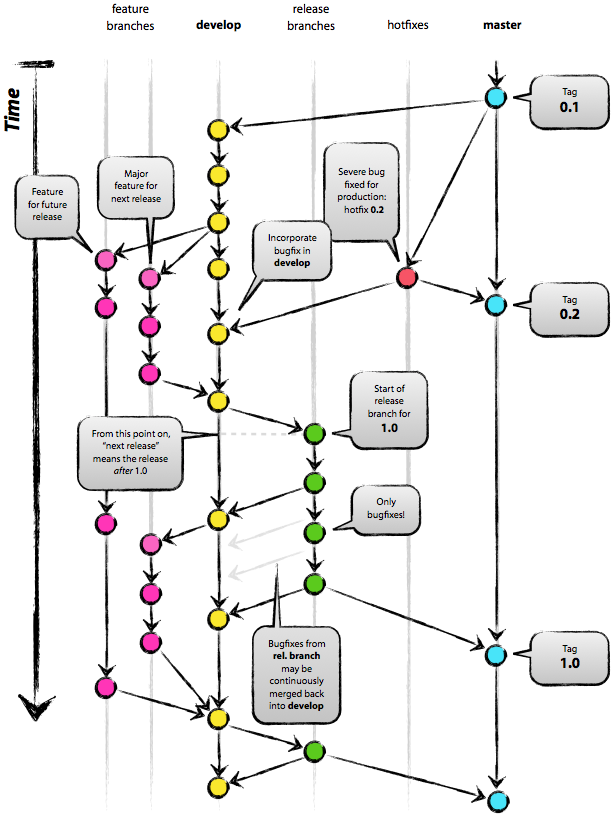
http://woowabros.github.io/experience/2017/10/30/baemin-mobile-git-branch-strategy.html
우린 Git-flow를 사용하고 있어요 - 우아한형제들 기술 블로그
안녕하세요. 우아한형제들 배민프론트개발팀에서 안드로이드 앱 개발을 하고 있는 나동호입니다.오늘은 저희 안드로이드 파트에서 사용하고 있는 Git 브랜치 전략을 소개하려고 합니다. ‘배달의민족 안드로이드 모바일 파트에서 이렇게 브랜치를 관리하고 있구나’ 정도로 봐주시면 좋을 것 같습니다.
woowabros.github.io
1. Branch Naming
master
배포버전 브랜치 > tag를 이용해서 버전을 기록한다.
- X . 0 : 프로젝트 추가
- 1 . X : 기능 추가
develop
개발 브랜치
- 2줄 전략 : merge + rebase 를 이용해서 git flow를 이쁘게 본다! 어느 시점에 반영이 됐는지 보기 위해서
feature
기능 브랜치
- develop에서 갈라져 나온 기능 : git flow를 깔끔하게 보기 위해, origin develop의 갈라나온 시점을 잘 관리해 주어야 한다.
git pull --rebase origin devlop을 이용해서 제일 마지막에 반영된 develop에서 branch가 갈라 나온 것 처럼 보이게 한다.
hotfixes
배포버전에서 버그가 났을 떄 고치기 위한 브랜치
- hotfixes에서 수정하고 나면 develop과 master에 push한다.
release
배포 직전에 QA 수정
- 베타 서버와 같은 버전, QA 받고 나면 develop과 master에 push한다.
2. github issue 이용 관련 intelli J 단축키
ctrl+shift+a - intellij에 github 등록해서 issue 바로 접근
alt+shift+n - issue이름으로 feature branch를 딴다.
3. git-flow 전략에 따른 git bash 명령어
git checkout feature/git-flow-2

git fetch                                     ## 원격에 있는 반영사항들을 local에 알리기

git commit -m "git-flow-2 commit"

git pull --rebase origin develop

git push origin feature/git-flow-2

git checkout develop

git pull origin devlop

git merge --no-ff feature/git-flow-2

git push origin develop
커밋 메시지 여러개를 하나로 !
git rebase -i HEAD~2
# s : commit 최신것을 스쿼시하겠다. 둘중에 의미없는 message를 지우거나 수정한다.
git-flow
In our clean code study group, we took some time to understand and practice the git-flow strategy to prepare for future collaboration.
These are the notes I wrote at the time.
To understand the git-flow strategy, I referenced the blog post from Woowa Brothers (Baemin) below.
http://woowabros.github.io/experience/2017/10/30/baemin-mobile-git-branch-strategy.html
We Use Git-flow - Woowa Brothers Tech Blog
Hello, I'm Dongho Na, an Android app developer on the Baemin Front-end Development Team at Woowa Brothers. Today, I'd like to introduce the Git branch strategy we use in our Android team. Think of it as a look into how the Baemin Android mobile team manages their branches.
woowabros.github.io
1. Branch Naming
master
Release version branch > Uses tags to record versions.
- X . 0 : New project added
- 1 . X : New feature added
develop
Development branch
- Two-line strategy: Use merge + rebase to keep the git flow looking clean! This helps you see at which point changes were integrated.
feature
Feature branch
- Branches off from develop: To keep the git flow looking clean, you need to carefully manage the point where it diverges from origin develop. Use
git pull --rebase origin devlopto make it look like the branch was created from the latest reflected develop.
hotfixes
Branch for fixing bugs found in the release version
- After fixing in hotfixes, push to both develop and master.
release
QA fixes right before deployment
- Same version as the beta server. After QA is done, push to both develop and master.
2. IntelliJ Shortcuts for Using GitHub Issues
ctrl+shift+a - Register GitHub in IntelliJ to access issues directly
alt+shift+n - Create a feature branch named after the issue.
3. Git Bash Commands Following the git-flow Strategy
git checkout feature/git-flow-2

git fetch                                     ## 원격에 있는 반영사항들을 local에 알리기

git commit -m "git-flow-2 commit"

git pull --rebase origin develop

git push origin feature/git-flow-2

git checkout develop

git pull origin devlop

git merge --no-ff feature/git-flow-2

git push origin develop
Squash multiple commit messages into one!
git rebase -i HEAD~2
# s : commit 최신것을 스쿼시하겠다. 둘중에 의미없는 message를 지우거나 수정한다.


댓글
Comments