결론부터 말하자면 LeetCode에서 코드를 제출할 때 static 변수를 사용하지 말자. 사용하더라도 한번의 코드가 끝나면 static 변수를 초기화해주자
public class Solution{
	static int carry = 0;

    public ListNode addTwoNumbers(ListNode l1, ListNode l2) {
    	// carry에 따라 결과값 변화
    }
}
대충 요약하면 이런 상황이었는데,
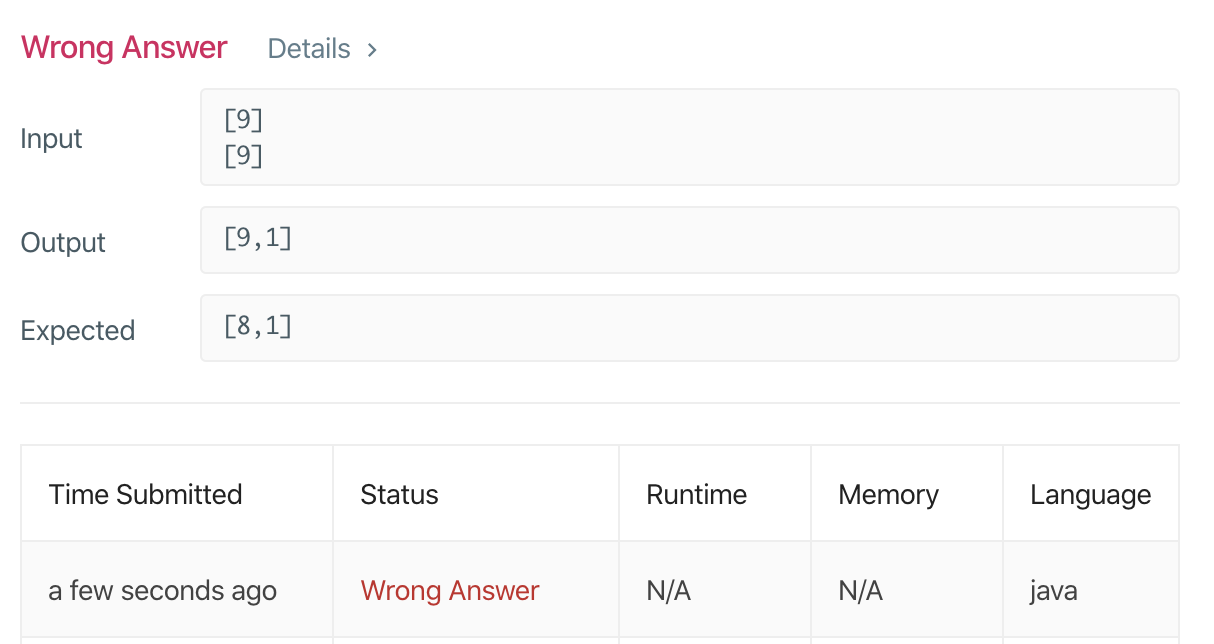
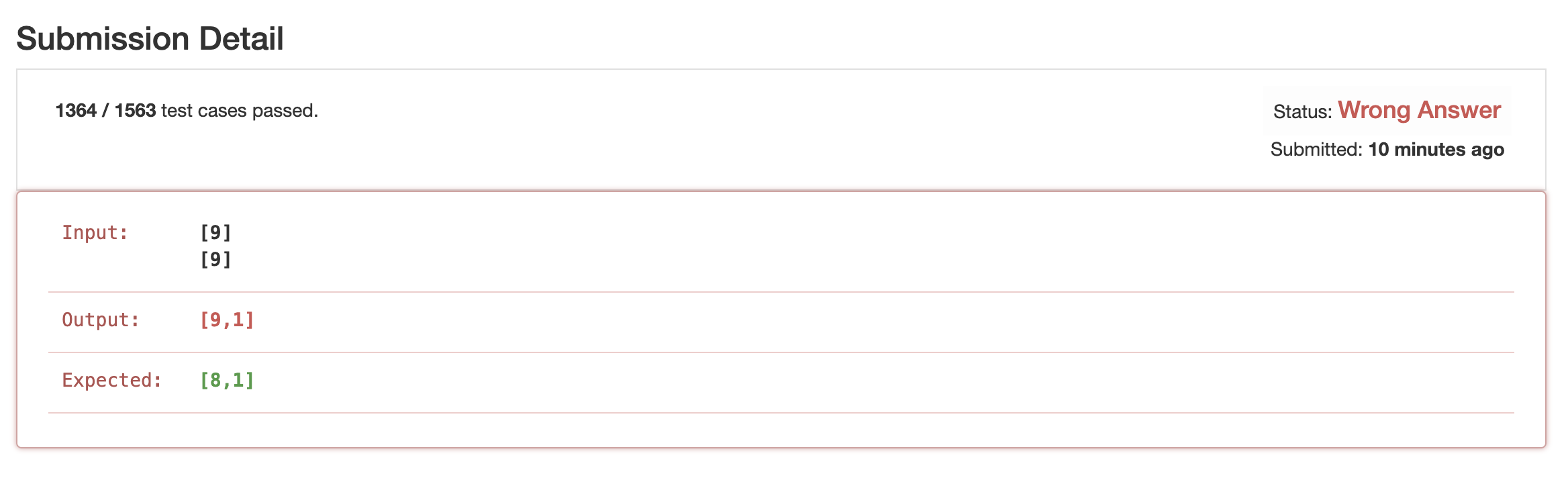
이상하게 testcase에 해당 wrong answer이 나는 걸 그대로 테스트하면 accept 되는데, 실제로 submit을 해서 넣어 돌리면 wrong answer이 떳다. 이상하게 내 output에 이 올바르지 않은 값이었다.
그래서 엥,, 이상하다 하고 leet code 측에 메일을 보냈었는데, 문뜩 생각이 들어서 확인을 해보니, test case를 1000개를 실행해 주었고, 내가 전역변수로 설정한 carry값이 다음 test case 실행에 영향을 미췄더라면? 이라는 가설을 내고 확인해보았더니 맞았다.
리트코드에서 전역변수를 사용할 때는 꼭 전역변수를 초기화해주자. 초기화하지 않은 전역변수 값이 submition시 test case에 영향을 줄 수 있다.
알고리즘을 역시 안풀어보니까 이런거에도 끙끙 대는구나 싶다... 다시 리트코드 풀러가야지 총총
I was solving this problem and it was a simple one — I thought my solution was correct, so I couldn't figure out what was going wrong.
Long story short: when submitting code on LeetCode, don't use static variables. If you do use them, make sure to reset the static variables after each run.
public class Solution{
	static int carry = 0;

    public ListNode addTwoNumbers(ListNode l1, ListNode l2) {
    	// carry에 따라 결과값 변화
    }
}
To summarize, here's what was going on:
Strangely, when I tested the exact wrong answer test case myself, it would pass just fine. But when I actually submitted the code, it came back as a wrong answer. Somehow my output had this incorrect value.
So I was like, huh, that's weird, and I even sent an email to the LeetCode team. But then it suddenly hit me — I checked and found out that they run around 1,000 test cases, and I hypothesized: what if the carry value I declared as a global variable was carrying over and affecting the next test case? I tested that theory, and sure enough, that was exactly the problem.
When using global variables on LeetCode, always make sure to reset them. Uninitialized global variable values can affect other test cases during submission.
I guess this is what happens when you don't practice algorithms regularly — you end up struggling with stuff like this... Time to get back to grinding LeetCode problems. Off I go~
위와 같이 Arrays.stream(object[] array) 를 이용하면 Instream 타입으로 반환된다. 이후 문제의 요구사항에 맞게 내가 원하는 Object 타입으로 변환해주고, .sorted(Comparator) 메소드를 사용하면 쉽게 문제의 로직을 구현 할 수 있다.
다만 염려되는 점은 stream을 사용하면 그냥 for문으로 구현했을 때보다 프로그램 실행시간이 더 오래 걸린다고 하는데, 아직 확인은 안해본 상태다.
내 생각에는 stream 을 사용하는 경우에는 빠르게 로직 구현이 가능하지만, 가장 중요한건 input parameter와 return 타입을 맞추는 것이라고 생각한다. 그런 의미에서 만약 intellij 등의 툴을 사용하지 못하는 코딩테스트에서 stream 메서드를 잘 모른다면 오히려 더 시간을 많이 잡아먹을 수 있다는 점을 생각하자.
2. Arrays의 정적 메서드 .toString(array)
나는 프로그래머스로 문제를 풀 때 주어지는 Solution class를 inner class로 만들고, main을 이용해서 디버깅 하면서 풀곤 한다. 그래서 array의 같은 경우는 테스트 결과가 맞는지 확인하곤 하는데 그때 배열 값을 그냥 프린트하면 해시값이 나와서 for문을 그때그때 만들어야 했다.
따라서 반환된 private array 값을 확인할 땐 다음과 같이 Arrays.toString(object[] array) 를 사용해서 출력값을 확인한다.
3. Arrays의 정적 메서드 .sort(array)
이전 글에서 언급한 comparable을 이용한 Collections.sort() 혹은 comparator를 이용한 List<Object>.sort() 같은 경우에는 전부 Object타입에 대한 sort 메서드이다. int, double 등의 primitive 타입은 전부 wrapper 클래스인 Integer, Double로 변환해주고 나서 사용해야한다.
그래서 primitive 타입일때 기본적인 sort는 Arrays.sort() 를 이용할 수 있다.
int[] result = {1,6,3,5,8};
Arrays.sort(result);
물론 primitive 타입이 아닌 Object 역시 정렬이 가능하며, 이 경우에는 comparator를 추가할 수도 있다.
 class Alphabet {
 	int number;
 	char letter;

	public Alphabet(int number, char letter) {
		this.number = number;
		this.letter = letter;
	}
}
Arrays.sort(Object[] objects); 라는 메서드가 있긴하지만 이렇게 사용했을 경우에는 ClassCastException 이 발생한다. 즉, Arrays.sort(Object[] object); 메서드는 Integer, Boolean, Double 과 같은 Wrapper 타입을 정렬할 때 사용한다.
따라서 위와 같이 멤버를 임의로 정의한 클래스의 경우에 Arrays.sort() 를 사용하려면 새로운 Comparator를 정의해주어야하고, 위 코드에서는 간단하게 number 멤버로 비교하는 Comparator로 비교하라고 지정해주었다.
copyOf(object[] array, int newLength)는 새로 지정해주는 길이만큼의 array를 만들어 주며, 기존의 array보다 newLength 가 작은 경우엔, 해당하는 길이 만큼만 배열을 만들어준다. copyOfRange(object[] array, int from, int to)는 지정한 인덱스에 해당하는 곳만 copy 해준다. 이때 주의할 점은 from의 인덱스는 포함되지만 to의 인덱스는 포함되지 않는다. 즉 [from, to) 에 해당하는 인덱스만큼만 배열의 깊은 복사가 이루어진다.
I solved the sorting problems from the category section on Programmers.
While solving these sorting problems, I used a lot of static methods from the Arrays class. Let me go through each method I used one by one.
1. Arrays Static Method .stream(array)
When solving problems on Programmers, the arguments are all given as primitive type arrays. As someone who uses streams a lot, this was really inconvenient, but using the static methods of the Arrays class makes it easy to work with streams.
When solving the "Largest Number" problem, I was able to write the logic smoothly using Stream.
As shown above, using Arrays.stream(object[] array) returns an IntStream type. After that, you can convert it to whatever Object type you need according to the problem requirements, and use the .sorted(Comparator) method to easily implement the problem's logic.
One concern, though, is that using streams supposedly takes longer to execute than implementing it with a plain for loop, but I haven't verified this myself yet.
In my opinion, using streams makes it possible to implement logic quickly, but the most important thing is matching the input parameter and return types. With that in mind, if you're taking a coding test where you can't use tools like IntelliJ and you're not familiar with stream methods, it could actually end up eating more of your time.
2. Arrays Static Method .toString(array)
When I solve problems on Programmers, I make the given Solution class an inner class and debug using the main method. So for arrays, I often check whether the test results are correct, but when you just print an array directly, it outputs the hash value, so I had to write a for loop every time.
So when I want to check the returned primitive array values, I use Arrays.toString(object[] array) like above to verify the output.
3. Arrays Static Method .sort(array)
The Collections.sort() using Comparable and List<Object>.sort() using Comparator that I mentioned in a previous post are all sort methods for Object types. Primitive types like int and double all need to be converted to their wrapper classes like Integer and Double before you can use them.
So for primitive types, you can use Arrays.sort() for basic sorting.
int[] result = {1,6,3,5,8};
Arrays.sort(result);
Of course, you can also sort Objects (not just primitive types), and in that case, you can add a Comparator as well.
 class Alphabet {
 	int number;
 	char letter;

	public Alphabet(int number, char letter) {
		this.number = number;
		this.letter = letter;
	}
}
Let's say there's an Alphabet object like the one above.
There is a method called Arrays.sort(Object[] objects);, but using it like this will throw a ClassCastException. In other words, the Arrays.sort(Object[] object); method is meant for sorting Wrapper types like Integer, Boolean, and Double.
So for classes with custom-defined members like the one above, if you want to use Arrays.sort(), you need to define a new Comparator. In the code above, I simply specified a Comparator that compares by the number member.
4. Arrays Static Methods .copyOfRange(array) and .copyOf(array)
These are methods that allow you to perform a deep copy of a specified array.
copyOf(object[] array, int newLength) creates a new array with the specified length. If newLength is smaller than the original array, it creates an array with only that many elements. copyOfRange(object[] array, int from, int to) copies only the portion corresponding to the specified indices. Note that the from index is inclusive but the to index is exclusive. In other words, only the elements in the range [from, to) are deep copied into the new array.
toOffset을 사용하지 않았을 경우에는, 문자열의 제일 앞에서부터 비교해서 prefix가 메소드를 호출한 value와 모두 대응되면 true를 리턴한다. toOffset을 사용하는 경우에는, 해당하는 index에서부터 비교해서 prefix가 메소드를 호출한 value와 모두 대응되면 true를 리턴한다.
이때, 안에 String.java 파일을 살펴보니 빠른 비교를 위해, string을 하나하나 비교하기 전, toOffset이 음수이거나, value보다 value.length - prefix.length 가 toOffset보다 작으면 (value보다 prefix의 길이가 더 긴 경우) 바로 false를 리턴하고, 그렇지 않은경우에는 문자열을 (toOffset의 위치부터 시작해) 앞에서부터 하나씩 비교해서 boolean을 판단한다.
4. Collections 클래스 - Comparable vs Comparator
베스트 앨범 문제를 풀면서 다시 한번 정리한다. 자바에서 알고리즘은 Collections 클래스를 얼마나 잘 쓰느냐에 있는 듯.
class Album {
int plays;
int number;
Album(int plays, int number) {
this.plays = plays;
this.number = number;
}
}
다음과 같은 클래스를 정렬한다고 생각하고 두가지 인터페이스를 비교해보겠다.
4-1. Comparator
Comparator은 이 클래스의 정렬을 여러개의 Comparator중에 지정한 것으로 정렬한다. compare의 로직을 해당 클래스 안이 아니라 새로운 Comparator 클래스를 선언하여 구현한다는 특징이 있고, 두 개의 argument 사이의 비교를 이용한다.
[정의]
class AlbumCompare implements Comparator<Album> {
@Override
public int compare(Album o1, Album o2) {
return Integer.compare(o1.plays, o2.plays);
}
}
[사용]
public static void main(){
List<Album> albums = Arrays.asList(new Album(10,0),new Album(20,1), new Album(30,2));
albums.sort(new AlbumCompare());
}
.sort 메소드 안 parameter로는 Comparator를 넣게 되어있어서 새로 정의한 클래스를 객체로 정의해서 넣으면 된다.
4-2. Comparable
Comparable은 이 클래스의 default 정렬을 정의할 때 사용한다. compareTo의 로직을 해당 클래스 안에 구현한다는 특징이 있고, this와 prameter로 들어온 argument와 비교한다.
[정의]
class Album implements Comparable<Album>{
int plays;
int number;
Album(int plays, int number) {
this.plays = plays;
this.number = number;
}
@Override
public int compareTo(Album o) {
return Integer.compare(this.plays, o.plays);
}
}
[사용]
public static void main(){
List<Album> albums = Arrays.asList(new Album(10,0),
new Album(20,1), new Album(30,2));
Collections.sort(albums); //방법 1
albums.sort(Album::compareTo); //방법 2
}
}
이때 Collections.sort(); 는 해당 클래스 안에 default로 정의된 Comparable을 이용하는 방법이고, .sort() 메소드는 Comparator를 이용하는 방법이다. sort()인자로 Album::compareTo를 넣으면, Comparable의 override인 compareTo()메소드가 Comparator 타입으로 변하게 되어서 두가지 방법으로 사용할 수 있다.
This was the original code — when map.get returns null (i.e., when it's a new key and you want to put 0), it inserts a different key value. This code can be simplified using getOrDefault():
public String solution(String[] participant, String[] completion) {
	HashMap<String,Integer> map = new HashMap();

	for(String part : participant){
		Integer integer = map.getOrDefault(part, 0);
		map.put(part, ++integer);
	}
}
And just like that, the code becomes much cleaner.
2. Useful method of HashMap<T, K>.putIfAbsent(T key, K value)
While writing the example code above, I came across another new method:
for(String part : participant){
	Integer num = map.get(part);
	if(num == null){
		map.put(part, 1);
	}
}
In a case like this, it can be simplified down to a single method call.
for(String part : participant){
	Integer num = map.putIfAbsent(part, 1);
}
This means it does a null check on the key to see if there's no key-value pair for part in the map, and only then performs the put.
3. String Class - Checking Prefixes and Leading Characters
.startsWith(@NotNull() String prefix, int toOffset)
While solving the phone book problem, I needed logic to check leading characters. I was about to use regex, but then I looked into the String class instead.
It's the boolean startsWith(@NotNull() String prefix, int toOffSet) method inside the String.java class.
When toOffset is not used, it compares from the very beginning of the string and returns true if the prefix fully matches the value the method was called on. When toOffset is used, it compares starting from the given index and returns true if the prefix fully matches the value the method was called on.
Looking inside the String.java file, for faster comparison, before comparing each character one by one, if toOffset is negative, or if value.length - prefix.length is less than toOffset (meaning the prefix is longer than the value), it immediately returns false. Otherwise, it compares characters one by one from the front (starting at the toOffset position) to determine the boolean result.
4. Collections Class - Comparable vs Comparator
I'm organizing this once again while solving the Best Album problem. It seems like Java algorithm skills come down to how well you can use the Collections class.
class Album {
	int plays;
	int number;

	Album(int plays, int number) {
	this.plays = plays;
	this.number = number;
	}
}
Let's say we want to sort instances of this class, and compare the two interfaces.
4-1. Comparator
Comparator sorts this class using a specified Comparator among multiple Comparators. A key characteristic is that the compare logic is implemented not inside the class itself but in a separate Comparator class, and it uses two arguments for comparison.
[Definition]
class AlbumCompare implements Comparator<Album> {
	@Override
	public int compare(Album o1, Album o2) {
		return Integer.compare(o1.plays, o2.plays);
	}
}
[Usage]
public static void main(){
	List<Album> albums = Arrays.asList(new Album(10,0),new Album(20,1), new Album(30,2));
    albums.sort(new AlbumCompare());
}
The .sort method takes a Comparator as its parameter, so you just need to instantiate the newly defined class and pass it in.
4-2. Comparable
Comparable is used to define the default sorting order for a class. A key characteristic is that the compareTo logic is implemented inside the class itself, and it compares this with the argument passed as a parameter.
[Definition]
class Album implements Comparable<Album>{
	int plays;
	int number;

	Album(int plays, int number) {
		this.plays = plays;
		this.number = number;
	}

	@Override
	public int compareTo(Album o) {
		return Integer.compare(this.plays, o.plays);
	}
}
[Usage]
public static void main(){
	List<Album> albums = Arrays.asList(new Album(10,0),
		new Album(20,1), new Album(30,2));
		Collections.sort(albums);	//방법 1
		albums.sort(Album::compareTo);	//방법 2
	}
}
Here, Collections.sort(); uses the default Comparable defined inside the class, while .sort() uses a Comparator. If you pass Album::compareTo as the argument to sort(), the overridden compareTo() method from Comparable gets converted to a Comparator type, so you can use it both ways.
6-2. 폴더 명 역시 바꾸어주고, first_main 폴더(구 algo 폴더) 안의 main.cpp의 타겟이 first_main product로 잘 선택되어있는지 확인합니다.
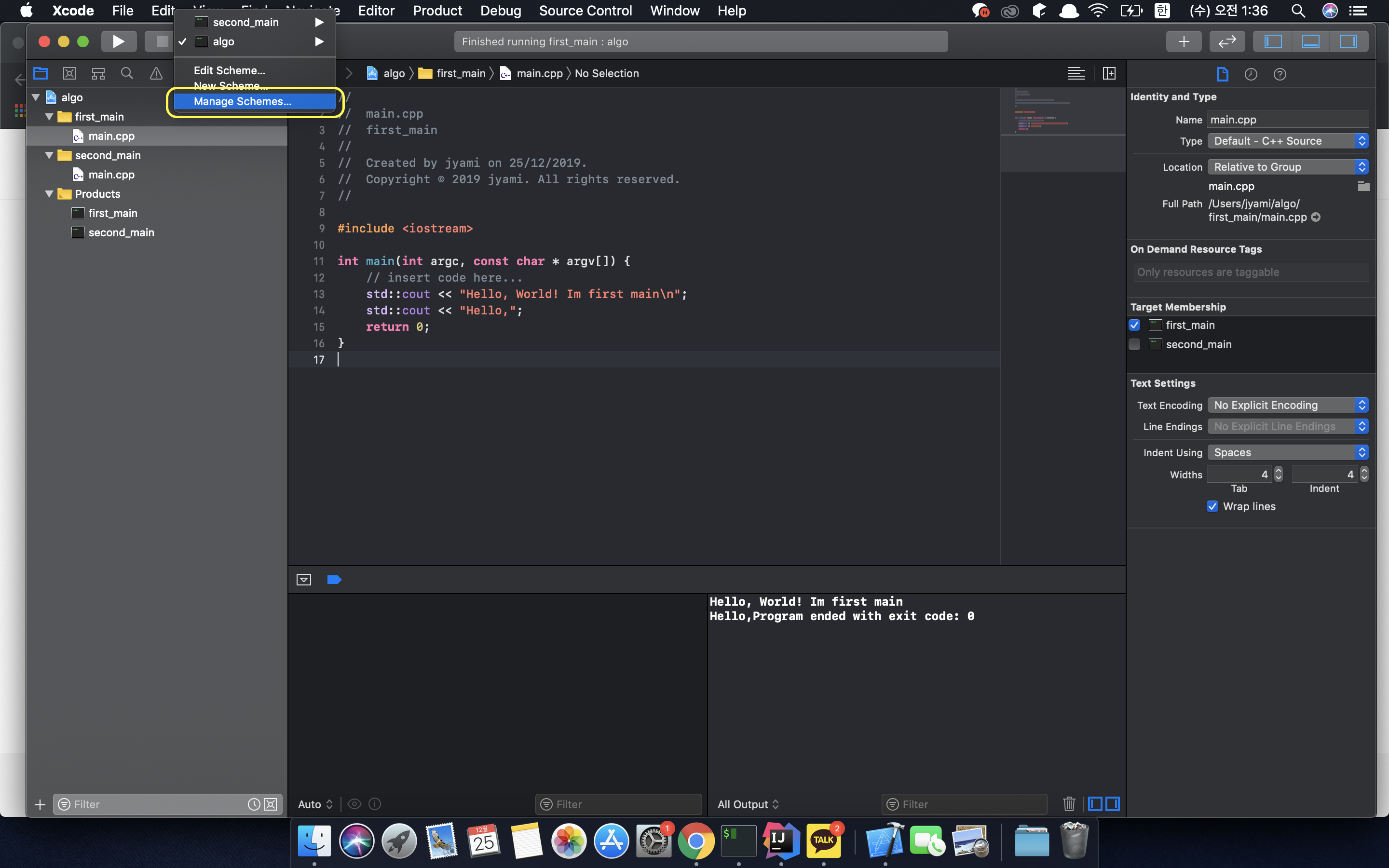
6-3. 위에 있는 Run에는 여전히 algo로 떠있습니다. 이대로 실행을 할 경우에는 algo에서 first_main으로 target명만 바꾼 것이기 때문에 first_main > main.cpp를 새로 작성하고 재 컴파일을 해도 올바르게 컴파일이 됩니다. 하지만, 나중에 헷갈릴 가능성이 있기 때문에 run을 위해 사용하는 Target이름 명 역시 바꾸어 주기 위해 Run 옆에 있는 Target 선택에서 Manage Schemes를 클릭합니다.
6-4. Manage Scheme에서 실행할 Target들을 관리할 수 있습니다. 여기에서 - 를 이용하여 기존의 algo라는 이름의 scheme를 지워주고 + 를 first_main이라는 이름으로 schemes에 target을 추가해 줍니다.
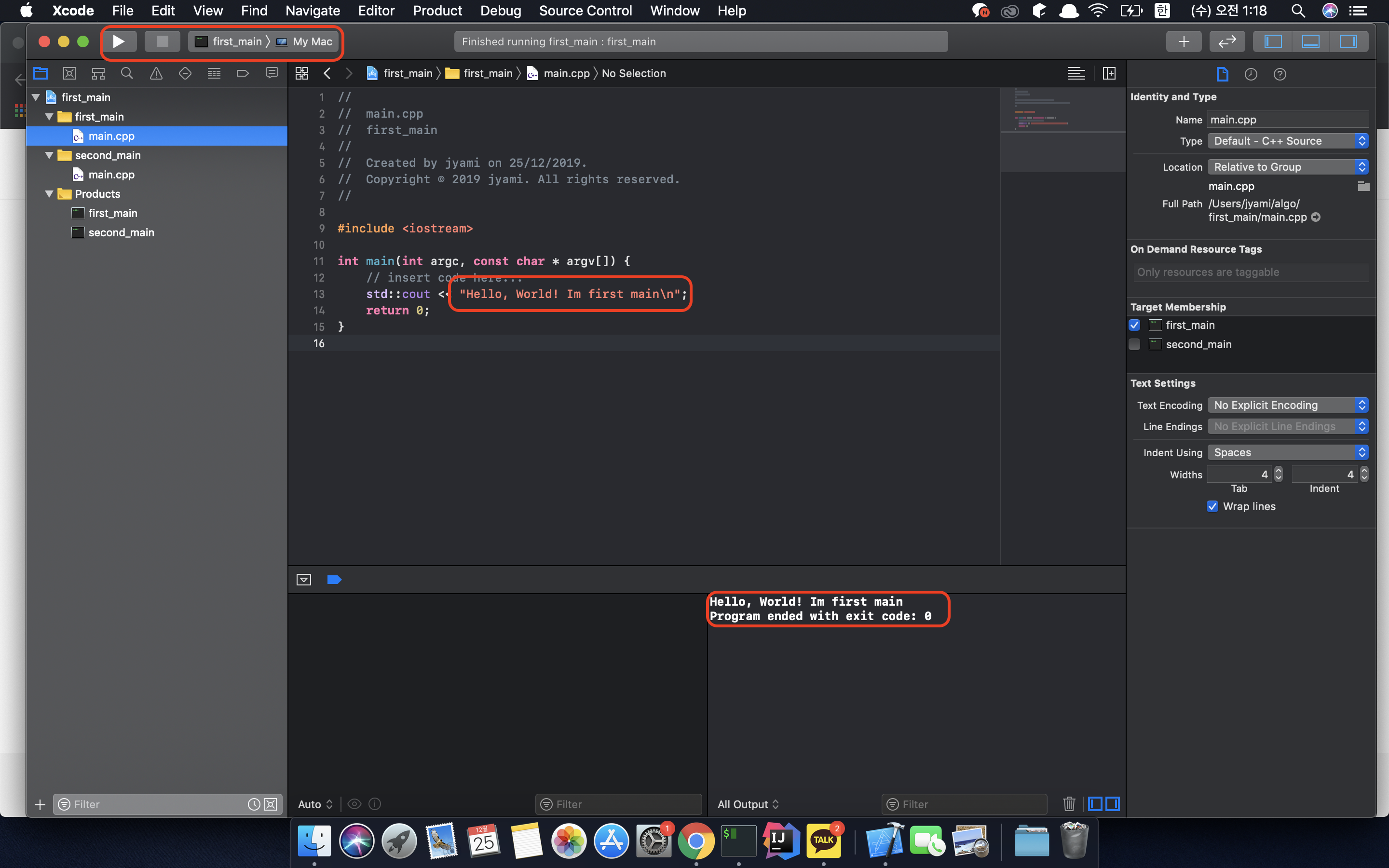
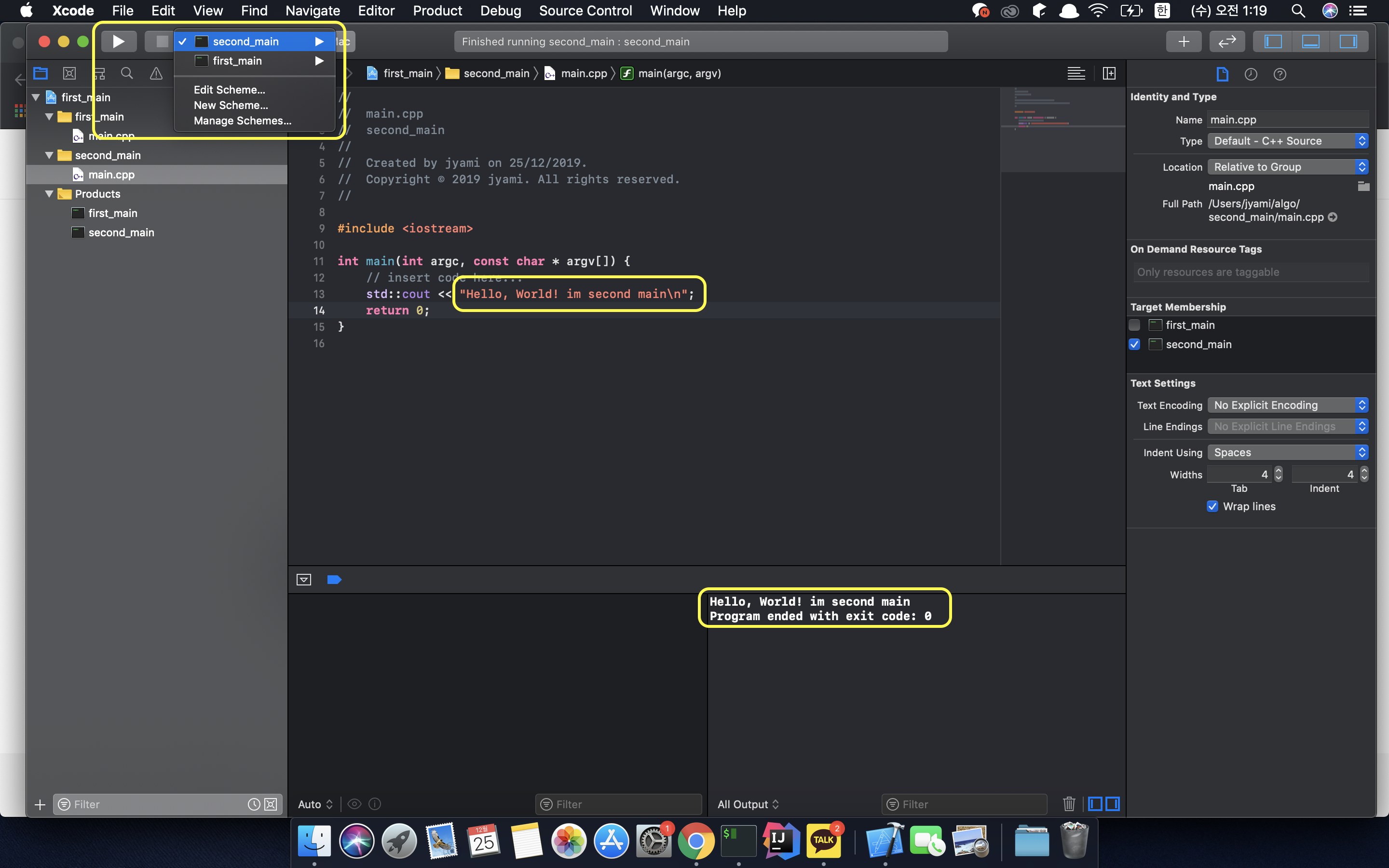
7. 실행을 합니다! 이때 왼쪽 상단에서 어떤 Target으로 실행을 할지를 선택해주면, 알고리즘용으로 여러개의 main을 한개의 프로젝트에서 작동시킬 수 있습니다.
여기까지 Xcode로 여러개의 main.cpp 파일을 만들어야할 때 방법입니다. 알고리즘을 cpp로 풀고, git으로 한 폴더에 관리하려다 보니까 환경을 세팅하다보니까 이렇게 포스팅까지 하게되었습니다 :) 혹시 더 좋은 꿀팁이 있다면 댓글 달아주세요 감사합니다.
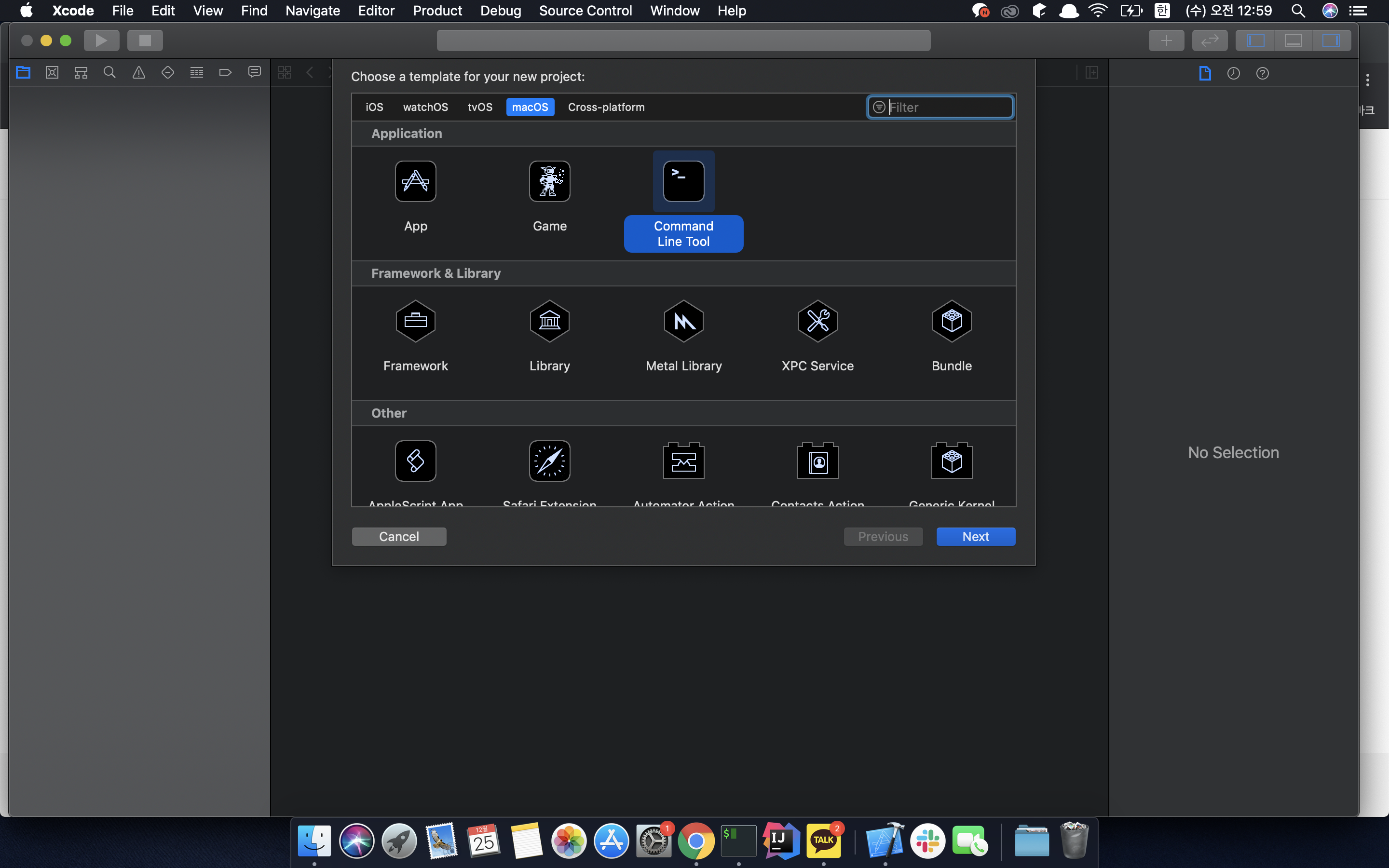
When solving problems on Baekjoon Online Judge or LeetCode, you often need to create and run multiple solution.cpp or main.cpp files. I'm going to show you how to create multiple main.cpp files in a single Xcode project.
1. Create a new Xcode project. Make sure to select Command Line Tool when creating the project.
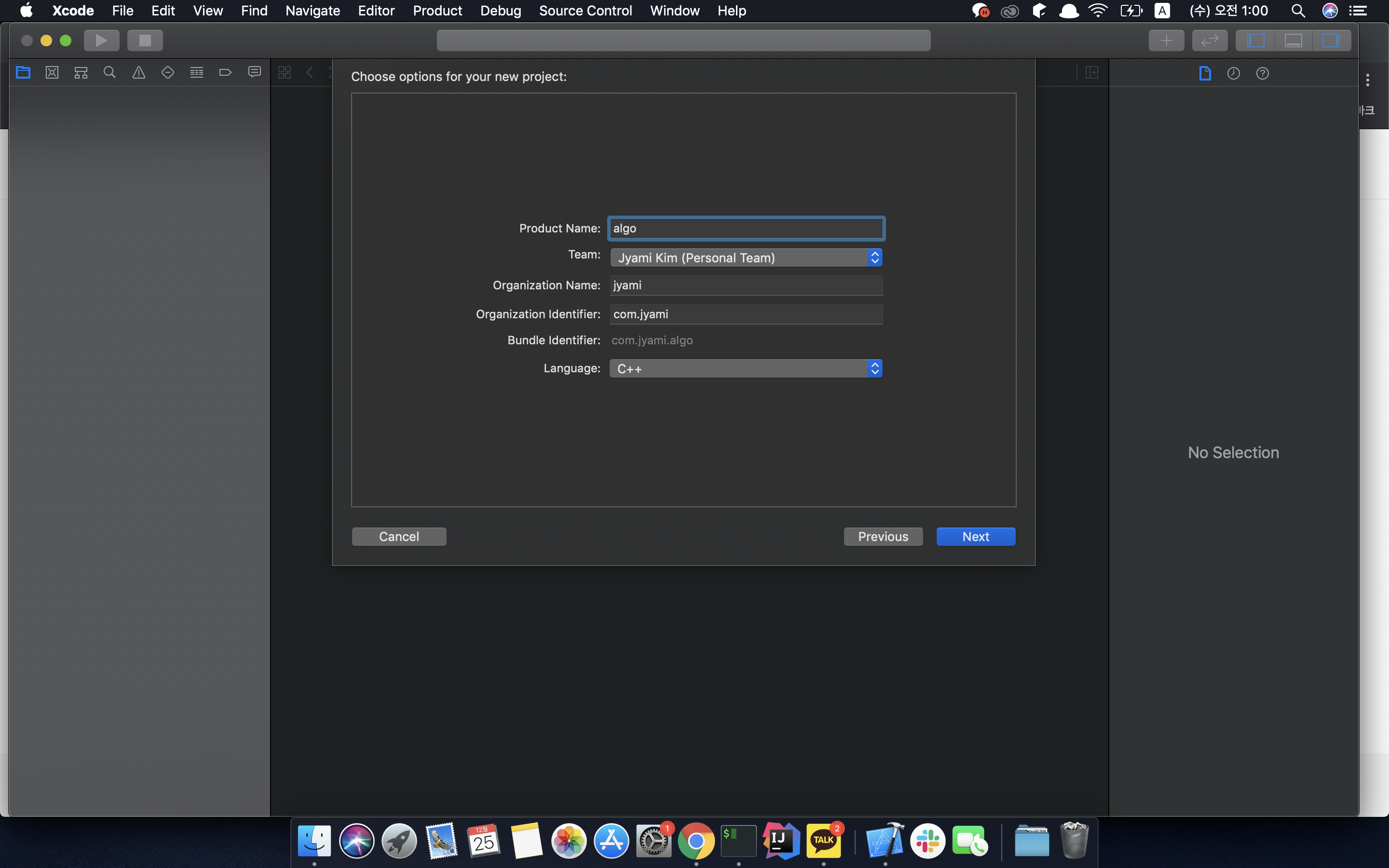
2. Fill in the options for the new project.
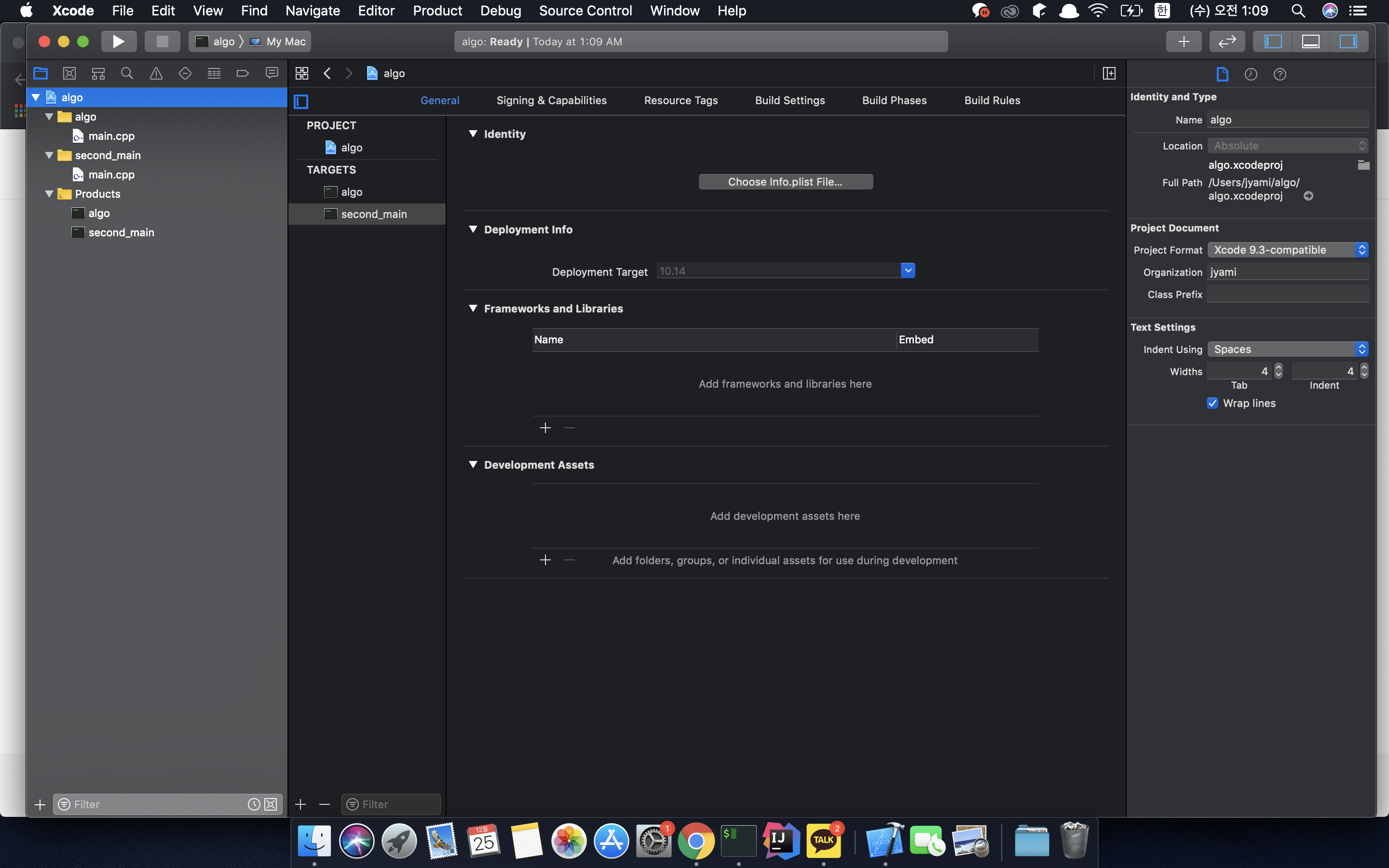
3. Click on the Xcode project.
4. At the bottom of the project, you'll see a bar listing the project and targets. At the bottom of that bar, there are + and - buttons. Click the + button to create a new Target.
Just like in steps 1–2, select Command Line Tool for the Target and specify a Product Name to create it.
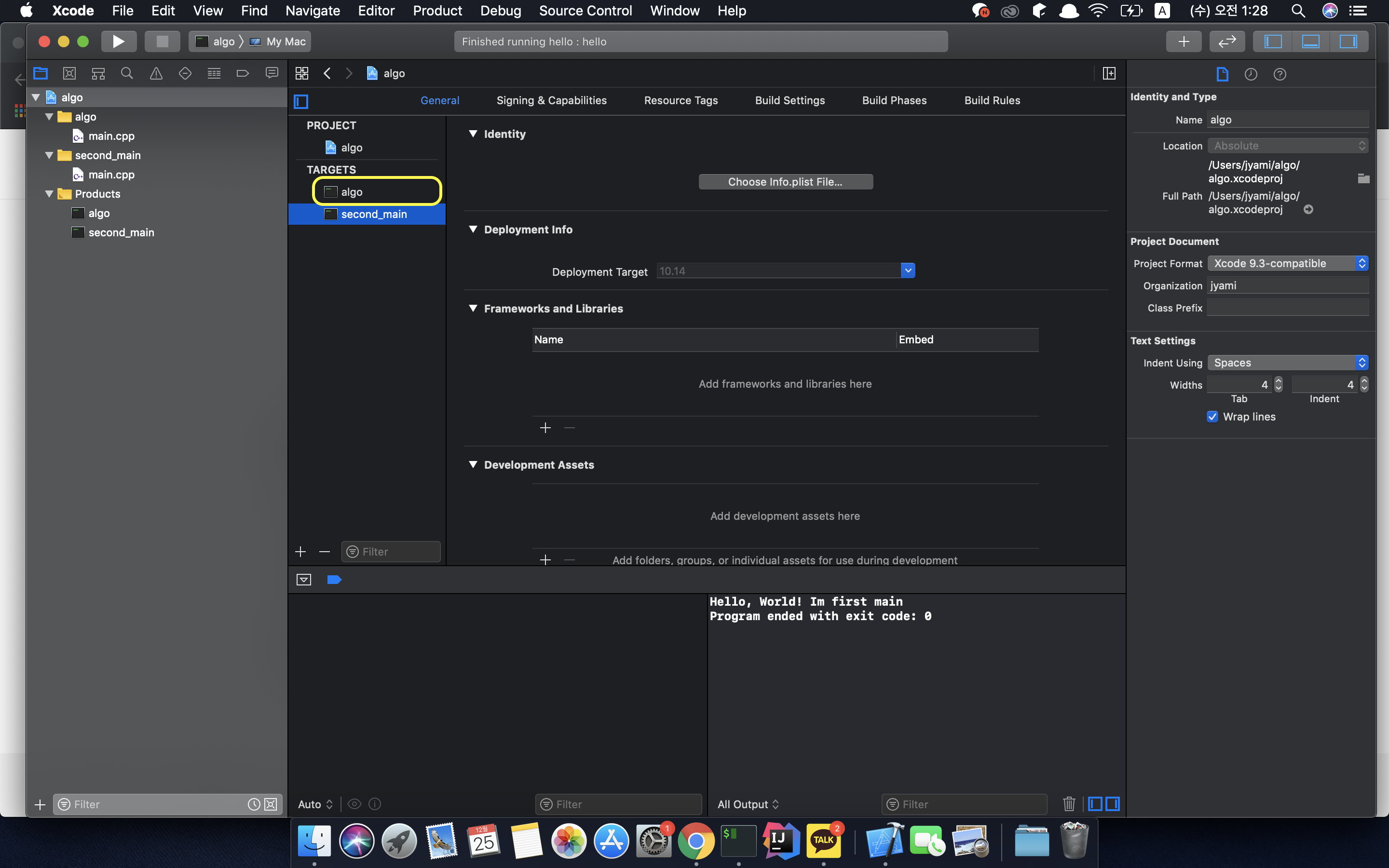
5. Now you can see that two main files have been created.
6. For convenience, I'll rename the folder and Products name of the first Target to first_main. Click the expand toggle for the detailed steps
6-1. Double-click the algo target under Targets in the Xcode project to rename it.
6-2. Rename the folder as well, then check that the main.cpp inside the first_main folder (formerly the algo folder) has its target correctly set to the first_main product.
6-3. The Run button at the top still shows algo. If you run it as-is, it will still compile correctly since you only changed the target name from algo to first_main — even if you rewrite first_main > main.cpp and recompile. However, to avoid confusion later, let's also rename the Target used for running. Click on the Target selector next to Run and select Manage Schemes.
6-4. In Manage Schemes, you can manage the Targets available for running. Here, use the - button to remove the old scheme named algo, then use the + button to add a target to the schemes with the name first_main.
7. Run it! Just select which Target to run from the top-left corner, and you can run multiple main files for algorithm problems within a single project.
And that's how you handle multiple main.cpp files in Xcode. I ended up writing this post while setting up my environment to solve algorithm problems in C++ and manage them in a single folder with git :) If you have any better tips, please leave a comment. Thanks!
package com.jyami.baekjoon;

import java.util.ArrayList;
import java.util.List;
import java.util.Scanner;

public class Main_9095 {
    public static void main(String args[]) {

        Scanner s = new Scanner(System.in);

        int num = s.nextInt();
        int max = 0;
        List<Integer> list = new ArrayList<>();


        for (int i = 0; i < num; i++) {
            int input = s.nextInt();
            list.add(input);
            if (input > max)
                max = input;
        }

        int dp[] = new int[max + 1];

        dp[1] = 1;
        dp[2] = 2;
        dp[3] = 4;

        for (int i = 4; i <= max; i++) {
            dp[i] = dp[i - 1] + dp[i - 2] + dp[i - 3];
        }

        for (Integer integer : list) {
            System.out.println(dp[integer]);
        }

    }
}
As soon as I saw the problem, it looked similar to the 0-1 knapsack problem, so I figured it must be a DP problem and started scribbling like that to find the pattern lol
At first, when I was just looking at the sums of those numbers, it felt like something was repeating with additions going on, but I couldn't quite figure it out. Then when I looked at the total sum of everything, the recurrence relation became clear.
As expected, with DP problems, once you find the pattern, the code ends up being pretty short.
But honestly, no matter how much I thought about it, I couldn't figure out why this pattern occurs. I guess DP problems still feel tough since I haven't solved that many yet. So I asked the people in my study group! And it was solved right away!!
First, the cases where N is 1, 2, or 3 are given as base values. If we let A(n) be the number of ways to represent the variable n:
[Base Values]
A(1) = 1 A(2) = 2 A(3) = 4
[When N=4]
Number of ways to represent 1 + 3 [=A(3)] Number of ways to represent 2 + 2 [=A(2)] Number of ways to represent 3 + 1 [=A(1)]
So A(4) = A(3) + A(2) + A(1) = 4 + 2 + 1 = 7.
Looking at each case in detail:
1 + A(3)
2 + A(2)
3 + A(1)
1 + 3 1 + 1 + 2 1 + 2 + 1 1 + 1+ 1+ 1
2 + 2 2 + 1 + 1
3 + 1
Similarly,
[When N=5]
Number of ways to represent 1 + 4 [=A(4)] Number of ways to represent 2 + 3 [=A(3)] Number of ways to represent 3 + 2 [=A(2)]
Since adding 1, 2, or 3 to a previously formed number gives us the current number, we just need to add up the number of previous combinations that result in the current number when adding 1, when adding 2, and when adding 3.
If this problem were "Adding 1, 2, 3, 4" instead, to find A(n), we would need: 1 + A(n-1) 2+ A(n-2) 3 + A(n-3) 4 + A(n-4) — these would be the cases that produce A(n).
By the same logic, if this problem were "Adding 1, 2", to find A(n), we would need: 1 + A(n-1) 2+ A(n-2) — these would be the cases that produce A(n), right?
package com.jyami.baekjoon;

import java.util.ArrayList;
import java.util.List;
import java.util.Scanner;

public class Main_9095 {
    public static void main(String args[]) {

        Scanner s = new Scanner(System.in);

        int num = s.nextInt();
        int max = 0;
        List<Integer> list = new ArrayList<>();


        for (int i = 0; i < num; i++) {
            int input = s.nextInt();
            list.add(input);
            if (input > max)
                max = input;
        }

        int dp[] = new int[max + 1];

        dp[1] = 1;
        dp[2] = 2;
        dp[3] = 4;

        for (int i = 4; i <= max; i++) {
            dp[i] = dp[i - 1] + dp[i - 2] + dp[i - 3];
        }

        for (Integer integer : list) {
            System.out.println(dp[integer]);
        }

    }
}
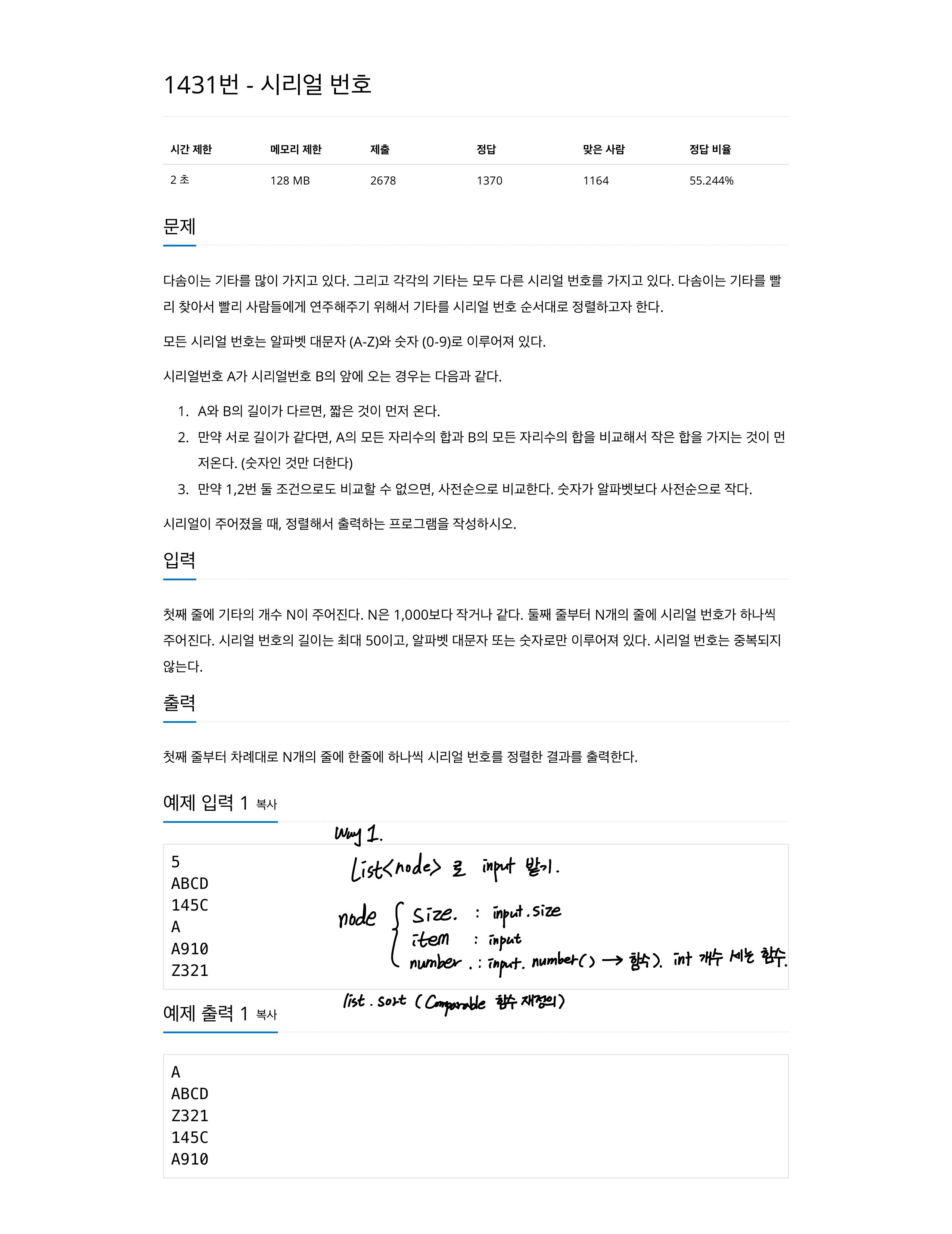
백준 알고리즘 1431 시리얼 번호 | Baekjoon Algorithm 1431 Serial Number
쟈 미
728x90
오늘은 이화여대 컴퓨터공학과 졸업 요건인 EPPER 경진대회를 보고왔습니다! 2시간 반동안 10문제를 풀었어야 했는데, 빡 집중하다가 다시 알고리즘 스터디 과제를 푸려니 어질ㄹ...
그래도 나름의 노하우가 쌓여서 오늘은 그 내용을 정리하려 합니다.
오늘 기록하고 싶은점은 먼저
1. 객체 Collections.sort()
기본적으로 Collections.sort() 메소드를 사용하면, 주어진 List가 오름차순으로 정렬이 됩니다.
저 같은 경우는 알고리즘 문제여도 새로운 객체 클래스를 정의하고, 그 객체안에 값을 넣어서 문제를 해결하는 경우가 많은데, 이때 객체의 특정 멤버값을 sort하고 싶을 때 어떻게해야하나 방법을 찾아보았습니다.
class Item implements Comparable<Item> {
    int size;

    @Override
    public int compareTo(Item o) {
        return this.size > o.size ? 1 : this.size < o.size ? -1 : 0;
    }
}
Item이라는 클래스를 선언하고, 그안에 있는 size라는 멤버변수를 이용해서 정렬이 하고싶다면 위와 같이 사용하면 됩니다.
Compareable<T> 인터페이스를 이용하고 그 인터페이스의 compareTo(T t) 메소드를 오버라이드 합니다.
이 메소드 안에서 return 되는 값에 따라 Collections.sort()가 이루어집니다.
[오름차순 정렬시]
인자로 전달된 obj가 작다면 1 반환
인자로 전달된 obj가 크다면 -1 반환
인자로 전달된 obj와 같다면 0을 반환
[내림차순 정렬시]
인자로 전달된 obj가 작다면 -1 반환
인자로 전달된 obj가 크다면 1 반환
인자로 전달된 obj와 같다면 0을 반환
2. 자리수 합 구할 때 주의할 점
원래 제가 자리수 합과 관련해서 구현한 코드는
    private int parsing(String str) {
        try {
            int number = Integer.parseInt(str);
            return number;
        } catch (NumberFormatException e) {
            return 0;
        }
    }

    private int findNumber(String str) {
        String replace = str.replaceAll("\\D", "");
        int num = parsing(replace);

        int sum = 0;
        while (num != 0) {
            sum += num % 10;
            num = num / 10;
        }
        return sum;
    }
String 클래스의 replaceAll을 사용해서 문자열에서 정수인 것들만 남게하고, 이들을 10단위로 나누어서 합을 구하는 방식으로 구현했습니다. 이때 replaceAll로 인해 모두 문자로만 이루어진 문자열 같은 경우엔, ""이 되므로 NumberFormatException이 나오니 이에 대한 return 값도 주려고 parsing 메소드안에 NumberFormatException도 넣었구요.
근데 계속 백준에서 틀렸습니다 가 뜨길래 엄청 화나서 왜그러지 왜그러지 하고 계속 생각하다가
입력값 조건에 시리얼 번호를 50자리 입력을 할 수 있다했는데 생각해보니 Integer로 변환을 하면 10자리 까지만 되더라구요!!!
하ㅏ... 그래서 앞으로 input 자리수를 잘 확인하자라는 교훈을 얻게 되었습니다.
그래서 아래와 같이 char의 ASCII 코드값을 한자리 한자리 비교하는 방식으로 리팩토링 하였습니다.
  private int findNumber(String str) {
        int sum = 0;
        for (int i = 0; i < str.length(); i++) {
            if (str.charAt(i) >= '0' && str.charAt(i) <= '9') {
                sum += str.charAt(i) - '0';
            }
        }
        return sum;
    }
3. String.replaceAll(), String.replace() 차이점
각 자리수의 합을 구하려고, 제가 String 클래스의 replaceAll()을 사용했는데요, 이과정에서 String.repace()랑 조금 헷갈렸어서 공유합니다.
package com.jyami;
import java.util.ArrayList;
import java.util.Collections;
import java.util.List;
import java.util.Scanner;
public class Main_1431 {
public static void main(String args[]) {
String str = "안녕1234";

String replace = str.replace("1234", "");
String replaceAll = str.replaceAll("\\d", "");

System.out.println(replace);
System.out.println(replaceAll);
Scanner sc = new Scanner(System.in);
int num = sc.nextInt();
List<Item> list = new ArrayList<>();
for (int i = 0; i < num; i++) {
list.add(new Item(sc.next()));
}
Collections.sort(list);
for (Item item : list) {
System.out.println(item.text);
}
}
}
class Item implements Comparable<Item> {
int size;
String text;
int number;
public Item(String text) {
this.text = text;
this.size = text.length();
this.number = findNumber(text);
}
private int findNumber(String str) {
int sum = 0;
for (int i = 0; i < str.length(); i++) {
if (str.charAt(i) >= '0' && str.charAt(i) <= '9') {
sum += str.charAt(i) - '0';
}
}
return sum;
}
@Override
public int compareTo(Item o) {
return this.size > o.size ? 1 : this.size < o.size ? -1 :
this.number > o.number ? 1 : this.number < o.number ? -1 :
this.text.compareTo(o.text);
}
}
Today I went to take the EPPER competition, which is a graduation requirement for the Computer Science department at Ewha Womans University! I had to solve 10 problems in two and a half hours, and after focusing so intensely, trying to get back to my algorithm study assignments is making me dizzy...
Still, I've built up some know-how along the way, so today I'd like to organize what I've learned.
What I want to document today is first
1. Object Collections.sort()
By default, when you use the Collections.sort() method, the given List is sorted in ascending order.
In my case, even for algorithm problems, I often define a new object class and store values inside that object to solve problems. So I looked into how to sort by a specific member value of an object.
class Item implements Comparable<Item> {
    int size;

    @Override
    public int compareTo(Item o) {
        return this.size > o.size ? 1 : this.size < o.size ? -1 : 0;
    }
}
If you declare a class called Item and want to sort by the member variable size inside it, you can use it like above.
You use the Comparable<T> interface and override the compareTo(T t) method of that interface.
Collections.sort() is performed based on the value returned inside this method.
[For ascending order]
Return 1 if the passed obj is smaller
Return -1 if the passed obj is larger
Return 0 if the passed obj is equal
[For descending order]
Return -1 if the passed obj is smaller
Return 1 if the passed obj is larger
Return 0 if the passed obj is equal
2. Things to Watch Out for When Calculating the Sum of Digits
The code I originally implemented for calculating the sum of digits was
    private int parsing(String str) {
        try {
            int number = Integer.parseInt(str);
            return number;
        } catch (NumberFormatException e) {
            return 0;
        }
    }

    private int findNumber(String str) {
        String replace = str.replaceAll("\\D", "");
        int num = parsing(replace);

        int sum = 0;
        while (num != 0) {
            sum += num % 10;
            num = num / 10;
        }
        return sum;
    }
I used String's replaceAll to keep only the integers from the string, then divided by 10 to calculate the sum. Since replaceAll would result in "" for strings that consist entirely of characters, causing a NumberFormatException, I also added a return value for that case inside the parsing method.
But I kept getting Wrong Answer on Baekjun, and I was so frustrated, thinking "why, why is this happening" over and over,
then I noticed the input conditions said the serial number could be up to 50 digits long, and it hit me that converting to Integer only supports up to 10 digits!!!
Ugh... So the lesson I learned is to always check the input digit count carefully.
So I refactored it to compare each character one by one using char ASCII values, as shown below.
  private int findNumber(String str) {
        int sum = 0;
        for (int i = 0; i < str.length(); i++) {
            if (str.charAt(i) >= '0' && str.charAt(i) <= '9') {
                sum += str.charAt(i) - '0';
            }
        }
        return sum;
    }
3. Difference Between String.replaceAll() and String.replace()
To calculate the sum of each digit, I used String's replaceAll(), and in the process I got a bit confused with String.replace(), so let me share the difference.
Replaces all substrings in the string that match the regex (regular expression) with the string specified by replacement.
string.replace(String target, String replacement)
Like "Replace All" in a word processor or Ctrl+R in an IDE where you can replace matching strings, it replaces the literal target string itself with the string specified by replacement.
So if you want to change the string 안녕1234 to 안녕 as shown below,
with replaceAll you need to use a regex that matches integers,
and with replace you need to write the literal string 1234.
package com.jyami;

import java.util.ArrayList;
import java.util.Comparator;
import java.util.List;
import java.util.Scanner;

public class Main_1026 {


    public static void main(String args[]) {

        Scanner scanner = new Scanner(System.in);
        int arrSize = scanner.nextInt();
        List<Integer> a = new ArrayList<>();
        List<Integer> b = new ArrayList<>();
        int sum = 0;

        for (int i = 0; i < arrSize; i++) {
            a.add(scanner.nextInt());
        }

        for (int i = 0; i < arrSize; i++) {
            b.add(scanner.nextInt());
        }

        a.sort(Comparator.naturalOrder());
        b.sort(Comparator.reverseOrder());

        for (int i = 0; i < arrSize; i++) {
            int mult = a.get(i) * b.get(i);
            sum += mult;
        }

        System.out.println(sum);

    }

}
Starting this semester, I kicked off an algorithm study group called Imergoroup!
We solve 3 problems per week and plan to upload on Tuesdays, Thursdays, and Saturdays.
To be honest, I still haven't been able to solve problem 1415, which was Tuesday's assignment ㅠㅜ
For now, let me share my experience with problem 1026, which was this Thursday's assignment.
I also want to share my scribbled notes from my iPad.
My first thought when I saw the problem was simply:
Can't I just sort array A in ascending order and array B in descending order, then add them up?
That's what came to mind.
However, the problem on Baekjoon says not to rearrange array B, which threw me off a bit. I tried submitting while ignoring that condition, and guess what — it worked! lol
When I looked at other people's blogs, everyone solved it the same way, which was surprising!
According to one of my study group members,
even though it says not to rearrange B, fitting A into the non-rearranged B, or sorting A in ascending (or descending) order and B in descending (or ascending) order — by the commutative property of addition, the result is the same, so they probably don't bother blocking it.
package com.jyami;

import java.util.ArrayList;
import java.util.Comparator;
import java.util.List;
import java.util.Scanner;

public class Main_1026 {


    public static void main(String args[]) {

        Scanner scanner = new Scanner(System.in);
        int arrSize = scanner.nextInt();
        List<Integer> a = new ArrayList<>();
        List<Integer> b = new ArrayList<>();
        int sum = 0;

        for (int i = 0; i < arrSize; i++) {
            a.add(scanner.nextInt());
        }

        for (int i = 0; i < arrSize; i++) {
            b.add(scanner.nextInt());
        }

        a.sort(Comparator.naturalOrder());
        b.sort(Comparator.reverseOrder());

        for (int i = 0; i < arrSize; i++) {
            int mult = a.get(i) * b.get(i);
            sum += mult;
        }

        System.out.println(sum);

    }

}












댓글
Comments