backingField와 recursive call | Backing Field and Recursive Call
쟈 미
728x90
Backing field
class User(name: String) {
    var name: String = name
        get() = name
        set(value) {name = value}

}
위와 같은 클래스가 있다고 할 때, 코틀린에서 해당 property를 get 혹은 set 할 때 재귀호출이 일어나게 된다.
public fun main(){
  println(User("mj").name)
    User("mj").name = "jyami"
}
위와 같이 name 프로퍼티를 접근하는 것이 getter를 부르는 것과 같기 때문에 결국get() = this.get() 과 같이, getter를 부르면서 다시 getter를 호출하는 것과 같다.
마찬가지로 name 프로퍼티를 할당하는 것도 setter를 부르는 것과 같아서. set()=this.set("jyami") 다시 setter를 호출하게 된다.
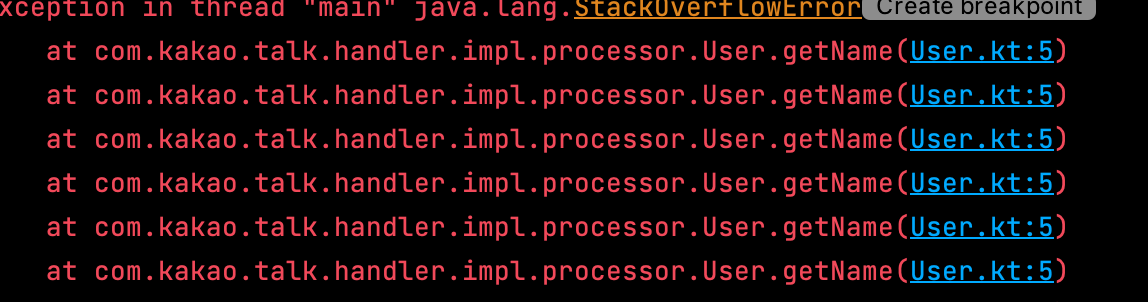
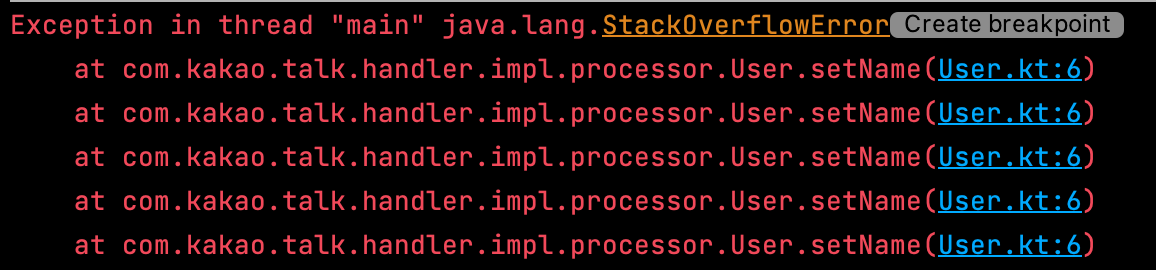
따라서 getter, setter 모두 본인의 필드를 참조하는 경우에는 StackOverflowException 을 발생시키게 된다. 친절하게도 intellij 에서는 recursive call 이라고 안내를 해주고 있다.
추가로 kotlin을 kotlinc를 사용하여 생성된 바이트코드를 보면 어떤 경우에 backing field가 생성되는지를 볼 수 있다. 즉 backing field가 인스턴스 변수로 생성되는 경우는 아래와 같다.
하나이상의 기본 접근자를 사용하는 경우 (getter, setter)
커스텀하게 만든 접근자에서 field 를 사용하는 경우.
data class HttpResponse(val body: String, var headers: Map<String, String>) {

    val hasBody: Boolean
        get() = body.isNotBlank()

    var statusCode: Int = 100
        set(value) {
            if (value in 100..599) field = value
        }
}
body, header는 기본 접근자를 이유로, statusCode는 커스텀 접근자를 이유로 생성되는데, hasBody는 그렇지 않다. (필드로 생성되지 않는다.)
javap -c -p com.kakao.talk.HttpResponse

 Compiled from "BackingField.kt"

public final class com.jyami.HttpResponse {
  private final java.lang.String body;
  private java.util.Map<java.lang.String, java.lang.String> headers;
  private int statusCode;

  // 함수들의 어셈블러 코드
Backing field
class User(name: String) {
    var name: String = name
        get() = name
        set(value) {name = value}

}
Given a class like the one above, in Kotlin, accessing the property via get or set will cause a recursive call.
public fun main(){
  println(User("mj").name)
    User("mj").name = "jyami"
}
Since accessing the name property is essentially the same as calling its getter, it ends up being equivalent to get() = this.get() — calling the getter triggers the getter again.
Likewise, assigning to the name property is the same as calling its setter, so set()=this.set("jyami") ends up calling the setter again.
So if both the getter and setter reference their own field, it will throw a StackOverflowException. Thankfully, IntelliJ is kind enough to warn you with a "recursive call" message.
Additionally, if you look at the bytecode generated by kotlinc, you can see when a backing field is actually created. In other words, a backing field is generated as an instance variable in the following cases:
When at least one default accessor is used (getter, setter)
When a custom accessor uses the field identifier.
data class HttpResponse(val body: String, var headers: Map<String, String>) {

    val hasBody: Boolean
        get() = body.isNotBlank()

    var statusCode: Int = 100
        set(value) {
            if (value in 100..599) field = value
        }
}
body and headers get backing fields because they use default accessors, and statusCode gets one because of its custom accessor — but hasBody does not. (It is not generated as a field.)
javap -c -p com.kakao.talk.HttpResponse

 Compiled from "BackingField.kt"

public final class com.jyami.HttpResponse {
  private final java.lang.String body;
  private java.util.Map<java.lang.String, java.lang.String> headers;
  private int statusCode;

  // Assembler code for functions
Kotlin Void vs Unit vs Nothing | Kotlin Void vs Unit vs Nothing
쟈 미
728x90
Void
자바의 void
java.lang 패키지안에 있는 Void 클래스 : java의 primitive type인 void를 래핑하는 객체이다. (int wrapper인 Integer과 같다고 보면 된다.)
자바에서는 void 말고 Void를 리턴해야하는 경우가 많지 않다. : 제네릭에서 Void를 사용하는 정도의 용례
package java.lang;

/**
 * The {@code Void} class is an uninstantiable placeholder class to hold a
 * reference to the {@code Class} object representing the Java keyword
 * void.
 *
 * @author  unascribed
 * @since   1.1
 */
public final
class Void {

    /**
     * The {@code Class} object representing the pseudo-type corresponding to
     * the keyword {@code void}.
     */
    @SuppressWarnings("unchecked")
    public static final Class<Void> TYPE = (Class<Void>) Class.getPrimitiveClass("void");

    /*
     * The Void class cannot be instantiated.
     */
    private Void() {}
}
Void를 코틀린에서 사용할 때
fun returnTypeAsVoidAttempt1() : Void {
    println("Trying with Void return type")
}
이때 컴파일이 되지 않는다.
Error: Kotlin: A 'return' expression required in a function with a block body ('{...}')
그래서 코틀린에서 Void 객체를 만들어서 return 해야하나. 위의 Void 클래스 정의와 같이 private constructor로 인스턴트화가 막혀있다.
따라서 위 경우에는 어쩔수 없이 Void를 nullable로 만들고 Void? null을 리턴해야한다.
fun returnTypeAsVoidAttempt1() : Void? {
    println("Trying with Void return type")
    return null
}
작동하는 솔루션이 있긴하나. java의 void와 같이 동일한 결과를 낼 수 있는 방법으로 Unit 타입이 있다. (의미 있는 것을 반환하지 않는 함수의 반환 유형)
반환타입이 Unit일 경우네는, return Unit;. return; 모두 선택적으로 작성해도 된다.
fun printHello(name: String?): Unit{
    if (name != null) {
        println("hello $name")
    } else {
        println("Hi")
    }
}
java에서의 void와 대응한다. 그러나 자바에서 void는 반환 값이 없음을 의미하는 특수 타입이지만, Unit은 class로 정의된 일반타입이다.
Unit은 기본 반환 유형이므로 그리고 return 타입 명시를 안했을 때도 함수가 작동한다.
// Unit.kt
package kotlin

/**
 * The type with only one value: the `Unit` object. This type corresponds to the `void` type in Java.
 */
public object Unit {
    override fun toString() = "kotlin.Unit"
}
따라서 Unit 타입을 반환하는 함수는 return을 생략해도 암묵적으로 Unit 타입 객체를 리턴한다 (싱글턴 객체이므로 객체 생성은 하지 않는다.)
즉 기원적으로 Void는 Java를 사용할 때 만들어진 클래스, Unit은 Kotlin을 사용할 때 만들어진 클래스인 듯
Nothing
kotlin에서는 throw가 expression 이다. 그래서 이때 throw의 타입이 Nothing 이다.
이 타입은 값이 없으며, 도달할 수 없는 코드 위치를 표한하는데 사용된다. Nothing을 사용하면, 도달할 수 없는 코드의 위치를 컴파일단에서 체크가 가능하다.
fun fail(message: String): Nothing {
    throw IllegalArgumentException(message)
}
컴파일단 체크 덕분에 잠재적인 버그와 좋지 않은 코드로부터 확인이 가능하다. 반환 유형이 Nothing인 함수가 호출되면 이 함수 호출 이상으로 실행되지 않고, 컴파일러에서 경고를 내보낸다.
fun invokeANothingOnlyFunction() {
    fail("nothing")
        println("hello") // Unreachable code
}
또한 Nothing은 type inference (타입추론)에도 사용이 가능하다.
null을 사용하여 초기화된 값일 때의 타입추론
구체적인 타입을 결정하는데 사용할 수 없는 경우에서의 타입추론
val x = null // "type : Nothing?"
val l = listOf(null) // "type : List<Nothing?>"
Nothing은 java에서 대응되는 개념이 없으며, 자바에서는 주로 throw 처리를 할 때 void를 사용했었다.
// Nothing.kt
package kotlin

/**
 * Nothing has no instances. You can use Nothing to represent "a value that never exists": for example,
 * if a function has the return type of Nothing, it means that it never returns (always throws an exception).
 */
public class Nothing private constructor()
마찬가지로 Nothing도 객체를 생성할 수 없다. (값을 가지지 않는다.)
따라서 Nothing이 값을 가질 수 있는 경우는 Nothing? 에서 null 이 할당되었을 때 뿐이다.
Void
Java's void
The Void class in the java.lang package: It's an object that wraps Java's primitive type void. (Think of it like Integer being the wrapper for int.)
In Java, there aren't many cases where you need to return Void instead of void — it's mostly used in generics.
package java.lang;

/**
 * The {@code Void} class is an uninstantiable placeholder class to hold a
 * reference to the {@code Class} object representing the Java keyword
 * void.
 *
 * @author  unascribed
 * @since   1.1
 */
public final
class Void {

    /**
     * The {@code Class} object representing the pseudo-type corresponding to
     * the keyword {@code void}.
     */
    @SuppressWarnings("unchecked")
    public static final Class<Void> TYPE = (Class<Void>) Class.getPrimitiveClass("void");

    /*
     * The Void class cannot be instantiated.
     */
    private Void() {}
}
Using Void in Kotlin
fun returnTypeAsVoidAttempt1() : Void {
    println("Trying with Void return type")
}
This won't compile.
Error: Kotlin: A 'return' expression required in a function with a block body ('{...}')
So should we create a Void object and return it in Kotlin? Well, as you can see from the Void class definition above, instantiation is blocked by a private constructor.
So in this case, you have no choice but to make Void nullable as Void? and return null.
fun returnTypeAsVoidAttempt1() : Void? {
    println("Trying with Void return type")
    return null
}
While this is a working solution, there's a better way to achieve the same result as Java's void — the Unit type. (It's the return type for functions that don't return anything meaningful.)
When you don't need a return value, you use Unit as the function's return type.
When the return type is Unit, both return Unit; and return; are optional — you can write either or omit them entirely.
fun printHello(name: String?): Unit{
    if (name != null) {
        println("hello $name")
    } else {
        println("Hi")
    }
}
It corresponds to void in Java. However, while void in Java is a special type meaning "no return value," Unit is a regular type defined as a class.
Since Unit is the default return type, functions work even when you don't explicitly specify a return type.
// Unit.kt
package kotlin

/**
 * The type with only one value: the `Unit` object. This type corresponds to the `void` type in Java.
 */
public object Unit {
    override fun toString() = "kotlin.Unit"
}
So a function that returns Unit implicitly returns the Unit object even if you omit the return statement. (Since it's a singleton object, no new object is created.)
In other words, it seems like Void is a class that originated from Java, while Unit is a class that originated from Kotlin.
Nothing
In Kotlin, throw is an expression. And the type of that throw expression is Nothing.
This type has no value and is used to mark code locations that can never be reached. By using Nothing, unreachable code locations can be checked at compile time.
fun fail(message: String): Nothing {
    throw IllegalArgumentException(message)
}
Thanks to compile-time checks, you can catch potential bugs and bad code. When a function with a return type of Nothing is called, execution never continues beyond that function call, and the compiler emits a warning.
fun invokeANothingOnlyFunction() {
    fail("nothing")
        println("hello") // Unreachable code
}
Nothing can also be used in type inference.
Type inference for values initialized with null
Type inference when a concrete type cannot be determined
val x = null // "type : Nothing?"
val l = listOf(null) // "type : List<Nothing?>"
Nothing has no corresponding concept in Java. In Java, void was typically used when handling throw.
// Nothing.kt
package kotlin

/**
 * Nothing has no instances. You can use Nothing to represent "a value that never exists": for example,
 * if a function has the return type of Nothing, it means that it never returns (always throws an exception).
 */
public class Nothing private constructor()
Likewise, Nothing cannot be instantiated either. (It holds no value.)
Therefore, the only case where Nothing can hold a value is when null is assigned to Nothing?.
위와같이 간단한 코드만 짜서 서버 RUN을 시키면? 서버 실행 속도가 이렇게까지 빨라도 되는건가.. spring안쓰고 간단하게 서버 만들고 싶을 때 쓰면 좋을 것 같다.
b. engineMain (HOCON 포맷)
위 예제는 embeddedServer로 짜는 방법을 적었는데, 만약 EngineMain 방식으로 ktor 서버를 짜고 싶다면 조금 다른 방식이다.
// main.kotlin.com.jyami

fun main(args: Array<String>): Unit = io.ktor.server.netty.EngineMain.main(args)

fun Application.module() {
    configureRouting()
}


// main.kotlin.com.jyami.plugins

fun Application.configureRouting() {
    routing {
        get("/") {
            call.respondText("Hello World!")
        }
    }
}


// resource

ktor {
    deployment {
        port = 8080
    }
    application {
        modules = [ com.jyami.ApplicationKt.module ]
    }
}
HOCON 포맷이라고한다. resources 폴더안에 application.conf 파일을 이용해서 실행시킬 포트나, entry point에대한 애플리케이션 설정을 작성한다. application.conf 관련 여러 설정들 : https://ktor.io/docs/configurations.html
get("{id}") {
    val id = call.parameters["id"] ?: return@get call.respondText(
        "Missing or malformed id",
        status = HttpStatusCode.BadRequest
    )
    val customer = customerStorage.find {it.id == id} ?: return@get call.respondText (
        "No customer with id $id",
        status = HttpStatusCode.NotFound
    )
    call.respond(customer)
}
인덱스 접근자 함수 : call.parameters["myParamName"] 요청 Path를 기본적으로 string으로 가져오게 된다.
2. request body
post {
    val customer = call.receive<Customer>()
    customerStorage.add(customer)
    call.respondText ("Customer stored correctly", status = HttpStatusCode.Created)
}
call.recevie<T> : 제네릭 변수를 사용하여 호출한 request body를 자동으로 코틀린 객체로 역직렬화 한다.
동시에 여러 요청이 접근될 때 문제는 이 실습의 범위를 벗어난다 : 동시에 요청/스레드에서 액세스 할 수 있는 데이터 구조 혹은 코드를 작성하면 될 것
3. response body
get {
    if (customerStorage.isNotEmpty()) {
        call.respond(customerStorage)
    } else {
        call.respondText("No customers found", status = HttpStatusCode.NotFound)
    }
}
call.respond() : kotlin 객체를 가져와 해당 객체가 지정된 형식으로 직렬화하여 http 응답을 반환한다.
call.respondText() : Text를 응답으로 보낼 때의 respond를 간단하게 구현해둔 함수이다. 문자열 응답을 반환한다.
Routing
Route 확장함수를 이용하여 경로를 정의하였다. 이렇게 할 경우 아무래도 라우팅만 역할을 빼서 코드를 관리할 수 있어서 좋아보인다. Application.module에 있는 라우팅 블록 내부에 각 경로를 직접 추가할 수 있긴하지만, 파일 경로들을 그룹화하여 관리하는 것이 유지보수에 더 좋다.
Route 확장함수만을 사용하여 경로를 정의할 경우 실제 Ktor 서버에는 적용되지 않는데, 맨 처음 ktor 시작하기에 했던 것처럼, route를 Application에 등록해주는 과정이 필요하다. 즉, Route.module에 등록된 경로들을 Application.module에 등록하는 방식으로 관리하자.
Application의 확장함수를 사용함으로써 application에 등록할 path를 route dsl을 이용하여 등록할 수 있으며, 이 dsl에는 사실상 Route 모듈에 등록된 경로를 Application에 경로를 등록하도록 도와주는 것으로 보인다.
fun Route.customerRouting() {
    route("/customer") {
    	get{}
    }
}

fun Application.registerCustomerRoutes() {
    routing {
        customerRouting()
    }
}

fun main() {
    embeddedServer(Netty, port = 8080, host = "0.0.0.0") {
        registerCustomerRoutes()
        install(ContentNegotiation){
            json()
        }
    }.start(wait = true)
}
4. Ktor 테스트
ktor-server-test-host : netty를 시작하지 않고도 endpoint 테스트가 가능하다. 테스트 request를 실행하기 위한 몇가지 헬퍼 메서드가 프레임워크에서 제공되며, 그중 하나가 TestApplication 이다.
다만 embeddedServer 방식으로 withTestApplication을 작성하는 경우에는, main() 함수안에 직접 선언이 되어있어 애플리케이션에 대한 모든 테스트는 불가능하고 위에서 내가 정의한 configureRouting(), registerCustomRouting(), registerOrderRouting()과 같이 Application 확장함수 단위로 테스트가 가능하다.
다만 여기서 주의해야할 점은 configureRouting은 단일하게 넣어도 테스트가 가능하나, registerOrderRouting, registerCustomRouting의 경우에는 불가능하다 왜냐하면 이것들을 직접 넣고 돌리게되면, Application에 등록해둔 ContentNegotiation이 빠지게 될것이고, serialize과정에 문제가 생겨서 테스트가 실패하게 될 것이다. 따라서 테스트시 두개의 configuration을 함께 등록하여 테스트해야한다.
위와같이 테스트가 가능하게 되면서, ktor을 사용할 경우에는 모듈별로, 설정별로 테스트가 손쉽게 될 것으로 보인다. 사실, embeddedServer나 HOCON이나 하나의 Application 확장함수를 만들어서 테스트하는건 같아서 입맛대로 사용하도록하자.
This is the basic skeleton for running a server. The routing part is typically extracted into a plugin-style pattern like configureXXX as shown below, separating concerns. (Using Kotlin's extension functions)
If you write just this simple code and RUN the server? Is it even okay for the server startup to be this fast.. Seems like it would be great for quickly spinning up a server without using Spring.
b. engineMain (HOCON Format)
The example above showed how to write it using embeddedServer. If you want to build a ktor server using the EngineMain approach, it's a slightly different method.
// main.kotlin.com.jyami

fun main(args: Array<String>): Unit = io.ktor.server.netty.EngineMain.main(args)

fun Application.module() {
    configureRouting()
}


// main.kotlin.com.jyami.plugins

fun Application.configureRouting() {
    routing {
        get("/") {
            call.respondText("Hello World!")
        }
    }
}


// resource

ktor {
    deployment {
        port = 8080
    }
    application {
        modules = [ com.jyami.ApplicationKt.module ]
    }
}
It's called the HOCON format. You write the application configuration — such as the port to run on and the entry point — in an application.conf file inside the resources folder. Various settings for application.conf: https://ktor.io/docs/configurations.html
It provides the ability to create executable JVM applications. It makes it easy to start the application during development and also supports application packaging like TAR and ZIP.
The application plugin has both the java and distribution plugins built in. Each seems to be a plugin that provides source sets for main and packaging functionality for distribution, respectively.
When using the application plugin, specifying the main class (i.e. entry point) in the configuration is mandatory.
get("{id}") {
    val id = call.parameters["id"] ?: return@get call.respondText(
        "Missing or malformed id",
        status = HttpStatusCode.BadRequest
    )
    val customer = customerStorage.find {it.id == id} ?: return@get call.respondText (
        "No customer with id $id",
        status = HttpStatusCode.NotFound
    )
    call.respond(customer)
}
Index accessor function: call.parameters["myParamName"] It retrieves the request path as a string by default.
2. request body
post {
    val customer = call.receive<Customer>()
    customerStorage.add(customer)
    call.respondText ("Customer stored correctly", status = HttpStatusCode.Created)
}
call.receive<T>: Uses a generic type parameter to automatically deserialize the request body into a Kotlin object.
Handling concurrent request access is beyond the scope of this tutorial — you'd just need to write data structures or code that can handle simultaneous requests/threads.
3. response body
get {
    if (customerStorage.isNotEmpty()) {
        call.respond(customerStorage)
    } else {
        call.respondText("No customers found", status = HttpStatusCode.NotFound)
    }
}
call.respond(): Takes a Kotlin object, serializes it into the specified format, and returns it as an HTTP response.
call.respondText(): A convenience function for sending text as a response. Returns a string response.
Routing
Routes are defined using Route extension functions. This approach is nice because it lets you separate and manage just the routing logic on its own. While you could add each route directly inside the routing block in Application.module, grouping file paths together is better for maintainability.
If you only define routes using Route extension functions, they won't actually be applied to the Ktor server. As we did in the initial ktor setup, you need to register the routes with the Application. In other words, manage it by registering the routes defined in Route.module into Application.module.
By using Application extension functions, you can register paths to the application using the route DSL. This DSL essentially helps register the routes defined in the Route module into the Application.
fun Route.customerRouting() {
    route("/customer") {
    	get{}
    }
}

fun Application.registerCustomerRoutes() {
    routing {
        customerRouting()
    }
}

fun main() {
    embeddedServer(Netty, port = 8080, host = "0.0.0.0") {
        registerCustomerRoutes()
        install(ContentNegotiation){
            json()
        }
    }.start(wait = true)
}
4. Testing in Ktor
ktor-server-test-host: Allows endpoint testing without starting Netty. The framework provides several helper methods for executing test requests, and one of them is TestApplication.
HOCON approach: A structure where all configurations can be registered at once
This appears to be usable with the HOCON format. (For the embeddedServer approach, it seems you'd use a direct call method with httpClient instead: https://ktor.io/docs/testing.html#end-to-end)
The key part is withTestApplication, which injects the application you want to run for testing. (It looks like any method in the form of Application.module() can be injected.)
With the HOCON format, since the Application extension function is defined outside of main before being put into main, all configurations for that application are registered and can be tested. So testing with module() as shown above works just fine.
embeddedServer approach: A structure where you can register only the needed modules in the configuration for testing
However, when writing withTestApplication with the embeddedServer approach, since everything is declared directly inside the main() function, you can't test the entire application at once. Instead, you can test at the Application extension function level — like configureRouting(), registerCustomRouting(), and registerOrderRouting() that I defined above.
One thing to watch out for here: configureRouting can be tested on its own, but registerOrderRouting and registerCustomRouting cannot. That's because if you plug them in directly and run them, the ContentNegotiation registered in the Application will be missing, causing issues with the serialization process and making the tests fail. So you need to register both configurations together when testing.
With testing set up like this, using ktor makes it look easy to test by module and by configuration. Honestly, whether you use embeddedServer or HOCON, it's the same in that you create one Application extension function and test with it, so just use whichever you prefer.





댓글
Comments