Develop/DevOps

[Intellij] GCP Plugin - Cloud Code 사용하기 in GCS | [Intellij] GCP Plugin - Using Cloud Code in GCS

GCP Storage를 연동하여 사용하는 글을 블로그에 포스팅하려고 Spring initializer을 이용해서 프로젝트를 생성하면서 좋은 플러그인을 발견하여 기록하려 한다.위와 같은 dependency로 새로운 프로젝트를 설정하니, Cloud Code라는plugin 추천이 떠서 받아보았다.Google에서 개발한 플러그인으로, Stackdriver Debugger와 통합되서 GCP에서 실행되는 프로덕션 애플리케이션을 intellij에서 디버깅할 수 있다. 특히 Stackdriver Debugger를 사용하면 Stackdriver Debugger를 사용하면 Compute Engine과 App Engine 표준 환경 및 가변형 환경 모두에 배포된 자바 애플리케이션을 디버깅할 수 있다. 또한 App Engin..

[Intellij] GCP Plugin - Cloud Code 사용하기 in GCS | [Intellij] GCP Plugin - Using Cloud Code in GCS

728x90

GCP Storage를 연동하여 사용하는 글을 블로그에 포스팅하려고 Spring initializer을 이용해서 프로젝트를 생성하면서 좋은 플러그인을 발견하여 기록하려 한다.
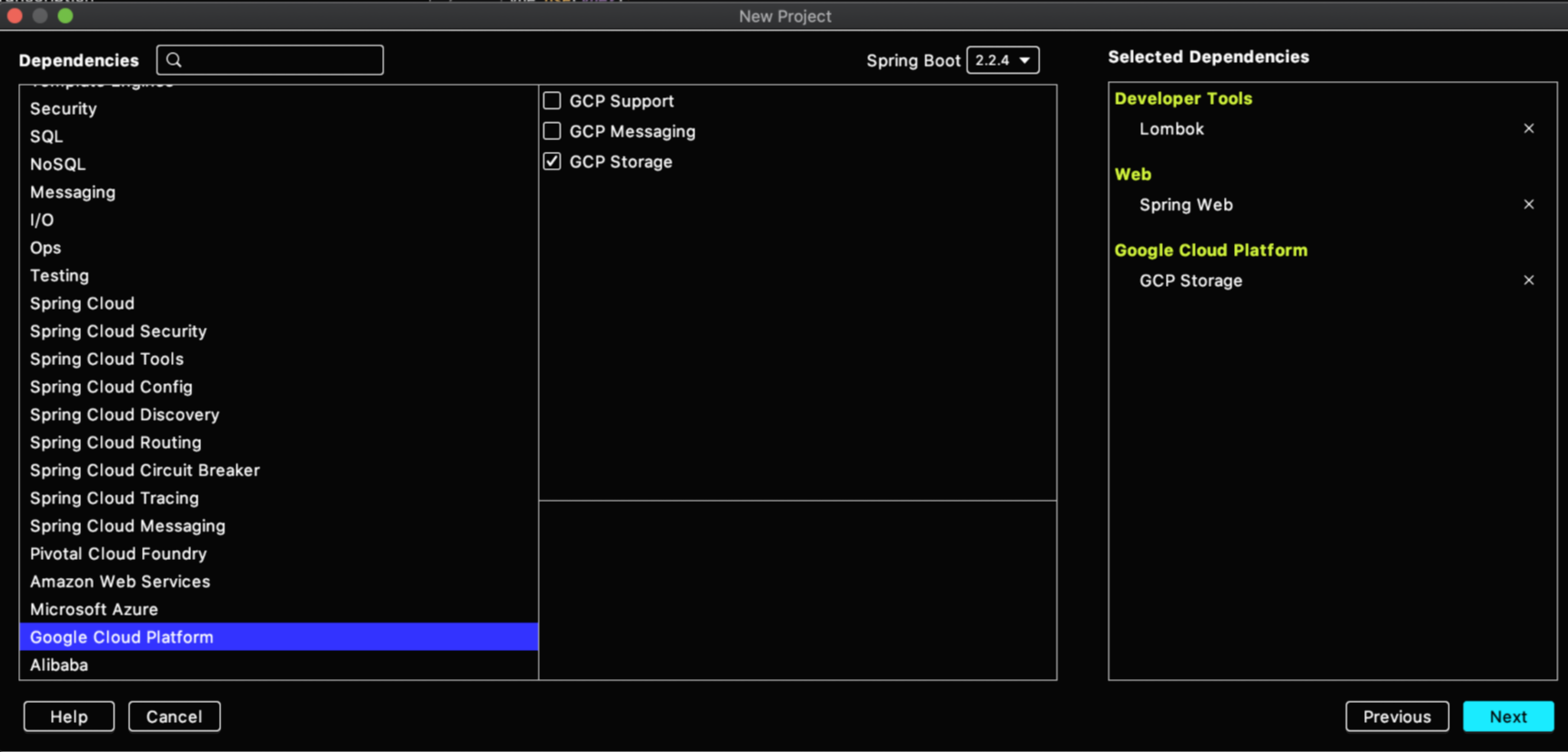
Initializer에 Google Cloud Platform 관련 dependency를 추가할 수 있다.

위와 같은 dependency로 새로운 프로젝트를 설정하니, Cloud Code라는plugin 추천이 떠서 받아보았다.

Google에서 개발한 플러그인으로, Stackdriver Debugger와 통합되서 GCP에서 실행되는 프로덕션 애플리케이션을 intellij에서 디버깅할 수 있다. 특히 Stackdriver Debugger를 사용하면 Stackdriver Debugger를 사용하면 Compute Engine과 App Engine 표준 환경 및 가변형 환경 모두에 배포된 자바 애플리케이션을 디버깅할 수 있다. 또한 App Engine 환경 배포를 직접 IDE에서 할 수 있는 장점도 있다.
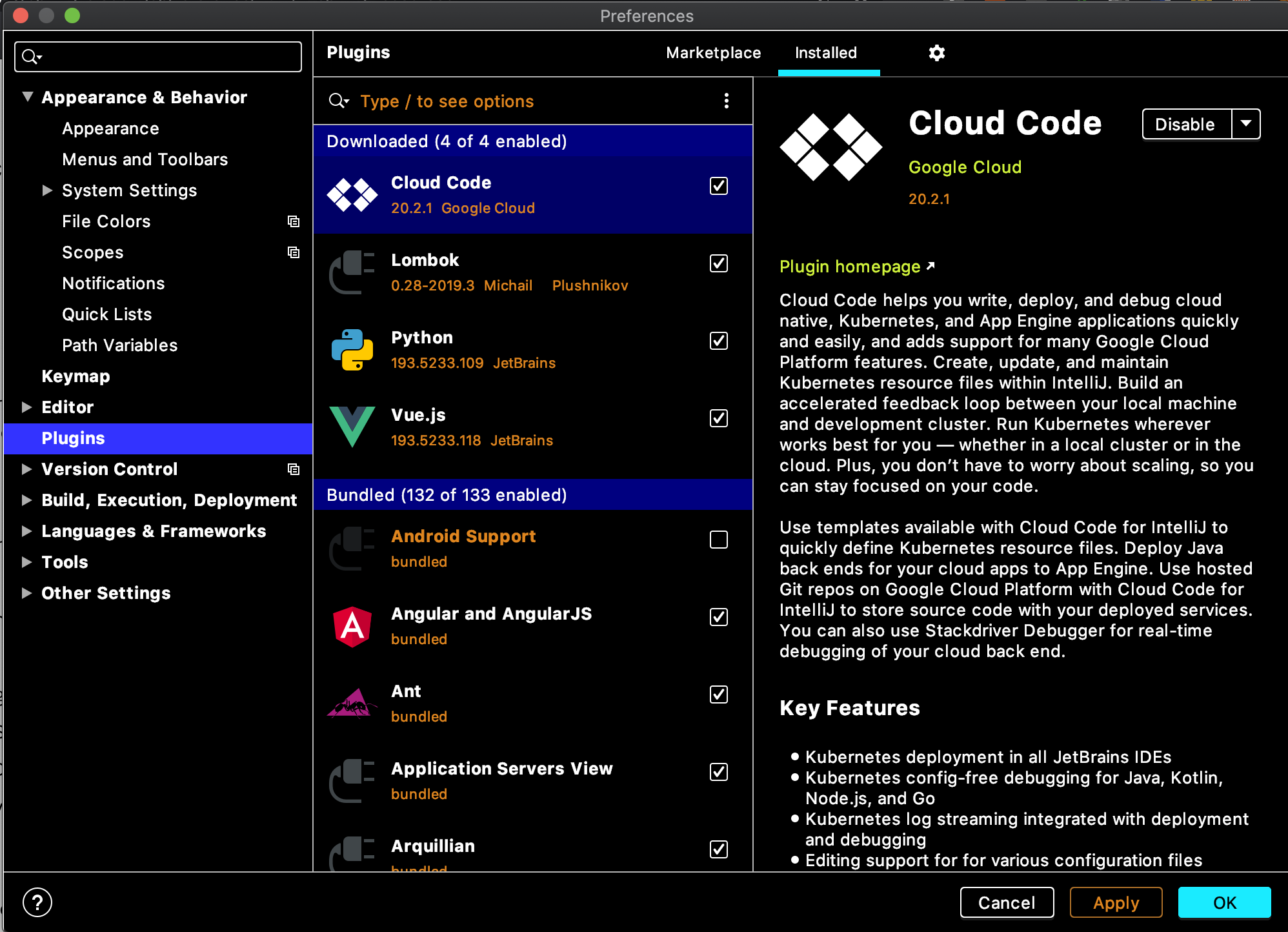
인텔리제이의 Preference [ ⌘ + , ] > Plugins > clod code 를 입력해서 설치할 수 있고, 설치가 완료될 경우 intellij를 restart 해야 플러그인을 적용할 수 있다.

https://cloud.google.com/code/docs/intellij/how-to


안내 가이드  |  IntelliJ용 Cloud Code  |  Google Cloud

Except as otherwise noted, the content of this page is licensed under the Creative Commons Attribution 4.0 License, and code samples are licensed under the Apache 2.0 License. For details, see the Google Developers Site Policies. Java is a registered trade

cloud.google.com

설명서를 읽어보니 Intellij가 아니더라도 JetBrains 의 여러 IDE에서 가능했다. 다만 Intellij에 최적화된 플러그인이다.

PyCharm / WebStorm / PhpStorm / Rider / RubyMine / GoLand / AppCode / CLion
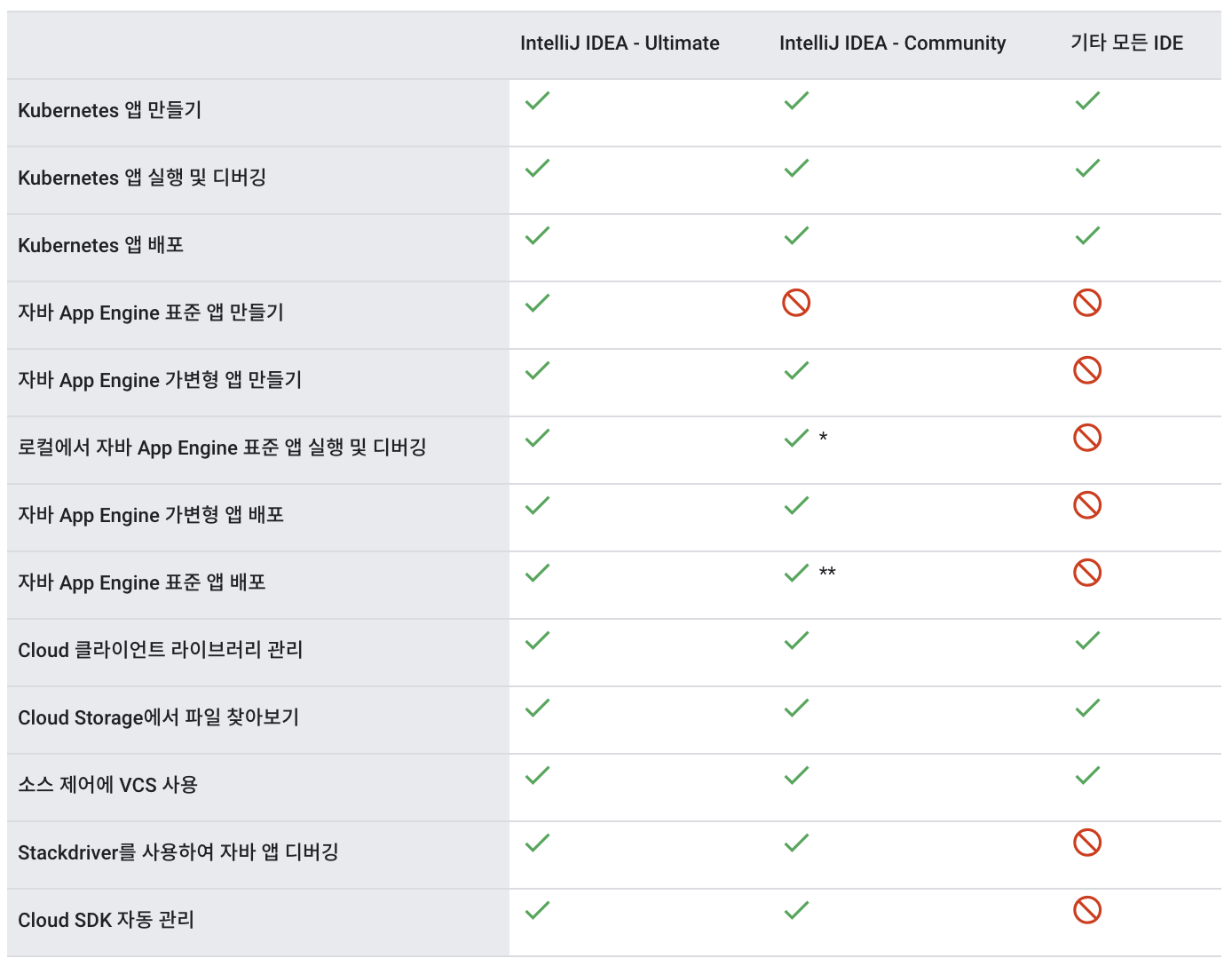
또한 Cloud code에서 제공하는 Google Cloud Platform에서 지원되는 프로덕트 리스트는 총 6개로 아래와 같으며 개요를 읽어보니 Kubernetes 개발, 배포에서의 편리성이 가장 큰 장점인 듯하다.
근데 나는 Storage 작업을 할 건데,, 여튼 저튼 쨋든

1. Kubernetes : 애플리케이션 만들기, 애플리케이션 배포
2. App Engine : 애플리케이션 만들기 (가변, 표준)
3. Cloud API 및 GCP 라이브러리 관리
4. Cloud Storage : 버킷 안 콘텐츠 탐색
5. Cloud Source Repositories
6. Stackdriver Debugger : logging

storage 연동 첫 시작

플러그인 설치를 완료하면 인텔리제이 우측 바에 google cloud storage, kubernetes Explorer 탭이 생기게 되는데,
현재 내가 개발할 프로젝트는 cloud storage와 관련된 것이라, storage 탭에 대해 알아보려 한다.

storage에 대한 정보를 얻어오려면 GCP의 project를 가져와야 하기 때문에, 그 프로젝트의 권한을 가진 account로 로그인을 진행해준다.
로그인 버튼을 누르면 왼쪽 아래 그림과 같이 로그인 창이 뜨고 허용을 눌러주면 된다.
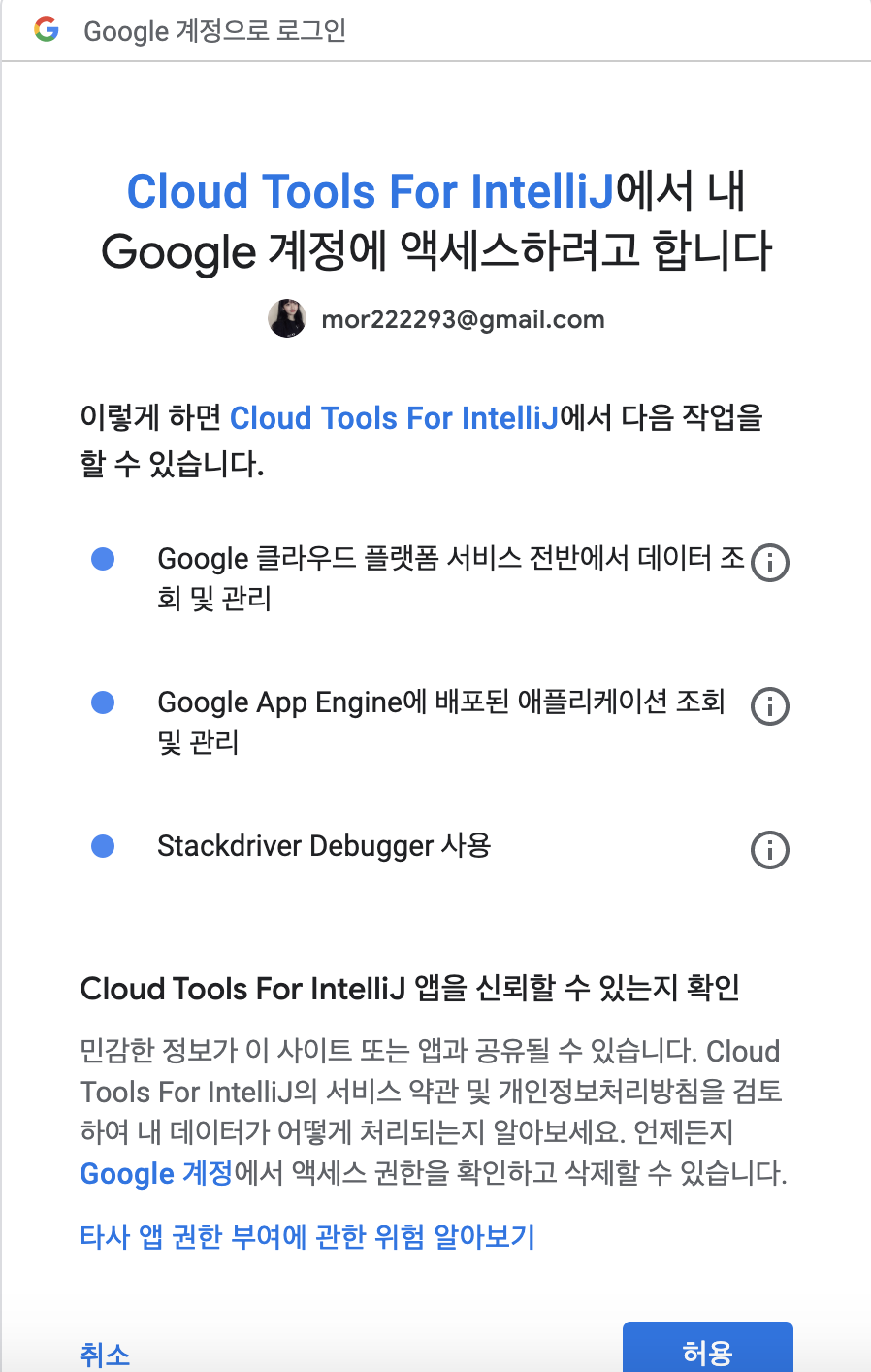
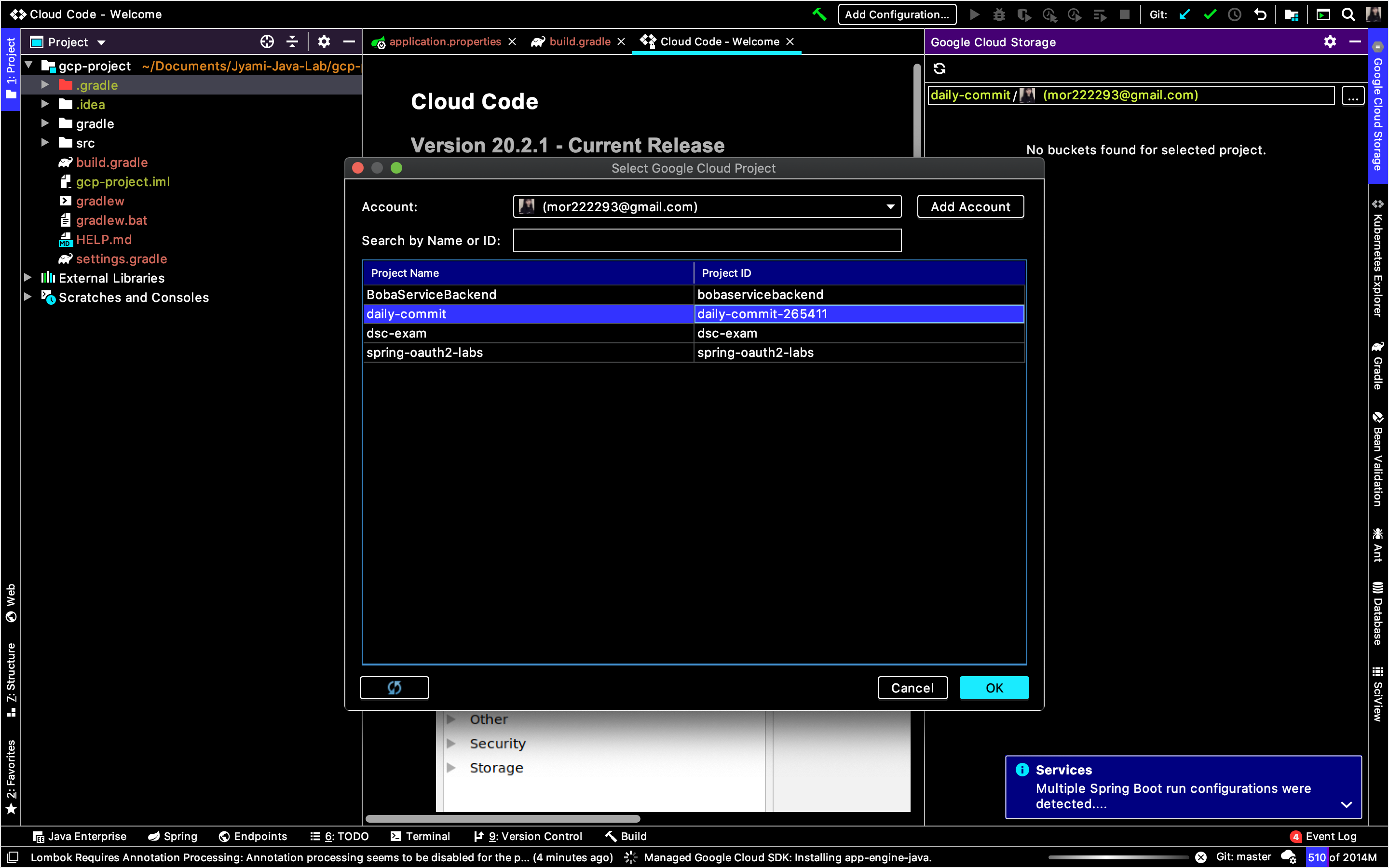
그리고 다시 Google Cloud Storage 탭으로 돌아와서 project를 선택해주면 되는데, 내가 현재 선택한 account가 권한을 가진 프로젝트 리스트들이 보이므로, storage를 사용할 project를 선택한다. 

나는 daily-commit이라는 개인 프로젝트를 선택하였다. 이렇게 간단하게 연동이 마무리된다.
따로 console.cloud web을 통해 bucket안에 들어있는 파일, 폴더를 찾아보지 않아도, 개발하는 IDE 안에서 볼 수 있다는 장점이 있다.

나는 프로젝트에 두 개의 bucket을 만들었고, ewha-commiters-static-file이라는 버킷 안에 여러 폴더 + 파일들을 저장해둔 상태이다.
이런 내용을 기존에 GCP console Web을 이용해서 봤다면, 플러그인을 이용해서
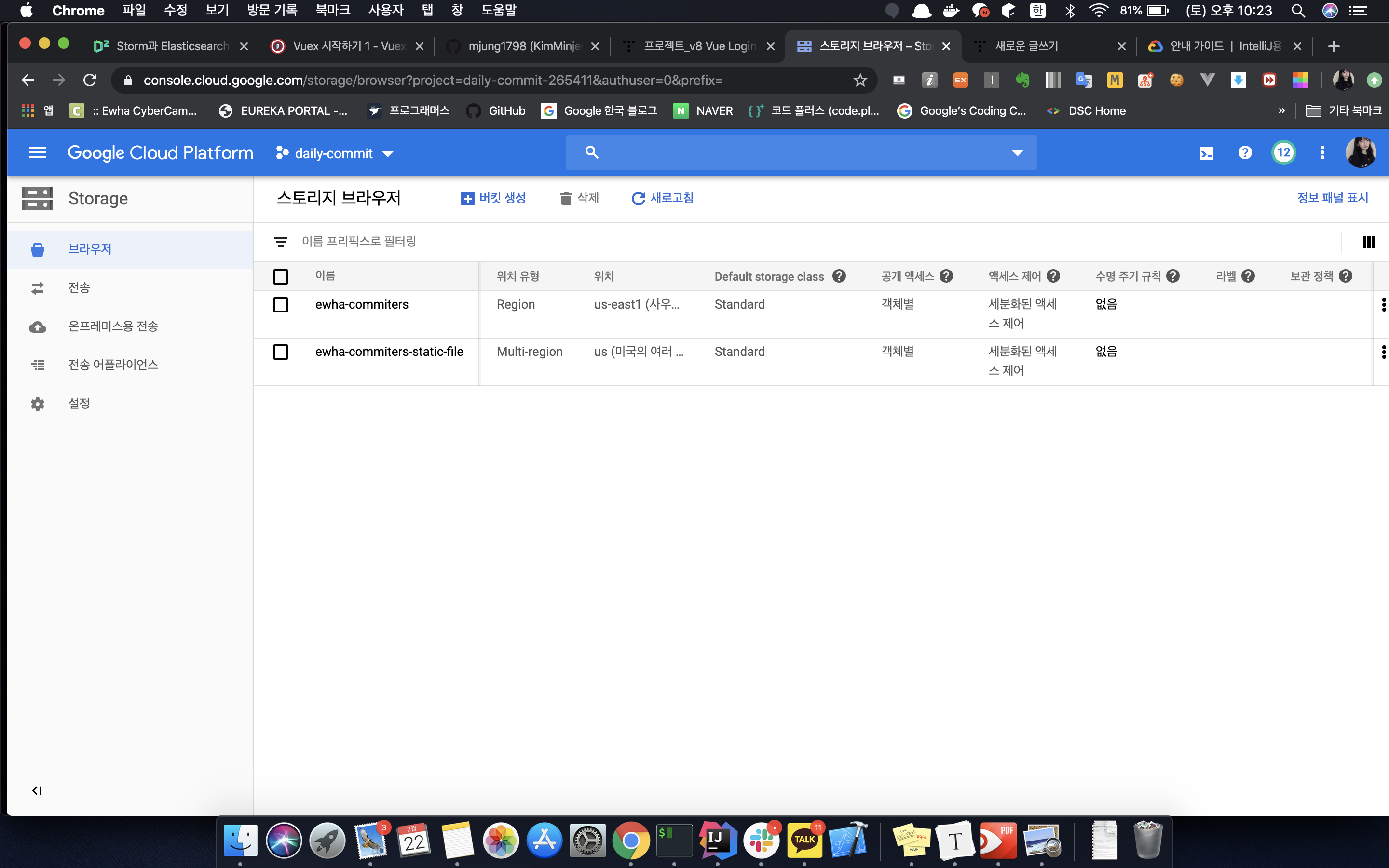
아래와 같이 Intellij IDE 안에서 bucket안에 있는 파일의 내용을 확인할 수 있다.
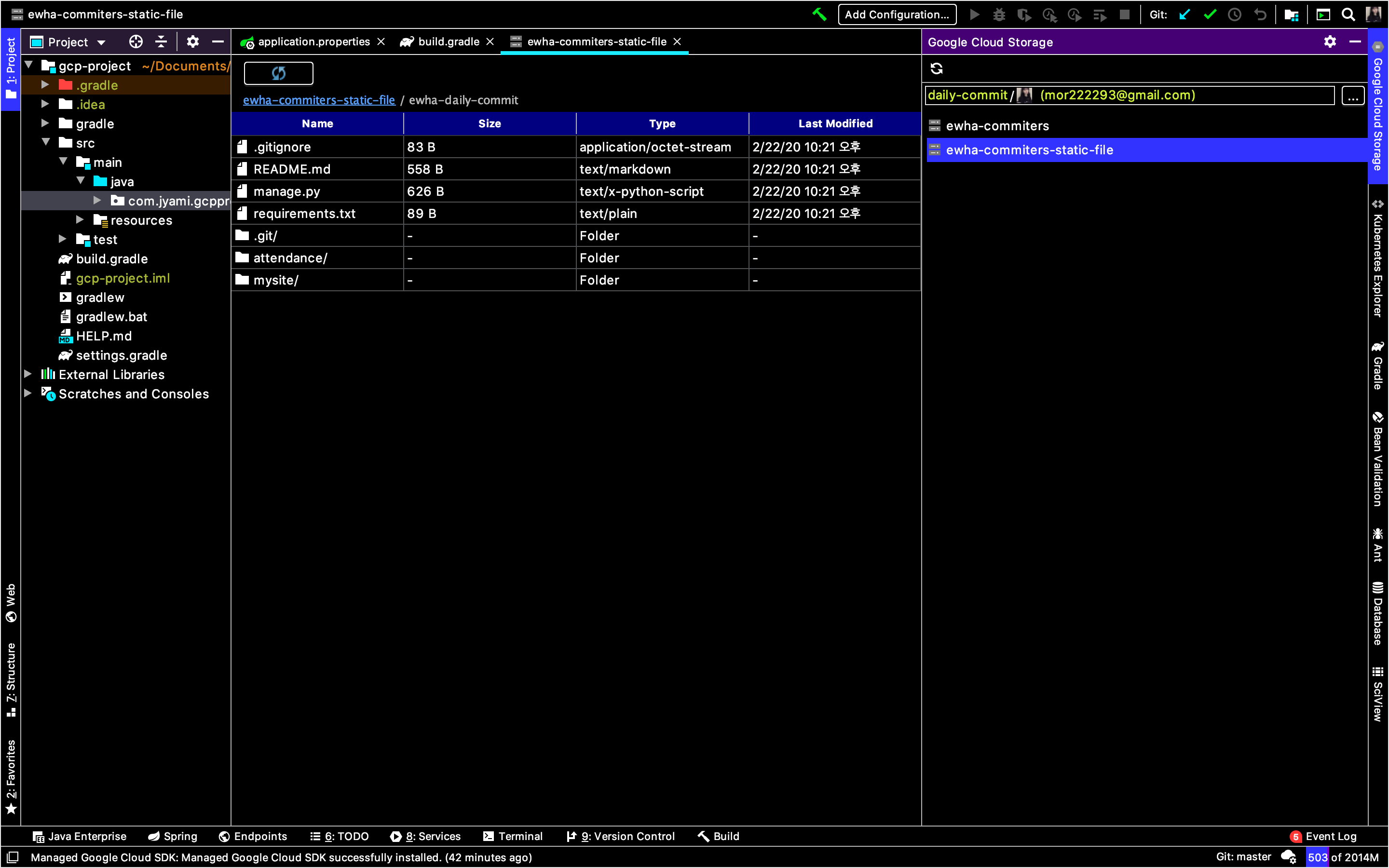
다만 아쉬운 게 있다면, Web GCP Console에서는 파일의 URL 및 다운로드 경로도 알 수 있었는데, plugin에서는 지원하지 않는다.
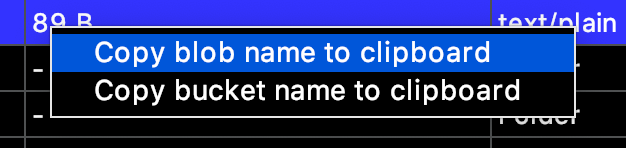
우클릭을 하면 아래와 같이 blob name과 bucket name을 복사할 수 있는데, 이를 이용해서 수제로 URL, 다운로드 경로를 만들어주자.

URL : gs://[bucket-name]/[blob-name]
링크 URL : https://storage.cloud.google.com/[bucket-name]/[blob-name]?authuser=0
 

storage 버켓 확인은 이 플러그인을 효과적으로 사용하는 것 같지 않아서, 다음번엔 Stackdriver의 log를 플러그인을 통해서 확인하는 방법을 찾아봐야겠다. 

I was about to write a blog post about integrating GCP Storage, and while creating a project using Spring Initializer, I discovered a nice plugin that I wanted to document.

You can add Google Cloud Platform related dependencies in the Initializer.

When I set up a new project with the dependencies shown above, a plugin recommendation for Cloud Code popped up, so I gave it a try.

It's a plugin developed by Google that integrates with Stackdriver Debugger, allowing you to debug production applications running on GCP directly from IntelliJ. In particular, with Stackdriver Debugger, you can debug Java applications deployed on both Compute Engine and App Engine standard and flexible environments. It also has the advantage of letting you deploy to App Engine environments directly from the IDE.

You can install it by going to IntelliJ's Preferences [ ⌘ + , ] > Plugins > and searching for "cloud code." Once the installation is complete, you need to restart IntelliJ to apply the plugin.

https://cloud.google.com/code/docs/intellij/how-to


How-to Guides  |  Cloud Code for IntelliJ  |  Google Cloud

Except as otherwise noted, the content of this page is licensed under the Creative Commons Attribution 4.0 License, and code samples are licensed under the Apache 2.0 License. For details, see the Google Developers Site Policies. Java is a registered trade

cloud.google.com

After reading the documentation, I found out it works not only with IntelliJ but also with several other JetBrains IDEs. However, it is optimized for IntelliJ.

PyCharm / WebStorm / PhpStorm / Rider / RubyMine / GoLand / AppCode / CLion

Also, Cloud Code supports a total of 6 Google Cloud Platform products as listed below. After reading the overview, it seems like the biggest advantage is the convenience in Kubernetes development and deployment.
But I'm just going to work with Storage, so... anyway, moving on.

1. Kubernetes : Create applications, deploy applications
2. App Engine : Create applications (flexible, standard)
3. Cloud API and GCP library management
4. Cloud Storage : Browse contents within buckets
5. Cloud Source Repositories
6. Stackdriver Debugger : logging

Getting started with Storage integration

Once the plugin installation is complete, you'll see Google Cloud Storage and Kubernetes Explorer tabs appear on the right sidebar of IntelliJ.
Since the project I'm currently working on is related to Cloud Storage, I'm going to look into the Storage tab.

To retrieve information about storage, you need to fetch the GCP project, so you'll need to log in with an account that has permissions for that project.
When you click the login button, a login window like the one on the left below will appear — just click "Allow."

Then go back to the Google Cloud Storage tab and select your project. You'll see a list of projects that your currently selected account has permissions for, so just pick the project you want to use with Storage. 

I selected my personal project called "daily-commit." And just like that, the integration is done.
The nice thing is that you don't have to go through console.cloud web to look for files and folders inside your buckets — you can see them right inside the IDE where you're developing.

I created two buckets in my project and have stored several folders and files inside a bucket called "ewha-commiters-static-file."
If you used to check this kind of stuff through the GCP Console Web, now you can use the plugin instead.

As shown below, you can view the contents of files inside a bucket right within the IntelliJ IDE.

One downside though — in the Web GCP Console, you could see the file's URL and download path, but the plugin doesn't support that.
If you right-click, you can copy the blob name and bucket name as shown below. You can use these to manually construct the URL and download path.

URL : gs://[bucket-name]/[blob-name]
Link URL : https://storage.cloud.google.com/[bucket-name]/[blob-name]?authuser=0


Checking storage buckets doesn't seem like the most effective use of this plugin, so next time I should look into how to check Stackdriver logs through the plugin. 

댓글

Comments

Daily/Code Fest

Google Cloud OnBoard 후기 & 정리본 링크 | Google Cloud OnBoard Review & Summary Notes Link

2019년 11월 26일 세종대학교에서 열린 Google Cloud OnBoard에 다녀왔습니다.11월 초 summit에 다녀오긴 했는데 실제로 핸즈온 세션이 열린다고 해서 갔다왔습니다. https://inthecloud.withgoogle.com/onboard-global/core-ko-register.html?utm_content=summit-invite&utm_source=summit&utm_medium=event&utm_campaign=FY19-Q4-apac-onboard-operational-er-KROnBoardSeoul_EV_summit Cloud OnBoardCloud OnBoard is a free, instructor-led training event, that gives you a h..

Google Cloud OnBoard 후기 & 정리본 링크 | Google Cloud OnBoard Review & Summary Notes Link

728x90

2019년 11월 26일 세종대학교에서 열린 Google Cloud OnBoard에 다녀왔습니다.

11월 초 summit에 다녀오긴 했는데 실제로 핸즈온 세션이 열린다고 해서 갔다왔습니다.


https://inthecloud.withgoogle.com/onboard-global/core-ko-register.html?utm_content=summit-invite&utm_source=summit&utm_medium=event&utm_campaign=FY19-Q4-apac-onboard-operational-er-KROnBoardSeoul_EV_summit


Cloud OnBoard

Cloud OnBoard is a free, instructor-led training event, that gives you a headstart on your journey to developing on Google Cloud Platform (GCP).

inthecloud.withgoogle.com


요약하자면 기대와는 다르게 핸즈온 세션보다 그냥 듣는 세미나가 더 길었는데, 그래도 학교를 빠지고 하루를 투자해서 갔다온 행사였어서 최대한 여기에서의 정보를 활용할 수 있는 방법을 고민하다가 결국 블로그 포스팅을 하게되었습니다.


1. 자료집 워드본

나눠준 자료집을 한번 워드로 옮기면서 머리속에 어떤 제품이 있는지 메모해두고, 앞으로 백엔드 개발하면서 제 글을 참고해서 인프라 구축할 때 도움이 될 것 같아서 정리한 링크는 아래와 같습니다.


https://jyami.tistory.com/28


[Cloud OnBoard] 1 - Google Cloud Platform 소개

2019년 11월 26일 세종대학교에서 있었던 Google Cloud OnBoard에서 나누어준 자료집의 정리본입니다 모듈1 Google Cloud Platform 소개 0. 추가 자료 GCP를 선택해야하는 이유 : https://cloud.google.com/why-go..

jyami.tistory.com


https://jyami.tistory.com/29


[Cloud OnBoard] 2 - 가상머신 및 스토리지

2019년 11월 26일 세종대학교에서 있었던 Google Cloud OnBoard에서 나누어준 자료집의 정리본입니다 모듈2 가상머신 및 스토리지 0. 추가 자료 Google Compute Engine : https://cloud.google.com/compute/docs G..

jyami.tistory.com

https://jyami.tistory.com/30


[Cloud OnBoard] 3 - 컨테이너 및 앱 개발, 배포, 모니터링

2019년 11월 26일 세종대학교에서 있었던 Google Cloud OnBoard에서 나누어준 자료집의 정리본입니다 모듈3 컨테이너 및 앱 개발, 배포, 모니터링 0. 추가자료 Kubernetes Engine : https://cloud.google.com/kube..

jyami.tistory.com

https://jyami.tistory.com/31


[Cloud OnBoard] 4 - 빅데이터 및 머신러닝

2019년 11월 26일 세종대학교에서 있었던 Google Cloud OnBoard에서 나누어준 자료집의 정리본입니다 모듈4 빅데이터 및 머신러닝 0. 추가자료 Google 빅데이터 플랫폼 : https://cloud.google.com/products/big-d..

jyami.tistory.com


2.  행사

행사 자체는 Summit하고 굉장히 비슷했어요 GCP에 대한 전반적인 소개, 각 제품의 특징을 소개하는 세미나로 이루어 졌습니다.

그래도 중간에 quiklab 쿠폰이나 Coursera 쿠폰을 주셔서 줍줍 했네요ㅋㅋ


행사장 가는길 그리고 기념품

이번 행사는 끝나면 Cloud 팝소켓을 주더라구요! 수료증도 준다고 해서, 학교 빠진 것때문에 끝까지 앉아있다 왔습니다.


Google Cloud 행사에는 항상 게임기가 있네요ㅋㅋ

세션에 대한 정리는 위를 참고하시면 될 것 같구요.

사실 핸즈온 세션의 비중이 높은줄 알고왔지만 세션이 다 끝나고 있던 클라우드 히어로가 아무래도 직접 킥랩을 풀어보는 세션이라 그런지 가장 기억에 남네요


Google Cloud Platform 과 관련해서 문제를 푸는거였는데요 킥랩을 얼마나 많이 빨리 푸느냐에 따라 점수가 달라졌습니다. 아무래도 저는 GCP를 접한지 얼마 안되서 1번 2번을 풀다가 그만 했어요ㅋㅋ 3번은 kubernetes를 내 킥랩계정에 설정하는거였는데 kubernetes까지는 어렵더군요!

그래서 약 1시간동안 다같이 cloud hero문제를 풀고 1등부터 10등까지 랭킹에 드신분들에게는 히어로 망토랑 cloud 백팩을 주셨습니다!


근데 행사 당시 아무래도 인원이 많아서 그런지 인터넷도 너무 안좋았고, Gshell도 갑자기 너무 많은 요청이 들어와서 그런지 프로비저닝이 끝나지 않아서ㅠㅠㅠ 기다리던 시간이 조금 많았는데, 

만약 제가 정말 GCP를 잘아는 사람이라서 망토를 노릴 정도였다면 많이 아쉬웠을 것 같아요.


3. 세미나 요약 표!

그래서 아무래도 전체 행사가 세미나로 이루어져 있다보니까 집에 돌아와서 세미나내용이라도 얼추 제대로 읽어보기라도 하자 생각해서 하게된게 블로그 포스팅이었습니다ㅋㅋ


온보딩에 못가서 어떤걸 했는지 아쉬웠던 분들은 참고 하시면 좋을 것 같아요


1. 컴퓨팅 옵션 비교

2. 부하 분산 옵션 비교

3. 상호 연결 옵션 비교

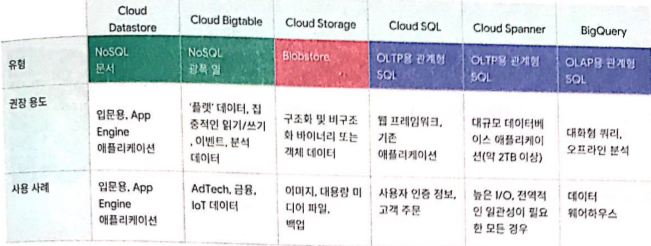
4. 스토리지 옵션 비교

5. Google Cloud Storage 클래스 중에서 선택하기

On November 26, 2019, I attended Google Cloud OnBoard held at Sejong University.

I had already been to the summit in early November, but I went again because they said there would be hands-on sessions.


https://inthecloud.withgoogle.com/onboard-global/core-ko-register.html?utm_content=summit-invite&utm_source=summit&utm_medium=event&utm_campaign=FY19-Q4-apac-onboard-operational-er-KROnBoardSeoul_EV_summit


Cloud OnBoard

Cloud OnBoard is a free, instructor-led training event, that gives you a headstart on your journey to developing on Google Cloud Platform (GCP).

inthecloud.withgoogle.com


To sum it up, contrary to my expectations, the seminar portion was longer than the hands-on sessions. Still, since I skipped school and invested a whole day to attend this event, I was thinking about how to make the most of the information I got — and that's how I ended up writing this blog post.


1. Handout Material — Word Transcription

I transferred the handout materials into a Word document to keep a mental note of what products are available. I figured it would come in handy as a reference when setting up infrastructure for backend development in the future. Here are the organized links:


https://jyami.tistory.com/28


[Cloud OnBoard] 1 - Introduction to Google Cloud Platform

This is a summary of the handout materials from Google Cloud OnBoard held at Sejong University on November 26, 2019. Module 1: Introduction to Google Cloud Platform. 0. Additional Resources. Why choose GCP: https://cloud.google.com/why-go..

jyami.tistory.com


https://jyami.tistory.com/29


[Cloud OnBoard] 2 - Virtual Machines and Storage

This is a summary of the handout materials from Google Cloud OnBoard held at Sejong University on November 26, 2019. Module 2: Virtual Machines and Storage. 0. Additional Resources. Google Compute Engine: https://cloud.google.com/compute/docs G..

jyami.tistory.com

https://jyami.tistory.com/30


[Cloud OnBoard] 3 - Containers, App Development, Deployment, and Monitoring

This is a summary of the handout materials from Google Cloud OnBoard held at Sejong University on November 26, 2019. Module 3: Containers, App Development, Deployment, and Monitoring. 0. Additional Resources. Kubernetes Engine: https://cloud.google.com/kube..

jyami.tistory.com

https://jyami.tistory.com/31


[Cloud OnBoard] 4 - Big Data and Machine Learning

This is a summary of the handout materials from Google Cloud OnBoard held at Sejong University on November 26, 2019. Module 4: Big Data and Machine Learning. 0. Additional Resources. Google Big Data Platform: https://cloud.google.com/products/big-d..

jyami.tistory.com


2.  The Event

The event itself was very similar to the Summit. It consisted of seminars that gave a general overview of GCP and introduced the features of each product.

But they did give out Qwiklabs coupons and Coursera coupons during the event, so I snagged those lol


On the way to the venue, and the swag

At this event, they gave out Cloud PopSockets when it was over! They also said they'd give out certificates of completion, so since I had already skipped school for this, I stayed until the very end.


There's always an arcade machine at Google Cloud events lol

You can refer to the links above for the session summaries.

I actually came expecting a heavy focus on hands-on sessions, but the Cloud Hero activity at the end — where you actually solve Qwiklabs challenges yourself — ended up being the most memorable part.


It was about solving problems related to Google Cloud Platform, and your score depended on how many Qwiklabs challenges you solved and how fast. Since I was pretty new to GCP, I only managed to solve problems 1 and 2 before calling it quits lol. Problem 3 was about setting up Kubernetes on your Qwiklabs account, and that was just too hard for me!

So after about an hour of everyone solving Cloud Hero challenges together, the top 10 ranked participants received hero capes and Cloud backpacks!


But since there were so many people at the event, the internet was really bad, and Google Cloud Shell seemed overwhelmed by all the requests — provisioning just wouldn't finish 😭😭😭 There was quite a bit of waiting around.

If I had actually been someone who knew GCP well enough to compete for the cape, I would've been pretty frustrated.


3. Seminar Summary Charts!

Since pretty much the entire event was seminars, I came home thinking I should at least properly read through the seminar content — and that's what led me to write this blog post lol


If you missed the onboarding event and were curious about what was covered, hopefully this will be helpful!


1. Comparing Compute Options

2. Comparing Load Balancing Options

3. Comparing Interconnect Options

4. Comparing Storage Options

5. Choosing Among Google Cloud Storage Classes

댓글

Comments

Daily/Code Fest

2019 google cloud summit 후기 | 2019 Google Cloud Summit Review

11월 6일 코엑스에서 Google Cloud Summit이 열렸는데요.DSC Korea 소속으로 티켓을 받아서 갔다왔습니다. 원래는 AWS만 사용하는 유저였는데, DSC 활동을 하면서 google product에 대한 얘기를 많이 듣게 되다보니 GCP에 대해 모를 수가 없더군요.근데 요즘 행사 준비로 바빠 공부할 시간이 부족해서 GCP가 있다는 것만 알고, 간단하게 google API를 사용할 때만 써봤었는데, 이번 Google Cloud Summit을 갔다오면서 GCP에서 제공하는 여러 프로덕트들을 간략하게나마 설명을 들을 수 있어서 좋았습니니다.그러면 후기 시작할까요? 0. google cloud summit 웹[Google Cloud Summit 홈페이지]https://inthecloud.wit..

2019 google cloud summit 후기 | 2019 Google Cloud Summit Review

728x90

11월 6일 코엑스에서 Google Cloud Summit이 열렸는데요.

DSC Korea 소속으로 티켓을 받아서 갔다왔습니다.


원래는 AWS만 사용하는 유저였는데, DSC 활동을 하면서 google product에 대한 얘기를 많이 듣게 되다보니 GCP에 대해 모를 수가 없더군요.

근데 요즘 행사 준비로 바빠 공부할 시간이 부족해서 GCP가 있다는 것만 알고, 간단하게 google API를 사용할 때만 써봤었는데, 이번 Google Cloud Summit을 갔다오면서 GCP에서 제공하는 여러 프로덕트들을 간략하게나마 설명을 들을 수 있어서 좋았습니니다.

그러면 후기 시작할까요?


0. google cloud summit 웹

[Google Cloud Summit 홈페이지]

https://inthecloud.withgoogle.com/summit-sel-19/agenda.html


Google Cloud Summit


inthecloud.withgoogle.com

세션에 대한 정보, 그리고 쇼케이스나 DevZone에 대한 모든 정보를 담고 있었습니다. 저는 주로 연사 세션과 DevZone에 많이 있었는데요. 공식 홈페이지 웹 뿐만이 아니라 참가자들이 자신의 코드를 입력해서 들어가는 웹을 이용해서 행사 정보를 한눈에 알 수 있었습니다.


다음과 같이 행사에 대한 모든 정보를 참가자들이 쉽게 알 수 있게 도와주는 웹이었습니다 :) 

또한, Google Cloud Summit에서 진행하는 여러 쇼케이스나 세션, 부스를 방문하면 summit point를 지급해주었는데요. 이 summit point를 Google 관련 굿즈와 바꿀 수 있는 cloud shop이 준비되어있었습니다 :)

그래서 포인트 탭을 이용해서 현재까지 누적된 포인트를 확인할 수 있었습니다.


위 사진처럼 장소 각종 트랙부터 시작해서, 파트너 부스, 쇼 케이스, 포토존, cloud shop, 미팅룸 등 참가자들이 행사를 잘 즐길 수 있도록 만반의 준비를 한 것이 인상적이었습니다.

특히나 참가자들이 세션을 듣고난 후에 발표자들에게 질문을 할 수 잇는 장소가 따로 마련되어있는점에서 기획단의 배려를 알 수 있었습니다.


1. 아젠다


위에 있는 웹에도 나와있는 아젠다이지만, 저희 DSC Lead들끼리 제목만 저장해서 원하는 세션만을 골라서 들었습니다!


가장 큰 벽면에 붙어있던 행사 요약


2. 행사장 분위기

등록대

코엑스에 입장을 하는 순간부터 구글특유의 4가지 색깔이 눈에 띄었습니다 :)

아무래도 큰 행사다 보니까 준비를 많이 한게 보이더라구요. 부스 퀄리티부터 현수막 크기, 각종 info인원 배치 등 세심한 배려가 인상깊었습니다


등록을 하면, 제 소속과 관련된 명찰과 행사에 참여한 각종 부스에 대한 팸플릿을 담아서 받을 수 있었습니다.

그런데 동시에 너무 많은 행사와 세션이 진행되서 사전에 조금 행사를 알아보고 갔으면 알차게 즐길 수 있었을텐데 라는 생각이 들어서 아쉬웠습니다.


한눈에 보는 Summit 행사장

행사장에는 GCP와 관련된 여러 부스가 있었는데, 아무래도 Google Cloud Summit 행사의 파트너 부스인 것 같았습니다.

GCP를 기업에 도입할 때 도움을 줄 수 있도록 각종 참가자들의 명함 이벤트나, 설문을 진행하는 모습을 볼 수 있었는데요. 여러 부스를 다니면서 설문을 진행하면 그 부스와 관련된 기념품이나, 경품 응모를 진행할 수 있었습니다.


기념사진 짠!!!

3. 세미나

[cloud summit 녹화 영상]

https://cloudonair.withgoogle.com/events/summit-sel-19-livestream


Cloud Summit Seoul 생중계

11월 6일 진행된 Google Cloud Summit Seoul을 다시보기로 만나보세요.

cloudonair.withgoogle.com


저는 거의 이 행사를 세션으로만 보낸 것 같아요

부스를 둘러보기엔 아직 대학생 신분이라서 입력이 어려운 폼도 있었고, 실습에 대한 사전신청도 안했어서 자리 하나 잡고 GCP와 세션을 들었습니다!!


제가 들은 세션은 이렇게 5 가지 였는데 각각을 정리해보았습니다.

그리고 여느때와 같이 세션 필기!!


그리고 점심식사때 점심을 먹으면서 듣는 것도 있었는데,, 유연님하고 같이 먹을 때 밥먹는데 집중해버렸습니다. 

4. DevZone 이벤트

저는 주로 이번 행사를 DSC Lead분들과 함께 즐겼습니다. 근데, 저희를 초대해주신 나연님과 나연님을 도와주시는 GDG분들이 맡아서하는 곳이 바로 이 DevZone이었어요! 그래서 거의 여기에 상주했던것 같아요

DevZone에서 GDG DSC 다같이 찰칵!!


Summit point와는 별개로 DevZone에서의 3가지 프로그램을 완수하면, 행사에 온 참가자들과 네트워킹을 할 수 있는 Dev Party의 초대권에 응모가 됩니다!


DevZone에 가면 무료로 주는 콜라, 맥주, 팝콘이 있었는데 저희 DSC Lead님들하고 짠!! 흐흐 너무 좋아요

DevZone의 콜라 맥주 쿠폰과 클라우드님의 출현ㅋㅋㅋ
혼란을 틈타 맥주 파티중인 DSC!!

4-1. Qwiklabs Zone

Qwiklabs Zone은 1개월 무료 엑세스 쿠폰으로 직접 실습을 진행해볼 수 있는 공간입니다.

여기에 가면 Qwiklabs 1개월 액세스 쿠폰을 주셨는데요, 주변에 GDG Cloud 운영진분들이 실습을 도와주려고 기다리고 계시기도하고, 일단 쿠폰을 준다고하니까 무조껀 했습니다!ㅎㅎ


킥랩 주소 : https://www.qwiklabs.com/?locale=ko


Qwiklabs - Hands-On Cloud Training

Qwiklabs provides real cloud environments that help developers and IT professionals learn cloud platforms and software, such as Firebase, Kubernetes and more.

www.qwiklabs.com

4-2. Presentation Zone

GDG/GCP 커뮤니티 소개, 스터디 잼 꿀팁 방출과 GCP 자격증에 관한 Q&A 미니 세션이 진행되는 공간이었습니다!

GCP OX퀴즈랑 경품 추첨을 봤는데요, 이외에도 GDG 설명 등여러 PT를 진행한 것으로 알고 있습니다.

경품추첨에서 하다하다 안나와서 결국은 가위바위보로 결정했는데 아으,,, 막판에 져서 아쉽네요ㅋㅋ


4-3. Play Zone

Play Zone은 클라우드 아케이드 게임을 즐길 수 있는 공간입니다.

GCP의 간단한 커맨드를 게임기로 구현해서 게임을 진행하는 곳이었는데요! 

문제를 해결하고 아래처럼 CORRECT 라는 문자가 뜰 때 성취감은 크으,, 아무리 생각해도 잘 만들었어요!!

5. 기념품

저번 DevFest Seoul도 그렇고 이번 summit도 그렇고 GDG관련 행사를 다니다보면 굿즈가 늘어나는 것 같아요!!


먼저 기본적으로 연사 세미나를 들으면, 이름표 뒤에 있던 응모권을 1점부터 5점까지 세미나 만족도 조사 박스에 넣으면 summit 행사 마지막에 있는 경품 추천이벤트에 참여할 수 있었습니다.


하지만, 경품추천을 원하지 않는 경우에는 이름표를 반납하고, 양털조끼를 기념품으로 받을 수 있었습니다 :)

그리고 행사 막바지에 summit point를 바꿔서 google cloud 방석도 받고! 갈때는 양손 무겁게 갔습니다. 만약 summit point가 더 많았더라면 13인치 노트북파우치나 담요로 바꿨을텐데ㅎㅎ 너무 세미나만 들으면서 시간을 보냈는지, 포인트가 모자라서 아쉬웠습니다


그래도 메가존에서 받은 맨투맨! 기본 기념품 양털조끼(센스굿!!) cloud point로 받은 방석! mongoDB에서 받은 수첩까지 양손 가득 무겁게 좋아요><

기념품 다같이 받고 남은 DSC Lead님들끼리 기념사진 찰칵!

6. DevParty

DevZone 이벤트를 3개다 수행해서 DevParty 초대권을 얻었습니다! DSC Lead, GDG분들하고 같이 저녁을 먹었는데, 행사 규모가 확실히 대단하더군요! 참석자들에게 이벤트를 하셔서 사진도 많이 찍고, 밥도 맛있게 먹고 오늘 행사를 마무리 했습니다 :)


GDG DSC 다같이 기념사진 찰칵!! 클라우드님 씹덕사..★

7. 마무리

Google Cloud Summit을 갔다오니 GCP 자격증에도 관심이 생기고, 얼마전에 들은 얘기로는 GCP가 요즘 클라우드 시장에서 급성장을 하는 이유중에 하나가 BigQuery를 기업에서 많이 사용하기 때문이라고 하셔서 궁금해졌습니다!


이전에 어떤 개발자님에게 듣기로 하나하나 섬세하게 조정하기는 AWS가 제격인데, UI/UX나 직관적으로 환경을 세팅이라는 점에서는 GCP가 강점을 갖고있다고 했던게 생각나더라구요.

오늘 여러 세미나를 들으면서 GCP가 제공하는 여러 기능들에 대해서 얕지만 넓게 귀동냥을 할 수 있어서 좋았습니다.


그러면 Google Cloud Summit 후기는 여기까지 끝!


The Google Cloud Summit was held at COEX on November 6th.

I got a ticket through DSC Korea and went to check it out.


I was originally an AWS-only user, but since I started my DSC activities, I kept hearing so much about Google products that I couldn't help but learn about GCP.

But lately I've been so busy preparing for events that I didn't have time to study, so I only knew GCP existed and had only used it briefly for Google APIs. Going to this Google Cloud Summit was great because I got to hear brief explanations about the various products GCP offers.

So shall we get this recap started?


0. Google Cloud Summit Website

[Google Cloud Summit Homepage]

https://inthecloud.withgoogle.com/summit-sel-19/agenda.html


Google Cloud Summit


inthecloud.withgoogle.com

It had all the information about sessions, showcases, and the DevZone. I mostly spent my time at speaker sessions and the DevZone. In addition to the official website, there was also a web app where attendees could enter their personal code to get an at-a-glance view of all the event info.


It was a web app that helped attendees easily find all the information about the event like this :) 

Also, Google Cloud Summit gave out summit points when you visited various showcases, sessions, and booths. There was a cloud shop where you could exchange these summit points for Google-related merchandise :)

So you could check your accumulated points using the points tab.


As shown in the photos above, it was impressive how thoroughly they prepared everything—from venue tracks, partner booths, showcases, photo zones, the cloud shop, to meeting rooms—so that attendees could fully enjoy the event.

I especially appreciated that they had a dedicated space where attendees could ask speakers questions after sessions, which really showed the organizers' thoughtfulness.


1. Agenda


The agenda was also available on the website mentioned above, but we DSC Leads saved just the titles and picked the sessions we wanted to attend!


Event summary on the largest wall


2. Venue Atmosphere

Registration desk

From the moment I entered COEX, Google's signature four colors caught my eye :)

Since it was such a big event, you could tell they put a lot of effort into the preparations. The booth quality, banner sizes, and the placement of info staff throughout—the attention to detail was really impressive.


Upon registration, I received a name badge with my affiliation and a bag containing pamphlets about the various booths at the event.

However, there were so many events and sessions happening simultaneously that I wished I had researched the event beforehand so I could have enjoyed it more fully—that was a bit of a regret.


Summit venue at a glance

The venue had various booths related to GCP, which seemed to be partner booths for the Google Cloud Summit event.

You could see them running business card events and surveys to help companies adopt GCP. By visiting different booths and completing surveys, you could get booth-related souvenirs or enter prize drawings.


Commemorative photo, cheese!!!

3. Seminars

[Cloud Summit Recorded Videos]

https://cloudonair.withgoogle.com/events/summit-sel-19-livestream


Cloud Summit Seoul Live Stream

Watch the replay of Google Cloud Summit Seoul held on November 6th.

cloudonair.withgoogle.com


I think I spent almost the entire event attending sessions.

Since I'm still a college student, some of the booth forms were hard to fill out, and I hadn't pre-registered for any hands-on labs, so I just grabbed a seat and attended GCP sessions!!


I attended 5 sessions in total, and here's a summary of each one.

And as always, session notes!!


There was also a lunchtime session where you could eat and listen at the same time, but I was eating with Yuyeon and ended up just focusing on the food. 

4. DevZone Events

I mostly enjoyed this event with fellow DSC Leads. But the person who invited us, Nayeon, and the GDG members helping her were in charge of this very DevZone! So I ended up hanging out here most of the time.

GDG and DSC together at the DevZone, say cheese!!


Separate from the summit points, if you completed all 3 programs at the DevZone, you could enter a drawing for an invitation to the Dev Party—a networking event with other attendees!


The DevZone had free cola, beer, and popcorn, and we DSC Leads cheered together!! Hehe, it was so great.

DevZone cola and beer coupons, plus Cloud mascot appearance lol
DSC having a sneaky beer party in the midst of it all!!

4-1. Qwiklabs Zone

The Qwiklabs Zone was a space where you could do hands-on labs with a 1-month free access coupon.

When you went there, they gave you a Qwiklabs 1-month access coupon. GDG Cloud organizers were standing by to help with the labs, and since they were giving out coupons, I absolutely had to do it! haha


Qwiklabs URL: https://www.qwiklabs.com/?locale=ko


Qwiklabs - Hands-On Cloud Training

Qwiklabs provides real cloud environments that help developers and IT professionals learn cloud platforms and software, such as Firebase, Kubernetes and more.

www.qwiklabs.com

4-2. Presentation Zone

This was a space where mini sessions were held, including GDG/GCP community introductions, Study Jam tips, and Q&A about GCP certifications!

I watched the GCP O/X quiz and prize drawing. I also know they had several other presentations including GDG introductions.

During the prize drawing, nobody was getting picked for so long that they ended up deciding by rock-paper-scissors. Ugh,,, I lost at the very end, so that was disappointing lol


4-3. Play Zone

The Play Zone was a space where you could enjoy cloud arcade games.

They had simple GCP commands implemented as arcade games that you could play! 

The sense of achievement when you solved a problem and saw CORRECT pop up like below was amazing,, no matter how I think about it, they did a great job with this!!

5. Souvenirs

Between the last DevFest Seoul and this summit, going to GDG-related events seems to keep growing my swag collection!!


First, when you attended speaker seminars, you could drop the raffle ticket from the back of your name badge into a satisfaction survey box (rated 1 to 5 points), which entered you into the prize drawing at the end of the summit.


However, if you didn't want to enter the prize drawing, you could return your name badge and receive a fleece vest as a souvenir instead :)

And toward the end of the event, I exchanged my summit points for a Google Cloud cushion! I left with both hands full. If I had more summit points, I would've gotten a 13-inch laptop sleeve or a blanket haha. I spent too much time just attending seminars, so I didn't have enough points—that was a bummer.


Still, the sweatshirt from Megazone! The basic souvenir fleece vest (great taste!!) the cushion from cloud points! And a notebook from MongoDB—I'm happy leaving with both hands full of goodies ><

Group photo with the remaining DSC Leads after getting our souvenirs!

6. DevParty

I completed all 3 DevZone events and earned a Dev Party invitation! I had dinner with DSC Leads and GDG members, and the scale of the event was truly impressive! They had activities for the attendees, so I took lots of photos, enjoyed delicious food, and wrapped up the day's event :)


GDG and DSC group photo together!! Cloud mascot being adorable..★

7. Wrapping Up

After attending the Google Cloud Summit, I became interested in GCP certifications too. I also heard recently that one of the reasons GCP is rapidly growing in the cloud market is because many companies use BigQuery, which made me curious!


I remember a developer once told me that AWS is the way to go for fine-grained control, but GCP has its strengths in terms of UI/UX and intuitive environment setup.

It was great to attend various seminars today and get a broad (if shallow) introduction to the many features GCP offers.


And that wraps up my Google Cloud Summit recap!


댓글

Comments