I gave three presentations at the mini seminar held by DSC Ewha. In the second session, I covered the basic concepts of git and github, along with the most essential commands :)
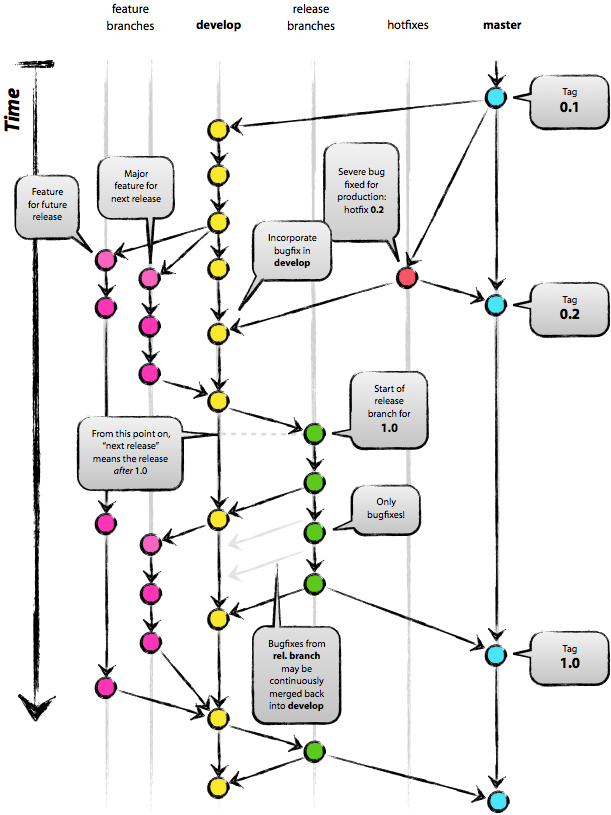
2줄 전략 : merge + rebase 를 이용해서 git flow를 이쁘게 본다! 어느 시점에 반영이 됐는지 보기 위해서
feature
기능 브랜치
develop에서 갈라져 나온 기능 : git flow를 깔끔하게 보기 위해, origin develop의 갈라나온 시점을 잘 관리해 주어야 한다. git pull --rebase origin devlop 을 이용해서 제일 마지막에 반영된 develop에서 branch가 갈라 나온 것 처럼 보이게 한다.
Release version branch > Uses tags to record versions.
X . 0 : New project added
1 . X : New feature added
develop
Development branch
Two-line strategy: Use merge + rebase to keep the git flow looking clean! This helps you see at which point changes were integrated.
feature
Feature branch
Branches off from develop: To keep the git flow looking clean, you need to carefully manage the point where it diverges from origin develop. Use git pull --rebase origin devlop to make it look like the branch was created from the latest reflected develop.
hotfixes
Branch for fixing bugs found in the release version
After fixing in hotfixes, push to both develop and master.
release
QA fixes right before deployment
Same version as the beta server. After QA is done, push to both develop and master.
2. IntelliJ Shortcuts for Using GitHub Issues
ctrl+shift+a - Register GitHub in IntelliJ to access issues directly
alt+shift+n - Create a feature branch named after the issue.
3. Git Bash Commands Following the git-flow Strategy


댓글
Comments