
크롤링 테스트를 위한 mock server test 구축 | Mock Server Test Setup for Crawling Tests
Java의 Jsoup을 이용해서 페이지를 크롤링을 하는 코드는 찾아보면 많지만, 크롤링을 테스트하는 코드는 찾기 어려웠다. 따라서 크롤링 테스트를 짜기 위해 직접 nginx 서버를 띄어서 그 서버를 크롤링 하기도 하는 등 JavaBom 스터디원과 구현해본 크롤링 테스트에 대한 포스팅을 하게되었다.
참고로 nginx 서버를 띄어서 크롤링 하는것은 실제 서버라서 크롤링 테스트의 의미가 없는 것 같다.
실제 서버가 죽으면 크롤링 테스트도 못하므로 결국은 @Ignore를 걸어야하는 테스트이기 때문이다.
내가 생각하기에 크롤링 테스트에서 쟁점은 2가지 이다.
1. Parsing 테스트
[ 목적 ]
페이지의 html 파일에서 크롤링을 통해 원하는 정보만을 가져왔는지 체크한다.
[ 구현 방식 ]
크롤링을 원하는 페이지를 ctrl+s 를 이용해서 .html 파일로 받아온 후, 해당 html 파일을 내 springboot project의 resource에 저장한다. 이후 이 파일을 받아와, 내가 만든 크롤링 코드를 돌려서, 내가 파싱한 정보가 원하는 대로 크롤링이 잘 되었는지 확인한다.
ex ) 네이버 영화 html 에서 찾아온 영화 리스트의 항목이 10개가 맞는가
ex ) 크롤링 한 영화의 title이 "마션"이 맞는가 등등 (젤 좋아하는 영화ㅋ)
2. connect 테스트
[ 목적 ]
크롤링으로 해당 페이지를 받아오겠다는 요청을 보내고 응답을 받아 내가 만든 크롤링 코드가 잘 동작하는지를 체크한다.
[ 구현방식 ]
test를 위한 Mockserver를 하나 생성한다. 우리가 보는 영화 페이지가 GET 메서드로 URL 요청을 보낼 경우 html 페이지를 리턴하는 것처럼, jsoup connect의 결과를 확인하기 위한 mock server를 만드는 것이다. 이 mock server 역시 내가 크롤링을 원하는 네이버 영화 페이지처럼 특정 URL 을 GET 메소드를 통해 호출할 경우 특정 html 파일을 보내도록 지정한다.
[ 기능 ]
1. 고정된 response를 만들고 return 할 수 있다.
2. request를 다른 서버에 forwarding 한다.
3. callbacks 실행이 가능하다.
4. request를 확인할 수 있다.
오늘 포스팅을 위해 사용할 크롤링 코드 + 페이지는 네이버 영화의 랭킹 페이지를 이용하려 한다.
https://movie.naver.com/movie/sdb/rank/rmovie.nhn
0. 디렉토리 구조

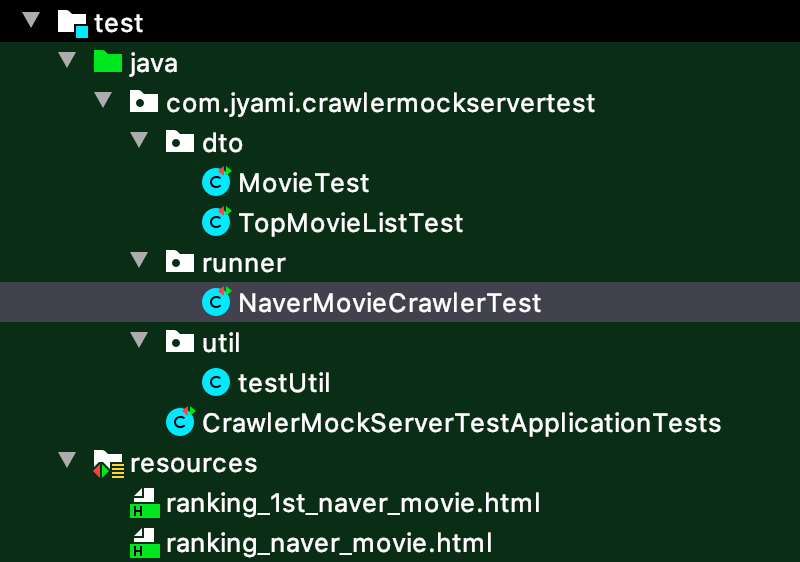
[포스팅 관련 코드] https://github.com/mjung1798/Jyami-Java-Lab/tree/master/crawler-mock-server-test
mjung1798/Jyami-Java-Lab
Jyami의 Spring boot 및 Java 실험소. Contribute to mjung1798/Jyami-Java-Lab development by creating an account on GitHub.
github.com
1. Jsoup을 이용한 Crawling
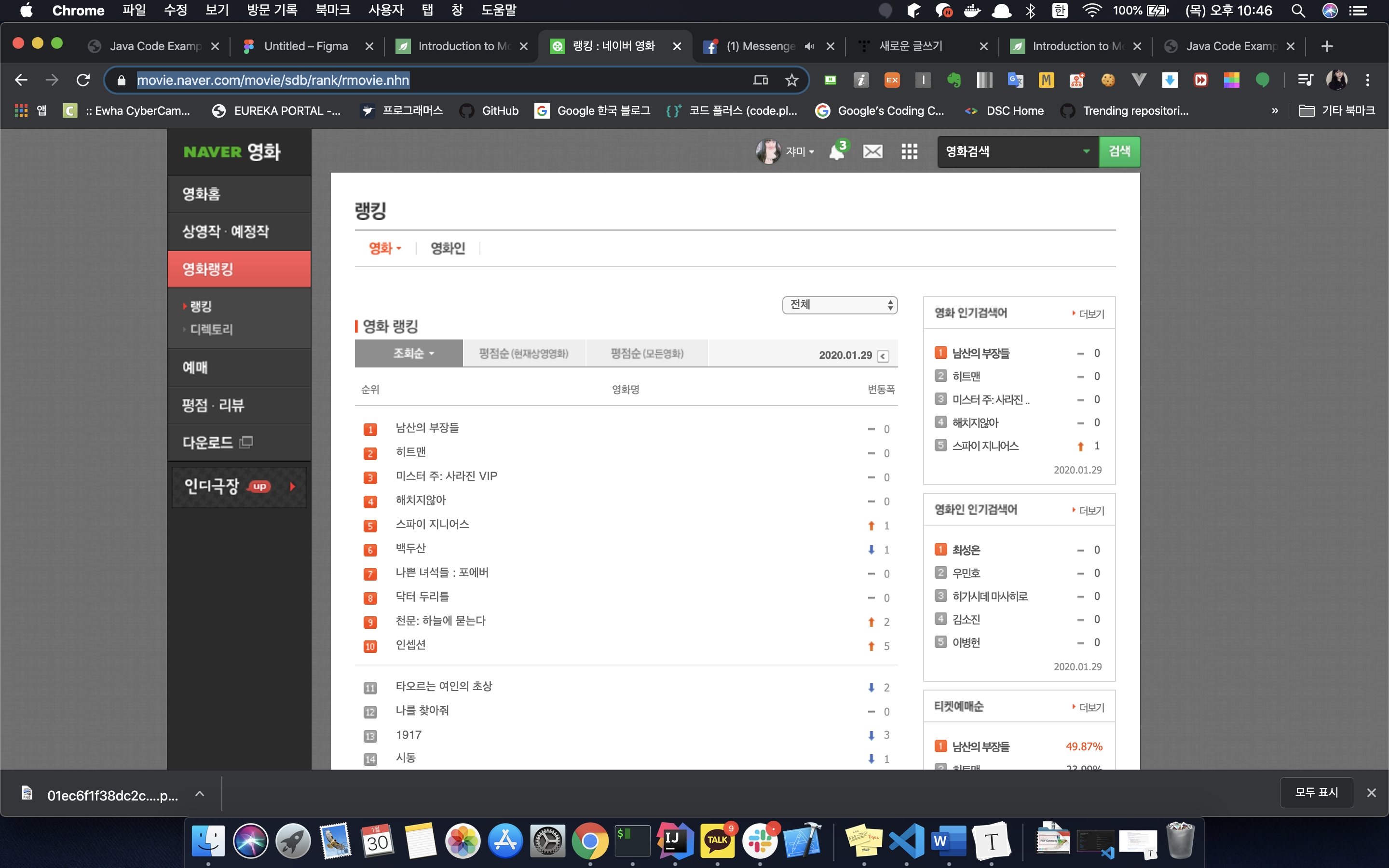
여기서 랭킹 항목의 순위와, 영화명, 그리고 연결 페이지 링크를 크롤링 하겠다.
# build.gradle

dependencies {
	implementation 'org.jsoup:jsoup:1.11.3'
	compileOnly 'org.projectlombok:lombok'
	annotationProcessor 'org.projectlombok:lombok'
}
Jsoup을 이용해 크롤링을 했고, Builder를 사용하려고 lombok을 넣어주었다.
// NaverMovieCrawler.java

public class NaverMovieCrawler {

    public static void main(String[] args) {
        Document document = new NaverMovieCrawler().getCrawlingResult("https://movie.naver.com/movie/sdb/rank/rmovie.nhn");
        TopMovieList topMovieList = new TopMovieList(document);
        System.out.println(topMovieList.toString());
    }

    // url 을 보내면, 해당 페이지를 크롤링하여 Document 타입을 리턴한다.
    public Document getCrawlingResult(String url){
        try {
            return Jsoup.connect(url)
                    .timeout(2000)
                    .get();
        } catch (IOException e) {
            throw new RuntimeException("crawling 실패");
        }
    }
}
스프링 부트로 API를 만들어도 좋지만, 일단은 간단하게 main을 만들어주고 돌려보았다.
여기서 중요한게 Jsoup.connect(url) 이부분인데, mockserver 테스트를 하는 이유라고 볼 수 있다. Jsoup의 connect() 메소드는 기본적으로 get 매핑을 요청하며, 이외에도 Jsoup에서 제공하는 다양한 메서드를 체이닝해서 좀 더 구체적인 요청을 보낼 수 있다.
그러나 크롤링하려는 네이버 영화 페이지의 html 파일을 받는 요청이므로 Get 메서드 + URL 매핑으로 간단하게 connect() 메소드를 마무리 할 수 있다.
@AllArgsConstructor
@Getter
public class TopMovieList {

    private List<Movie> topMovies = new ArrayList<>();

    public TopMovieList(Document document){
        this.topMovies = document.select("table.list_ranking tr").stream()
                .filter(x -> !x.select(".ac").isEmpty())
                .map(Movie::of)
                .collect(Collectors.toList());
    }

    @Override
    public String toString() {
        return topMovies.stream()
                .map(Movie::toString)
                .collect(Collectors.joining(", \n"));
    }
}
main에서 보면 알다싶이 나는 TopMovieList 라는 일급컬렉션 객체를 만들었다. Jsoup을 이용해 받아온 Document객체를 (html 전체를 리턴한다) 파싱하여 List<Movie>를 만든다. 이때 Movie 객체 하나하나를 만들기 위해서 네이버 영화 랭킹의 테이블 row를 하나씩 분리해서 Movie 객체의 of() 메서드를 이용해서 테이블 row 하나하나에서의 데이터를 분리하는 파싱은 Movie 객체에 맡긴다.
// Movie.java

public class Movie {
    private int rank;
    private String title;
    private String detailLink;

    @Builder
    private Movie(int rank, String title, String detailLink) {
        this.rank = rank;
        this.title = title;
        this.detailLink = detailLink;
    }

    public static Movie of (Element element){
        return Movie.builder()
                .rank(Integer.parseInt(element.select(".ac img").attr("alt")))
                .title(element.select(".title").text())
                .detailLink(element.select(".title a").attr("href"))
                .build();
    }

    @Override
    public String toString() {
        return "Movie{" +
                "rank='" + rank + '\'' +
                ", title='" + title + '\'' +
                ", detailLink='" + detailLink + '\'' +
                '}';
    }
}
Movie 객체에서는 List<Movie>의 생성자에서 받아온 네이버 영화 랭킹 테이블의 row 한 줄인 Element를 인자로 받아, 데이터를 바인딩해준다. 개발자도구를 이용해 내가 원하는 데이터만을 분리할 수 있도록 css selector를 적절히 사용한다.
> Task :NaverMovieCrawler.main()
Movie{rank='1', title='남산의 부장들', detailLink='/movie/bi/mi/basic.nhn?code=176306'},
Movie{rank='2', title='히트맨', detailLink='/movie/bi/mi/basic.nhn?code=185838'},
Movie{rank='3', title='미스터 주: 사라진 VIP', detailLink='/movie/bi/mi/basic.nhn?code=177509'},
Movie{rank='4', title='해치지않아', detailLink='/movie/bi/mi/basic.nhn?code=180025'},
... // 생략
이렇게 만들어진 List<Movie> 객체를 toString()을 이용해 main에서 출력하면 위와 같이 확인 할 수 있어, 크롤링이 잘되었음을 확인 할 수 있다.
2. MockServer 생성하기
mock-server 생성과 테스트를 위한 모듈을 추가해준다. test는 junit5를 이용해서 했다.
# build.gradle

test {
	useJUnitPlatform()
}

dependencies {
	testCompile group: 'org.mock-server', name: 'mockserver-netty', version: '5.8.1'
}
가장 먼저 크롤링 하려는 네이버 영화 페이지로 가서 html을 다운받는다. 내가 request와 response를 지정한 mock-server가 네이버 영화 페이지의 html 파일을 리턴해야하기 때문이다.
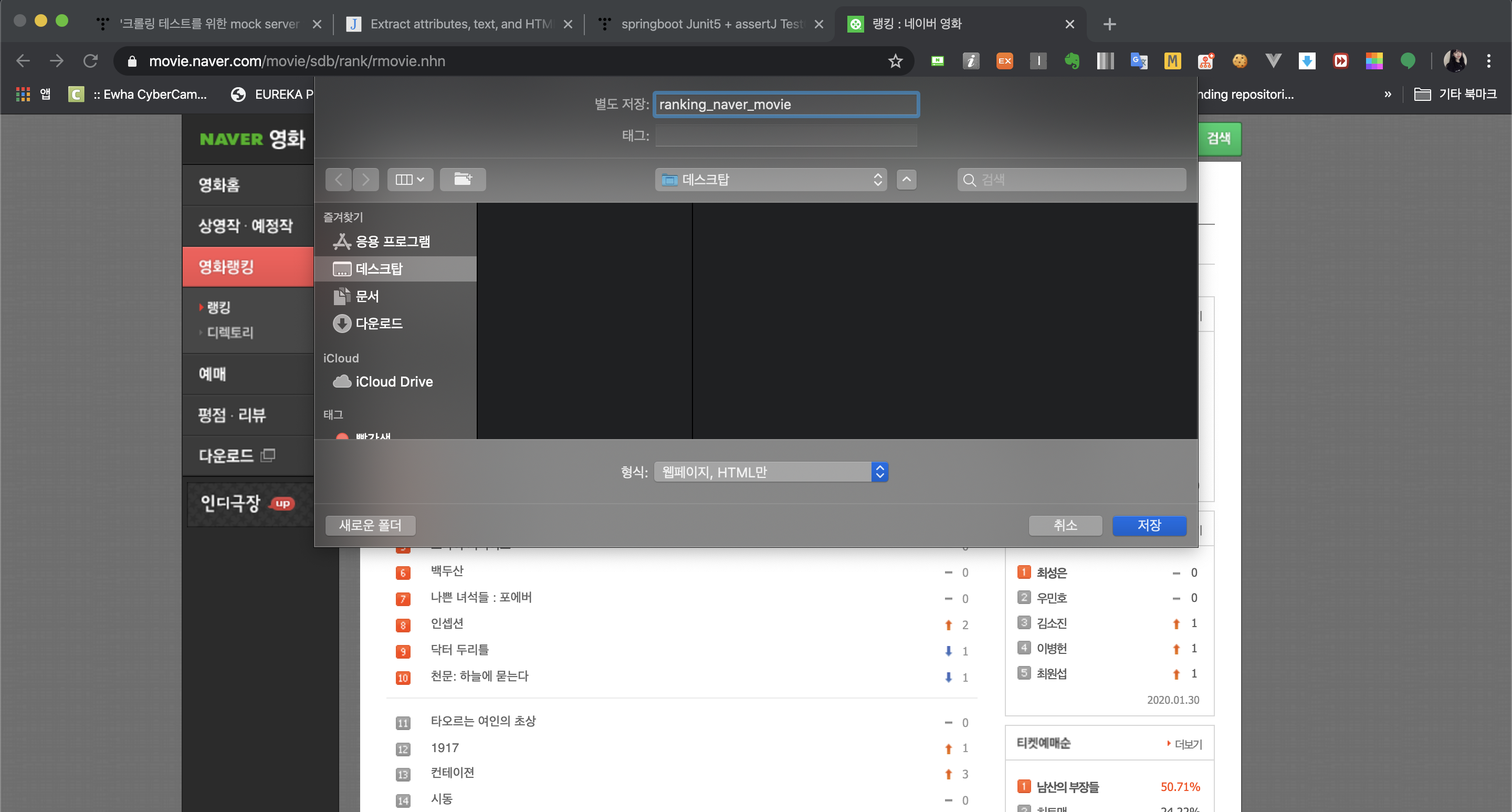
나는 ranking_naver_move.html 이라는 이름으로 저장했다. 그리고 이렇게 다운 받은 파일을 test > resources 폴더 안에 넣는다.
추가로 초반에 말한 parsing test와 관련해서 테스트 코드를 구현하느라 나는 하나의 html 파일이 더 생기게되었다.

mock-server와 관련한 테스트를 할 경우에, 테스트 시작 전, mock-server를 열어주어야한다. 그리고 테스트가 끝나면 mock-server를 닫아주어야한다. 따라서 테스트코드의 시작과 전에 해당 메소드를 써준다.
// NaverMovieCrawlerTest.java

public class NaverMovieCrawlerTest {

    private static final int PORT = 9000;
    private static ClientAndServer mockServer;

    @BeforeEach
    void setUp() {
        mockServer = ClientAndServer.startClientAndServer(PORT);
        System.out.println("mock server start");
    }

    @AfterEach
    void tearDown() {
        mockServer.stop();
        System.out.println("mock server stop");
    }
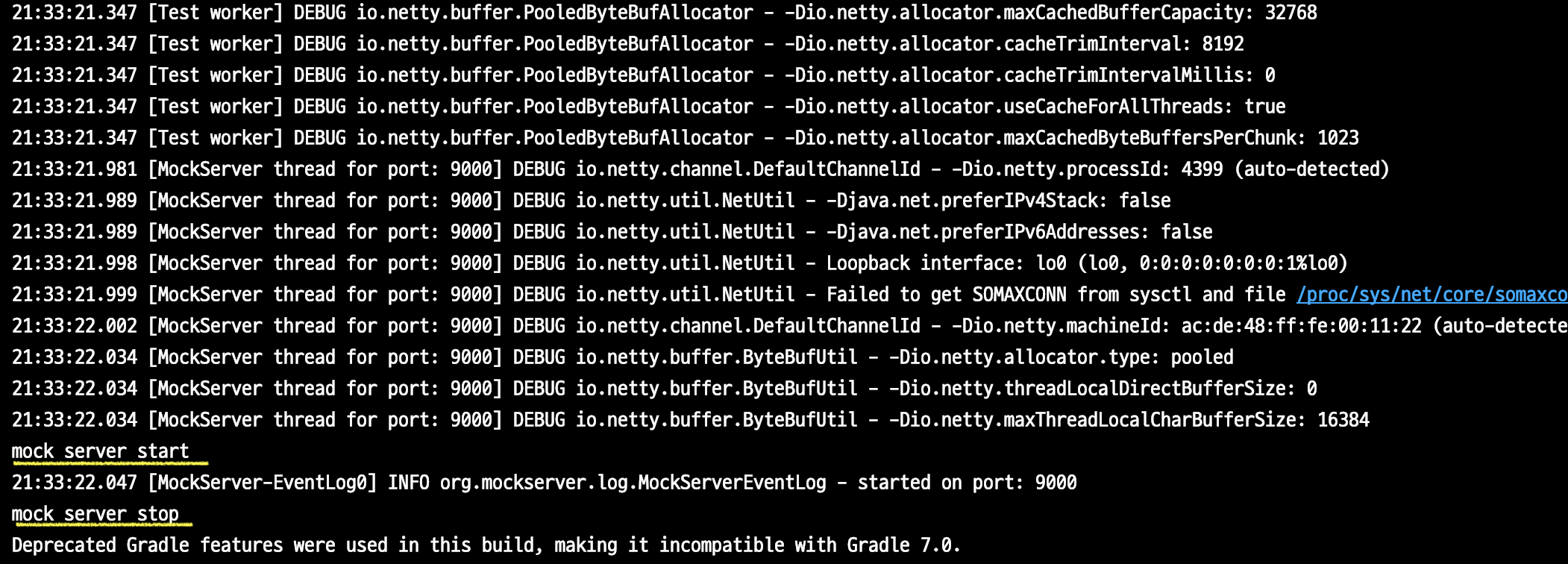
@Test 어노테이션을 붙인 빈 테스트를 만들고 이 테스트를 돌려보면 아래와 같이 엄청난 로그가 뜬다. 몇몇 눈에 띄는 로그를 읽어보면 java version, cachesize 등을 자동으로 설정함을 알 수 있다.
또한, 인자로 PORT값 즉 9000을 넣은 것은 잠깐 뜨는 mock-server의 포트를 지정한 것인데, 실제로 sout을 찍은 부분 이후 즉, startClientAndServer 메소드가 실행된 이후, 9000포트로 mock-server가 설정되었다는 로그가 출력됨을 알 수 있다.

이제 mock-server의 자세한 세팅을 해보자. 내가 구현하려는 mock-server는 네이버 영화 랭킹 페이지와 같은 역할을 수행해야한다. 따라서 네이버 랭킹 페이지를 나타내는 path인 "/movie/sdb/rank/rmovie.nhn"을 입력할 경우 html 파일을 리턴하도록 mock-server의 기능을 설정해주어야 한다. 이는 아래 보다 싶이 .when()과 .response() 메소드를 이용해서 설정할 수 있다.
when 부분에는 mock-server에서 받을 request 그리고 respond 부분에는 when에서 정의한 request를 받았을 때 실행할 response 값을 설정해 준다.
가장 먼저 mock-server host인 localhost, 그리고 mock-server를 실행할 port를 적어준다. 이때 mock-server를 가장먼저 시작할 때 사용하는 메서드인 ClientAndServer.startClientAndServer() 에서 만든 mockserver의 port를 적어주었기 때문에, 이때 사용한 port와 똑같이 적어준다. 따라서 PORT(9000)을 할당하였다.
// NaverMovieCrawlerTest.java

private void createNaverRankingPageServer(String filePath){
        byte[] response = readHtmlFile(filePath);

        new MockServerClient("localhost", PORT)
                .when(
                        request()
                                .withMethod("GET")
                                .withPath("/movie/sdb/rank/rmovie.nhn")
                )
                .respond(
                        response()
                                .withStatusCode(200)
                                .withBody(response)
                );
}
request로는 네이버 영화 랭킹 페이지의 URL인 "/movie/sdb/rank/rmovie.nhn"를 GET 메소드로 호출하도록 정의하고, 이 경우에는
response는 statusCode 200과 함께 랭킹페이지 html을 넘겨주도록 지정하였다. (response 변수)
이때 response 변수는 아까 저장한 네이버 영화 랭킹 페이지의 html 파일이 리턴되어야 하므로, 아래와 같이 Stream 형태로 html 파일의 내용을 받아오는 로직을 짰다. (인자로는 리턴 받을 html 파일을 적어준다)
// NaverMovieCrawlerTest.java

private byte[] readHtmlFile(String filePath) {
        InputStream resourceAsStream = getClass().getClassLoader()
                .getResourceAsStream(filePath);
        try {
            assert resourceAsStream != null;
            return IOUtils.toByteArray(resourceAsStream);
        } catch (IOException e) {
            e.printStackTrace();
            throw new RuntimeException("file IO 실패");
        }
}
mock-server 세팅까지 한 후에, @Test에 createNaverRankingPageServer() 메서드만 적어서 실행시키면 또 여러 로그가 나오는데, 대충 읽어보면, 내가 설정한 mock-server 세팅에 관한 내용이다.

3. MockServer를 이용한 Parsing 및 Connect 테스트
이제 mock-server 설정도 모두 마쳤으니, 테스트할 크롤링 코드를 적어준다. mock-server의 request와 response를 지정해주는 아까 구현한 createPathNoteServer() 메서드를 호출한다. (이때 인자값은 response 값을 의미하도록 구현했다.)
이후 내가 설정한 mock-server의 주소값 포트 Url에 맞게, Crawling한 결과를 가져오는 코드를 넣어주고, 그 값을 테스트한다.
[GET] http://localhost:9000/movie/sdb/rank/rmovie.nhn
host localhost
port 9000
path /movie/sdb/rank/rmovie.nhn
URL을 적어줄 때 http를 빼고 적어주면 인식하지 못한다! 주의하자
 // NaverMovieCrawlerTest.java

    @BeforeEach
    void setUp() {
        mockServer = ClientAndServer.startClientAndServer(PORT);
        System.out.println("mock server start");
    }

    @Test
    public void naverMovieMockServerTest(){

        createNaverRankingPageServer("ranking_naver_movie.html");
        Document document = new NaverMovieCrawler().getCrawlingResult("http://localhost:9000/movie/sdb/rank/rmovie.nhn");
        TopMovieList topMovieList = new TopMovieList(document);
        assertThat(topMovieList.getTopMovies().size()).isEqualTo(50);

    }

    @AfterEach
    void tearDown() {
        mockServer.stop();
        System.out.println("mock server stop");
    }
이렇게 코드를 완성해서 실행한 결과 크롤링한 데이터가 잘 들어와서 Parsing까지 완료되었음을 테스트 성공 표시를 통해 확인할 수 있다.

4. 크롤링 Parsing 테스트
크롤링 Parsing 테스트의 내용은 코드를 구현한 github에서 Movie.test / TopMovieList.test 파일을 이용해서, 크롤링 로직이 데이터를 내가원하는대로 객체에 바인딩 하는 지 여부를 확인하였다.
그러나 읽어보면 어렵지 않은 코드라서 생략하였다. github 를 참고하자 :)
[관련 블로그]
javabom 스터디를 통해서 쓰게된 글이며, 팀 블로그가 존재한다 :) 같은 내용의 글을 업로드 한 상태이다.
자바봄
자바 스프링 블로그 입니다.
javabom.tistory.com
[참고 페이지]
There are plenty of examples out there for crawling pages using Java's Jsoup, but it was hard to find code for testing the crawling. So I ended up writing this post about crawling tests that I implemented with the JavaBom study group — including spinning up an nginx server and crawling from it.
By the way, crawling from an nginx server doesn't really serve as a proper crawling test since it's an actual server.
If the real server goes down, the crawling test can't run either, so you'd end up having to slap @Ignore on it anyway.
In my opinion, there are two key points when it comes to crawling tests.
1. Parsing Test
[ Purpose ]
Verify that only the desired information was extracted from the page's HTML file through crawling.
[ Implementation ]
Save the page you want to crawl as an .html file using ctrl+s, then store that HTML file in your Spring Boot project's resources. After that, load the file, run your crawling code against it, and verify that the parsed information matches what you expected.
e.g.) Does the movie list extracted from the Naver Movie HTML have exactly 10 items?
e.g.) Is the crawled movie title "The Martian"? etc. (my favorite movie lol)
2. Connect Test
[ Purpose ]
Send a request to fetch the page via crawling, receive a response, and verify that your crawling code works correctly.
[ Implementation ]
Create a mock server for testing. Just like how a movie page returns an HTML page when you send a URL request via GET method, we create a mock server to verify the result of Jsoup's connect. This mock server is configured so that when a specific URL is called via GET method — just like the Naver Movie page we want to crawl — it returns a specific HTML file.
[ Features ]
1. You can create and return a fixed response.
2. It can forward requests to another server.
3. It can execute callbacks.
4. You can inspect the requests.
For today's post, I'll be using the Naver Movie ranking page as the crawling target.
https://movie.naver.com/movie/sdb/rank/rmovie.nhn
0. Directory Structure
[Code for this post] https://github.com/mjung1798/Jyami-Java-Lab/tree/master/crawler-mock-server-test
mjung1798/Jyami-Java-Lab
Jyami's Spring Boot and Java experiment lab. Contribute to mjung1798/Jyami-Java-Lab development by creating an account on GitHub.
github.com
1. Crawling with Jsoup
From here, I'll crawl the ranking number, movie title, and the link to the detail page.
# build.gradle

dependencies {
	implementation 'org.jsoup:jsoup:1.11.3'
	compileOnly 'org.projectlombok:lombok'
	annotationProcessor 'org.projectlombok:lombok'
}
I used Jsoup for crawling and added Lombok to use the Builder pattern.
// NaverMovieCrawler.java

public class NaverMovieCrawler {

    public static void main(String[] args) {
        Document document = new NaverMovieCrawler().getCrawlingResult("https://movie.naver.com/movie/sdb/rank/rmovie.nhn");
        TopMovieList topMovieList = new TopMovieList(document);
        System.out.println(topMovieList.toString());
    }

    // url 을 보내면, 해당 페이지를 크롤링하여 Document 타입을 리턴한다.
    public Document getCrawlingResult(String url){
        try {
            return Jsoup.connect(url)
                    .timeout(2000)
                    .get();
        } catch (IOException e) {
            throw new RuntimeException("crawling 실패");
        }
    }
}
It would be fine to build a Spring Boot API, but for now I just created a simple main method and ran it.
The important part here is Jsoup.connect(url) — and this is essentially the reason we need mock server testing. Jsoup's connect() method basically sends a GET request, and you can chain various other methods provided by Jsoup to send more specific requests.
However, since we're just fetching the HTML file of the Naver Movie page, we can keep the connect() method simple with just a GET method + URL mapping.
@AllArgsConstructor
@Getter
public class TopMovieList {

    private List<Movie> topMovies = new ArrayList<>();

    public TopMovieList(Document document){
        this.topMovies = document.select("table.list_ranking tr").stream()
                .filter(x -> !x.select(".ac").isEmpty())
                .map(Movie::of)
                .collect(Collectors.toList());
    }

    @Override
    public String toString() {
        return topMovies.stream()
                .map(Movie::toString)
                .collect(Collectors.joining(", \n"));
    }
}
As you can see in the main method, I created a first-class collection object called TopMovieList. It parses the Document object fetched via Jsoup (which returns the entire HTML) to build a List<Movie>. To create each individual Movie object, I split the table rows from the Naver Movie ranking table and delegate the parsing of each row's data to the Movie object's of() method.
// Movie.java

public class Movie {
    private int rank;
    private String title;
    private String detailLink;

    @Builder
    private Movie(int rank, String title, String detailLink) {
        this.rank = rank;
        this.title = title;
        this.detailLink = detailLink;
    }

    public static Movie of (Element element){
        return Movie.builder()
                .rank(Integer.parseInt(element.select(".ac img").attr("alt")))
                .title(element.select(".title").text())
                .detailLink(element.select(".title a").attr("href"))
                .build();
    }

    @Override
    public String toString() {
        return "Movie{" +
                "rank='" + rank + '\'' +
                ", title='" + title + '\'' +
                ", detailLink='" + detailLink + '\'' +
                '}';
    }
}
The Movie object takes an Element — a single row from the Naver Movie ranking table passed from the List<Movie> constructor — and binds the data. I used appropriate CSS selectors with the browser's developer tools to extract only the data I needed.
> Task :NaverMovieCrawler.main()
Movie{rank='1', title='남산의 부장들', detailLink='/movie/bi/mi/basic.nhn?code=176306'},
Movie{rank='2', title='히트맨', detailLink='/movie/bi/mi/basic.nhn?code=185838'},
Movie{rank='3', title='미스터 주: 사라진 VIP', detailLink='/movie/bi/mi/basic.nhn?code=177509'},
Movie{rank='4', title='해치지않아', detailLink='/movie/bi/mi/basic.nhn?code=180025'},
... // omitted
When you print the resulting List<Movie> object using toString() in the main method, you can see the output above, confirming that the crawling worked correctly.
2. Creating a MockServer
Add the modules needed for mock-server creation and testing. I used JUnit 5 for the tests.
# build.gradle

test {
	useJUnitPlatform()
}

dependencies {
	testCompile group: 'org.mock-server', name: 'mockserver-netty', version: '5.8.1'
}
First, go to the Naver Movie page you want to crawl and download the HTML. This is because the mock server — where we define our own request and response — needs to return the Naver Movie page's HTML file.
I saved it as ranking_naver_move.html. Then I placed the downloaded file inside the test > resources folder.
Additionally, I ended up with one more HTML file because I implemented test code related to the parsing test I mentioned earlier.
When running tests related to the mock server, you need to start the mock server before each test and shut it down after each test. So we add those methods before and after the test code.
// NaverMovieCrawlerTest.java

public class NaverMovieCrawlerTest {

    private static final int PORT = 9000;
    private static ClientAndServer mockServer;

    @BeforeEach
    void setUp() {
        mockServer = ClientAndServer.startClientAndServer(PORT);
        System.out.println("mock server start");
    }

    @AfterEach
    void tearDown() {
        mockServer.stop();
        System.out.println("mock server stop");
    }
If you create an empty test with the @Test annotation and run it, you'll see a massive amount of logs like the ones below. Reading through some of the notable ones, you can see it automatically configures things like the Java version and cache size.
Also, the PORT value of 9000 passed as an argument specifies the port for the temporary mock server. After the sout line — that is, after the startClientAndServer method executes — you can see a log confirming that the mock server has been set up on port 9000.
Now let's do the detailed setup of the mock server. The mock server I'm building needs to perform the same role as the Naver Movie ranking page. So when the path "/movie/sdb/rank/rmovie.nhn" — which represents the Naver ranking page — is requested, it should return an HTML file. As you can see below, this can be configured using the .when() and .respond() methods.
The when part defines the request the mock server will receive, and the respond part defines the response to return when that request is matched.
First, specify localhost as the mock server host, and then the port to run the mock server on. Since we already specified the port when starting the mock server with the ClientAndServer.startClientAndServer() method, we use the same port here. So I assigned PORT(9000).
// NaverMovieCrawlerTest.java

private void createNaverRankingPageServer(String filePath){
        byte[] response = readHtmlFile(filePath);

        new MockServerClient("localhost", PORT)
                .when(
                        request()
                                .withMethod("GET")
                                .withPath("/movie/sdb/rank/rmovie.nhn")
                )
                .respond(
                        response()
                                .withStatusCode(200)
                                .withBody(response)
                );
}
For the request, I defined it to call the Naver Movie ranking page URL "/movie/sdb/rank/rmovie.nhn" via GET method. In that case,
the response is configured to return a status code of 200 along with the ranking page HTML. (the response variable)
The response variable needs to contain the HTML file of the Naver Movie ranking page that we saved earlier, so I wrote logic to read the HTML file contents as a Stream. (The argument specifies which HTML file to return.)
// NaverMovieCrawlerTest.java

private byte[] readHtmlFile(String filePath) {
        InputStream resourceAsStream = getClass().getClassLoader()
                .getResourceAsStream(filePath);
        try {
            assert resourceAsStream != null;
            return IOUtils.toByteArray(resourceAsStream);
        } catch (IOException e) {
            e.printStackTrace();
            throw new RuntimeException("file IO 실패");
        }
}
After finishing the mock server setup, if you run @Test with just the createNaverRankingPageServer() method, you'll see more logs — which, if you read through them, describe the mock server configuration you set up.
3. Parsing and Connect Tests Using MockServer
Now that the mock server setup is all done, let's write the crawling code to test. Call the createPathNoteServer() method we implemented earlier, which defines the mock server's request and response. (The argument represents the response value.)
Then, plug in the crawling code to fetch results from the mock server's address, port, and URL, and test the values.
[GET] http://localhost:9000/movie/sdb/rank/rmovie.nhn
host localhost
port 9000
path /movie/sdb/rank/rmovie.nhn
If you leave out "http" when writing the URL, it won't be recognized! Watch out for that.
 // NaverMovieCrawlerTest.java

    @BeforeEach
    void setUp() {
        mockServer = ClientAndServer.startClientAndServer(PORT);
        System.out.println("mock server start");
    }

    @Test
    public void naverMovieMockServerTest(){

        createNaverRankingPageServer("ranking_naver_movie.html");
        Document document = new NaverMovieCrawler().getCrawlingResult("http://localhost:9000/movie/sdb/rank/rmovie.nhn");
        TopMovieList topMovieList = new TopMovieList(document);
        assertThat(topMovieList.getTopMovies().size()).isEqualTo(50);

    }

    @AfterEach
    void tearDown() {
        mockServer.stop();
        System.out.println("mock server stop");
    }
After completing the code and running it, the test passed — confirming that the crawled data came through properly and parsing was completed successfully.
4. Crawling Parsing Test
For the crawling parsing test, I used the Movie.test / TopMovieList.test files in the GitHub repo to verify that the crawling logic binds the data to objects exactly as I intended.
But the code is pretty straightforward, so I've omitted it here. Check out the GitHub repo :)
[Related Blog]
This post was written through the JavaBom study group, and we have a team blog :) The same content has been uploaded there as well.
JavaBom
A Java Spring blog.
javabom.tistory.com
[References]


댓글
Comments